1.57.257 now fixes the fix for the problem with the house number editor if you use the keyboard shortcut to exit the editor, rather than clicking on the topbar button to do so. Thanks to Ojlaw for mkaing me aware there was even a shortcut to do this in the first place, and to Daveacincy for the alternative suggestion on how to fix the problem.
1.58.257 stops the sidepanel UI being blocked at wider zoom levels, and the offsets applied by the aerial shifter now match up to the distances measured by the native measure tool…
I think in past I saw a switch in the FUI controls to expand the search box to use free space in the upper toolbar. Now I don’t find such option. Am I wrong, or was the option removed?
It should just happen automatically, so if you’re not seeing the search bar expand to fill the available space then it suggests something is preventing FUME from doing so, and if this is happening in WME Production then I’d be interested in getting more information about your setup (which browser, what other scripts, and if there are any obvious errors listed in the developer console window when WME starts up) so I can figure out why it’s not working as expected.
I asked because the search box on my office PC occasionally expands too much and moves other controls off the screen. I wanted to disable the extending.
When it happens again, I’ll provide a screenshot and required details.
Ah, that’s definitely not supposed to happen either!
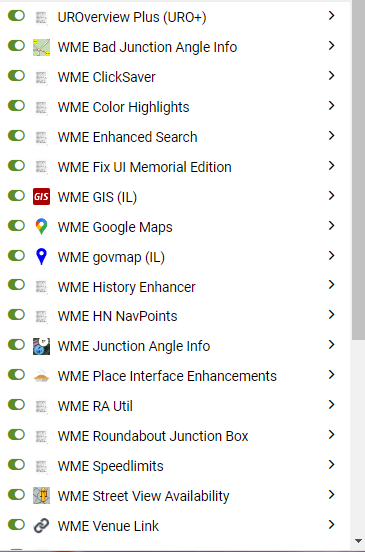
The console errors aren’t anything to do with FUME, so that’s one positive. I notice you’re running with most/all of the topbar compression options turned down/off, which makes me wonder if that’s affecting how the search expansion calculation is deciding how much space it has to play with, and it’s also not clear from that screengrab (or the list of scripts) if there’s anything else in there that might be installing its own UI elements into the topbar and also throwing off the calculation.
So please can you try running with just FUME enabled and see if you can recreate the problem. If not, then start adding your other scripts back in until it starts to go wrong again.
Also try enabling the various options that will provide more space in the topbar - “Compress/enhance bars above the map”, “High” compression setting under UI Enhancement controls, and "Hide menu labels" are the three that will cause the available space to change.
The issue with the search box expanding too much happened rather seldom, may be one or two times a day. I am not ready to work w/o all add-ons to localize the problem. So far I only enabled the 3 compress options in FUI, and yesterday the search box behaved properly. If there will be no problem for a week, I’ll try to disable the compress options one-by-one.
Since today (which is weird, yesterday it was OK ) I have also issue with searching box - it intersects with comentary button:
I have tried to turn off scripts, which were updated today including Toolbox and still the same.
1.59.257 makes the search box resizing a user-selectable option, as I’m still none the wiser as to what’s causing an increasing number of users to be seeing problems with this feature…
Feature idea: deselect segments when creating new one.
When creating new segments, you cannot click on a selected segment in order to attach your new one. This results in having to hit escape to exit the segment creation mode and then re-enter segment creation mode. If we could intercept the initial entrance to segment creation mode, and insert a deselect command, this annoyance could be reduced.
Please advise if this capability already exists elsewhere.
That should be be doable, although note that it is possible to connect a newly drawn segment to an already-selected one, however if you’re using FUME’s “Enlarge geo handles” option then this can make it slightly harder to do, as the enlarged handle can make it harder to see when the end node of the newly drawn segment has snapped onto the selected segment. The trick is to keep moving your pointer towards the desired connection point until it changes from the default arrow to the crosshairs, then move just a little bit more to make sure (basically, try to get your pointer over the existing segment rather than just off to the side of it), and then double-click to make the connection.
Maybe it’d therefore make more sense for FUME to temporarily disable that option when it detects a new segment is being drawn…
Don’t know if someone already mentioned this (it is not really a bug / problem … it’s simple annoying ): the influence area of the buttons on top (comments, places, roads) is bigger than the button itself, so when I try to close the SV it almost always open the road menu (yes, I know I can adjust the size of the SV screen in order to the X not be immediately below the button :)) .
Not wanting to give you more work … but it would be nice if the clickable are of such buttons be “compress” according to the option
«UI Enhancements
Compress/enhance bars above the map»
See gif
Thanks in advance … and thank you for your time and amazing work
Whilst the active areas of those topbar buttons does indeed natively encroach a little into the mapview area, FUME’s topbar compression option exacerbates the problem, because whilst ISTR it used to also compress the active areas, it’s now compressing only the visible elements - the active area elements aren’t being similarly compressed at present, leaving them to encroach even further into the mapview… So it looks like both a native bugfix AND a FUME bugfix are called for here.
Adds a checkbox in the “User Preferences” section of the UR panel to control whether passes are shown or hidden
Partially restores UI compression to the UR panel
Notes:
The show/hide passes option currently always defaults to “hide” when a UR is opened.
The remaining UR panel compression tweaks will be restored once I can be bothered to mess with shadowRoots again…
I’m probably being really dense here, where is the checkbox? I’m running 1.61.257. Maybe another script is moving it, I can dig more tomorrow if needed.(unavailable attachment: Screenshot 2024-02-19 at 7.43.49 PM.png)
Edit-
With only FUME and TB i see this
(unavailable attachment: Screenshot 2024-02-19 at 7.48.30 PM.png)
My bad, I’d forgotten to explain that, as hiding passes is an enhancement to the UR panel, it requires the “Compress/enhance report panels (UR/MP)” option to be selected.




 ): the influence area of the buttons on top (comments, places, roads) is bigger than the button itself, so when I try to close the SV it almost always open the road menu (yes, I know I can adjust the size of the SV screen in order to the X not be immediately below the button :)) .