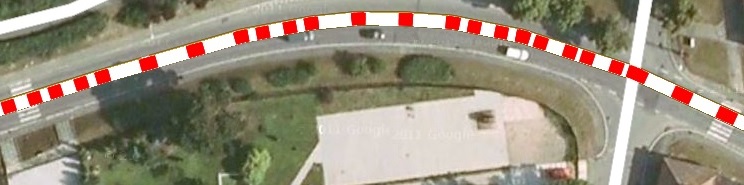
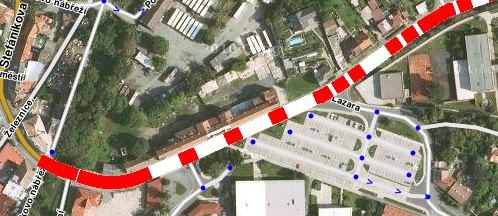
I’ve tried to make a dashed line similar to the Live map but it didn’t look so nice. The same was with the black border around the line. This simple red line was the best result of my testing.
I think the icons are not necessary in WME they could hide some other segments. It would be more annoying than helping. The same is with the information about the closure details. The Editor usually does not need this information for editing; he needs information that there is a closure, which means: “Don’t touch the segments”. If he needs in an exceptional case some additional information, he can easily switch to the Live map.
My intention was to make a simple script without any bells and whistles, which is fast and can be switched on all the time.
Right now, you are hardcoded for the ROW routing server. There is a sample function located in WME Live Map Alerts Overlay that can get the server name from Waze.location.code (or W.location.code) since the routing servers differ.
I also like wlodek76’s suggestion in trying to build the dashed line similar to LiveMap. While it’s not the same red line as a segment without any information, we already have “red roads” for that purpose.
I’ve posted new version 0.2 which should use the right routing server but I didn’t find any road closure in the USA to test it there. Please could you test it or send me a permalink of a road closure?
I will try to make the line nicer but it needs more testing.
It doesn’t look the best, but IMHO it’s better than having it look like an unconfirmed (red) road.
It would actually be better with the black borders.
Remember, this isn’t being presented to the drivers on the app. This is a tool for editors. We can handle a reduction in aesthetics if it helps to clarify what we are looking at without having to select the segment.
New version 0.3 is available.
I’ve found an error in generating the overlapping lines and the dotted line works now with one layer only.
Additionally I’ve improved the design of the line (check the updated picture in the first post).
I’ve prepared a new version which changes index of “Road Closures” layer (Z-Index change didn’t help) to be lower than “LiveMap Alerts Overlay” layer. It works fine the Road Closure line is shown under the alert icons but the “LiveMap Alerts Overlay” doesn’t show the alert details in this case therefore I dint not post the new version and I will contact davielde directly to find common solution.
Yes, I thought about it but it is not so important and it has no priority I will do it probably later together with changing width of the line based on the zoom.
Could you send me a permalink to this or does it not work everywhere?
I think it is not necessary to set same values when they are in correct order therefore I didn’t use sorting.
I think the width should depend on zoom but it should completely cover the road.
I’ve tested the version 0.4 in FF and Chome, both with and without WME LiveMap Alerts Overlay and everything worked correct. It is strange. I will try to test it with different script order in the Mokeys.
I’ve changed the execution order of the scripts but it works fine too.
There are two differences between your and my code.
I don’t search for my own layer because I have it in the variable closuresLayer
I don’t set setZIndex if there is no change
Włodzimierz could you apply this two changes to your version to see if some of them is the reason of the problem in your browser?
It is strange with your new version is the road closure line in the front of alerts icons. With the old version was the line behind the icons.
This means now I have the behavior as Włodzimierz has and I can test it.
This cold be the differnce. Włodzimierz probably modified both scripts and I did may test with unmodified WME LiveMap Alerts Overlay.
I’ve tested my script with your code with the new version of WME LiveMap Alerts Overlay an the behavior is same as with my code. The line is in the front of the icons on my computer in both browsers.
It works on my computer now; the new version of WME LiveMap Alerts Overlay has different uniqueName = “__livemap_alerts”. Therefore my script didn’t find the layer.
I will wait with the new release for Włodzimierz’s tests.