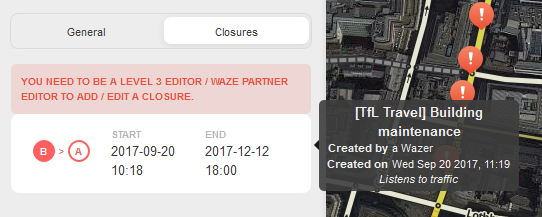
I got slightly annoyed this morning by not being able to see the details of a closure outside of my editing area, even though I was able to find all its details when I started looking into the data received from the server. Therefore I decided to make a small userscript that adds the description and also some additional data in a tooltip: origin of the closure is (WME or app), closure data provider, closure creator, closure creation timestamp, last closure updater and last closure update timestamp.
Just noticed that the ‘WME-entered’ and ‘App-entered’ indication was wrong. The data I was basing that on actually indicates whether or not the closure ignores traffic. Version 0.2 has been created to fix this.
I’ve released version 0.3 in which an indication is added when a closure doesn’t have a description set and I’ve also added some better date parsing to find closures for more date formats. The userscript should now always work with WME Fix UI enabled.
One tool that every amateur script hacker should have in their toolbox: the ability to patiently wait until an expert who knows what they are doing solves a problem.
I am that amateur and you are that expert sir. :lol:
Just released a fix to prevent applying more than one description to the same closure block. This usually only happens when you have one selected segment and move to another segment with the same closure restrictions on it or when you select multiple segments at the same time with the same closure restrictions on them.
I’ve just released a new version that will match the closures in the list much better in all date formats. If you didn’t get any closure details in the past in your language: now’s the time to try it again
Instead of trying to parse the date in the list I now just transform the date of the underlying data model to the local date format and compare that result. It now basically does the same transformations as the WME does.
Just released a fix for a bug that prevented closure details from showing up due to a missing ‘last updated on’ timestamp. Apparently there is a way for a closure to get updated by a user without actually setting the update time. I’m assuming a staff script will be responsible for this.
No news yet on the bug itself getting fixed in the WME.
FYI: I’m aware that this userscript currently doesn’t work any more in the editor. I somehow overlooked this script when I tested my scripts for the new layout. I’m most likely going to make the tooltip show on the right whenever you hover over a closure item. But I’m not sure when I’ll find the time to do this…
I know you stated that the script is not working but wanted to pass this along just in case anyone encounters before/without reading your post. When this script is enabled and the Near HOV (old ignore traffic) check box is checked, this will prevent a closure from being saved. Disabling or removing this script then refreshing WME will return the check box and save ability.
If that is the case I’ll have to take a closer look to the script later tonight. I don’t mind the script being broken for now, but it shouldn’t block anyone from performing certain actions. From heart I can’t really imagine what could be causing that sort of behaviour though.
I really didn’t expect it to be the case either. To isolate I disabled all scripts to test if it was a bug in WME first, then enabled all the issue returned, then disabled just this script noting the statement you had made above and fact it dealt with closures and the problem returned. I performed these steps in both Prod and Beta with the same results using Firefox v56.0.2 as that is all I have access to at work. The only other closure related script I have is WME RTC Improvements.
I’m going to test more here in a moment to make sure it is not a combination script issue and report back to be sure.