[Script] WME Quick Replies

Hi Wazeditors!

I’d like to share a userscript I’ve been working on: WME Quick Replies.

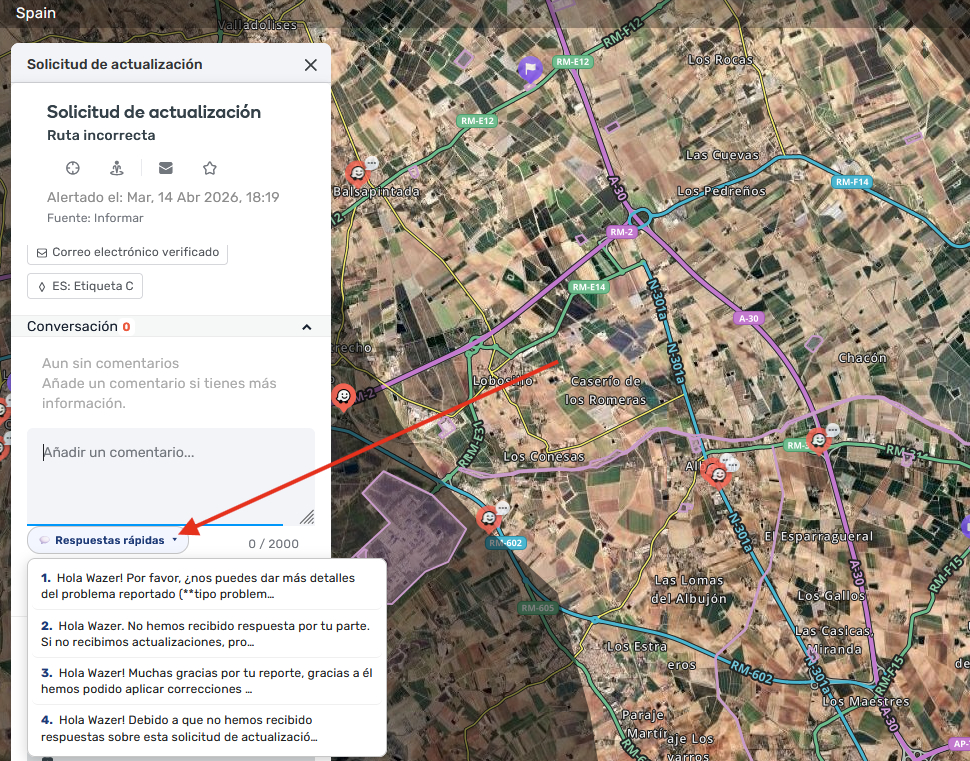
If you handle a lot of Update Requests (URs), you probably type the same answers over and over. This script adds a :speech_balloon: Quick replies button right next to the UR comment box, so you can drop in a template with a single click.

:sparkles: What it does

  • :speech_balloon: Quick replies dropdown next to the UR comment character counter.
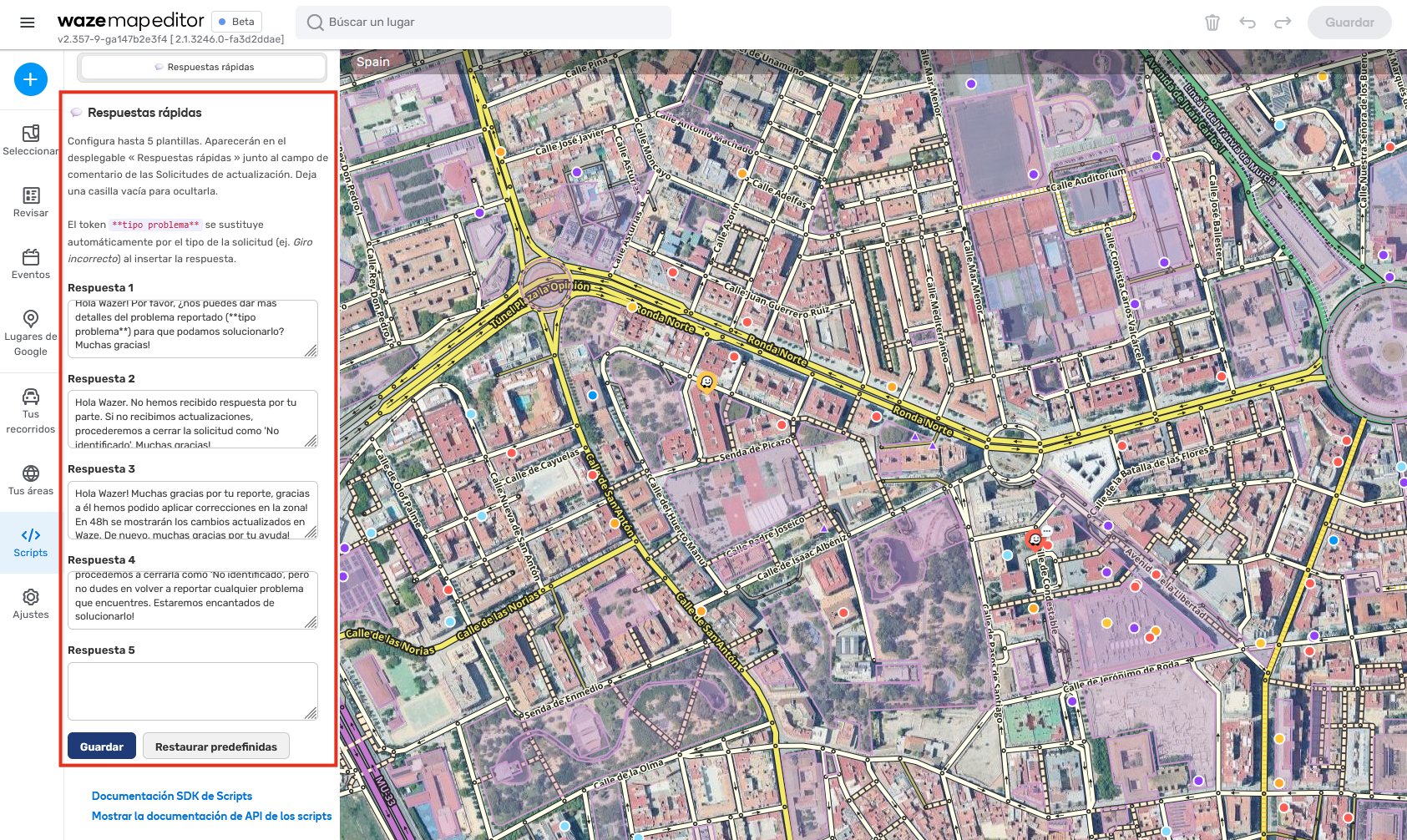
  • :writing_hand: Up to 5 editable templates, managed from a dedicated tab in WME — no code editing needed.
  • :puzzle_piece: Problem-type token: write **problem type** in a template and it’s automatically replaced with the actual UR type (e.g. Turn not allowed).
  • :broom: Clears the field first instead of appending to whatever was there.
  • :globe_showing_europe_africa: Multilingual — the UI, default templates and token auto-adapt to the editor language: English (default), Español, Français, Português, Deutsch.
  • :high_voltage: Lightweight — the button is cached, so it doesn’t slow the editor down.

:framed_picture: Screenshots

:inbox_tray: Install

:link: Source & feedback

This is an early version, so any feedback, bug report or idea is very welcome — just reply here or open an issue on GitHub. If you’d like to help add or refine a translation for your language, it’s just three small blocks in the code (instructions are in the README) and PRs are welcome.

Happy editing! :automobile::dashing_away:

Hello.

Thank you for this script. I have been using it and found it very useful.

One suggestion: instead of a button and a dropdown menu to select the answer, is it possible to substitute it with five buttons (all in the same line), corresponding each one to one answer? This would save one click in each answer.

You can always give the option in the settings menu page for the user to select the option of a dropdown menu of the option of five buttons …

Thanks in advance

Hi! I’ve been trying to install it for days, but it won’t let me. It says “page not found”. If anyone has the solution, please share it. Thanks

Try this direct link:

https://update.greasyfork.org/scripts/583881/WME%20Quick%20Replies.user.js

Thank you so much for the feedback. I’m working on an update that might make that possible. I’ll release it soon! :smiley:

v2.1.1 — Unlimited replies, SuperFast mode, emoji picker & backups

Added

  • ♾️ Unlimited replies: the 5-template limit is gone. Add as many as you need with + Add more replies, and reorder or delete them with the ▲ ▼ ✕ buttons.
  • ⚡ SuperFast mode: a new setting lets you choose how replies are shown. Normal keeps the dropdown; SuperFast turns every reply into its own button (emoji + title), so answering a UR takes a single click.
  • 🏷️ Icon and title per reply, used for the SuperFast buttons and also shown in the Normal dropdown.
  • 😀 Emoji picker: 146 emojis in 6 categories (traffic & map, status, faces, hands, objects, misc), with an accent-insensitive search that works in all supported languages. You can still paste any emoji manually.
  • 💾 Export / import configuration as a JSON file, to back it up or move it to another browser or computer.
  • 🛡️ Automatic migration: your replies, titles, icons and selected mode are carried over automatically on every future update.
  • ⚠️ Restore defaults now asks for confirmation and warns that all customisations will be permanently deleted.

Changed

  • Redesigned settings panel: each reply is now a card with icon, title and text.
  • The reply buttons wrap onto several lines when needed, so SuperFast mode never breaks the UR panel layout.
  • Buttons refresh instantly after saving — no need to reload the editor.
  • All new texts are translated into English, Español, Français, Português and Deutsch.

Upgrade notes

  • Nothing to do: your existing 5 templates are migrated automatically, keeping their exact text and getting a default icon and title. The script starts in Normal mode, so it behaves exactly as before until you switch to SuperFast.

Hi, from the last version of WME the token **problem type** is not working anymore.

Are you working on fixing it?
Thank you.

Hi! Good news: it’s fixed in v2.1.2 :tada:

What happened: the latest WME update changed how the problem type is shown in the UR panel. The script was still looking for it in the old place, couldn’t find it, and so left problem type in the text as it was instead of replacing it.

The fix: v2.1.2 reads the problem type again, using a more stable reference that WME provides. It also keeps working with the old layout, so it should hold up better against future WME updates.

How to get it: if you installed the script from Greasy Fork, Tampermonkey/Violentmonkey will update it automatically within a day. If you can’t wait, check for userscript updates in Tampermonkey, or reinstall from here (your saved replies are kept):

Thank you very much for reporting it so quickly :folded_hands:, and thanks to everyone who’s using WME Quick Replies. It’s great to see it helping other editors. If you notice anything else or have ideas, just let me know here!

Happy editing! :automobile::dashing_away:
— osZONE