WME Sidebar Wazeopedia
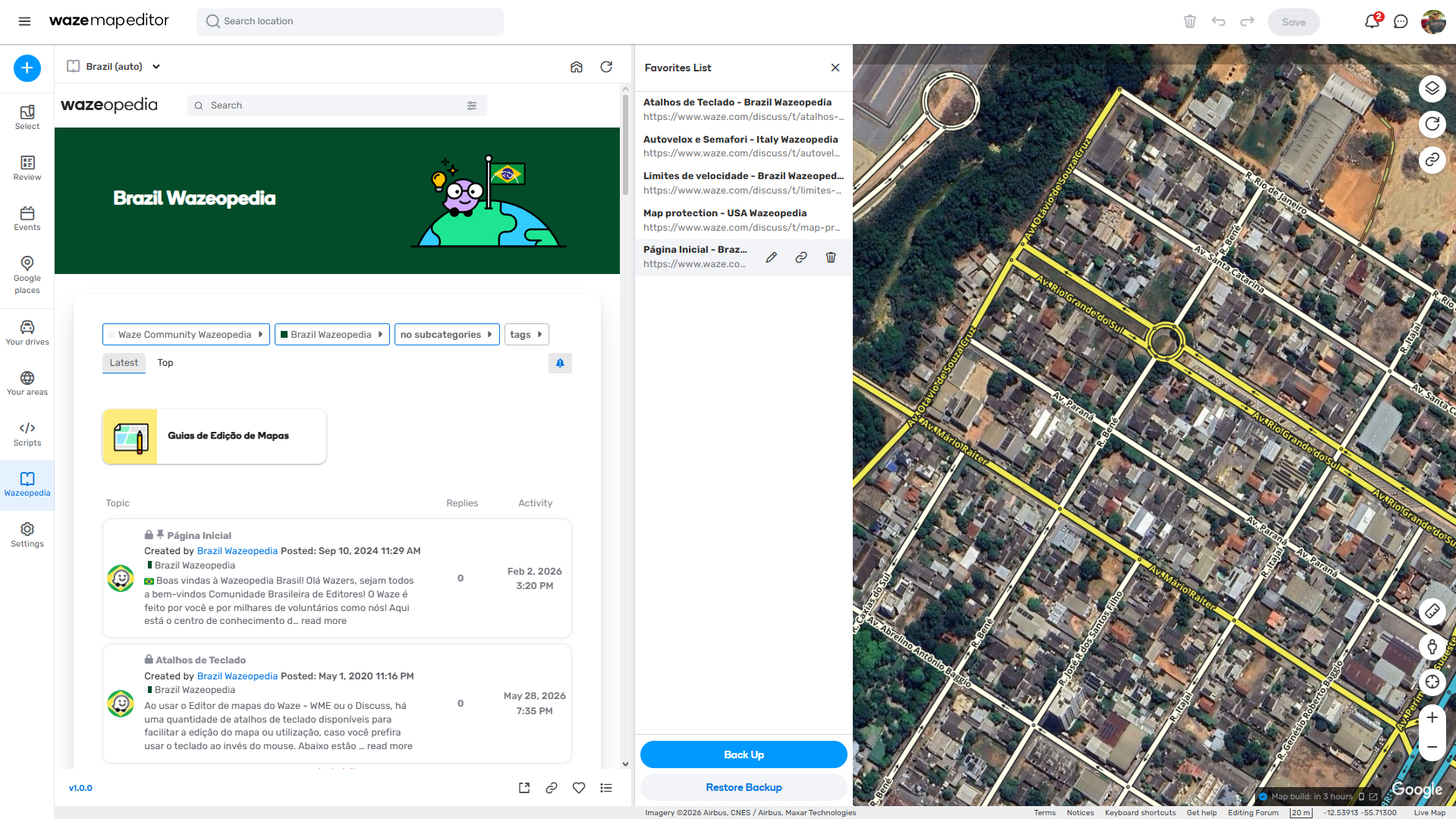
WME Sidebar Wazeopedia is a userscript designed to optimize the workflow of map editors by bringing regional Wazeopedia documentation directly into the Waze Map Editor (WME) sidebar.
No more switching between tabs or getting lost looking for the right guidelines! With this script, the documentation and editing rules automatically adapt to the country you are currently editing, keeping your focus entirely on the map.
Main Features
- Flexible Country Selection (Automatic or Manual): By default, the script operates intelligently: it tracks your coordinates and automatically detects which country is being edited in the center of your screen, loading the corresponding regional Wazeopedia. If you prefer, you can disable the automatic mode at any time and manually select your desired country from the list.
- Pinning Countries (Pin): Do you frequently edit in more than one country? Pin your most accessed countries to the top of the selection menu for immediate access.
- Robust Favorites System: Save specific topics, rules, or pages for quick reference. You can rename your favorites, delete them, and use the Backup and Restore function (Export/Import in JSON) to ensure you never lose your favorites list.
- Resizable Side Panel: Adjust the width of the side panel by dragging its edge to read the documentation comfortably. The map shifts dynamically to compensate for the opening and resizing of the tab!
- Integrated Navigation Controls: Navigate through the documentation easily using the Home, Refresh, Back, Forward, and Open in a New Tab buttons, all built into the panel’s footer.
- Clean Interface Focused on Discuss!: The script is designed to keep you strictly focused on reading the Wazeopedia rather than forum distractions. To achieve this, it injects custom styles that hide unnecessary elements from the standard Discuss! interface (such as massive headers, global search bars, and login buttons), maximizing the useful screen space.
How to Use
- Accessing the Tab: After installation, a new “Book” icon will appear in the WME left menu. Click it to open the Wazeopedia tab.
- Navigating Between Countries:
- The script starts tracking the map automatically.
- To check another country’s rules manually, click on the “Wazeopedia” header and select the desired country from the dropdown menu, which is organized alphabetically by region.
- Adding and Managing Favorites:
- While reading a useful article, click the “Heart” icon in the footer to save it to your favorites list.
- In the footer, you will also find the Copy Link button to copy the direct URL of the current page.
- To view, rename, or backup your favorites list, click the “List” icon.
- Adjusting the Size: Place your mouse on the right edge of the Wazeopedia panel and drag horizontally to resize the width according to your reading needs.
Notice Regarding WME Beta
Due to strict browser security restrictions present in the WME Beta environment (iframe and CORS policies), direct loading of Wazeopedia content inside the sidebar is blocked by the browser itself.
When using this script in WME Beta, you will see a user-friendly screen informing you about this limitation. From this screen, the script offers quick options to open the page externally or migrate your exact coordinates (including zoom level) directly to WME Production, where the iframe works perfectly.
Credits
- Developed by luan_tavares_127.
- Inspired by the original concept of the WME Sidebar Wiki script created by gncnpk.
Download Link
https://greasyfork.org/scripts/579070-wme-sidebar-wazeopedia


