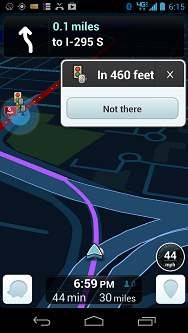
I’m obviously new here but I’ve gotten fairly familiar with editing maps over the past month or so.
I’m not sure if it’s been discussed before but I’ve found a problem in areas that are very dense with speed and red-light cameras, such as Baltimore City and surrounding areas. When approaching an intersection that has both a red-light and speed camera (very common here), it seems that priority is given to the red-light camera and the client warns the user of the red-light camera instead of the speed camera. Is there a way to change the priority? I know most drivers would rather be warned of a speed camera instead of a red-light camera. Half of the time I’m not even audibly warned of a speed camera, which is a problem.
The red light cameras now have the functionality to warn on speed as well – it’s very common for the RLCs to include “speed-on-green” photo functionality, so that was added to Waze.
If you input the speed limit into the camera settings in the Waze editor, Waze will warn on the RLC, but also alert the driver if they are exceeding the speed limit that there is a speed camera there.
In intersections where the camera does both red light and speed photos, there should not be a speed camera approved.
I understand that and it makes since, but here in Maryland the red light cameras do not issue speeding tickets and are not active when the light is green. We have Ka band speed cameras that are designated specifically for that so it can be deceiving if a red light camera is reported and an approved speed camera is right next to it.
Also, there are a lot of places that have speed cameras only but no red-light camera. In this case, there is no audible warning to the driver that he is approaching a speed camera. (whether he is speeding or not)
See permalink for general reference to the number of cameras in a small space
Also, are there any plans to add a “mobile speed camera” option? That’s a big problem in our state. We have vehicle-mounted speed cameras and users often attempt to report them as stationary speed cameras so the map gets cluttered with unapproved speed cameras.
since you say that your RLCs don’t issue speed tickets, are you suggesting that sometimes there is an intersection that has an RLC and a speed camera? If so, what’s the harm in wrapping them into one Waze RLC and giving it the speed limit?
If there is only a speed camera, then (providing it is properly positioned in WME), it should alert the driver. Nicely if he’s within the speed limit, or loudly if he’s above. Can you verify that this isn’t working?
Also: in MD, are the speed cameras fixed or mobile?
Yes. A lot of intersections have a RLC with a separate speed camera next to it. Our RLCs do not issue speeding tickets so most Marylanders speed through RLC intersections with no harm done as long as they didn’t run the red light. If it’s wrapped into one, then when there actually is a speed camera there, they won’t be alerted. I personally think that a speed camera is more important than a RLC since our RLCs are rarely ever triggered.
I pass about 7 speed cameras and RLCs on the way home and I have not been alerted of the standalone speed cameras. I will double-check this today.
In MD there are both fixed and mobile cameras. The number of mobile cameras is growing rapidly. It’s so bad that people don’t even know they exist because they are used to seeing stationary cameras only. The mobile cameras can consist of a small 4ft white box that sits on the side of the road and can be at any segment in the road. They can also be vehicle-mounted. The vehicle-mounted mobile cameras are usually used in construction areas. I know quite a bit about the cameras in Maryland as I did a 10 page research paper for school on them. I argued AGAINST them. lol
What I’m saying is that if you approve an RLC, AND put the speed limit in there, people will be notified of both. So, when an intersection has both cameras, then just approve the RLC, but ensure the speed limit field is completed – that way, people will get both alerts.
They may not be positioned properly. If you send me a permalink to one you pass that doesn’t alert, I’d be happy to take a look at it.
Only fixed cameras should be reported as speed cameras (but you probably knew that). Mobile units should be reported as “Police (hidden)”.
Correct but I find this to be a problem. People from out-of-town report the “hidden police” speed cameras as “not there” because they don’t see a police car. Would it hurt to have another category?
Neither of those are likely to work. I’ve repositioned them now. They were well off the side of the road (if you zoomed in a couple levels). They’re now directly on the road, where they need to be.
Please wait for the next refresh and see if the alerts are triggered.
Let’s make sure we can get these alerts to trigger with the proper positioning. In the case of what you showed, I would sooner establish one RLC with the 35 mph speed limit, but the two cameras are somewhat spaced out.
I think there’s been some talk of having a third camera type to report, but I’m not sure if it has gained any traction with the Champs / Waze Staff. We will see.
I don’t understand this. You should be notified of any approved camera on the map regardless of the entered speed, correct?
It just doesn’t happen for me. As I noted in this thread, the alerts I receive can only be described as random. I get a popup for this RLC when its not even on my route.
Yet I also pass RLCs on my route that give me no popups some times.
I haven’t had an audible alert for a speed camera in many months (since December, 2012, when cameras in the US were allegedly updated to use “the imperial system”). I don’t typically exceed the speed limit, so this may not be a problem. However, I’m still not convinced that you don’t have to being going 1.6 times the entered speed (here in the US where we are entering the speed in MPH) to get the audible alert.
So, it’s a red light camera that also has a speed attached to it which is doing this? Is it alerting as a speed camera or red light camera? The icon is different.
Contrary to what I’ve read above, I was not aware that one could make a dual-camera by setting a non-zero speed to a red light camera. Need to verify with Waze.
Ok after lots of speeding and lots of driving, I’ve concluded that the alerts are completely sporadic. Sometimes I don’t even get a poput that the speed camera is there even though it is properly positioned and has the correct speed. Sometimes I get the proper audible alert and popup. I have no idea why this is happening.
The problem seems to be specific to speed cameras only. RLCs work just fine with or without the speed set. However, I get an audible alert EVERY time approach one that has the speed set. However, as I stated before, in Baltimore, our RLCs do not issue speeding tickets. We have a separate camera for that.