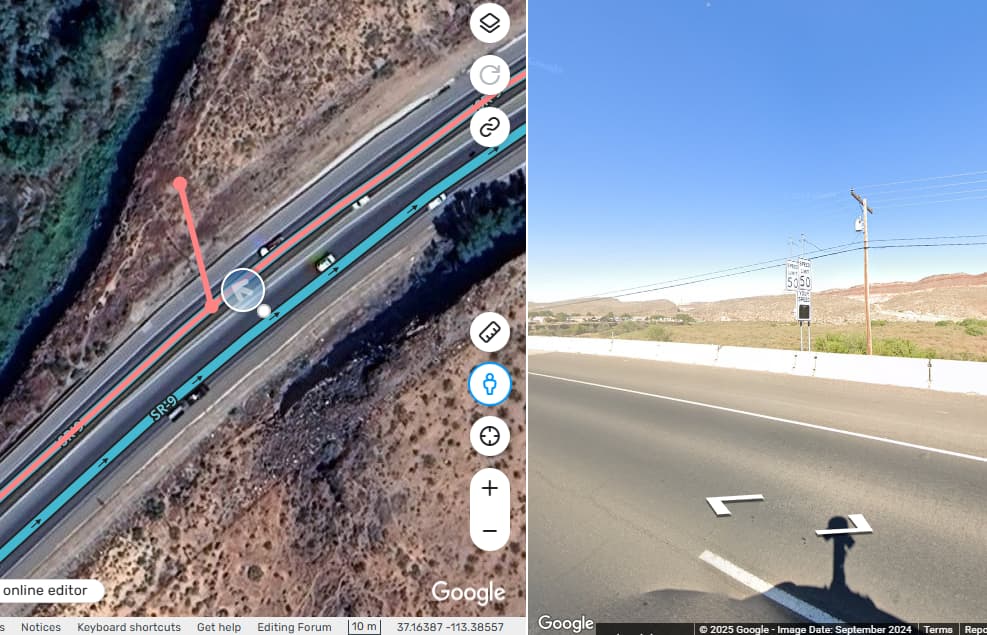
Hi. New editor here. I’m not sure how to do this, but this segment:
https://waze.com/en-US/editor?env=usa&lat=37.16338&lon=-113.38598&zoomLevel=17&segments=523329686
…has two different speed limits. The speed limit at the start of the segment (B) is 55 MPH. It changes to 50 MPH at the white dot (whatever that’s called) right where the house development starts.
Right now, the entire segment is 50 MPH, but that’s incorrect, and it sets off an “over speed limit” ding in my phone’s app, even though I’m still doing the speed limit until the road sign.
How is this sort of thing fixed? Thanks!
If you would like help making the change yourself, let us know. You can reach out to me or @rocketsciguy (or a number of other Utah editors) via chat to walk you through it. You can also join us on the Southwest Region Discord server for a little more robust tool to communicate.
Hello @MrWhipple, and welcome! Thanks for posting and for being willing to help out on the map.
In order to insert a speed limit change in the middle of an existing segment, it is necessary to “cut” the segment into two segments at the location of the speed limit change. The way to cut a segment in the Waze Map Editor (WME) is actually to draw a new, temporary road segment that ends by intersecting the existing segment. After the existing segment has been cut, the temporary segment can be deleted ( trashcan icon), and the speed limit can be corrected on section that is wrong. Be sure to change the Settings
  to use Imperial units (MPH) before changing the speed limit.
The temporary segment might look something like this, but should be deleted before saving. (Using the built in Street View tool to check the location, and the pink indicates unsaved changes.)
Since SR-9 is a state highway and critical for proper routing, it is locked to avoid damage to the map. I have unlocked this segment of the highway so you can make the edit (and get credit for it). After you are done, I will check it and lock it up again.
See this section of the Wazeopedia for more detail: https://www.waze.com/wiki/USA/Creating_and_editing_road_segments#Cut_a_segment_to_create_a_new_junction
Here’s a quick video from the Waze Academy showing how to draw segments in WME (not cutting specifically, but an overview): https://www.youtube.com/watch?v=5y3XYa5PD-4
You can find additional help resources for New Editors here: https://www.waze.com/wiki/
But as turbomkt mentioned, our regional Discord server (link above) is the best way we have to communicate including training and questions like these answered, and for unlocks and advanced edit assistance. We’d be glad to have you join us!
Thank you very much; I appreciate your help. I can understand why a major road like that would be locked from editing.
Your documentation was very helpful. I tried creating a new segment from the speed limit sign (point A) to the gas station intersection (point B), but I received the error message “Saving Error: You do not have permission to make some of the changes. Suggestion: Check and try again.”
I’m not quite sure what I’m doing wrong. I don’t necessarily need to take credit for this change, so if getting me up to speed is a problem, feel free to take care of it yourself! The speed limit sign is at 37.16407028173416, -113.38598687832666 and the new road segment should start there.
I’m old and have never used Discord before, so that’s probably more effort than it’s worth. 
No worries. It is updated. You’ll probably see this on Monday.