Template of topic 380525, post 1
Template of topic 380019, post 1
Purpose of mapping traffic lights
Traffic lights do not affect routing. They exist only to:
- Provide drivers with a visual reference
- Add enhanced (“decorated”) turn instructions.
Map stopping lines, not every physical signal head. Many intersections have multiple traffic light poles for visibility, but we only map the stop line for each direction of travel — not each individual light.
If unsure, apply the 80/20 rule (Pareto Principle):
- Focus on the 20% of effort that delivers 80% of the value.
- In practice, map the clear, primary stopping points that most drivers use.
- Avoid over-engineering rare, complex, or edge-case signal setups that add minimal benefit.
Keep it simple and prioritise what meaningfully improves the driver experience. 
Intersections vary widely, and not every layout can be prescribed. Simple, skewed and other types of intersections are explored below to help you understand key mapping principles, however use pragmatic judgement.
Traffic lights may be mapped when all of the following circumstances exist:
 Traffic lights are fixed and permanent installations
Traffic lights are a three-coloured light system (red, yellow/amber, green)
At junctions with a minimum of three segments (e.g. T-intersections)
At junctions handling regular public road traffic
Traffic lights must operate 24 hours a day.
Traffic lights must not be mapped in any of the following circumstances:
 Traffic lights related to roadworks or other temporary installations
Traffic lights used for pedestrian crossings or drawbridges
At junctions that exist only to facilitate crossing bus, tram or rail routes.
Like all permanent hazards, traffic lights must be mapped on public roads, with the exception that they should be mapped where a non-public road (e.g. parking or private segment) reconnects to the public road network.
Examples of when to map traffic lights
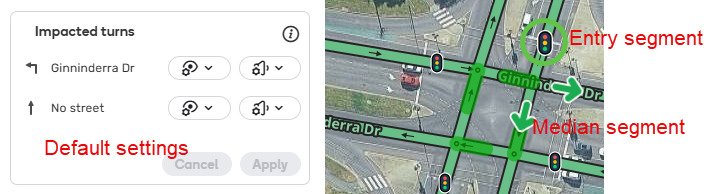
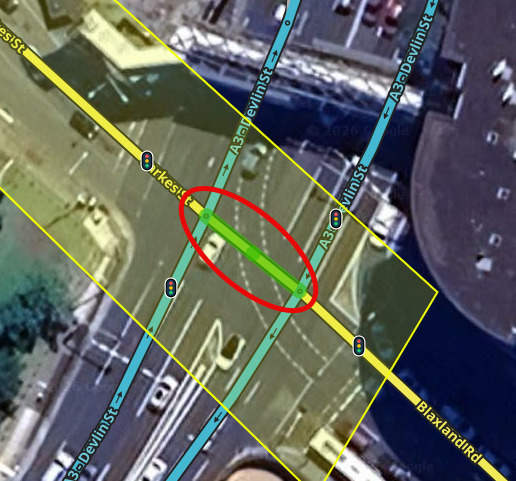 This intersection is suitable for a traffic light to be mapped as it meets all the mapping criteria. As there are no stop lines in the middle of the intersection, the traffic light is only mapped on the entering segments
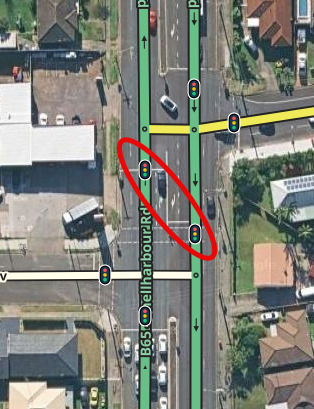 This intersection is suitable for traffic lights to be mapped as it meets all the mapping criteria. Additionally, as the intersection is elongated with stop lines within the median, traffic lights are mapped on the middle segments
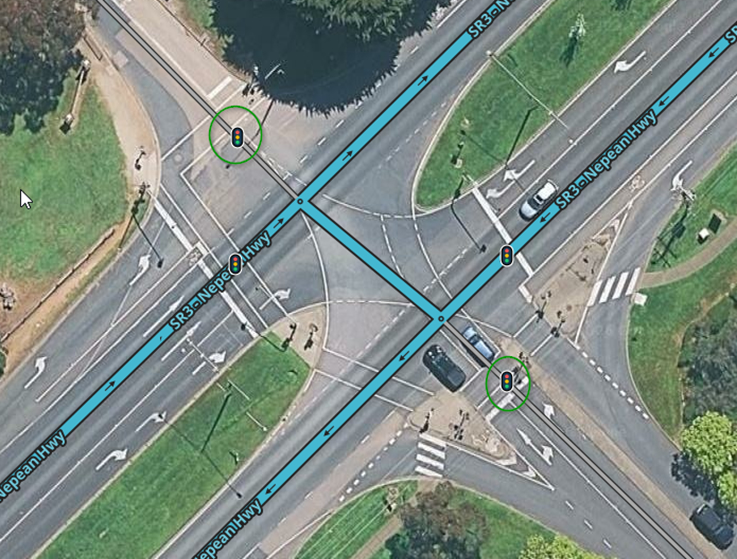 While these traffic lights are not on public roads, they are reconnecting to the public road network and also meets all the mapping criteria. These are both suitable locations for mapping
Examples of when not to map traffic lights
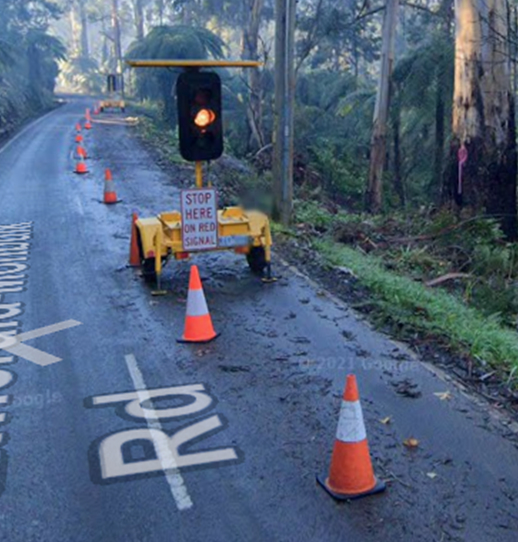 Although it is a three-coloured light system, it is temporary, related to roadworks and it is not at a junction with three segments. This is not suitable for mapping
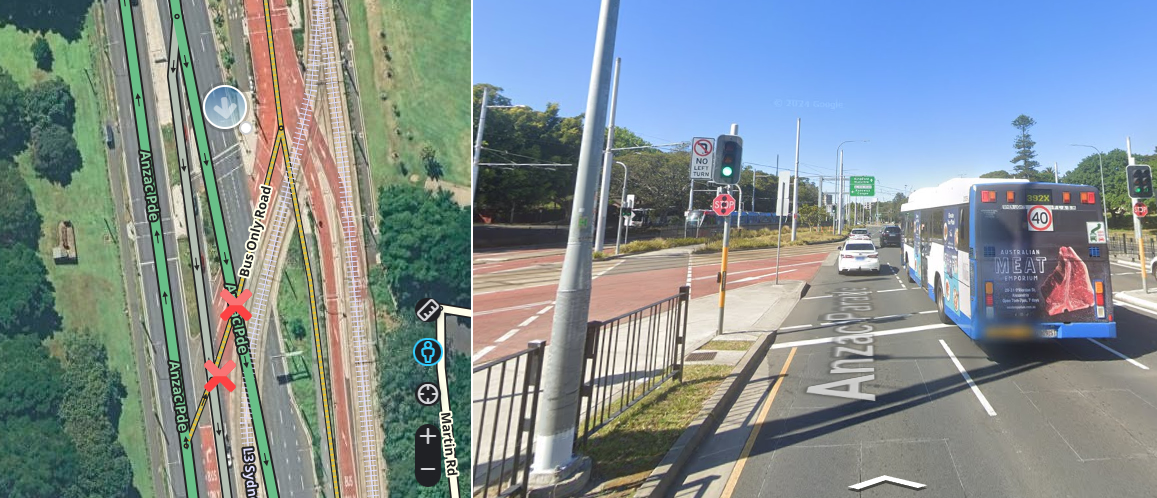 Although the traffic light is a fixed and permanent installation, operates 24 hours a day and at a junction with a minimum of three segments, it exists only to allow buses/rail to cross the road. This is not suitable for mapping
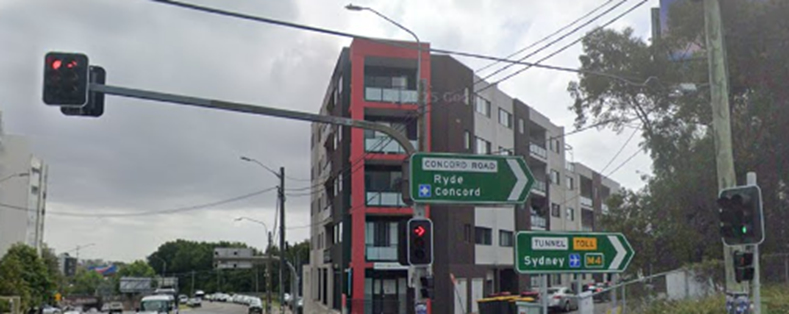
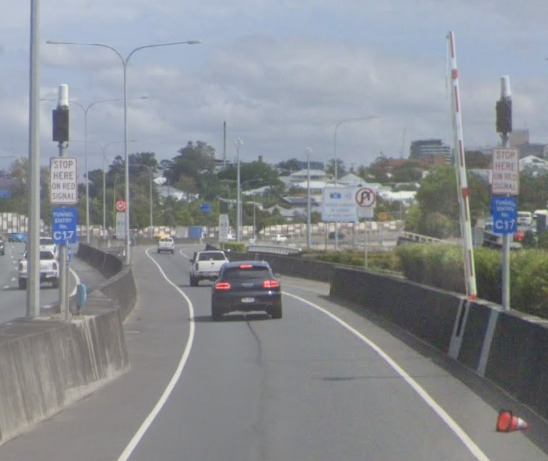 This is a two-coloured light system for a tunnel entry which does not operate 24 hours a day and would only be activated manually. This is not suitable for mapping
Understanding how to map traffic lights
Heuristics
Traffic lights use two types of heuristics:
- intersection detection heuristics
- slip lane detection heuristics
Heuristics are the backbone of automating traffic light configuration. However, heuristics are very limited in what they are able to detect. Where heuristics fails to detect, editors must be able to identify this, and take over the responsibility of configuring the intersection and traffic lights correctly. This wiki page will later discuss simple intersections, where heuristics typically works, but also explores mapping settings where heuristics fails, such as skewed, other complex intersections and unique traffic light scenarios.
Essential community developed scripts for detecting and visualising heuristics that should be used when working with traffic lights are:
- WME Lane Tools script - displays intersection detection heuristics on median segments when lane guidance is mapped. It must be configured appropriately under LT settings > lane heuristics candidates > positive and negative candidates enabled, with layer > LT Highlights Layer enabled, to help identify when heuristics fail, and problems with lane guidance (v1) and traffic lights may occur.
- WME Junction Angle Info (JAI) - for visualising angles used to implement heuristics.
Let’s now explore in detail how both types of heuristics work.
Intersection detection heuristics
Intersection detection heuristics used in lane guidance to detect H-style and hash (#) intersections are also used to detect similarly named intersections for traffic lights. It detects turns based on assumptions about how the intersection is designed. However, atypical, unusually shaped intersections, will not be detected by intersection detection heuristics, which may require manual configuration to define paths through the intersection (either with a junction box or a path) and alteration of the traffic light settings. Incorrectly configured intersections may give incorrect voice decorations, such as “after the lights” instead of “at the lights”.
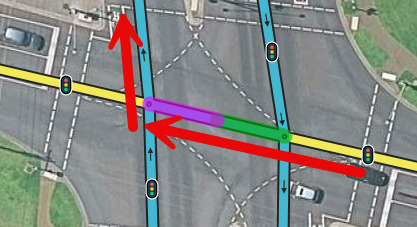
Below is an example where WME Lane Tools script shows a purple colour, indicating a negative intersection detection heuristic, and drivers were receiving an “after the lights” instruction. How to manage this skewed intersection, and other intersections is discussed later in the wiki.
Slip lane detection heuristics
The traffic light feature has built-in detection for slip/turn lanes as discussed in the staff produced how-to document. This slip lane detection heuristic doesn’t always get it right. After mapping traffic lights, editors should check at-grade connections/slip/turn lanes/previous turns and crossing paths/future turns appear correctly by clicking on the traffic light. If the turns are missing, a junction box or path should be mapped (whichever is most appropriate), to avoid erroneous instructions.
Template of topic 380209, post 14
Understanding the slip lane detection heuristic
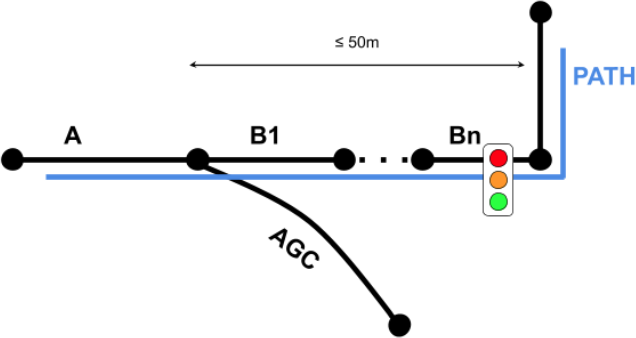
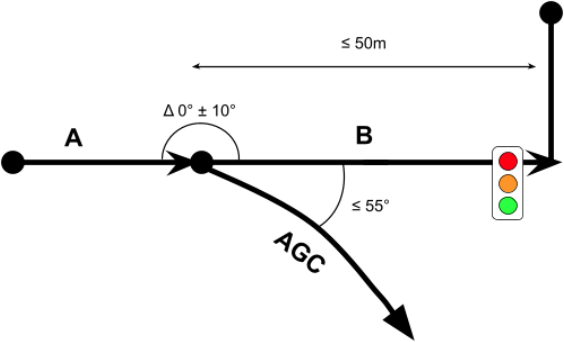
A screenshot of the detection methods are placed here for convenience, with more detail available in the staff produced how-to document.
Method A: Path-Based Detection (Explicit)
Method B: Automatic Discovery (Heuristic)
Practical examples demonstrating slip lane detection heuristic working and not working are explored below.
Understanding previous turn detection
This section looks at some cases where “previous turns” may or may not appear belonging to a traffic light and explains why.
Traffic light with previous ramp
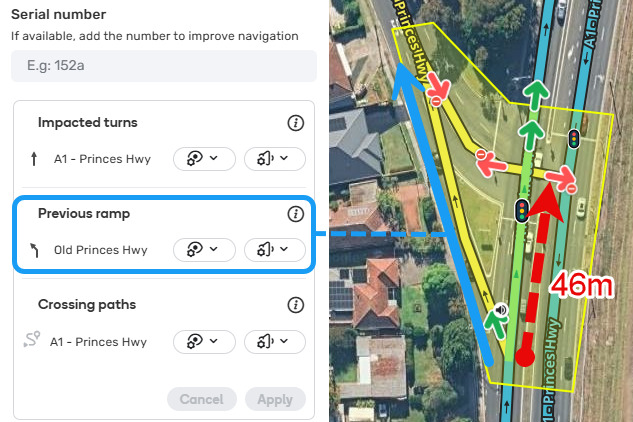
Uses Method B: Automatic Discovery (Heuristic) to detect this slip lane. The blue route is captured as a “previous ramp” because the red dashed arrow is between 30-50m in length. The default Waze behaviour for “previous ramp” will show a traffic light on the map but will not play a traffic light voice instruction.
This should not be overridden for consistency reasons (including instances where segments [e.g. u-turns, parking roads or private roads] are detected as previous ramps prior to the intersection), except in overly complex or unusual intersections.
Traffic light with no previous ramp - segment length
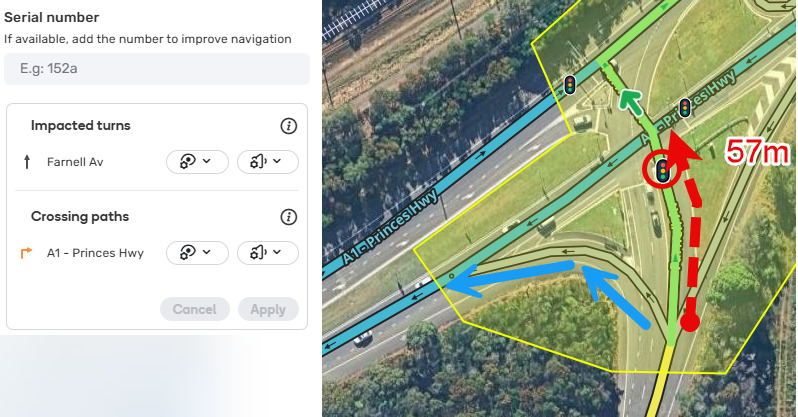
Failed previous ramp detection with “Method A: Path-Based Detection (Explicit)” - this is expected behaviour and does not need to be fixed. The segment with the red dashed arrow is >50m in length. As such, the “previous ramp” is not captured and Waze will not display a traffic light or play a traffic light voice instruction.
Traffic light with no previous ramp - segment angle
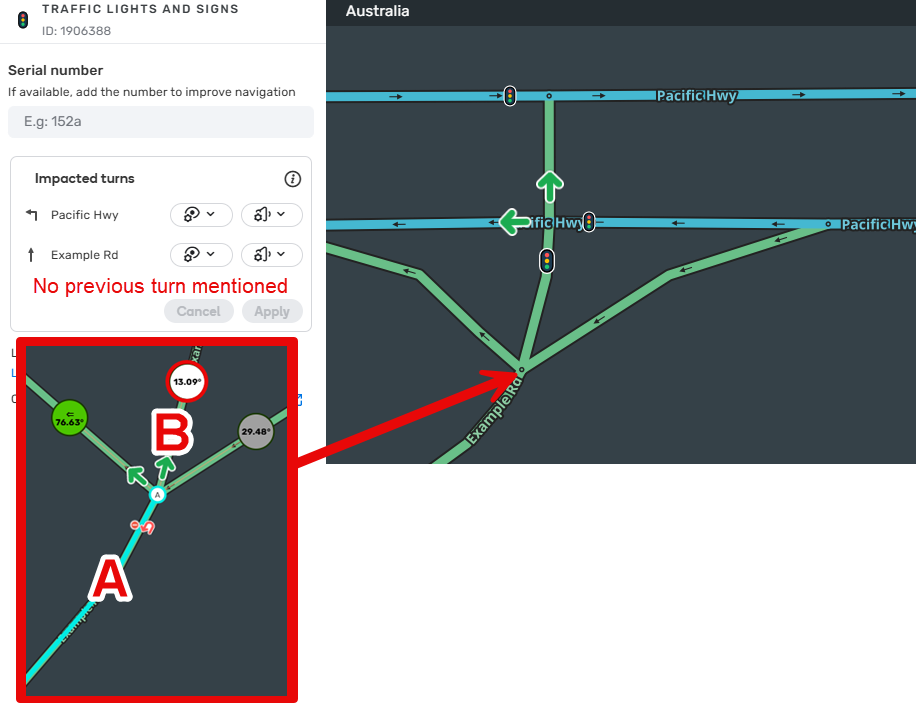
Failed previous ramp detection with “Method B: Automatic Discovery (Heuristic)” - this is expected behaviour. For a previous turn to be detected, segments A and B need to be nearly straight, with the angle delta between 0-10 degrees. In the above example, no previous turn is detected belonging to this traffic light because the segment A to B angle delta is > 13 degrees.
Mapping and configuring traffic lights
Template of topic 380209, post 14
Waze controls the default settings to ensure they’re optimal for the majority of use cases. In Australia, the preferred configuration for traffic light visibility and voice instructions is to use the default settings, except where discussed below. In skewed or unusual intersections where heuristics cannot detect turns, optimising settings may be required, and is discussed below.
Australia does not use the serial number feature, leave this box blank.
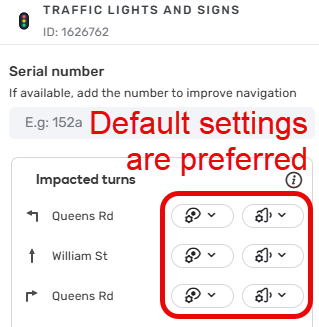
Simple intersections
It is expected that 90% of intersections will be simple intersections and will work with the traffic light default configuration settings because they can be detected by intersection detection heuristics. Simple intersections are any T or + (plus) intersection where 3 or more two-way segments meet at a node. Both H and # intersections can also be defined as simple when the median segment meets following conditions:
- Both left and right turns are possible at the intersection
- The two portions of the divided roadway are essentially parallel to each other
- The two intersecting roads are more or less perpendicular to each other; 70-110 degrees
- The median segment in question is 50m or shorter.
Where Lanes have been mapped on both the entry and median segments, the WME Lane Tools script will highlight the location as a positive heuristic (green highlighting).
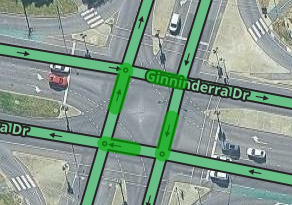
To map traffic lights, add a traffic light permanent hazard to each entry segment where there is a stop line, leaving the traffic light settings at their default:
Skewed intersections
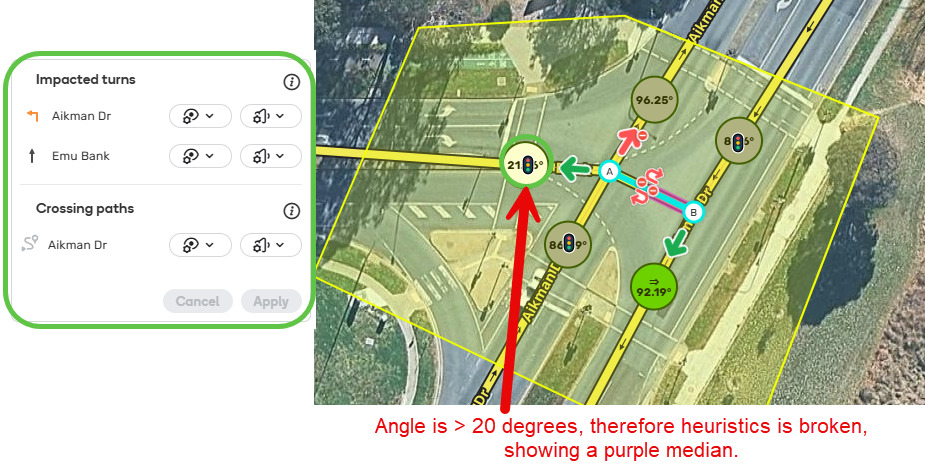
A skewed intersection is an intersection where one or both the roads are divided (one-way segments) and the roads are not perpendicular, one road is offset by a margin 20-40 degrees, which can be visualised by looking at WME Junction Angle Info (JAI) and the WME Lane Tools scripts. These are not detected by intersection detection heuristics, because of their shape, and require manual configuration.
An intersection is considered skewed if, when selecting the median segment, the JAI circle shows either:
- White / grey circle being between 20-40 degrees or
- Green circle being between 50-70 or 110-130 or
- The properly configured WME Lane Tools script shows a purple highlight (when lanes have been mapped on the entry and median segment).
To map traffic lights here, you need to add a junction box or path and add a traffic light permanent hazard on each entry segment where there is a stop line.
Template of topic 380209, post 14
Other intersections
Traffic light for turn only
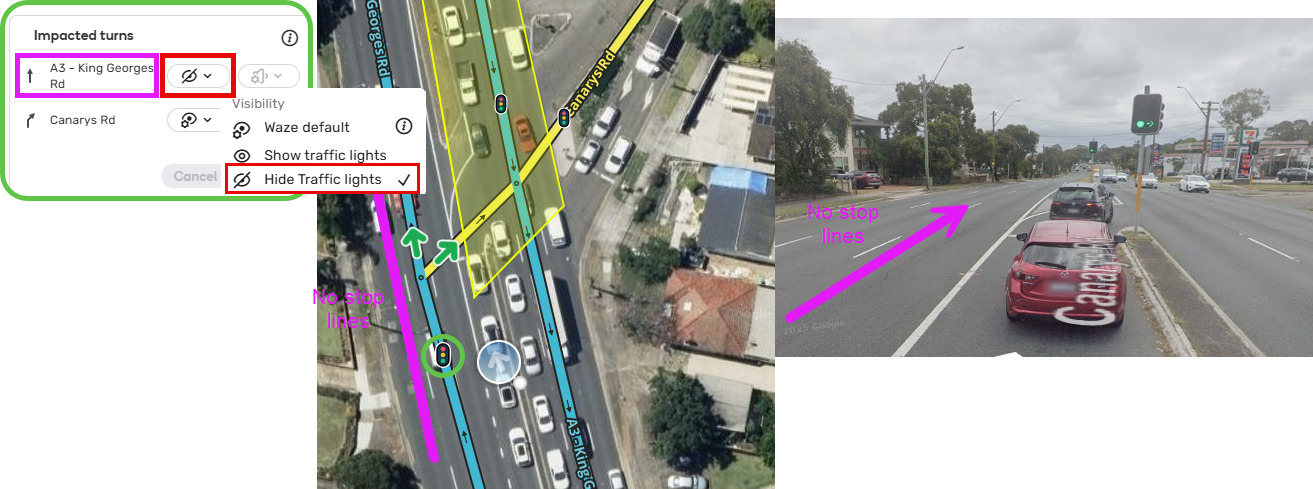
Where there is a traffic light only controlling the turning traffic, map this traffic light and edit settings to set visibility to hide for straight ahead traffic.
“After the lights” decoration
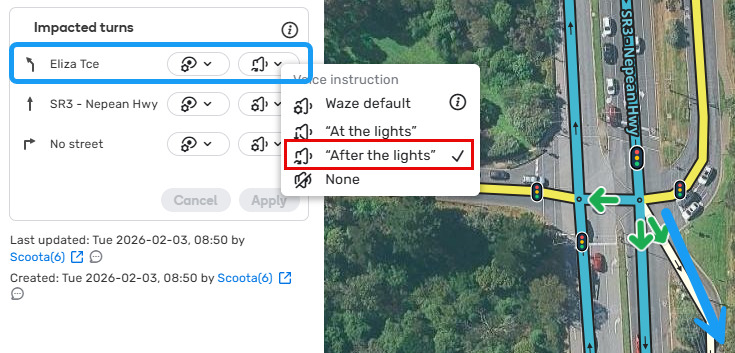
Waze will automatically give an “after the lights” instruction for a turn 100m or less beyond the traffic light.
However, there are times where it may be helpful to override the Waze defaults. In this example, there is a keep left turn that is physically made after you proceed through the traffic lights central zone. This is a valid spot where “after the lights” decoration setting adjustment will assist the driver.
Single Point Urban Interchange
These intersections have a median made up of multiple segments, where the right turn segment intersects between the parallel road segments. Intersection detection heuristics does not recognise these intersections because of the shape and multiple median segments, and therefore they require a junction box or path, and need to be manually configured. See the below example.
King Georges Rd overpass of M5

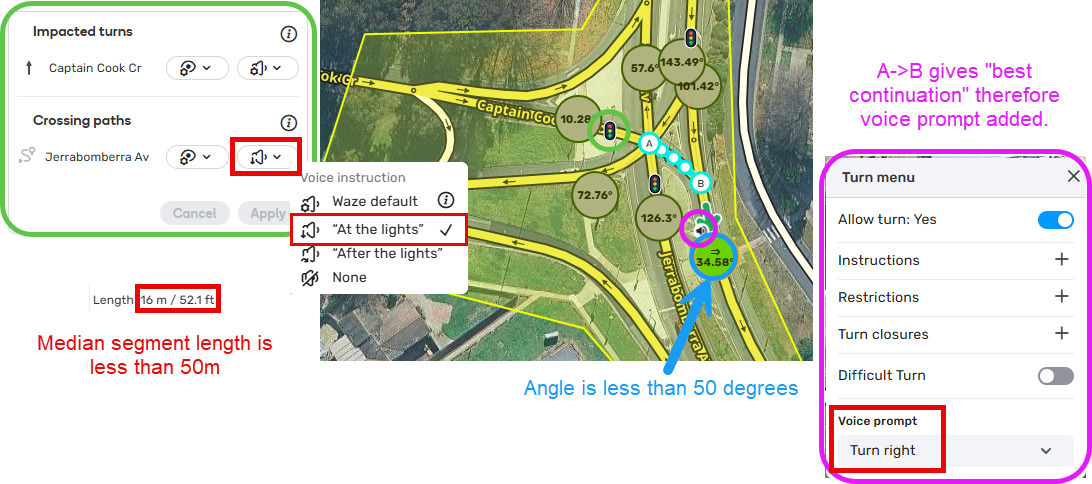
Very skewed intersections
Intersection detection heuristics does not recognise these intersections because of the shape. An intersection is very skewed if, when selecting the median segment, the JAI circle shows either:
- white / grey circle being more than 40 degrees or
- green circle being between less than 50 degrees or more than 130 degrees.
To map traffic lights here, you need to add a junction box or path and add a traffic light permanent hazard on each entry segment where there is a stop line, and change the traffic light setting for the corresponding crossing path to change the voice setting from default to “at lights”.
Template of topic 380209, post 14
Unusual shaped intersections
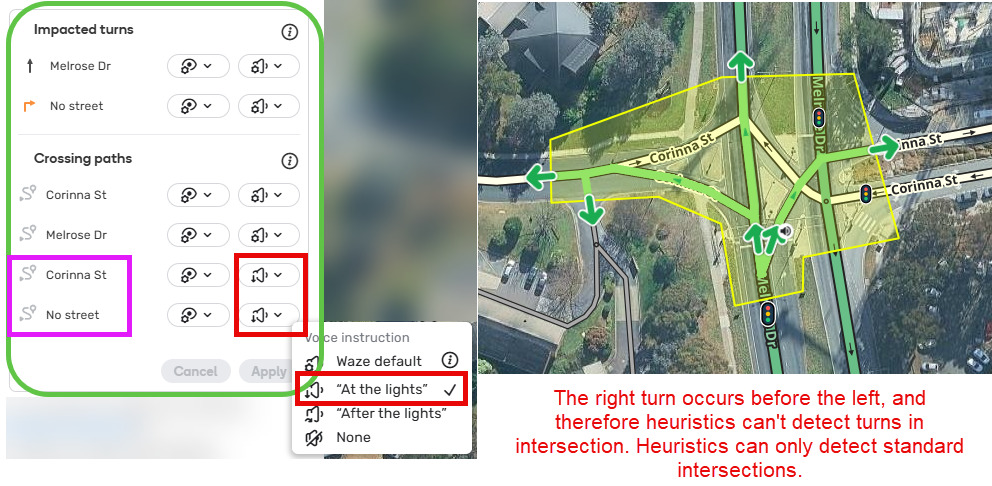
Heuristics does not recognise these intersections because of the shape and because the right turn appears before the left turn. In rare examples like this, they require a junction box or path, and need to be manually configured. See the below example. Note the turn into the parking lot road is also overriden for consistency.