Template of topic 380525, post 1
What is a UR?
An Update Request (UR) is a map issue reported by a Waze user that highlights a potential problem encountered on the map. These reports can be submitted through various channels. URs reported from the mobile application appear in WME after a user’s drive ends and is processed. URs reported from the live map website and help and feedback sections are created instantaneously in WME.
These reports appear in the Waze Map Editor (WME) via the “Solve” tab based on set filters as well as on the map as coloured pins, indicating their status.
| Icon | Colour | Status |
|---|---|---|
 |
Yellow | Open for 0-5 days |
 |
Orange | Open for 6-14 days |
 |
Red | Open for 15+ days |
 |
Green | Marked as solved |
 |
Grey | Marked as not identified |
The WMEBR tool is a great way to discover open URs in Australia and their status. Thanks to Ronsek57 of the Brazilian editing community for this resource.
Map Editor Responsibilities
Map editors play a crucial role in addressing URs promptly and courteously, while representing Waze and its community in a positive light. Key responsibilities are outlined in the table below.
| Do | Don’t |
|---|---|
| Respond in a timely and polite manner | Be rude, disrespectful or retaliative |
| Be understanding, culturally sensitive and considerate of the reporter | Use technical jargon and overwhelming information (recognising we are in a privileged position of having greater insight and understanding of how Waze works) |
| Refer reporters to the appropriate support channels when we are unable to help | Assume reporter knowledge |
| Recognise Waze drivers and reporters are valued members of the Waze community with insight to share and improve the map | |
| Thank reporters and validate their efforts. We want them to have a positive experience and continue to reply to us. |
Communicating with reporters
New Update: Revamped email and email flow based on https://www.waze.com/discuss/t/ur-email-overhaul-june-2026/405290
New Update: Certain UR’s will get an automatic initial response based on https://www.waze.com/discuss/t/introducing-automatic-update-request-replies-for-urs-without-description/397721
(leaving the above links here to remind us to update this page)

- Initiate contact with a concise, friendly message, prompting the reporter to respond and explain the issue.
- Using tools like the URComments-Enhanced script with the Australia configuration for localised messaging templates is recommended.
- Respond to reporter replies (except in cases of abusive or inappropriate replies, see below); you will receive an email notification when a reply is received.
- Reporters are welcome to provide photos and screenshots, either via an email address you provide or by sharing a link to the image hosted on a third-party site (e.g. imgur.com or imgbb.com).
- Where the issue being reported can be resolved without further information, direct contact with the reporter isn’t required, and the UR can be marked as “solved”.
Template of topic 380209, post 10
Template of topic 380209, post 13
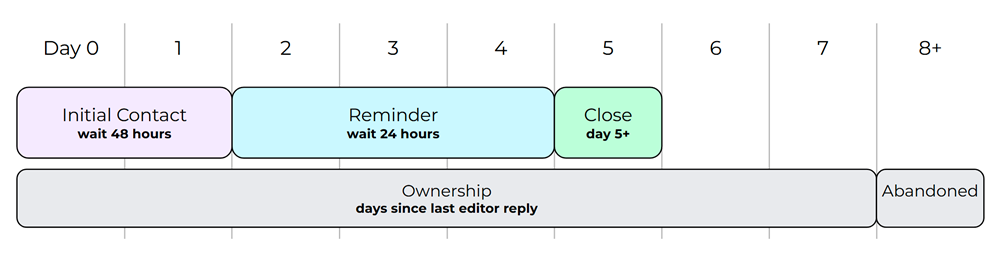
Minimum UR timeframes
Following a minimum timeframe helps with controlling the volume of URs.
- Aim to make initial contact with the reporter promptly.
- Initial contact = Day 0
- If you get a reply and the information is:
- sufficient to resolve, only reply if extra information needs to be provided. Otherwise, mark the UR as “solved”.
- insufficient to resolve, reply again requesting clarification.
- Send a reminder 48 hours after the previous contact if no response is received
- If you have sent a reminder that has not been responded to for 24 hours and initial contact was at least 5 days ago, no further action is needed. The UR can be closed as “not identified”.
Template of topic 380209, post 5
Handling abusive or inappropriate URs
Waze Australia has a zero-tolerance policy for abuse or aggression towards our volunteer community. Such violations of the Terms of Service should be addressed as follows:
- Do not engage further
- Contact your State Manager with the UR permalink
- The State Manager will escalate to the Local Champs and action may be taken against the offending account. Local Champs will close the UR once it has been reviewed.
Addressing frustrated users
People express frustration as a natural emotional response to obstacles, unmet expectations, or a perceived lack of control. When users express frustration (without abuse):
- Acknowledge their concerns empathetically.
- Clarify your role as a volunteer map editor.
- Guide them to appropriate resources to overcome their concern, if possible:
- Assume all reporters have honest intentions, though not all requests are valid for implementation. In these cases, thank the reporter, briefly explain why, and close the report to deliver a positive user experience.
Clusters of URs
 A group of URs submitted in close proximity is known as a cluster and may indicate a significant issue. When investigating a cluster, gather information from all related URs to identify patterns such as repeated routing problems, missed turns, or consistent directions of travel. Clusters are especially valuable for identifying issues that affect multiple drivers. Use standard investigation practices to address these effectively.
Occasionally, duplicate URs are created. These are usually submitted within minutes of each other, close in location, and share matching driver attributes. This often happens when users experiment with the app or correct a submission error (e.g. selecting the wrong issue type).
Handling Duplicates
- First UR - Respond as usual.
- Second UR - Close as a possible duplicate. Include a message inviting them to clarify if it isn’t (making sure to monitor your email for responses).
- Third UR onwards - Close without replying.
Investigating URs
A quick investigation may uncover the source of the problem.
- Use available information to discover the problem:
- Report category (e.g. turn not allowed)
- Date/time of issue
- Waze suggested route (purple track) and user-driven route (green track)
- Turn prompt indicators at segment nodes
- User preferences (e.g. avoid unpaved)
- Description (if provided)
- Check for:
- Recent map edits
- Roadworks, road closures, as well as new, moved or closed businesses or new residential estates
- GPS tracks, map notes and recently closed URs
- Seek help from senior editors and mentors if needed
- Recommendation - Have a look around and fix any other map issues noticed during your investigation.
Managing URs
Consider the following while managing URs through their life cycle.
- Anyone with local knowledge can help in the investigation process.
- URs are generally targeted at level 2+ editors who have a more advanced understanding of the application and routing behaviour
- URs can only be closed by level 2+ editors.
- The first editor to investigate and reply to a UR is considered the “editor responsible” for the management of the UR.
- URs with no activity for 7 calendar days (no replies or updates) are considered abandoned and may be handled by another editor.
Exceptions and Editor Courtesy

- URs with active conversations are still open to input from all editors, but updates or fixes should be left to the editor responsible.
- Editors can give other editors permission to take over a UR (this must be agreed between both parties).
- Editors reporting issues while driving can reserve the UR for 14 calendar days by:
- including their username in the report, or
- replying with their username as the reporter after submission.
- If more time is needed, consider recording the issue in your own system.
- Area and State Managers are encouraged to oversee URs in their managed areas.
- State Managers and above may intervene and close URs at their discretion.