One of our members was given some rather strange directions and I can’t seem to figure out what could have caused it. If any of you could investigate it it would be much apricicated. Our conversation and the UR is linked here:
URs are only visible to those who can edit in the area.
One possibility, when you ask for a route immediately after waking up Waze, it has to guess what direction you are pointed. If it guesses wrong, it may give odd directions to avoid any disabled turns.
Can you provide any details?
Ahh I’m sorry. I always forget that. The user turned left from Santa Lucia onto Los Gatos but Waze sent them back the way they came by making the first two available lefts. The reporter did a great job describing the issue. Here is a screen shot.
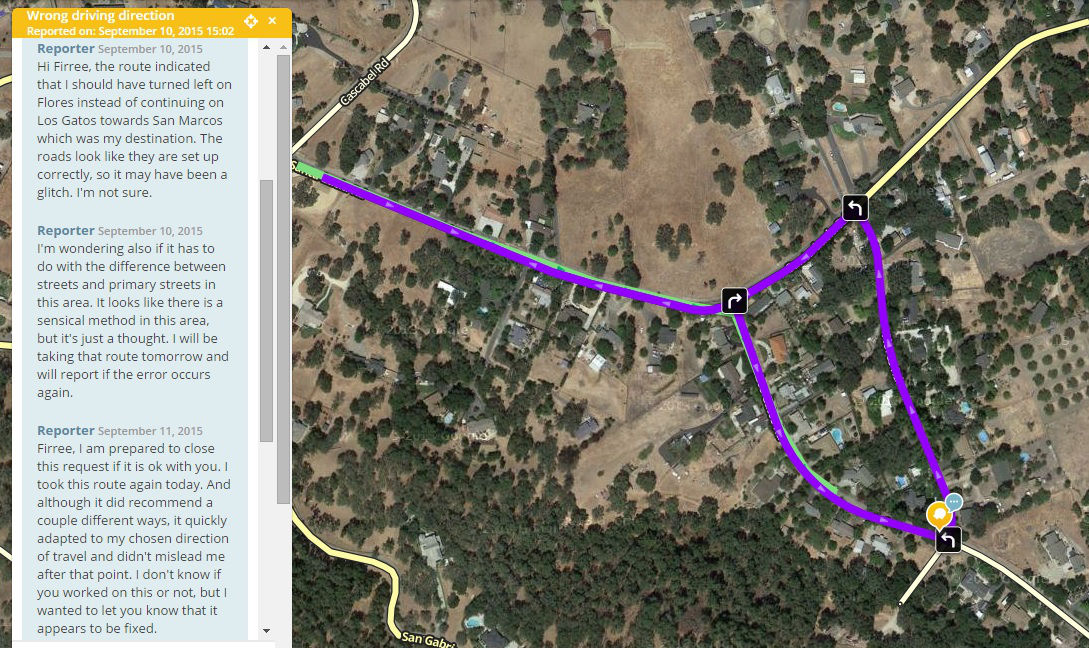
Thank you both for your time addressing this issue. The Waze application had been running for roughly ten minutes prior to this error happening, so it wasn’t caused by it just waking up. Also, I have taken the route twice since, but the error has not reoccured.
To elaborate on what happened even before this screenshot, the suggested original route was via San Gabriel. I know that way is a little longer, so I drove past the turn towards Los Gatos. Once the app sensed me passing the turn it rerouted. However, instead of routing via Los Gatos, it was trying to get me to loop back to San Gabriel (I believe), which would have been a much longer route. It’s definitely odd, and I lack the experience to know what it could possibly be. Thank you again for your time and energy.
My thought about about Waze waking up was only one of dozens of possibilities that could have caused the problem.
You mentioned longer route. Waze choses “faster” by default, which does not necessarily mean shorter.
At this point, the cause could still be any number of things. Traffic, a daily pattern of traffic, a temporary road closure, a bicyclist or very slow vehicle inappropriately using Waze, or just a slow intersection that routinely backs up cars can all cause Waze to suggest surprising alternatives. Sometimes Waze may recommend an unexpected route even after traffic has cleared up or a temporary closure has ended, because it doesn’t know yet.
Also, if Waze hasn’t yet collected enough data in the area, it may overestimate the speeds of side roads, turns, and U-turns. I know that most people in that area don’t use GPS navigation. Enable the GPS layers. Do you see much data? Run Waze while driving, even if you don’t need it. Your data will help improve future accuracy. I also know that cell coverage in that area is spotty; this will also cause nav problems.
Since I haven’t been able to identify the issue or repeat it, I’m going to go ahead and add this to the not identified pile.
It could depend on where his destination was on San Marcos. If his address is not verified on Waze or is otherwise existent, Waze will pull it from Google Maps. If it is wrong in Google Maps, Waze will route incorrectly.
Click on all of the HNs in Waze. They are not verified if they do not show an editor name. Move them slightly and save to verify them. Confirm their correct location with Waze Street View. But they still won’t be available in a Waze search until their corresponding tiles are updated. So, wiggle the road segment and save to trigger a tile update.
I already see one problem. Someone added a private place/residence for 8825 on the north side of San Marcos. But a HN for that address exists on the south.
Someone also added one for 9155. This usually happens because Waze isn’t locating it correctly on its own, which tells me the HNs are not confirmed. HNs won’t be searchable until they are confirmed.
Well, I’ve gone through all of San Marcos and manually checked all the HNs myself and forced it to update. I don’t see any more reports and the original one is getting old so I’m going to close it. If you see routing like this again please make a new report or notify us. Thanks!