Fej, LPG may end up ###.# but not anytime soon, so that’d be fine. 
Sent from my GT-I9100P using Tapatalk 2
Fej, LPG may end up ###.# but not anytime soon, so that’d be fine.
Sent from my GT-I9100P using Tapatalk 2
Ps thanks for the update
Sent from my GT-I9100P using Tapatalk 2
As a few of the initial bugs have been fixed I thought I’d do a recap of where we are with this feature:
Price entry in iOS, 130.9 becomes 130.8:
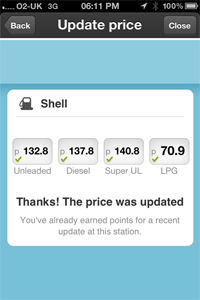
Interestingly, LPG Works fine here, perhaps as it’s less than 100 pence?
Also, personally I’d prefer it was displayed as 130.9p rather than p130.9, this applies to all screens where price is displayed (entry, search and station info box)
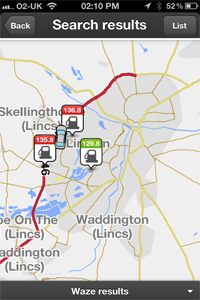
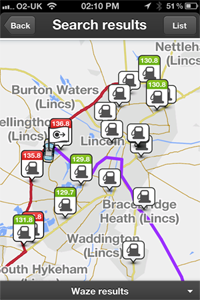
When searching to drive directly to a local station you only get 1.5 to 2 miles, I don’t think that is enough to make a decision on where is cheapest. The first screenshot here shows only three stations, whereas the second shows all the stations in Lincoln (which was produced by planning a route across the city and the trying to add a gas station stop ):
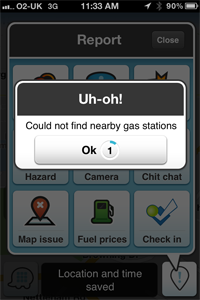
A Translation issue, almost everywhere it displays Petrol Stations (assuming you use the “UK English” Language) but this one slipped through the net:
The station Info screen inconsistent with price entry screen. “LPG” and “Super UL” in Price entry become “Lpg” and “Super ul” in station info, additionally here the price IS STILL displayed as Dollars:
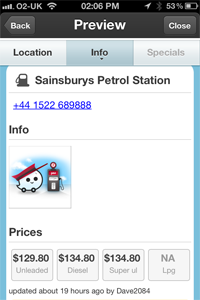
Formatting error for phone number in Station info page, this only occurs when adding a station as a stop en-route:
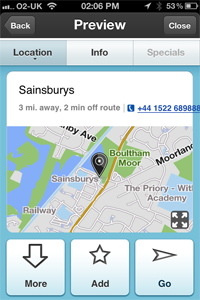
The search list for both direct navigation and adding a station as a stop en-route seem to have a lot of wasted space. Should the address of the station be here?
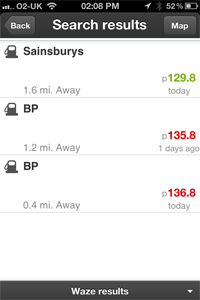
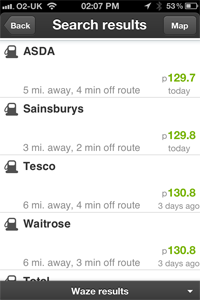
Looking at the “Gas Stations” manual on the Wiki is would seem so:
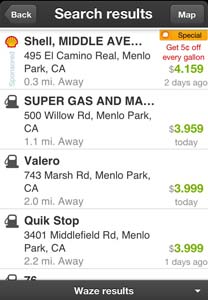
Other observations include a lack of brand logos, can Waze confirm that this is only available for stations who offer a discount?
Lastly I’d like to have to option to display stations on the map all the time (subject to de-cluttering rules as with landmarks and roads).
What’s Been fixed:
On Android, the price is shown correctly on the entry screen, with .9 or .7 suffix. It even appears correctly in the search results list and map too. However, on the station Info screen the prices are all rounded to .8.
Can we get rid of that trailing zero too please? Desired format is 129.9p.
It’s odd how the search radius while navigating is so much bigger than when not. More is better.
How do we also ad bio diesel, price per kW/h of electricity and premium super unleaded fuels?
Premium super unleaded being an option I think most fuel stations supply these days such as Shell V Power, BP Ultimate or Tesco Momentum 99.
Only have room for four, so went with those four as the ones most used / needed. Very few cars need Premium.
via mobile
Some petrol stations are appearing twice in my area. And of course I’m only creating price data for one of them. So far as I can see, they are only on WME once.
An example, this Texaco station comes up once in the right place, with unleaded price and telephone number, and once a couple of hundred yards further south. https://world.waze.com/editor/?zoom=6&lat=51.28252&lon=-0.32775&layers=BFTFTTTTTTTTTTTTTTTTFT
I am hoping that this is a temporary problem, possibly the station was created once manually and then a second version was taken on from Texaco-supplied data. In which case, if one of these has now been deleted, the problem should disappear the next time the live map is recreated. Can anyone confirm this?
Yes, there are some duplicate petrol stations in some places. If they’ve been sorted out in the editor, then you’ll need to wait for the next map update. Hopefully the updates will become more frequent soon…
Getting the address displayed is the most important fix IMHO.
Formatting errors and “.8” instead of “.9” are annoying but don’t really matter.
Without the address, it is difficult to distinguish stations on opposite sides of dual carriageways (especially but not restricted to motorways), and correct entries for stations from ghost entries (although hopefully the ghosts will disappear as the take-on data is tidied up).
Has anyone else been getting an error message today about the price data appearing to be an invalid format (can’t recall the exact wording, and I couldn’t get a screengrab whilst driving)? Tried entering prices for three different stations this morning, and every time I got the same error. After the first station, I double-checked the prices I was entering for the next two stations, so I’m confident the prices were being entered correctly (and in exactly the same format as I was using yesterday when the client was happily accepting them)…
In general, the more I use this feature the more I think the data entry part hasn’t really been tested much by real drivers entering real data during real drives - why are the prices squashed up into a tiny little strip across the top of the screen, leaving the majority of the screen area completely unused? Even when the soft keyboard slides up into place, there’s still a fair bit of screen area that could be better used to display the prices in a larger/clearer typeface. My phone has a pretty big screen, yet at arms length in its windscreen mount it can be a struggle to see if the price I’m entering is correct (especially the difference between an 8 and 9, or a 9 and 0, for example - digits right next to one another on the soft keyboard, and so very easy to mistype on the move).
Also, on Android at least, given the variety of soft keyboards provided by the different manufacturers, it might be preferable if the client provided its own price entry keypad with just those keys required for price entry (i.e. 0-9, . and delete), rather than relying on whichever keyboard the device provides in response to the client request for a keyboard - this would also help reduce the risk of data entry errors.
For the prices feature to be of any real use, accurate data needs to be available for as many locations as possible. Realistically, I suspect this means that most of the data would need to be entered by drivers on the move as they pass by each station, since I doubt there are sufficient Waze-using passengers who’d be able to update prices as they’re driven by, or sufficient Waze-using drivers stopping at all these stations to fill up who’d then be able to update the prices whilst stationary. If this is the case (and I don’t recall seeing a “typing disabled on the move” prompt whilst entering price data on the move, so does this mean Waze suspects this too…), then the price entry UI ought to be designed to make it as easy and as quick as possible to enter data with one hand at arms length. Which, right now, it isn’t. I know, I know, early days and all that, but there’s no harm in trying to get it right right from the start, as opposed to trying to get it right once it’s become an established feature of the client.
That’s one of the reasons why displaying the petrol stations on the map screen is a must. Then you can just touch the one you want to update/drive to/find info.
Click the [Map] button in the top corner of the results list.
Thanks for that. I knew the map button was there, but so far have only used it when selecting where to go, rather than when inputting prices.
I accept that this is not in the current plans, but would like to flag it up as a possible future enhancement.
Could Waze store open hours for petrol stations? They aren’t all 24x7! If we could input the opening hours, then Waze could only offer stations which are currently open. (OK, it would probably get Bank Holidays wrong, but it could be fairly accurate at night and over the weekend).
This information would probably be better captured on WME rather than the phone client; the phone needs to be kept simple, and some brands list opening hours on their website, making it easy to update Waze in bulk from home.
…after searching for a new destination/stop, selecting Categories, selecting Petrol Stations. waiting, waiting… then press Map button… then try and zoom about the map to see which station is which.
They should just appear on the map, as Hazards do currently. Then I can just see which of the four petrol stations near me is the cheapest, and easily update the prices.
Without this the Petrol Station feature is doomed in places where Waze don’t get 3rd party price updates.
What you have to consider is that… there are 20million registered waze users. Less than 10 million of which are even registered in these forums. The most concurrent users ever on this forum was 182… back in Nov 2011. Currently there are 62 forum users online.
This forum is not representative of waze users. You can document all you like on here and the wiki, but the vast majority of waze users won’t even see it. It’s all about how the client works… if a feature isn’t visible then it won’t get used by the vast majority of users.
The main reason the congestion feature is the most used, and the bit that works the best, is because it’t automatic.
Actually, the map option doesn’t appear to be available when updating prices. Where the ‘map’ button would normally be, it says ‘close’.
The good news is that the “ghost” second Texaco station which was giving me a problem has now disappeared, but I still think there could be a problem when two petrol stations are opposite - although if they are the same brand they will probably be the same price so it wouldn’t matter so much.
Typical, I’m all prepared to screengrab the error message on my way home, and now the price submission process seems to be working just fine…
Hi,
I did some mild testing this evening.
In all appearances, you have to be pretty much on top of a garage to be able to either find it or add fuel prices for it. This by pressing report and Gas Prices. They really do need to change that “gas” to Fuel as well. A major americanism it is.
Des. . . 
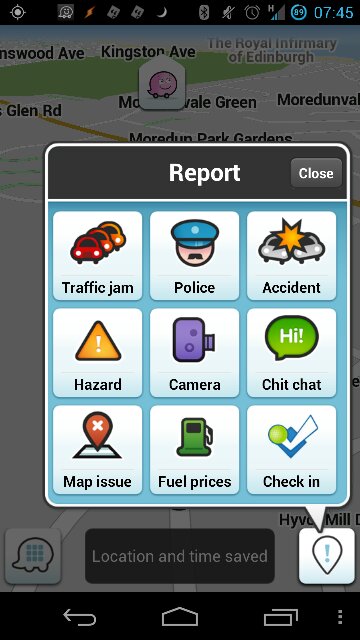
Have you changed your language to UK English?

via Tapatalk
The feature itself wasn’t up for translation which is why it looks dodgy, but that button should be fine.
Sent from my GT-I9100P using Tapatalk 2