Hello, I live in Jacksonville, FL. The intersection of Park and Kingsley Avenues in Orange Park, FL has 4 sets of red light cameras. 2 on Park, and 2 on Kingsley. I travel on Park every day. It’s configured to go north and south. Kingsley, east and west. When I started traveling north on Park and I’m approaching the intersection of Park and Kingsley, the app announced the red light cameras. Lately, for the past couple of weeks, it doesn’t. It announces the cameras when I’m going south on Park, but not north. There is another set of 4 cameras at the intersection of Park and Loring Avenues. The app announces both sets of cameras there with no problem.
I submitted if I recall correctly 2 or 3 reports through the app, and was told to restart the app, and my phone, and clear the cache. I did that, and no change. I was then told to submit a support ticket through the website. Did that, got no response. I just got home and the app is still not announcing the cameras on the north intersection of Park Ave and Kingsley Aves. Has anyone here experienced a similar problem and solved it? I’d love to hear how.
Thanks in advance,
Good afternoon TsidkenuRohi,
Sorry to hear your having difficulties with the enforcement cameras not alerting.
Can you check something for me in your settings on the app?
Once in the settings menu tap on the following options.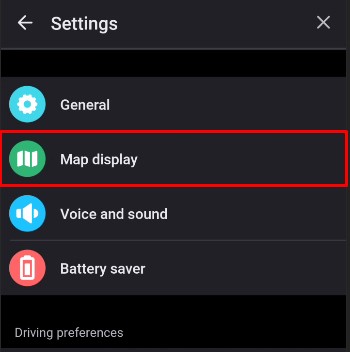
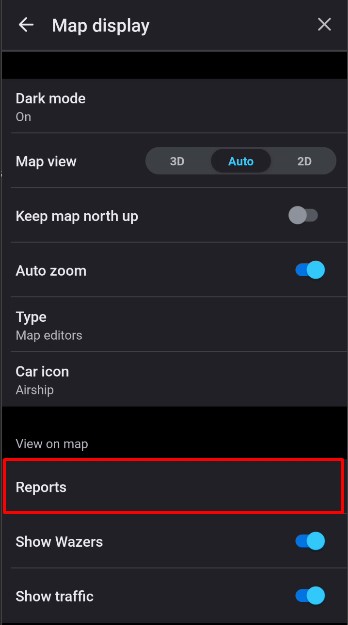
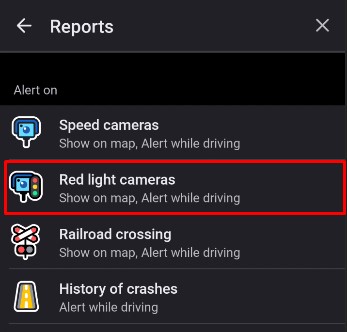
Please verify that Alert while driving is on at this screen. 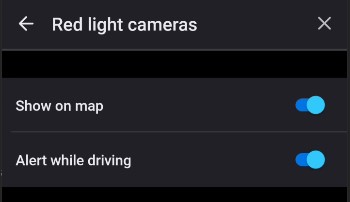
Hey Will,
I followed your instructions, and under Red Light Cameras, “Show on map” and “Alert while driving” are both activated. They have been from the beginning. What do we do now?
Hello TsidkenuRohi,
Apologies for the delayed reply.
If those are both activated, then the app should alert for the red light cameras.
There is a possibility, if they only alert occasionally and it’s a route you take often Waze’s familiarity mechanism might be taking effect.
The way that works is if you travel the same route multiple times in a certain time frame it will mute/not show some alerts where it feels
you should be familiar with the those types of alerts as it’s on a frequented route.
It does reset at some interval and will start alerting them again, then the cycle repeats.
If certain ones are alerting every time and one isn’t then, there might be something we need to investigate further.
Hello again,
I would say further investigating is needed because your last statement is exactly what’s been happening!
Hello again,
So this problem is still happening and every suggestion made to me so far hasn’t worked. Does anyone have any other suggestion that does work? Surely someone in this community has experienced this issue and came across a solution for it!
Hello again,
I sent another support ticket earlier today through the app along with a new set of logs because I haven’t heard anything from the support team since July 2nd. That’s the last time I submitted a ticket, which is a day after my last post above. I get that you guys are answering tickets from numerous users. I just hope I don’t get lost in all of the tickets you deal with.
Hello again,
I sent another support ticket earlier today through the app along with a new set of logs because I haven’t heard anything from the support team since July 2nd. That’s the last time I submitted a ticket, which is a day after my last post above. I get that you guys are answering tickets from numerous users. I just hope I don’t get lost in all of the tickets you deal with.