Is this a…:
Standard bug Steps to reproduce this issue:
Open up keyboard shortcuts and assign the “Delete” key to a shortcut, then revert that shortcut back to the original key binding. The delete key is now unmapped and can not be remapped to the original functionality (deleting the selected item).
Environment where the bug occurs…:
NA Permalink:
N/A Browser name and version:
Chrome Version 147.0.7727.102 (Official Build) (64-bit) Are you using scripts? Please detail which ones.:
This happens without any scripts enabled.
I had this happen to me on both Windows and MacOS.
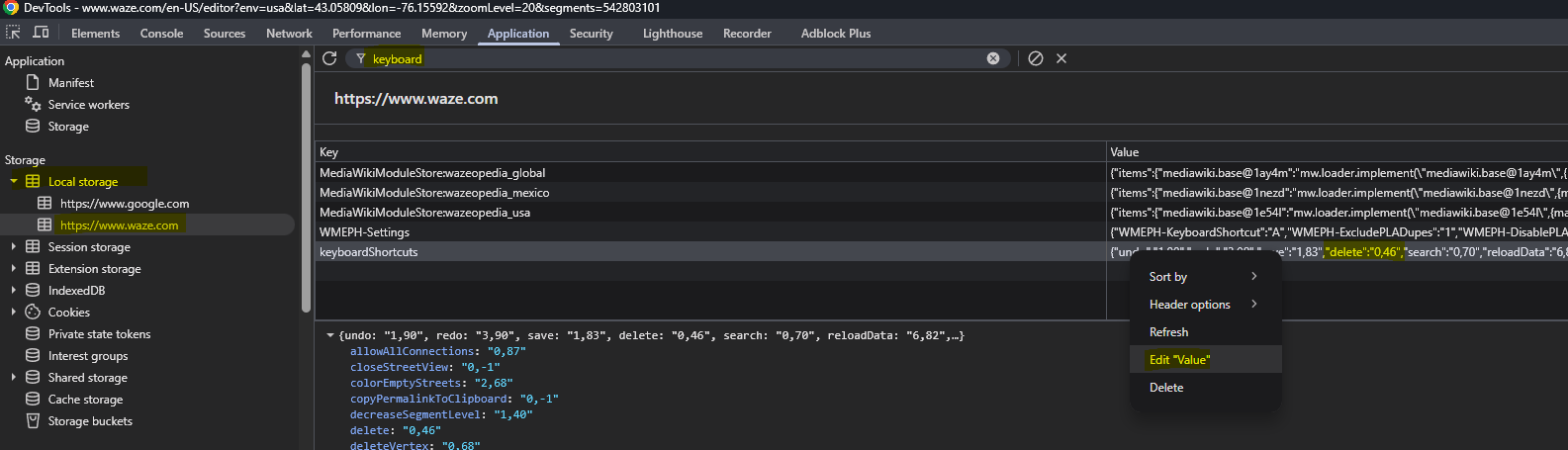
Functionally what happened was the “delete” key in keyboardShortcuts in local storage was being set to 0,-1 when it should be 0,46 - I wasn’t able to figure out why or how this happened originally but this was the reason for the failure when I checked myself, and also for Keith above.
It’s been mentioned that the delete functionality can be restored with dev tools (F12 for developer console), this is where you would find/edit the setting to restore “delete” to “0,46” (the delete key):