Introduction
Separate from the lock system used to protect the map, some features of the WME are restricted until you reach a certain Editor Rank. The rank these features become available has been discussed and decided by the UK Country Admins.
Rank 2
Closing any URs, MPs
- Location: Ensure the relevant options are visible in the layers menu.
- Function: Allowed to close URs & MPs created by any users and themselves.
Deleting segments
- Function: Allowed to delete any segment not created by themselves (respecting lock levels).
Approve Places
- Location: Ensure that Place Update Requests are visible in the layers menu.
- Function: Approve new or edited Places submitted via Place Update Requests.
Force House Numbers
- Location: Within the House Number interface.
- Function: When entering the house number into the WME, the system checks for errors like out-of-sequence, invalid numbers, etc. Some of these can be forced saved if it is deliberate.
Cameras
- Location: Within the Hazards menu
- Function: Adding and editing any type of camera.
Speed Bumps
- Location: Within the Hazards menu
- Function: To give warnings of upcoming Hazards on the map that are always there.
Rank 3
Setting difficult turns
- Location: Within the Time Based Restrictions screen for each turn arrow.
- Function: Marks a turn as difficult. The App can be set to avoid these when routing.
Real time closures
- Location: Within the segment’s info panel under Closures tab.
- Function: Allows real-time closures to be set immediately live on the map. This still respects auto locks on segments.
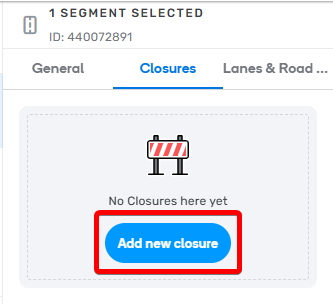
Add Real Time Closure
Lane guidance
- Location: Within the segment’s info panel under Lanes tab.
- Function: Set the lane guidance choices for a segment.
Traffic lights
- Location: Within the Hazards menu
- Function: To show on-map icons where traffic lights are and a navigation aid (turn instructions).
Rank 4
Create new city names
- Location: Popup when an unknown name is entered into the segment name field.
- Function: Adds a new name to the City database.
Routing option
- Location: Within segment side-panel below Road Type.
- Function: Upgrades/downgrades a segment without changing its Road Type.
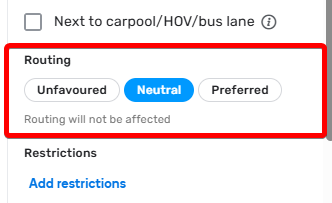
Change routing option
Junction Boxes
- Location: Within the Road menu.
- Function: Allows better routing control through complex junctions and set Far Lanes guidance.
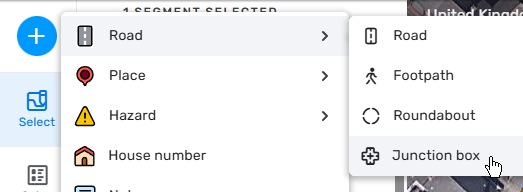
Add a Junction Box
Paths (Far Lanes 2)
- Location: With the Paths layer switched on, add Paths from one segment to another
- Function: Allows setting Paths over several segments to map (including nested) Far Lane Guidance.
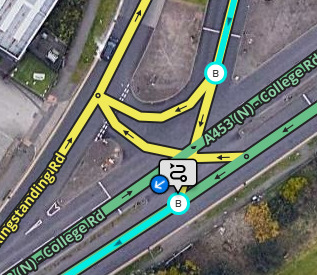
Paths button
Road shields
Adding shields to roads
- Location: To the right side of the Address fields when a segment is selected.
- Function: Allows setting of road shields
Setting Turn Instructions (including road shields)
- Location: The “Add Instruction” option in the turn arrow pop-up
- Function: Allows the ability to customise the on-screen and TTS instructions for turns, including adding road shields
Level crossings
- Location: Within the Hazards menu
- Function: To give warnings of upcoming Level (Railway) Crossings.
School Zones
- Location: Within the “Hazards” menu.
- Function: Allows the ability to add school zones to the map.
Rank 5 (Country Manager)
Rename City
- Location: With the City Layer turned on and the City name additional option enabled. Select the city name and the edit icon on the right of the panel.
- Function: Allows editing an entire City name without touching individual segments or leaving the old name lingering in the servers.
Request updated imagery
- Location: With the “Pneo” Additional Imagery layer enabled, in the top-right of the layers menu.
- Function: Allows updated satellite imagery to be requested if the currently available imagery is not sufficient for mapping.
Rank 6
Restricted Areas
- Location: Within the top menu bar.
- Function: Allows the editing of a Restricted Area by setting vehicle/time restrictions (similar to TBRs) and associate passes. Currently, the UK has the London CCZ & ULEZ mapped, plus other LEZ and CAZ around the country. Some restricted zones that use residential passes are also mapped.