MegaMapRaid (obsolete)

A MegaMapRaid (MMR for short) is a special kind of MapRaid. It’s a global event where many editors (anywhere from 350 to 1000) from all over the world meet virtually to help improve a very large area of a country or an entire small country. It is a fantastic opportunity for newer editors to work with many senior editors to gain skills and insight into mapmaking. In addition to editing experience, they will learn about the Waze editing community and form relationships.

So far, three MegaMapRaids have been held:

Welcome to MegaMapRaid! All editing areas should be live! Team assignments are found here. There are now five regions in the MegaMapRaid! Check out the late addition

MegaMapRaid (MMR for short) is a special kind of MapRaid. It is a one time event virtually gathering well over a thousand map editors, from dozens of countries, to jointly perfect several large pieces of the map. It is also a fantastic opportunity for newer editors to work with many senior editors to gain skills and insight into mapmaking and the Waze editing community.

The editors are divided into groups, and each Editing Group has a particular area it works on. There are fifty editing groups, and four MapRaid Regions of the map.

A unique feature of this MapRaid is that the Editing Groups are in friendly competition to see who can rack up the top editing score.

Where is it?

There are four MapRaid Regions in the MegaMapRaid project. Each of them has its own project page. The four Regions, with links to their dedicated pages, are:

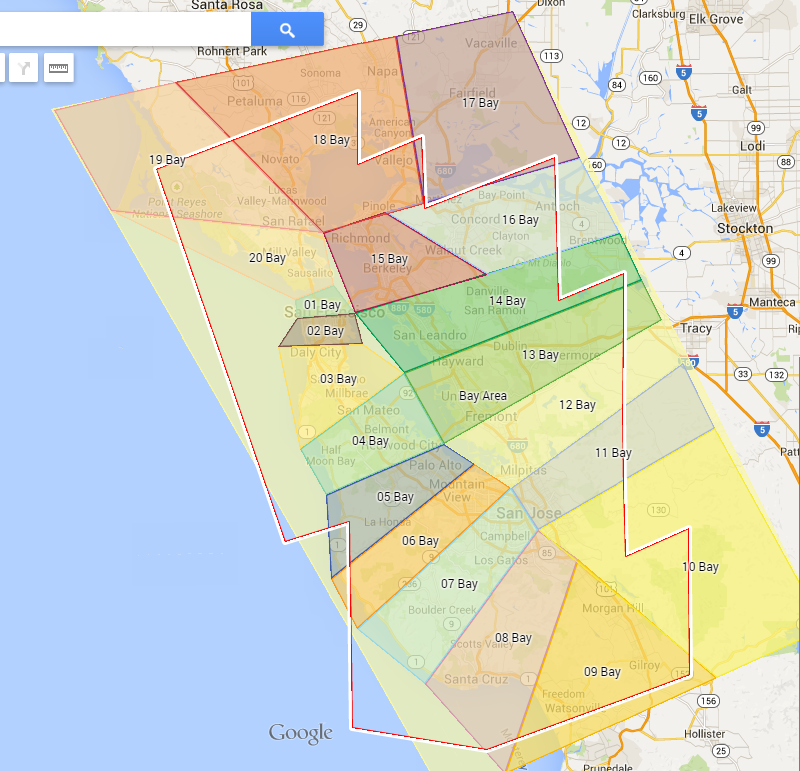
The illustrations below show the first four areas. On the left is the SF Bay Area. The upper right is Baltimore, and below it is nearby Washington. Louisiana’s map is at the bottom. More information about each of these areas appears later in this page. Note that Louisiana and the Mentoring areas were late addition, early MegaMapRaid communications only listed three Regions.

Note that the United States is large, and has 50 main political units that are called States. The four regions each cover portions of one or more states, and those states have pages describing local editing practices and policies. You may optionally read the State page related to your editing area when it is assigned. However, it is not required: the important information form the State pages has already been placed on this page and the four Region pages linked above.

If you do wish to review the State pages, they are:

  • San Francisco Bay Area: See California
  • Washington, DC: There are three State pages, depending on where in the Metro DC area you are editing. They are District of Columbia, Maryland, and Virginia. (Note that DC is not a regular State politically, but functions as a State for Waze purposes.)
  • Baltimore: Maryland
  • North/Central Louisiana: Louisiana

The mentoring areas are generally rural, with an almost original “basemap,” and still subject to very basic editing. This is ideal for inexperienced editors, as there is more basic editing to be done, fewer “locked” roads, and more tolerance for errors. It is critical that editors of these areas participate in their assigned Slack channel for guidance from their mentors and to gain access to their specific assigned editing areas.

The mentoring map areas are spread across many States.

When is it?

The public portion of the MegaMapRaid, including initial registration through final editing cleanup, is running from mid-January 2015 to mid-March.

Registration

The registration period originally ran from January 18, 2015 to February 22, 2015. It was later extended to February 28 due to demand. About half of the participants registered in the extended period.

Editing Group assignments

Preliminary formation of the groups are shown in the forum. Detailed information will follow. Please keep an eye out in your forum Private Message inbox, the Waze MapRaid Slack to find out more, e.g., who the group leader is, and where to edit the map. Your extra editing area will become available shortly before the start time of 19:00 (7 PM) UTC Sunday March 8.

Live MapRaid

The editing start of the MegaMapRaid is Sunday, March 8 at 19:00 UTC (Greenwich Mean Time), and runs through Thursday March, 12. The end time will be posted here once it is confirmed.

Your extra Editing Area will become available shortly before the start time.

(Note: The start and end times were originally one day earlier. They were postponed due to technical issues with editing area assignments. We apologize for the delay. Please keep your excitement level!)

What will we do?

Getting started

MegaMapRaid will work very much as if it is four normal MapRaids operating simultaneously. Each editor will be assigned to an Editing Group. The groups are numbered from 1 through 50. Editors will get an e-mail letting them know about the group assignment. You will have an extra editing area for the duration of the raid.

Communication

  • Email – check your email and forum private messages to learn your group assignment. Other special announcements for MMR will come this way too. E-mail and private messages will not be a primary tool for other editing activities
  • wazemapraid.slack.com WazeMapraid slack messaging
    • Look for a channel dedicated to your editing group (You will need to click the “+58 more…” link to display all the numbered group channels.)
    • -general channel for general questions about mapraid.
    • local channels for each map raid region will be to ask questions of locals.
  • megamapraid forums are there for you to get answers to questions that don’t get answered in the slack channels. The slack messages scroll off the page, so if you don’t get an answer in Slack, post it to the forum for less immediate response.

More details

When you get your assignment, go to the Wiki page for your assigned group’s host city MapRaid. You will see your group’s specific map assignment area and your group leader’s name there. We will provide a link that takes you to Waze Map Editor (WME) at the approximate center of your group’s editing area.

In Slack, find your group’s channel (chat room) on the upper left, and join it. (You will need to click the “+58 more…” link to display all the numbered group channels.) The channel name will be -mmr-group_nn where nn is your group number, 01-50.

Your group channel helps you keep abreast of activities going on within your group; ask questions; and receive instructions from your group leader, local MapRaid hosts, and other senior editors. You can ask questions, make suggestions, or make an unlock request in your group channel - there is no need to post unlock requests to the unlock forum. Use of WME built-in chat is discouraged for MapRaid editing, as there is too much going on during a Raid to make it an effective tool. The messages from the combined active editors would be overwhelming at times. WME chat may still be used for non-MapRaid activities.

You may also wish to read the Wiki State page for the state of your assigned area. There are state pages for California, District of Columbia, Louisiana, and Maryland, as well as Virginia for some of the Washington suburbs. Note that key information for the State is repeated on the MapRaid pages, so it may seem partially repetitive.

There are also a few Slack channels for specialized MapRaid purposes. The default channel “-general” is for discussion that goes beyond any one Editing Group, and there will be a channel for each host area where local hosts are available to clarify regional policy and practices.

Editing: Overall guidance

The most common activity in a MapRaid is resolving Update Requests, followed by correcting restrictions (turn restrictions, vehicle restrictions, timed restrictions). The MapRaid includes some areas that have a less mature map; in those areas, there will be a lot of geometry and setting directionality for “unknown direction” roads.

Each editor will get an extra Waze Editing Area matching the approximate boundaries of the Editing Group’s geographic area. This extra Editing Area will become available shortly before the start time on Sunday, March 8. It will be revoked some time after the Raid completes.

Editing: Specific guidance

Your Editing Group leader may provide more specific guidance to the group or to individual editors. There may be specific edit types that a group leader is looking to implement in the group’s geographic area. In some groups, the group area may be subdivided into smaller areas with specific editors getting assigned to take ownership of one of the small areas, to focus on it and perfect it.

When the high is over

MegaMapRaid has a short duration of about 4 days, but some activities will continue when it is over.

  • Promotions and competition results: Deserving editors will have their rank increased, or receive new Manager status. See also the Competition section immediately below.
  • Group “picture:” no promises, but this is a MapRaid “tradition.” Details to come.
  • Continued cleanup of Update Requests: URs can take longer to resolve. If you start managing or following a UR during the Raid, you should continue responding to the Reporter and working on the map and with other editors to resolve the problem. If your extra Editing Area expires while actively working on a UR, contact a local host for follow-up.
  • Mentoring and networking: Newer editors have an opportunity to network with other editors from around the world, including some senior editors (Champs, Country Managers). You can build on those opportunities, staying in touch with your new editor friends, and continue receiving valuable mentor tips.
  • Next MapRaid: Take a breather! We don’t recommend jumping from one MapRaid to the next. But there will be other (smaller!) MapRaids in the near future that you may wish to participate in. Keep informed through the Wiki, forums, and those valuable networking contacts you have made.
  • Skills! Any improved skills and techniques you pick up in the Raid, and knowledge about the current state of mapping, are yours to keep … forever. Don’t let them get stale!

Competition

We’re having a contest! Every MapRaid results in rank or role promotions for some outstanding editors - become an Area Manager, gain Rank 3 or Rank 4 rights, etc.

In the MegaMapRaid, we’re also tracking Editing Group performance. Since groups are partially aligned by country and language, there’s also a little national pride at stake. We’ll announce the rankings about a week after the Raid. Go team!

Who is participating?

1,333 editors are participating! The table below is slightly out of date, and is missing 66 editors… maybe they’re driving Route 66.

Participants by country
Country Editor count Country Editor count Country Editor count
USA 378 El Salvador 5 Greece 1
Brasil 141 Portugal 5 Hidalgo 1
Malaysia 52 Turkey 5 HK 1
Colombia 49 Uruguay 5 Jakarta Utara 1
Italy 48 India 4 James City County 1
Mexico 43 Myanmar 4 Kuala Lumpur 1
France 42 Rio de Janeiro 4 Kyrgyzstan 1
Canada 35 South Africa 4 Lithuania 1
Romania 31 Switzerland 4 Madrid 1
Chile 22 Austria 3 Magyarország 1
Philippines 19 Bulgaria 3 Maharashtra 1
Poland 18 Dominican Republic 3 Malawi 1
Australia 16 Ecuador 3 Maldives 1
Peru 16 Honduras 3 Malta 1
Argentina 15 Ireland 3 mauritius 1
Belgium 15 Nicaragua 3 Moldova 1
Germany 15 Norway 3 Mongolia 1
Indonesia 15 panama 3 Montenegro 1
Slovakia 15 Paraguay 3 Namibia, All 1
Hungary 14 Thailand 3 New Zealand 1
Israel 14 Trinidad and Tobago 3 Pakistan 1
United Kingdom 14 Bolivia 2 República Dominicana 1
Costa Rica 12 England 2 RSA 1
Czech Republic 12 Virginia 2 Santiago 1
Latvia 12 Serbia 1
Sweden 12 Belarus 1 Singapore 1
Netherlands 10 BIH 1 Slovensko 1
Venezuela 10 Brno 1 Sweden 1
Estonia 8 Caldas 1 Taiwan 1
Guatemala 8 Cuenca 1 TANANA 1
Spain 8 Cundinamarca 1 Ukraine 1
Singapore 7 Dubai 1 Veneto 1
Denmark 6 fortaleza/ceara 1 Wales 1
Puerto Rico 6 Ghana 1 Zambia 1
Russia 6

Editing Groups

There are 50 Editing Groups being assigned. Each group will have a group leader and will get a geographic Editing Area within one of the four MegaMapRaid Regions. Once the groups are formed, MegaMapRaid administrators will let the participants know which group each editor belongs to, and who the group leader is. There will be some effort to align groups by country and primary language spoken.

The list of Editing Groups and their local MapRaid Regions (within SF Bay, DC, Baltimore, Louisiana) will be posted here, in this section of the Wiki page. The group membership and precise area to be edited will be posted on the MapRaid pages specific to each of the regions.

These graphics have been temporarily inserted while the actual editor list is sorted and completed.

Am I registered for it?

Editors can verify that they are successfully registered by visiting https://www.waze.com/forum/ucp.php?i=167

If you see the forum group “Mega MapRaid!” in your memberships, you are in! (Forum groups are not related to MapRaid Editing Groups. There is only one forum group for the entire MegaMapRaid, but 50 Editing Groups.)

Make sure you have received your Slack invitation. If not, PM (private message) orbitc on the forum.

More information

This wiki page is complete. Editing Group assignments are complete, and the MapRaid is in full swing! Check this page and the MegaMapRaid page for changes at least once per day, as we will post updates regularly. Stay in touch in your assigned slack channel (not the general channel if you can avoid it)

MegaMapRaid! will run from Sunday, March 8, 2015 19:00 UTC thru Thursday, March 12, 2015. The raid will last 4 days.


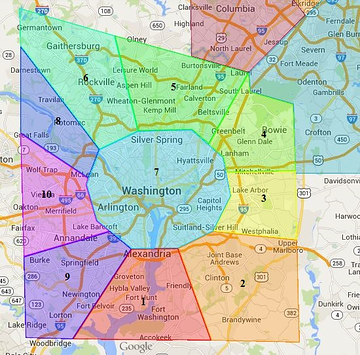
Welcome to the DC Metro Area

The group will be divided into multiple teams, one for each section, and possibly other exclusive teams; for PURs or to handle the Waze provided problem sheet. Each team will have their own assigned senior editor (rank 6, or 5) who will be able to edit anywhere in the Raid area, but will focus on their assigned section.

This wiki page is an attempt to highlight a majority of the local differences, but does not cover all local differences. Please see the Washington DC, Virginia or Maryland wiki pages for complete information. Additionally, parts of the DC Metro area that are actually in Maryland will follow the local guidance found in the Mega Map Raid Baltimore wiki page as this page is primarily for D.C. and Virginia.

Raid Areas

The MapRaid! is being divided up by teams. Team assignments have been posted on the Waze Forum.

Mission

Our primary mission will be to handle the URs, and PURs, followed by Place validation, and general map verification.

Functional Classification (FC) has been fully implemented for the DC Metro area.
Some road types deviate intentionally from the state DOTs classifications. If you find a road which is set to a type that is too low, upgrade it. Conversely, if you find a road which you feel is set to a type that is too high, or you need to talk about deviating from FC, please contact a local champ or State Manager before making changes.

Local hosts


Note that Metropolitan Washington DC includes areas outside the city in the states of Virginia and Maryland. Washington DC is not considered to be in any US state, but is treated as a quasi-state.

Important!

Please do not alter any of the following road types without first consulting a Local Host: Freeway, Ramp, Major Highway, minor Highway, Primary Street. It is OK to change segments of the above types, but do not change the segment’s type without local guidance.

Please do not mass-edit Do not perform edits which will affect large numbers of segments at once. The edit history of segments is highly valuable in the process of solving URs. Mass editing effectively mass erases this history, permanently. We ask that all necessary processes which might affect large portions of the map, or long stretches of roads, be reserved until near the end of the MapRaid. This includes the “Select entire street” function.

Anything locked at 5 or 6? Please check with a local editor before making changes. Rank 5 and 6 editors - consider keeping highlights active for locks 5 and 6.

Close nodes We make extensive use of the “micro-dogleg” technique, where a geometry node is carefully placed, at full zoom, directly next to a junction node, in order to set the angle to create a desired Turn/Stay/Exit prompt. Please watch for these if you move any junction node, and be sure to recreate the same angle at the new location.


Actual locks used may be more or less than values in the table below, depending on area circumstance

Please consult the RC, SM, or appropriate AM for guidance

Washington, DC Locking Rank Standard Guideline
Segment Type Default locks
 Freeway  5
 Ramp  Highest rank of connected segment
 Major Highway  4
 Minor Highway  3
 Primary Street  2
 Street  1
 • • • • Ferry • • • •   5
 |-|-|-|-|-|-|-|-|-| Railroad |-|-|-|-|-|-|-|-|-|  2

Note that these are minimums and, for protection, certain segments may be at higher lock levels. If you find a road locked to a higher level than its minimum, please leave it locked no lower than that level when you have finished editing.

Local Guidance

Functional Classification

In the United States, we set our road types using a national standard called Functional Classification (FC). You can read a detailed explanation in our Road Type Wiki

The Functional Classification has been completed in the DC Metro Area. Occasionally, we find short segments that were missed in the selection process for conversion, and it is important that these be corrected for routing continuity. In general, however, we ask that Road Types not be changed without consulting one of the Local Hosts. In isolated cases, we have chosen to deviate from official classifications, due to errors or outdated information in the VDOT or DCDOT FC maps, or to better accommodate real-life situations and Waze quirks. It is important that these remain intact. If you find an area that doesn’t seem to be complete please bring it to the attention of a Local Host for review.

The Functional Classification (FC) map for Virginia is currently broken. Please do NOT make any road type changes to any segment typed Primary Street or above without first contacting a Virginia State Manager.

Place Editing

Please show some national pride and update your country’s embassy!

To prevent loss of data due to automatic acceptance of submissions from "trusted users, all area places and points with complete data should be locked to Level 2 at minimum. Places (formerly called landmarks) in Virginia now follow the detailed guidance in the US standard for places. Additionally, please consult the following table for minimum lock level for completed places.

Place Type Minimum Lock Level
Area Places 2
Gas Stations 3
Hospital/Medical Care 4
Fire Department 3
Police Station 3


Gas Stations

Gas Stations should be locked to level 3 but, only after all data fields in the gas station have been filled. At least ensure that Brand, Name and Address have information. Remember to ask a hosting local if you need help identifying gas station information.

For editors below rank 3, once you have completely filled out a gas station with the min required information, please ask for a lock request.

Toll Roads / HOV / HOT / Truck Lanes

It is our custom to mark the Toll checkbox only on the entrance segments to Toll Roads. (Exception: the Dulles Toll Road, or Virginia Route 267. Please check with a local host before changing the toll/non-toll status of any segments along this road.) HOV and HOT road types have already been set correctly according to our local practices. Many toll road in the DC Metro area require the use of an EZ-Pass Toll transponder and the exits should be marked as such. If you have a question about one of these lanes, please contact a Local Host. There are multiple URs a day about people being directed onto the Express or HOT lanes but staying on the regular lanes. Please explain to them how Waze will not recalculate until it is sure that you are no longer following the suggested route.

U-turns

Note: Important Change

In the District of Columbia, U-turns are prohibited at intersections controlled by traffic lights or police officer, or on a crosswalk adjacent to such an intersection.

In Virginia, U-turns are generally allowed unless unsafe, or specifically denied by signage. That being said,in Virginia, a U-turn is defined as two left turns and as such, is prohibited when a left hand turn is as well.

Generally we can confirm, lock or “harden” U-turns (click to remove the Purple question mark indicating a soft turn – see the Wiki) on residential streets, but please avoid confirming them on major streets.

Alleys

Often, Google address points are closer to these alleys than to the street they belong to, and Waze routing suffers. The correct response is to “nudge” the House Numbers on the streets along (either side of) the alley, so they will become trusted. See the UR page below for a suggested response to these issues. All alleys should not be named, unless they are signed.

D.C.- Alleys should not be mapped unless they are named, and/or necessary for routing to a destination that should be accessed from the alley. If they are mapped they should be set as parking lot roads.

Virginia- There are many access/service roads which run behind businesses and between houses on residential streets. Alleys are not always used but if they are they should be set as Private Roads, to prevent routing through them.

UR Guidance

Due to the short nature of this map raid normal UR protocol will be suspended. All URs will be commented on, before the map raid begins. A reminder notice should be sent either 3 days after initial contact or on Tuesday morning. Finally a closure notice to all URs without responses on the final day of the raid.

Cameras

In the District of Columbia, their are seven different types of traffic enforcement cameras. Below is a table containing each type of camera and how it should be mapped. Reference the DC MPD Automated Traffic Enforcement page to verify camera locations.

Camera Type Icon Used
Traditional Speed Cameras Speed Camera
Speed Cameras at Intersections Speed Camera
Traditional Red Light Cameras Red Light Camera
Gridlock Cameras Red Light Camera
Stop Sign Cameras Red Light Camera
Pedestrian Right of Way Cameras Red Light Camera
Oversized Vehicle Cameras Not Mapped


Red Light Cameras are legal in Virginia, but are used at a very few locations in certain jurisdictions, all of which are already mapped. In particular, there are no red light cameras in Fairfax County.

Speed Cameras are illegal in Virginia.

Roundabouts

Many of the larger roundabouts in D.C. are named and should be left named. Please do not attempt to “fix” any roundabouts without first consulting a local host.

Mapping Resources

GIS

Washington D.C. GIS

City of Alexandria GIS

Arlington County GIS

City of Fairfax GIS

Fairfax County GIS

Loudoun County GIS

Reference Links

The Basics

Recommended Tools for MegaMapRaid DC

  • MegaMapRaid Overlay Script

  • UR Comments - a tremendous time and labor saving tool with automation and integration with URO+, to help with working URs. Read the documentation.

  • Place Browser - In combination with the Place Name Harmonization list, this is an invaluable tool for working on existing places. Be sure to click the About tab to get an overview of the tool.

  • The WME Reference Sheet[PDF] is a printable double-sided tri-fold quick reference guide to some of the common topics used in WME.

  • Validator is a script that validates a map area in Waze Map Editor, highlights issues and generates a very detailed report with wiki references and solutions.
    Download links:

    Note: for Firefox browser you also need Greasemonkey or Tampermonkey installed.

  • WME Chat Addon is a script that improves the WME chat GUI. For a list of all the features check the thread here.

    Note: Tampermonkey/Greasmonkey is required to use this script


Click here to view the MapRaid forum thread

Mapraid edit lists

Spreadsheets and forms are being used to streamline management of various group efforts and track important edits. Below you can find links to use these these forms, sheets, and see the lists.

Scheduled Edits

Boots on the ground

We sometimes need local information not available online – local editors can help discover this needed infoboots on the ground to check things. Please add requests for locals to go and scout things in person, as in on the road. Some examples when this would be used include to verify if:

  • The street view is accurate,
  • A road is really closed,
  • A turn really allowed/prohibited, etc.

First, try the local slack channel for your area: #mmr-md-va-dc

If you don’t have success there, you can post a more enduring request to the Boots on the Ground sheet, to be explored by local editors. To place a new request, or respond to an existing request, please use this form.

[View this list full-screen in Google Sheets](//docs.google.com/spreadsheets/d/1N8ZYFkew8bcVjJAMygd87BN38Rwze-3XN9GZJ6HXbss/pubhtml?gid=1833776804)

New feature: Boots responders can click the Navigation Link on a Waze-enabled device, or copy and send/save it for later use. It will open Waze and navigate to the coordinates at the center of the permalink.

Results

MapRaid Promotions

Some editors really let their bright side out, and let their community skills shine. This is even more evident in a concerted group effort with high-density editing like a MapRaid!. Editors of all ranks working closely with each other and the Champs, really lets us everyone get to know each other, and allows certain editors to be recognized for their skills and effort.

When the Champs see someone consistently editing well, interacting well with the community, and knowledgeable of the various details from the Wiki, they can issue promotions. This can be anything from the size of a managed area, to a rank increase, or even a new role.

Groups

MegaMapRaid!
Regional Coordinator: Silvio (PM [Help])  , Enhket (PM [Help])  , caradellino (PM [Help])  , orbitc (PM [Help])  , Jemay (PM [Help])  , sketch (PM [Help])  
Username (rank) Team Assigned Comments Team Area
Amarock85(6)  21 - Washington 21
vectorspace(6)  21 - Washington 21
gaetanaga(5)  21 - Washington 21
PhantomSoul(5)  21 - Washington 21
iamrioo(4)  21 - Washington 21
rst193(4)  21 - Washington 21
BenMimix(3)  21 - Washington 21
gimow(3)  21 - Washington 21
juanfelipep(3)  21 - Washington 21
kgatit(3)  21 - Washington 21
TR-11(3)  21 - Washington 21
ekapan(2)  21 - Washington 21
eletrimark(2)  21 - Washington 21
jumantilla(2)  21 - Washington 21
marianox94(2)  21 - Washington 21
sabrikadir(2)  21 - Washington 21
Trotskyist(2)  21 - Washington 21
Durango48(6)  22 - Washington 22
HEPST(6)  22 - Washington 22
alexnet1983(5)  22 - Washington 22
qwaletee(5)  22 - Washington 22
elcitia(4)  22 - Washington 22
maxoTNS(4)  22 - Washington 22
amiga6(3)  22 - Washington 22
DelleTenebre(3)  22 - Washington 22
nirvuad(3)  22 - Washington 22
RIMAJUES(3)  22 - Washington 22
theups(3)  22 - Washington 22
brujofav(2)  22 - Washington 22
haziqruzaini(2)  22 - Washington 22
hkubilayk(2)  22 - Washington 22
jhcifue(2)  22 - Washington 22
mkovnick(2)  22 - Washington 22
rfergomes(2)  22 - Washington 22
BellHouse(6)  23 - Washington 23
frankino36(5)  23 - Washington 23
perezgustavo(5)  23 - Washington 23
TerryPurdue(5)  23 - Washington 23
JaRoY(4)  23 - Washington 23
NalaKarokaro(4)  23 - Washington 23
Bluediemond(3)  23 - Washington 23
curantes(3)  23 - Washington 23
diegopineros(3)  23 - Washington 23
foxrpg(3)  23 - Washington 23
skydras(3)  23 - Washington 23
billt42(2)  23 - Washington 23
ermidel(2)  23 - Washington 23
ferchomon(2)  23 - Washington 23
HeladoCaliente(2)  23 - Washington 23
ivancarlos81(2)  23 - Washington 23
kadirardic(2)  23 - Washington 23
top_gun_de(6)  24 - Washington 24
jab_au(5)  24 - Washington 24
ohiostmusicman(5)  24 - Washington 24
Olestas(5)  24 - Washington 24
GerritW74(4)  24 - Washington 24
kakmade(4)  24 - Washington 24
Andris30(3)  24 - Washington 24
eaglejm7(3)  24 - Washington 24
hurja(3)  24 - Washington 24
Ralphius(3)  24 - Washington 24
sammyke007(3)  24 - Washington 24
Cp820(2)  24 - Washington 24
dalejandro7(2)  24 - Washington 24
DustinHetzel(2)  24 - Washington 24
f1tzy1(2)  24 - Washington 24
MetallicAsh(2)  24 - Washington 24
PetryLuz(2)  24 - Washington 24
Mynios(6)  25 - Washington 25
DavidChanTW(5)  25 - Washington 25
Helgramite(5)  25 - Washington 25
ituajr(5)  25 - Washington 25
juliansgm(4)  25 - Washington 25
mapdevil(4)  25 - Washington 25
grevco(3)  25 - Washington 25
hawkeygoal(3)  25 - Washington 25
MAL123MAL(3)  25 - Washington 25
MattKo(3)  25 - Washington 25
Zm0gis(3)  25 - Washington 25
AmySolen(2)  25 - Washington 25
bylipe(2)  25 - Washington 25
D3RPY(2)  25 - Washington 25
maknu_2(2)  25 - Washington 25
mlo1088(2)  25 - Washington 25
HugoGTM(6)  26 - Washington 26
dark_lobito(5)  26 - Washington 26
Dogshrink(5)  26 - Washington 26
fuchserl(5)  26 - Washington 26
SerzhM1(4)  26 - Washington 26
stefanogeol(4)  26 - Washington 26
AdamB1995(3)  26 - Washington 26
aler13(3)  26 - Washington 26
anjim(3)  26 - Washington 26
xanderb(3)  26 - Washington 26
yywilk(3)  26 - Washington 26
BERMOX(2)  26 - Washington 26
Luismedina85(2)  26 - Washington 26
M4n0t4z(2)  26 - Washington 26
Redman822(2)  26 - Washington 26
sandrormc(2)  26 - Washington 26
roencaco(6)  27 - Washington 27
arielorellana(5)  27 - Washington 27
ghost012(5)  27 - Washington 27
karlcr9911(5)  27 - Washington 27
ulle2(4)  27 - Washington 27
jayleongwk(3)  27 - Washington 27
ricardozanan(3)  27 - Washington 27
SanzClew(3)  27 - Washington 27
sonert(3)  27 - Washington 27
tomyk(3)  27 - Washington 27
ArmandoBro(2)  27 - Washington 27
bundlegut(2)  27 - Washington 27
FernandoBDutra(2)  27 - Washington 27
gio_ge(2)  27 - Washington 27
HEFEROCE(2)  27 - Washington 27
cherianchris(6)  28 - Washington 28
akkingjason(5)  28 - Washington 28
Ctpoole(5)  28 - Washington 28
netogrimald(5)  28 - Washington 28
ruspicioni(4)  28 - Washington 28
swm(4)  28 - Washington 28
aleonnet(3)  28 - Washington 28
boranbora(3)  28 - Washington 28
CoolCityCat(3)  28 - Washington 28
jaywazin(3)  28 - Washington 28
Pleswi(3)  28 - Washington 28
Davisnado(2)  28 - Washington 28
JackPoliceDepartment(2)  28 - Washington 28
lavmagno(2)  28 - Washington 28
Santii432(2)  28 - Washington 28
SeekingSerenity(2)  28 - Washington 28
ci2212(6)  29 - Washington 29
Arnoniem(5)  29 - Washington 29
ct13(5)  29 - Washington 29
stebur71(4)  29 - Washington 29
sweus(4)  29 - Washington 29
advent149(3)  29 - Washington 29
AgentW4C(3)  29 - Washington 29
asher399(3)  29 - Washington 29
netoathayde(3)  29 - Washington 29
tckma(3)  29 - Washington 29
GeorgiaBreeze(2)  29 - Washington 29
nightshadeNOLA(2)  29 - Washington 29
Peagah(2)  29 - Washington 29
spiderveprik(2)  29 - Washington 29
tonybt(2)  29 - Washington 29
neo777(6)  30 - Washington 30
apolo16(5)  30 - Washington 30
lipegam(5)  30 - Washington 30
nhanway(5)  30 - Washington 30
mapzade(4)  30 - Washington 30
xFrancesca(4)  30 - Washington 30
james890526(3)  30 - Washington 30
JasonN899(3)  30 - Washington 30
Longlay(3)  30 - Washington 30
rodrigojusti(3)  30 - Washington 30
stausholm(3)  30 - Washington 30
AntonioLuizCC(2)  30 - Washington 30
cheaspee(2)  30 - Washington 30
DjjDcz(2)  30 - Washington 30
mudge42(2)  30 - Washington 30
Rand-o-licious(2)  30 - Washington 30
This wiki page is complete. Editing Group assignments are complete, and the MapRaid is in full swing! Check this page and the MegaMapRaid page for changes at least once per day, as we will post updates regularly. Stay in touch in your assigned slack channel (not the general channel if you can avoid it)

MapRaid! Northern and Central Louisiana is scheduled to run for approximately 4 days from Saturday, March 7, 2015 through Wednesday, March 11. It is part of a wide-scale MapRaid known as MegaMapRaid.


Welcome to Louisiana!

The group is divided into 10 teams. Each team will have their own assigned senior editor (level 6 or 5) who will be able to edit anywhere in the Raid area, but will focus on their assigned section.

Raid areas

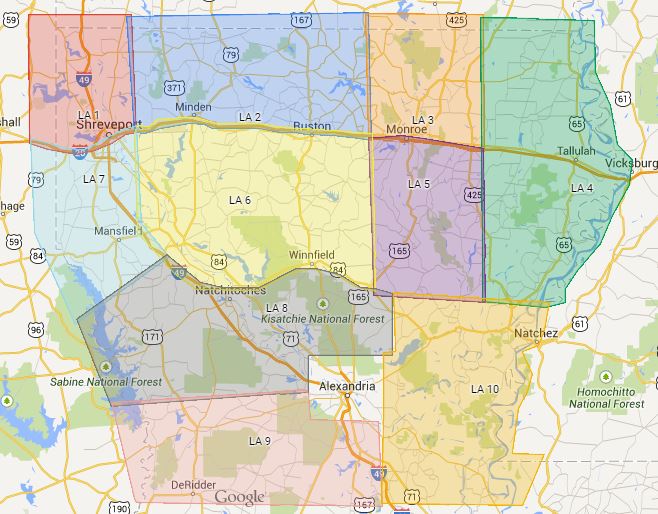
The MapRaid! is divided into 10 teams. The team areas are shown in the map below; below the map are links to points within each team area.


Raid groups

Raid Area 1 Raid Area 2 Raid Area 3 Raid Area 4 Raid Area 5 Raid Area 6 Raid Area 7 Raid Area 8 Raid Area 9 Raid Area 10

Mission

Our primary mission will be to handle the URs, and PURs, followed by Place validation, and general map verification.

Functional Classification (FC) has been largely but not fully implemented for Northern and Central Louisiana.
Some road types deviate intentionally from the state DOT's classifications. If you find a road which is set to a type that is too low, upgrade it. Conversely, if you find a road which you feel is set to a type that is too high, or you need to talk about deviating from FC, please contact a local champ before making changes.

The following is a nonexhaustive list of edits that should be done in your area, in order of priority, from highest to lowest:

  • Ensure proper connectivity, directionality, and numbering of Louisiana’s U.S. and state highways.
    • Don’t worry about the format of U.S. and state highway names, just make sure the number is right. sketch (PM [Help]) will run a script at the end of the raid to correct the naming format on Louisiana’s highways.
  • Ensure proper connectivity, directionality, naming, and the existence of other roads.
    • GIS, Street View, and aerials, among other things, are helpful here.
    • Be careful when deleting roads. Even if a road does not exist in Street View or GIS, that may not be enough reason to delete it—consult your team leader or a local host. Only delete roads if they undoubtedly do not exist.
  • Add railroads. Many of them have not been added. Railroad names are usually available in LaDOTD’s Parish Maps.
  • Add bridges on all roads except freeways. See #Elevation.
  • Add Parking Lot Roads at shopping centers and drive-thrus.
  • Add U turns where necessary. See #U turns.

This is not an exhaustive list! If you see a problem, fix it.

Local hosts

sketch (PM [Help]) - Global Champ

jasonh300 (PM [Help]) - Global Champ & South Central Regional Coordinator

bz2012 (PM [Help]) - Area Manager, Baton Rouge & Lafayette

Important!

Please do not lower the type of any road without first consulting a Local Host. You may raise the type of a road to meet road type rules if necessary.

Please do not mass-edit. Do not perform edits which will affect large numbers of segments at once. The edit history of segments is highly valuable in the process of solving URs. Mass editing effectively mass erases this history, permanently. We ask that all necessary processes which might affect large portions of the map, or long stretches of roads, be reserved until near the end of the MapRaid. This includes the “Select entire street” function.

Anything locked at 5 or 6? Please check with a local editor before making changes. Level 5 and 6 editors: consider keeping highlights active for level 5 and 6 locks.

Hard-to-find geometry nodes. We often use “doglegs” to force a “Turn” instruction, instead of a “Stay” or “Exit” instruction, on certain connectors and at certain intersections. This involves a geometry node carefully placed directly next to a junction node, in order to set the correct angle. You may need to zoom in to see this geometry node. Please watch for these if you move any junction node, and be sure to recreate the same angle at the new location.

Local guidance

Road types

In the United States, road types are determined by the intersection of Functional Classification (FC) and U.S. + State highway systems. You can read a detailed explanation at Road types.

The current road type rules have been mostly implemented in Northern and Central Louisiana. Some areas may have been missed; too-low road types should be raised to the correct levels for routing continuity. Conversely, do not lower a road type without consulting one of the Local Hosts. In isolated cases, we have chosen to deviate from official classifications. It is important that these remain intact. Also, remember that all unpaved roads should be set to the Dirt Road type.

If you find an area that doesn’t seem to be complete, please bring it to the attention of a Local Host for review.

We observe the following minimum lock levels for Waze road types: In MegaMapRaid we have a set minimum standard for locking roads based on segment type. Any road of a certain segment type must be locked at least to the rank (level) in the chart below. Roads may be locked higher for protection and special situations (areas with construction, tricky design, frequent mistakes, imaging inaccuracies, and the like), but should not be locked lower.

A great time to implement these locks is while bringing the road types of an area into compliance with the current US road type standards (FC and highway systems). Lock the roads based on type after they’ve been set to current US road type standards.

MegaMapRaid Minimum Locking Rank Standard
Segment Type Mature areas  Non-mature areas
 Freeway  5
 Ramp  5
 Major Highway  5
 Minor Highway  3 1
 Primary Street  2 1
 Street  1
 • • • • Ferry • • • •   5
 |-|-|-|-|-|-|-|-|-| Railroad |-|-|-|-|-|-|-|-|-|  2


Note that Freeways, Ramps, and Major Highways should be locked to these levels statewide; Minor Highways and Primary Streets should only be locked in mature areas of the map.

Note also that these are minimums and, for protection, certain segments may be at higher lock levels. If you find a road locked to a higher level than its minimum, please leave it locked no lower than that level when you have finished editing.

Elevation

Louisiana uses a real elevation method to set road elevations. This method sometimes requires the use of extra segments. This has the benefit of an enhanced look in the Live Map, and, more importantly, makes it easier to close a bridge or tunnel without affecting traffic to nearby homes and businesses.

Don’t worry about elevations on freeways, as that is mostly aesthetic and will be handled by Louisiana’s resident champs. If you come across a bridge, however, on a non-freeway, please cut the segment to create a segment for the bridge and raise the elevation of the bridge segment to 1.

Place editing

Places from both editors and trusted users have become a major issue. Misspelled names, incorrect categories, missing addresses (EVERY business place should have an address!!), incorrect locations, and mismatched photos are all over the map. Use the powerful Place Browser (link below) and the information on the Places page to correct them.

Gas Stations

All gas stations in Louisiana have already been edited and locked to 4 with parking lot roads. Do not delete parking lot roads in gas stations!!!

If you find any problems with a gas station, contact a local host.

Left turns at intersections without traffic signals

It is perfectly legal to make a left turn across a double yellow line. A double yellow line simply prohibits passing. A pair of double yellow lines, spaced apart, is considered a “barrier,” and is illegal to cross.

Construction

A number of construction projects are underway in the Raid area. Some of these involve road closures. If you learn of any road closures that have not been entered on the map, contact sketch (PM [Help]) . See Louisiana DOT Traveler Information for closure and construction information.

U turns

Roads divided in fact but mapped as undivided in Waze: Enable the U turns at every intersection where they are not specifically disallowed.

Roads undivided in fact: U turns may be enabled where the road is wide enough to enable the driver of a normal automobile to safely make a U turn and where U turns are not specifically disallowed.

Roads divided in fact and in Waze (divided highways/dual carriageways): If a divided roadway has a dedicated U turn segment in between the sides of the roadway (where the segment in the median connects only to the two sides of the roadway and nothing else), name the segment “U turn”. No hyphen, lowercase t. This is the rule in Louisiana.

The road type should be Street, unless the U turn segment is part of a median U turn intersection.

Simple parking lot roads connected to two different major roads: For simple parking lot roads connected to two different major roads, as many gas station PLRs are, enable the U turns at either end of the parking lot road. This will enable drivers in the near future to be sent out of the parking lot the faster way, rather than simply the way that Waze thinks they are facing.

Tiny area places at intersections

As you work the map, you may run across very small Area Places at junctions/intersections. Leave them alone. We have used these to note turn restrictions at particular intersections. We have chosen to retain them. They are drawn small enough that they do not show in the app, and we’d like to keep them.

Parking lot roads

Add parking lot roads for medium-to-large malls and shopping centers, all restaurant and bank drive-thrus, and anywhere that a Place is closer to the road behind it than to the road its parking lot connects to. Add parking lot roads in other parking lots where it would be helpful for routing.

UR & MP guidance

Many of the URs in northern and central Louisiana are quite old. Nevertheless, it’s still worth trying to help.

Please ensure, before closing a UR, that the UR truly cannot be solved. If there is any info in the UR at all—even a “turn not allowed” UR with no additional message can be enough to solve—do not close it.

Also, always leave a closing comment when closing a UR.

Cameras

Speed and red light cameras may be found in Louisiana. However, speed cameras are disallowed on Interstate Highways in Louisiana.

Mapping resources

Functional classification maps

We use LaDOTD’s Proposed Functional Classification for setting road types in Louisiana. Click here, then click “Interactive Online Map” for a helpful viewer; PDFs are available as well.

Highway maps

At the beginning of the raid, download the LaDOTD Parish Maps for all the parishes in your team’s area. These maps are very helpful for verifying Louisiana’s state highways and some other roads. To make this easier, ZIP files containing the relevant parish maps have been created for each group.

An overview map showing all of Louisiana’s parishes is available here: DOTD Districts Parishes

Team 1 Team 2 Team 3 Team 4 Team 5

Bossier
Caddo

Bienville
Bossier
Claiborne
Lincoln
Ouachita
Union
Webster

Morehouse
Ouachita
Richland
Union

Catahoula
East Carroll
Franklin
Madison
Morehouse
Richland
Tensas
West Carroll

Caldwell
Catahoula
Franklin
La Salle
Ouachita
Richland

Team 1 ZIP Team 2 ZIP Team 3 ZIP Team 4 ZIP Team 5 ZIP
Team 6 Team 7 Team 8 Team 9 Team 10

Bienville
Bossier
Caddo
De Soto
Jackson
La Salle
Lincoln
Natchitoches
Ouachita
Red River
Webster
Winn

Bossier
Caddo
De Soto
Red River
Sabine

De Soto
Grant
La Salle
Natchitoches
Rapides
Sabine
Vernon
Winn

Allen
Beauregard
Evangeline
Rapides
Sabine
Vernon

Avoyelles
Catahoula
Concordia
Evangeline
La Salle
Pointe Coupee
Rapides
St. Landry
West Feliciana

Team 6 ZIP Team 7 ZIP Team 8 ZIP Team 9 ZIP Team 10 ZIP

GIS and local maps

GIS maps are available for some of the areas covered by the Raid.

GIS available GIS not available
Avoyelles Parish
Bienville Parish
Bossier Parish (incl. Bossier City)
Caddo Parish (incl. Shreveport)
Catahoula Parish
Claiborne Parish
Concordia Parish
De Soto Parish
La Salle Parish
Lincoln Parish
Rapides Parish
Red River Parish
Richland Parish
Sabine Parish
Tensas Parish
Caldwell Parish
East Carroll Parish
Franklin Parish
Grant Parish
Jackson Parish
Madison Parish
Morehouse Parish
Natchitoches Parish – login required
Ouachita Parish (incl. Monroe)
Union Parish
Vernon Parish
Webster Parish – login required
West Carroll Parish
Winn Parish

Reference links

The basics

Recommended tools for MapRaid

  • The OVERLAY SCRIPT is available on GreasyFork to indicate the Group areas on the map as you work. You will need TamperMonkey (Chrome) or GreaseMonkey (Firefox) to install and use this.

  • UR Comments - a tremendous time and labor saving tool with automation and integration with URO+, to help with working URs. Read the documentation.

  • PLACE BROWSER - In combination with the Place Name Harmonization list, this is an invaluable tool for working on existing places. Be sure to click the About tab to get an overview of the tool.

  • The WME Reference Sheet[PDF] is a printable double-sided tri-fold quick reference guide to some of the common topics used in WME.

  • Validator is a script that validates a map area in Waze Map Editor, highlights issues and generates a very detailed report with wiki references and solutions.

Download links:

Note: Greasemonkey is required to use Validator in Firefox.

  • WME Chat Addon is a script that improves the WME chat GUI. For a list of all the features check the thread here.

Note: Tampermonkey/Greasmonkey is required to use this script.

MapRaid edit lists

Spreadsheets and forms are being used to streamline management of various group efforts and track important edits. Below you can find links to use these these forms, sheets, and see the lists.

Scheduled edits

Boots on the ground

First, try the local slack channel for your area: #mmr-louisiana

If you don’t have success there, you can post a request to the Boots on the Ground sheet, to be explored by local editors. To place a new request, or respond to an existing request, please use this form.

[View this list full-screen in Google Sheets](//docs.google.com/spreadsheets/d/1N8ZYFkew8bcVjJAMygd87BN38Rwze-3XN9GZJ6HXbss/pubhtml?gid=374893229)

New feature: Boots responders can click the Navigation Link on a Waze-enabled device, or copy and send/save it for later use. It will open Waze and navigate to the coordinates at the center of the permalink.

Results

MapRaid promotions

Some editors really let their bright side out, and let their community skills shine. This is even more evident in a concerted group effort with high-density editing like a MapRaid!. Editors of all ranks working closely with each other and the Champs, really lets us everyone get to know each other, and allows certain editors to be recognized for their skills and effort.

When the Champs see someone consistently editing well, interacting well with the community, and knowledgeable of the various details from the Wiki, they can issue promotions. This can be anything from the size of a managed area, to a rank increase, or even a new role.

The following editors have all earned our respect, and gratitude for a job well done. Not all received a promotion, but all were noticed and appreciated.

Groups

MegaMapRaid!
Regional Coordinator: Silvio (PM [Help])  , Enhket (PM [Help])  , caradellino (PM [Help])  , orbitc (PM [Help])  , Jemay (PM [Help])  , sketch (PM [Help])  
Username (rank) Team Assigned Comments Team Area
sketch(6)  41 - Louisiana 41
Guardian4ngel(5)  41 - Louisiana 41
JinLaiHui(4)  41 - Louisiana 41
Nacron(4)  41 - Louisiana 41
VitorGoiabeira(4)  41 - Louisiana 41
bumpandruneveryday(3)  41 - Louisiana 41
Hernesto57(3)  41 - Louisiana 41
majorjc_MS(3)  41 - Louisiana 41
Murilo-Carvalho(3)  41 - Louisiana 41
Vico_XV(3)  41 - Louisiana 41
JButz2(2)  41 - Louisiana 41
josiasfabricio(2)  41 - Louisiana 41
Mkelly90(2)  41 - Louisiana 41
numik83(2)  41 - Louisiana 41
rccoros(2)  41 - Louisiana 41
MagicOfLA(5)  42 - Louisiana 42
tsuzumasa(5)  42 - Louisiana 42
akiMarcelo(4)  42 - Louisiana 42
BlueTiger68(4)  42 - Louisiana 42
rizalrz69(4)  42 - Louisiana 42
Audi(3)  42 - Louisiana 42
jcog69(3)  42 - Louisiana 42
thom_p(3)  42 - Louisiana 42
vileladelima(3)  42 - Louisiana 42
diegoGimenez(2)  42 - Louisiana 42
guillaume017(2)  42 - Louisiana 42
icerc(2)  42 - Louisiana 42
tanamay9(2)  42 - Louisiana 42
wallydury(2)  42 - Louisiana 42
MdSyah(6)  43 - Louisiana 43
elphix(5)  43 - Louisiana 43
PhilipeRangel(5)  43 - Louisiana 43
damaultz(4)  43 - Louisiana 43
SteveInArk(4)  43 - Louisiana 43
vamarante(4)  43 - Louisiana 43
Ardillon42(3)  43 - Louisiana 43
chrisroc(3)  43 - Louisiana 43
HugoRuDo(3)  43 - Louisiana 43
jrcapela(3)  43 - Louisiana 43
losefirst(3)  43 - Louisiana 43
brprigge(2)  43 - Louisiana 43
DavidPompeo(2)  43 - Louisiana 43
DonPromillo666(2)  43 - Louisiana 43
DrunkenDryver(2)  43 - Louisiana 43
geopgeop(2)  43 - Louisiana 43
velezss(6)  44 - Louisiana 44
LeighGr(5)  44 - Louisiana 44
mauricioleonardi(5)  44 - Louisiana 44
bummerdude69(4)  44 - Louisiana 44
Lineocjr(4)  44 - Louisiana 44
paulkok_my(4)  44 - Louisiana 44
elsgk123(3)  44 - Louisiana 44
jonathanaugusto(3)  44 - Louisiana 44
lalo_rr(3)  44 - Louisiana 44
onryou(3)  44 - Louisiana 44
triage685(3)  44 - Louisiana 44
Achti72(2)  44 - Louisiana 44
grzewal(2)  44 - Louisiana 44
hackmycomputer(2)  44 - Louisiana 44
iBichet(2)  44 - Louisiana 44
JustinS83(2)  44 - Louisiana 44
blakviper(6)  45 - Louisiana 45
manoeuvre(5)  45 - Louisiana 45
vince1612(5)  45 - Louisiana 45
dmcrandall(4)  45 - Louisiana 45
MauricioCGB(4)  45 - Louisiana 45
myw1234(4)  45 - Louisiana 45
Moon27(3)  45 - Louisiana 45
Poncewattle(3)  45 - Louisiana 45
Touffman(3)  45 - Louisiana 45
triordan(3)  45 - Louisiana 45
WhiteBr(3)  45 - Louisiana 45
andrewohio(2)  45 - Louisiana 45
bl4ckr4m(2)  45 - Louisiana 45
djasbir(2)  45 - Louisiana 45
MichiganRoadRunner(2)  45 - Louisiana 45
wwilenski(2)  45 - Louisiana 45
arturoae(6)  46 - Louisiana 46
EECGeek(5)  46 - Louisiana 46
popel22(5)  46 - Louisiana 46
AJKanSL(4)  46 - Louisiana 46
elton_cm(4)  46 - Louisiana 46
FAPA_Fernando(4)  46 - Louisiana 46
faromasa(3)  46 - Louisiana 46
jroman7(3)  46 - Louisiana 46
Kleijnr(3)  46 - Louisiana 46
Kyuuki(3)  46 - Louisiana 46
stephenr1966(3)  46 - Louisiana 46
MariuszGrodecki(2)  46 - Louisiana 46
Mikempell(2)  46 - Louisiana 46
Ohmanrayman(2)  46 - Louisiana 46
olavocavalcante(2)  46 - Louisiana 46
randolphpflueger(2)  46 - Louisiana 46
carloslaso(6)  47 - Louisiana 47
Gasparfox(5)  47 - Louisiana 47
Jubbyuk_13873(5)  47 - Louisiana 47
resmota(4)  47 - Louisiana 47
t0cableguy(4)  47 - Louisiana 47
ZENN24(4)  47 - Louisiana 47
asph4lt(3)  47 - Louisiana 47
Bogey2(3)  47 - Louisiana 47
roschweitzer(3)  47 - Louisiana 47
SevreWG(3)  47 - Louisiana 47
subcritical71(3)  47 - Louisiana 47
nanakara(2)  47 - Louisiana 47
phil-mtl(2)  47 - Louisiana 47
Rooksie(2)  47 - Louisiana 47
virusmiura(2)  47 - Louisiana 47
YukonXL00(2)  47 - Louisiana 47
kdevries(6)  48 - Louisiana 48
homerunner(5)  48 - Louisiana 48
woodvale_5(5)  48 - Louisiana 48
armandrose(4)  48 - Louisiana 48
Jakflash(4)  48 - Louisiana 48
renatoseixas(4)  48 - Louisiana 48
fane10(3)  48 - Louisiana 48
kwrigh01(3)  48 - Louisiana 48
RBRapha(3)  48 - Louisiana 48
rickzabel(3)  48 - Louisiana 48
SomozRafa(3)  48 - Louisiana 48
DrakeAnnDisorderly(2)  48 - Louisiana 48
fjperezxlvi(2)  48 - Louisiana 48
Hawkeyevaw124(2)  48 - Louisiana 48
Olkos(2)  48 - Louisiana 48
Raiden38(2)  48 - Louisiana 48
ispyisail(6)  49 - Louisiana 49
Edwaldana(5)  49 - Louisiana 49
sirgabouy(5)  49 - Louisiana 49
Dandober(4)  49 - Louisiana 49
HuckD(4)  49 - Louisiana 49
TheWatcherMx(4)  49 - Louisiana 49
elpan_9(3)  49 - Louisiana 49
Evan502(3)  49 - Louisiana 49
Mephisto18m(3)  49 - Louisiana 49
neyribas(3)  49 - Louisiana 49
subs5(3)  49 - Louisiana 49
elig0s(2)  49 - Louisiana 49
iFer4G(2)  49 - Louisiana 49
Loprz(2)  49 - Louisiana 49
mrsmith66(2)  49 - Louisiana 49
valdi_1(2)  49 - Louisiana 49
samussilva(6)  50 - Louisiana 50
Fedelosa(5)  50 - Louisiana 50
javiercr75(5)  50 - Louisiana 50
akron25(4)  50 - Louisiana 50
eddysanthos(4)  50 - Louisiana 50
kodi75(4)  50 - Louisiana 50
eeschuler(3)  50 - Louisiana 50
jep65(3)  50 - Louisiana 50
Pokerfjes(3)  50 - Louisiana 50
ReneRdeCarvalho(3)  50 - Louisiana 50
UpppS1(3)  50 - Louisiana 50
Adam_001(2)  50 - Louisiana 50
deadpocketss(2)  50 - Louisiana 50
Mulligan87(2)  50 - Louisiana 50
nzozz(2)  50 - Louisiana 50
QuattroCS(2)  50 - Louisiana 50
This wiki page is complete. Editing Group assignments are complete, and the MapRaid is in full swing! Check this page and the MegaMapRaid page for changes at least once per day, as we will post updates regularly. Stay in touch in your assigned slack channel (not the general channel if you can avoid it)

Map Raid Baltimore is will run for approximately 4 days from Sunday, March 8, 2015 17:00 UTC through Thursday, March 12. It is part of a wide-scale MapRaid known as MegaMapRaid.


Welcome to Baltimore!

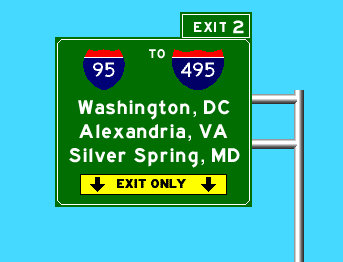
Sign on MD-295 NB

Baltimore is the largest city in Maryland and the largest independent city in the United States, meaning it is not included or merged with any other County. Baltimore County borders the City on most sides.

Charm City has a unique culture, to say the least. If you want to experience some more of the ‘eccentric’ features of Baltimore as you edit follow these steps:

  • Rent/buy/stream Hairspray (1988), Cry-Baby (1990) or the Wire (2002-2008). They are all fiction but have some truth to them.
  • Get some Old-Bay seasoning, and ignore the packaging. Put it on everything: seafood, french fries, chips, sandwiches, etc. Try using it on the rim of your bloody-mary too.
  • Speaking of booze, try some baltimore flavor (or lack there of): National Bohemian (Natty Boh) is the default beer for Baltimorons, but if you are looking for more flavor try Union Craft Brews, Brewers Art, or Heavy Seas.
  • Finally, complain about the weather. Right now its 20°F and snowing or icing, but in 6 months it will be 95°F and 100% humidity, so we really can’t win.

The city’s history spans back to the British Colonial times, as the Port of Baltimore. During the War of 1812, Fort McHenry set the stage for Francis Scott Key to pen our National Anthem, the “Star-Spangled Banner”. Through the 1800s-1950s, Charm City experienced growth as a result of trade and industry. However in the 1950s to 1980s, there was drastic decline in part due to drugs, school issues, suburbanization, and the loss of jobs associated with historic industrial operations. The History of Baltimore Wikipedia page has lots more information.

Today Baltimore is fighting to reclaim jobs and revitalize its downtown area. Popular Inner Harbor attractions such as the National Aquarium and events such as the Grand Prix and Star Spangled Spectacular have shifted the cities attention to downtown tourism opportunities. At the same time communities further from the downtown core, especially to the west and south, have struggled as blight and crime continue to weigh on the city.

Baltimore City Roads

Baltimore City is unique in Maryland as the City’s Department of Transportation assumes responsibility for all roads, from surface streets to interstate highways. Only the tolled tunnel facilities are operated and maintained by the State’s Department of Transportation. However, Baltimore County roads are constructed and maintained through either the County or the State depending on the size and importance.


Raid Areas

Baltimore MMR Zones

WME Permalink Baltimore Area

Check your Team assignment

Raid Groups

Mega Map Raid Team List (searchable)

Permalinks for MMR Zones

31 - Downtown Baltimore City & South

32 - Baltimore City North East

33 - Baltimore City North West

34 - Baltimore City West

35 - Baltimore County North & East

36 - Baltimore County West

37 - Harford and Cecil Counties

38 - Anne Arundel South

39 - Howard & Carroll Counties West

40 - North

PUR Areas

Place Browser for Baltimore

Mission

Our primary mission will be to handle the URs, and PURs, followed by Place validation, and general map verification.

Functional Classification (FC) has been fully implemented for the Baltimore area.
Some road types deviate intentionally from the state DOT's classifications. If you find a road which is set to a type that is too low, upgrade it. Conversely, if you find a road which you feel is set to a type that is too high, or you need to talk about deviating from FC, please contact a local champ or State Manager before making changes.

Local Hosts

CBenson (PM [Help]) - Mid Atlantic Regional Coordinator - generally available during daytime hours

kodi75 (PM [Help]) - State Manager - generally available on weekends, evening hours during the work week.

JasonN899 (PM [Help]) - Area Manager - flexible hours, change daily, mostly evenings

nzahn1 (PM [Help]) - Area Manager - generally available during weekends, and weekday evening hours

Bugladen (PM [Help]) - Area Manager - generally available during evening hours

jr1982jr (PM [Help]) - Local Editor - generally available during daytime hours

Important!

Please do not alter any of the following road types without first consulting a Local Host: Freeway, Ramp, Major Highway, minor Highway, Primary Street.

Please do not mass-edit Do not perform edits which will affect large numbers of segments at once. The edit history of segments is highly valuable in the process of solving URs. Mass editing effectively mass erases this history, permanently. We ask that all necessary processes which might affect large portions of the map, or long stretches of roads, be reserved until near the end of the MapRaid. This includes the “Select entire street” function.

Anything locked at 5 or 6? Please check with a local editor before making changes. Rank 5 and 6 editors - consider keeping highlights active for locks 5 and 6.

Close nodes We make extensive use of the “micro-dogleg” technique, where a geometry node is carefully placed, at full zoom, directly next to a junction node, in order to set the angle to create a desired Turn/Stay/Exit prompt. Please watch for these if you move any junction node, and be sure to recreate the same angle at the new location.

Local Guidance

Functional Classification

In the United States, we set our road types using a national standard called Functional Classification (FC). You can read a detailed explanation in our Road Type page.

The Functional Classification has been completed in the Greater Baltimore Metro Area. Occasionally, we find short segments that were missed in the selection process for conversion, and it is important that these be corrected for routing continuity. In general, however, we ask that Road Types not be changed without consulting one of the Local Hosts. In isolated cases, we have chosen to deviate from official classifications, due to errors or outdated information in the MdTA FC maps, or to better accommodate real-life situations and Waze quirks. It is important that these remain intact. Sometimes dirt roads may appear higher on FC maps but shouldn’t be used by Waze for routing.

If you find an area that doesn’t seem to be complete please bring it to the attention of a Local Host for review.

FC Maps

We have .KML maps available, compiled by nzahn1 (PM [Help]) . Please contact him directly if you have any questions about the maps.

FC Maps

Locking Rank

In MegaMapRaid we have a set minimum standard for locking roads based on segment type. Any road of a certain segment type must be locked at least to the rank (level) in the chart below. Roads may be locked higher for protection and special situations (areas with construction, tricky design, frequent mistakes, imaging inaccuracies, and the like), but should not be locked lower.

A great time to implement these locks is while bringing the road types of an area into compliance with the current US road type standards (FC and highway systems). Lock the roads based on type after they’ve been set to current US road type standards.

MegaMapRaid Minimum Locking Rank Standard
Segment Type Urban  Rural
 Freeway  5 4
 Ramp  5 4
 Major Highway  3 2
 Minor Highway  2
 Primary Street  2
 Street  1
 • • • • Ferry • • • •   5
 |-|-|-|-|-|-|-|-|-| Railroad |-|-|-|-|-|-|-|-|-|  2

Note that these are minimums and, for protection, certain segments may be at higher lock levels. If you find a road locked to a higher level than its minimum, please leave it locked no lower than that level when you have finished editing.

Place Editing

Maryland follows the general Wiki guidelines for Places. Items to look for & fix: misspelled names (use proper capitalization!), wrong categories (doctor’s offices are generally not hospitals), missing addresses (EVERY business place should have an address!!) poor location (not in the middle of a highway) and incorrectly assigned photos are all over the map. Use the powerful Place Browser (link below) and the information on the Place editing page to get these places corrected.

Review the Waze Wiki Page on approving photos .

If you fill in all (most) of the information in the data fields, raise the lock level to at least a “2” (or higher depending on guidance stated elsewhere in the Waze Wiki).


Gas Stations
Gas Stations should be locked to level 3 but, only after all data fields in the gas station have been filled. At least ensure that Brand, Name and Address have information. Remember to ask a hosting local if you need help identifying gas station information. Please read the Gas Station page for details about how to maintain gas station Places.

For editors below rank 3, once you have completely filled out a gas station with the min required information, please ask for a lock request.

Toll Roads / HOV / HOT / Truck Lanes

It is our custom to mark the Toll checkbox only on the entrance segments to Toll Roads. HOV and HOT road types have already been set correctly according to our local practices. If you have a question about one of these lanes, please contact a Local Host.

To learn more about HOV lanes read more in the Editing Manual

Special case: Do not alter the ETL (Electronic Toll Lanes) on I-95 North/South. Yes they are highlighted by validator as being a 2-way freeway, but no, its not an issue.

Construction

There are a number of major construction projects in process within the overall MapRaid area. These construction projects can cause frequent intermittent road closures. Many closures change daily and cause great numbers of URs to appear. When handling URs in one of these areas, be aware that reports of “Turn not allowed”, “Missing road”, “Wrong driving direction” are common, but may not indicate a map problem that can be fixed, because the physical road situation will change before our edits can take effect.

Baltimore City DOT closures are only intermittently reported on its Traffic Advisory webpage.

Baltimore County closures are frequently posted on the the County’s Road Closure webpage, but some details are often missing.

Maryland Highway Administration posts its closures for state roads, highways, and interstates to the CHART website.

Local TV Station WJZ monitors closures and traffic related incidents for the Baltimore region through this map.

Local Hosts will attempt to keep editors informed of closures as they are discovered. Please contact us if you add / modify ANY closure via WME. The sheet below will serve as a database of closures, especially those not listed in the Official Waze Closure sheets:

U-turns

Generally we can confirm, lock or “harden” U-turns (click to remove the Purple question mark indicating a soft turn – see the Wiki) on residential streets, but please avoid confirming them on major streets.

Alleys

DO NOT map NEW alleys without FIRST gaining approval from a Local Host (Area manager or higher).

If alleys are mapped (e.g. Baltimore City, Metro area), the road type should be set as Parking Lot Road; the other attributes (Name, city, direction, turn restrictions) should be set according to best practices like any other drivable road.

Please ensure use of GIS data and/or Street View to confirm the name of the alley.

Waze will route to the closest segment for a set of destination coordinates which may result in the destination being along the alley way.

To try to prevent this issue, try several things:

  1. Make sure the Waze house number is confirmed – move the house number a little in any direction and save. To force this to be uploaded in the next tile update, make a minor change to a nearby segment. When waze routes to a waze house number, it will always route to the stop point at the street
  2. If, after the next tile update, waze seems to be ignoring the Waze house number, you may need to adjust the Google address pin. Wait at least 24 hours after the Google edit is accepted.
  3. If all else fails, try creating a private place with the correct address. Ensure this point is closer to the correct street than it is to the alley. Refer to the FAQ for additional information.

UR & MP Guidance

During the Mega Map Raid, we will be shortening the Closure time of UR’s without responses to 2 days. Please ensure that there has been no activity on the UR before closing it. If there is a UR that is being actively worked but the reporter has not responded in 2 days DO NOT close it.

Also, always leave a closing comment; no UR should be closed without one.

Cameras

For information on Cameras within the Baltimore metro/Maryland area please visit our Maryland Camera Wiki

Mapping Resources

Maryland GIS Resources

Also see the Mapping Resources section of the Maryland Wiki page

  • MDMerlin (DNR website)

www.mdmerlin.net

Click on “Interactive Map V 2.0” tab near the top of the page to access the map. In the search box type in the city name to zoom to that locale, then enter the street address. Add the "Parcel Boundaries / SDAT data from the layer list on the left. Clicking on a polygon opens a link containing property data. Toggle aerial imagery if needed.

  • Baltimore CityView

cityview.baltimorecity.gov

“City Map” is the official map for the city; find this by clicking on Base Map then selecting it out of the drop down box.

The “Property Information” layer will provide house numbers upon request; click on “Thematic Overlay” and then select “Property Information” from the drop down box.

  • Baltimore City Addresses Map[1]

Address nodes formatted in the addressing scheme used on OpenStreetMap. Data is for import consideration only.

  • Baltimore County My Neighborhood

myneighborhood.baltimorecountymd.gov

An excellent source for street names and address locations. Note: The “Silverlight” plugin is necessary to load this page. Check the permissions for your browser if the page doesn’t load (in Chrome this may be an icon on the right side of the address bar).

Make sure to agree to the terms/disclaimer, then click enter to view the map.

  • Maryland Census Designated Places (CDP) Resources

Maryland 2010 CDP Maps (PDF by County, with street overlays)

Overlay the above boundary file(s) with the WME Geometries Plugin. After loading the file(s) in WME, turn on the Roads layer (to reference existing CDP/ City names) and the cities layer (to view which WME city boundary may need to be modified).

/* Communication */ moved to MegaMapRaid#Communication

Reference Links

The Basics

Recommended Tools for MMR Baltimore

  • The Overlay Script is available on GreasyFork to indicate the Group areas on the map as you work. You will need TamperMonkey (Chrome) or GreaseMonkey (Firefox) to install and use this.

  • UR Comments - a tremendous time and labor saving tool with automation and integration with URO+, to help with working URs. Read the documentation.

  • Place Browser - In combination with the Place Name Harmonization list, this is an invaluable tool for working on existing places. Be sure to click the About tab to get an overview of the tool.

  • The WME Reference Sheet[PDF] is a printable double-sided tri-fold quick reference guide to some of the common topics used in WME.

  • Validator is a script that validates a map area in Waze Map Editor, highlights issues and generates a very detailed report with wiki references and solutions.

Download links:

Note: Greasemonkey is required to use Validator in Firefox.

  • WME Chat Addon is a script that improves the WME chat GUI. For a list of all the features check the thread here.

Note: Tampermonkey/Greasemonkey is required to use this script.

Baltimore Map Raid Forum

Click here to view the Mega MapRaid! Baltimore forum thread

Mapraid edit lists

Spreadsheets and forms are being used to streamline management of various group efforts and track important edits. Below you can find links to use these these forms, sheets, and see the lists.

Scheduled Edits

These are edits which need to be completed but must be postponed in order to retain history for UR Solving. These edits are designated to specific editors to complete, once they get the green light from the MapRaid! leaders.

Boots on the ground

We need local boots on the ground to check things. Please add requests for locals to go and scout things in person, as in on the road. Some examples when this would be used include to check and see if:

  • The street view is accurate,
  • A road is really closed,
  • A turn really allowed/prohibited, etc.

First, try the local slack channel for your area: #mmr-md-va-dc

If you don’t have success there, you can try the Maryland MMR forum, or post a request to the Boots on the Ground sheet, to be explored by local editors. To place a new request, or respond to an existing request, please use this form.

[View this list full-screen in Google Sheets](//docs.google.com/spreadsheets/d/1N8ZYFkew8bcVjJAMygd87BN38Rwze-3XN9GZJ6HXbss/pubhtml?gid=712355616)

New feature: Boots responders can click the Navigation Link on a Waze-enabled device, or copy and send/save it for later use. It will open Waze and navigate to the coordinates at the center of the permalink.

Results

MapRaid Promotions

Some editors really let their bright side out, and let their community skills shine. This is even more evident in a concerted group effort with high-density editing like a MapRaid!. Editors of all ranks working closely with each other and the Champs, really lets us everyone get to know each other, and allows certain editors to be recognized for their skills and effort.

When the Champs see someone consistently editing well, interacting well with the community, and knowledgeable of the various details from the Wiki, they can issue promotions. This can be anything from the size of a managed area, to a rank increase, or even a new role.

The following editors have all earned our respect, and gratitude for a job well done. Not all received a promotion, but all were noticed and appreciated.

Aside from our local hosts Bugladen, JasonN899, jr1982jr, nzahn1, subs5 and our Regional Coordinator CBenson, we want to recognize the following MMR Editors for their tireless work:

  • dchary2418
  • doryphore_
  • Noney82
  • psubrian
  • Rising_Sun

Groups

MegaMapRaid!
Regional Coordinator: Silvio (PM [Help])  , Enhket (PM [Help])  , caradellino (PM [Help])  , orbitc (PM [Help])  , Jemay (PM [Help])  , sketch (PM [Help])  
Username (rank) Team Assigned Comments Team Area
CBenson(6)  31 - Baltimore 31
shmupi(6)  31 - Baltimore 31
jdojeda(5)  31 - Baltimore 31
Lonewolf147(5)  31 - Baltimore 31
PealRinger(4)  31 - Baltimore 31
speedtrippa(4)  31 - Baltimore 31
adum74(3)  31 - Baltimore 31
BugLaden(3)  31 - Baltimore 31
LarsOnTheRoad(3)  31 - Baltimore 31
liong89(3)  31 - Baltimore 31
xth3bo(3)  31 - Baltimore 31
dchary2418(2)  31 - Baltimore 31
Janek250(2)  31 - Baltimore 31
jr1982jr(2)  31 - Baltimore 31
kadubmx(2)  31 - Baltimore 31
Livicu(2)  31 - Baltimore 31
levin(6)  32 - Baltimore 32
arlesjemi(5)  32 - Baltimore 32
Ricardo_Patricio(5)  32 - Baltimore 32
yamarteg(5)  32 - Baltimore 32
jebus_rl(4)  32 - Baltimore 32
rocket_r6(4)  32 - Baltimore 32
carstennielsen(3)  32 - Baltimore 32
cruxidex(3)  32 - Baltimore 32
evaldirsramos(3)  32 - Baltimore 32
john-cole(3)  32 - Baltimore 32
thetapeworm(3)  32 - Baltimore 32
dolphinwave(2)  32 - Baltimore 32
IMaiden666(2)  32 - Baltimore 32
npark0(2)  32 - Baltimore 32
thesembuk(2)  32 - Baltimore 32
Vladimir_Vovka(2)  32 - Baltimore 32
beersh(6)  33 - Baltimore 33
Mariservz(5)  33 - Baltimore 33
zuker0(5)  33 - Baltimore 33
zy_pher(5)  33 - Baltimore 33
DavidAbarca(4)  33 - Baltimore 33
thegianny(4)  33 - Baltimore 33
AndyPot2(3)  33 - Baltimore 33
BrunoCordeirodaRocha(3)  33 - Baltimore 33
cp820_3(3)  33 - Baltimore 33
oepneto(3)  33 - Baltimore 33
whoaitspete(3)  33 - Baltimore 33
ComstockMine(2)  33 - Baltimore 33
hams1907(2)  33 - Baltimore 33
julianodsp(2)  33 - Baltimore 33
nikrg1(2)  33 - Baltimore 33
zgradas(2)  33 - Baltimore 33
Maxzok(6)  34 - Baltimore 34
Jaime-Schmidt(5)  34 - Baltimore 34
mousepl(5)  34 - Baltimore 34
nicolaswaisman(4)  34 - Baltimore 34
ovilchiszarate(4)  34 - Baltimore 34
Paperopoli69(4)  34 - Baltimore 34
ckb142(3)  34 - Baltimore 34
dckj(3)  34 - Baltimore 34
JosedasilvaMe(3)  34 - Baltimore 34
Joyriding(3)  34 - Baltimore 34
lbrugal(3)  34 - Baltimore 34
adamwillis(2)  34 - Baltimore 34
cruzinforabruzin(2)  34 - Baltimore 34
Doryphore_(2)  34 - Baltimore 34
edfew(2)  34 - Baltimore 34
FishyFinger(2)  34 - Baltimore 34
vincio60(6)  35 - Baltimore 35
lianoramos(5)  35 - Baltimore 35
zaym5(5)  35 - Baltimore 35
Paliano(4)  35 - Baltimore 35
roadtechie(4)  35 - Baltimore 35
Z_R21(4)  35 - Baltimore 35
as0157(3)  35 - Baltimore 35
DaveKS14(3)  35 - Baltimore 35
krants(3)  35 - Baltimore 35
LoirinhoLuiz(3)  35 - Baltimore 35
Noney82(3)  35 - Baltimore 35
blackWranglerJK(2)  35 - Baltimore 35
duduslip(2)  35 - Baltimore 35
Gazoo4U(2)  35 - Baltimore 35
mikupoiss(2)  35 - Baltimore 35
Umarth735(2)  35 - Baltimore 35
asterix06(6)  36 - Baltimore 36
Dundy(5)  36 - Baltimore 36
nelramos(5)  36 - Baltimore 36
Litavnieks(4)  36 - Baltimore 36
touring21(4)(4)  36 - Baltimore 36
turnertr(4)  36 - Baltimore 36
fgamio(3)  36 - Baltimore 36
Rising_Sun(3)  36 - Baltimore 36
rrespindola(3)  36 - Baltimore 36
serega_12(3)  36 - Baltimore 36
widzhit(3)  36 - Baltimore 36
baam1014(2)  36 - Baltimore 36
Mikk36(2)  36 - Baltimore 36
pinus95(2)  36 - Baltimore 36
psubrian(2)  36 - Baltimore 36
VincentWillms(2)  36 - Baltimore 36
miole67(6)  37 - Baltimore 37
dneutrino(5)  37 - Baltimore 37
hvdutra(5)  37 - Baltimore 37
FzNk(4)  37 - Baltimore 37
RIFF_RAFF(4)  37 - Baltimore 37
sergioblancoo(4)  37 - Baltimore 37
chief5232(3)  37 - Baltimore 37
jebat9736(3)  37 - Baltimore 37
mizter6(3)  37 - Baltimore 37
Rain2975(3)  37 - Baltimore 37
sandrin29(3)  37 - Baltimore 37
Crew_Rest(2)  37 - Baltimore 37
LAA55(2)  37 - Baltimore 37
notinf(2)  37 - Baltimore 37
RamonGinzo_9(2)  37 - Baltimore 37
roltskar(2)  37 - Baltimore 37
anto64(6)  38 - Baltimore 38
b-lins(5)  38 - Baltimore 38
Griev0us(5)  38 - Baltimore 38
Dundurs(4)  38 - Baltimore 38
jessejame(4)  38 - Baltimore 38
kmart27(4)  38 - Baltimore 38
Aqualung812(3)  38 - Baltimore 38
Edgurubey(3)  38 - Baltimore 38
LeandroWoody75(3)  38 - Baltimore 38
leflysurfeur(3)  38 - Baltimore 38
steinbdj(3)  38 - Baltimore 38
DashKS(2)  38 - Baltimore 38
Grand_ZJ(2)  38 - Baltimore 38
Kinematic(2)  38 - Baltimore 38
ricardofocus(2)  38 - Baltimore 38
Tailszefox(2)  38 - Baltimore 38
giovanni-cortinovis(6)  39 - Baltimore 39
OlavoAG(5)  39 - Baltimore 39
xirurg58(5)  39 - Baltimore 39
jstrangfeld_4(4)  39 - Baltimore 39
rusjanis(4)  39 - Baltimore 39
vitorluna(4)  39 - Baltimore 39
apolo59(3)  39 - Baltimore 39
GadgetMTS(3)  39 - Baltimore 39
klindb01(3)  39 - Baltimore 39
Mikachu59(3)  39 - Baltimore 39
nakratz(3)  39 - Baltimore 39
blcm64(2)  39 - Baltimore 39
CyberSnipe(2)  39 - Baltimore 39
fragglelock(2)  39 - Baltimore 39
Max05ninja(2)  39 - Baltimore 39
thiaghoalberto(2)  39 - Baltimore 39
davide7O(6)  40 - Baltimore 40
dragstor(5)  40 - Baltimore 40
fbdl(5)  40 - Baltimore 40
Amarildo4279(4)  40 - Baltimore 40
lareina82(4)  40 - Baltimore 40
SiewMeng98(4)  40 - Baltimore 40
AeRoBianCo(3)  40 - Baltimore 40
dkercher(3)  40 - Baltimore 40
dZoup(3)  40 - Baltimore 40
Jawel44(3)  40 - Baltimore 40
x556(3)  40 - Baltimore 40
crincs13(2)  40 - Baltimore 40
hisshadow(2)  40 - Baltimore 40
marbarph(2)  40 - Baltimore 40
mickarocco(2)  40 - Baltimore 40
Sakabe(2)  40 - Baltimore 40

MegaMapRaid San Francisco Bay Area ended March 12, 2015 @ 0300 UTC (after 4.5 days).

Welcome to Northern California!

The group will be divided into 20 teams, one for each section, and two exclusive teams; one to handle PURs, the other for the Waze provided problem sheet. Each team will have their own assigned senior editor (rank 6, or 5) who will be able to edit anywhere in the Raid area, but will focus on their assigned section.

Please review the MegaMapRaid main wiki page, the California wiki page, and its associated Places wiki page.

Raid Areas

The red line in the map below shows the actual edit area opened by Waze. Some edit assignments have been modified as a result. Those assigned to Area 17 should edit in Area 1 as well.

Mission

Our primary mission will be to handle the URs, and PURs, followed by Place validation, and general map verification.

Functional Classification (FC) unknown level of compliancy for the San Francisco area.
Some road types deviate intentionally from the state DOT's classifications. If you find a road which is set to a type that is too low, upgrade it. Conversely, if you find a road which you feel is set to a type that is too high, or you need to talk about deviating from FC, please contact a local champ or State Manager before making changes.

Local Hosts

jemay (PM [Help]) (slack: jemay) - Southwestern Regional Coordinator

ottonomy (PM [Help]) (slack: ottonomy_6) - US Local Champ & Mentor

tonestertm (PM [Help]) (slack: tonestertm_5) - California State Manager

Important!

Please do not alter any of the following road types without first consulting a Local Host: Freeway, Ramp, Major Highway, minor Highway, Primary Street.

Please do not mass-edit Do not perform edits which will affect large numbers of segments at once. The edit history of segments is highly valuable in the process of solving URs. Mass editing effectively mass erases this history, permanently. We ask that all necessary processes which might affect large portions of the map, or long stretches of roads, be reserved until near the end of the MapRaid, using the Scheduled Edits form. This includes the “Select entire street” function.

Anything locked at 4, 5 or 6? Please check with a local editor before making changes. Rank 4, 5 and 6 editors - consider keeping highlights active for locks 4, 5 and 6, so you won’t mistakenly fix an intentional unusual edit.

Close nodes We make use of the “micro-dogleg” technique, where a geometry node is carefully placed, at full zoom, directly next to a junction node, in order to set the angle to create a desired Turn/Stay/Exit prompt. Please watch for these if you move any junction node, and be sure to recreate the same angle at the new location.

Local Guidance

Functional Classification

In the United States, we set our road types using a national standard called Functional Classification (FC). You can read a detailed explanation in our Road Type page.

Functional Classification has been completed in most, but not all, of the San Francisco Bay Area. Occasionally, we find short segments that were missed in the selection process for conversion, and it is important that these be corrected for routing continuity. In general, however, we ask that Road Types not be changed without consulting one of the Local Hosts. In isolated cases, we have chosen to deviate from official classifications, due to errors or outdated information in the Caltrans (DOT) FC maps, or to better accommodate real-life situations and Waze quirks. It is important that these remain intact. Sometimes dirt roads may appear higher on FC maps but shouldn’t be used by Waze for routing.

Unfortunately, at the moment, our state’s interactive map is not working for Roads or Functional Classification. You can go to Caltrans Earth and select the CRS Maps layer, then click on the area you want, which will pop up a link to download the right map for that area, in pdf form. Or you can go straight to the CRS Maps Grid site, which allows you to select the correct map according to a grid system.

If you find an area that doesn’t seem to be complete please bring it to the attention of a Local Host for review.

In MegaMapRaid we have a set minimum standard for locking roads based on segment type. Any road of a certain segment type must be locked at least to the rank (level) in the chart below. Roads may be locked higher for protection and special situations (areas with construction, tricky design, frequent mistakes, imaging inaccuracies, and the like), but should not be locked lower.

A great time to implement these locks is while bringing the road types of an area into compliance with the current US road type standards (FC and highway systems). Lock the roads based on type after they’ve been set to current US road type standards.

Bay Area Map Raid Segment Locking Guideline
Segment Type Default locks
 Freeway  5
 Ramp  5
 Major Highway  3
 Minor Highway  2
 Primary Street  2
 Street  1
 • • • • Ferry • • • •   5
 |-|-|-|-|-|-|-|-|-| Railroad |-|-|-|-|-|-|-|-|-|  2

All others - 1, or as needed – for protection, certain segments may be at higher lock levels. If you find a road locked to a higher level than its minimum, please leave it locked no lower than that level when you have finished editing. Please consult RC, SM, or appropriate AM for guidance

Place Editing

Places and updates from both editors and trusted users have become a major issue. Misspelled names, wrong categories, missing addresses (EVERY business place should have an address!!) poor location and incorrectly assigned photos are all over the map. Use the powerful Place Browser (link below) and the information on the Place editing page to get these places corrected. Please do not lock a place without first confirming the correct location, naming, and category, and filling at least the address fields.

Also be on the lookout for Area Places which should actually be Point Places. See the Places wiki table for guidance.

When correcting place locations in response to URs, always ask the UR reporter to wait a few days, then remove all instances of the destination from the app’s recents and/or favorites list before navigating to the destination again! Otherwise the reporter’s app will continue to use the stale, incorrect location.

Gas Stations
Gas Stations should be locked to level 3 but, only after all important data fields in the gas station have been filled. At least ensure that Brand, Name and Address have information. Remember to ask a hosting local if you need help identifying gas station information. When a convenience store is co-located with a gas station, naming varies, depending on the setup. ARCO ampm and Chevron Extra Mile have brand-associated convenience stores, and should include that Category. Circle K convenience stores, for example, are sometimes affiliated with certain gas stations and should have their own, separate, Place Point.

For editors below rank 3, once you have completely filled out a gas station with the min required information, please ask for a lock.

Satellite imagery misregistration in San Francisco

Many parts of San Francisco are built on rapidly undulating terrain. In addition, downtown San Francisco features elevated roadways amidst very tall buildings. As a result, the Waze Satellite Imagery can be difficult to interpret, and for some roads may be misregistered by as much as 20 meters! When editing in San Francisco it is critical to use the GPS Points layer to ensure accurate segment registration. Do not simply attempt to match the satellite imagery without also checking the GPS Points layer!

Complex Intersections

There are many complicated intersections in the Bay Area which should not be edited without consulting a local senior editor, even if the presence of URs seems to indicate problems. Some of these intersections have been carefully refined to achieve the best Waze performance, which can involve years of testing, adjustment, and experimentation. Others are locations which are currently under construction, and daily changes to the physical roads cause Wazers to report problems which will no longer exist by the time our edits could take effect. We have done our best to lock the most important of these intersections to Rank 6. When dealing with URs at these locations, please keep in mind that few, if any additional road changes are required. Again, please consult with a Local Host before making changes.

Avoid adding redundant time- or vehicle-restricted turns

Time and vehicle restrictions may be found throughout San Francisco and elsewhere in the Bay Area. In many cases these have already been implemented using segment restrictions. Please do NOT add redundant time or vehicle turn restrictions when the segment restrictions are already sufficient; leave such turn restrictions green.

Frequent temporary closures in San Francisco

San Francisco enjoys a multitude of events that close roads temporarily. As in many cities, seemingly perpetual construction closes roads for short intervals at unpredictable times. The city also experiments with temporary street conversions to public space. Beyond that, however, San Francisco hosts frequent parades, walks, bicycling events, and marathons. These events commonly take place in Golden Gate Park and the adjacent neighborhoods as well as in Downtown.

San Francisco Wazers appear largely unaware of the Report → Closure feature in the Waze app, and typically report temporary closures as Map Issues with no additional comment. If you suspect a temporary closure, please suggest to UR reporters that Report → Closure is a more productive way to help the local Waze community.

Toll Roads / HOV / HOT / Truck Lanes

It is our custom to mark the Toll checkbox only on the entrance segments to Toll Roads, or at Toll collection locations. HOV and HOT road types have already been set correctly according to our local practices. If you have a question about one of these lanes, please contact a Local Host.

Left turns at intersections without traffic signals

In California it is perfectly legal to make a left turn across one double yellow line. Drivers are sometimes confused and think that they can’t, when in reality it is permitted. Turning across two double yellow lines, spaced apart 2 feet or more, is considered a barrier, and is illegal to cross. Passing another vehicle over a double yellow line is prohibited. For illustration of these concepts, visit the California DMV Drivers’ Handbook page on traffic lanes

A common complaints we receive in the Bay Area is when Waze directs drivers to turn left from a smaller side street on to a major thoroughfare, without the benefit of a traffic control signal. Most of these turns are completely legal and, when driven properly, can be significant time-savers on a route, as opposed to waiting at a traffic signal, sometimes through several cycles. It is also known that making such turns can be difficult at certain times of the day, due to passing cross-traffic. On many larger roads in California, we have Center Left Turn Lanes, which are intended for use in completing left turns to, and from, driveways and side streets. Please do not disallow left turns due to URs reporting “dangerous” or “too difficult” turns, without consulting a level 4, 5 or 6 Local Host.

We usually inform the reporter of such a UR that if they wait and complete the left turn, it may actually be faster than the alternative. If it’s not faster, then their wait time will contribute to Waze’s database, thus helping to discourage the routing server from suggesting left turns at that site. We also suggest to the reporters that if they feel too uncomfortable making such left turns, they can always turn right instead, and let Waze recalculate. More info about this can be found on the UR Guidance page.

Construction

There are a number of major construction projects in process within the overall MapRaid area. These construction projects can cause frequent intermittent road closures. Many closures change daily and cause great numbers of URs to appear. When handling URs in one of these areas, be aware that reports of “Turn not allowed”, “Missing road”, “Wrong driving direction” are common, but may not indicate a map problem that can be fixed, because the physical road situation will change before our edits can take effect.

LINKS:

Caltrans (CA DOT) District 4 Projects


U-turns

In California, U-turns are generally allowed unless unsafe, or specifically denied by signage. In general we can confirm, lock or “harden” U-turns (click to remove the Purple question mark indicating a soft turn – see the Wiki) on major streets, which have room for large vehicles to turn, but please avoid confirming or enabling them on residential streets.

Alleys

In California, we have many access/service roads which run behind businesses and between houses on residential streets. We mark these Alleys as Parking Lot Roads, to prevent routing through them. Often, Google address points are closer to these alleys than to the street they belong to, and Waze routing suffers. The correct response is to “nudge” the House Numbers on the streets along (either side of) the alley, so they will become trusted. See the UR page below for a suggested response to these issues. Alleys should not be named, unless they are signed, or are already named “Alley”.

UR & MP Guidance

As the MegaMapRaid begins, the greater San Francisco Bay area has over 3,100 open Update Requests (URs) and over 900 Map Problems (MPs). Investigating and responding to these URs and MPs will be a primary objective of the MapRaid teams. Therefore, a UR Guidance page has been created to help guide teams through the maze of MPs and URs.

There are also various scripts available to help with commenting on URs. If you use one of these, please be sure to check if the UR is solvable with the information already given, before sending a comment. Do not enter comments without first examining the available information.


Cameras

Speed Cameras are never used in California.

Following is a list of Cities known to currently use Red Light Cameras:

  • Capitola
  • Daly City
  • Fremont
  • Menlo Park
  • Millbrae
  • Napa
  • Newark
  • Pleasanton?
  • San Francisco
  • San Leandro
  • San Mateo

This list may not be comprehensive, so if you have doubts about a city not on this list, please do some web research, preferably with the city’s official site or their police/sheriff department’s site.

Private Installations / Residential Communities

You may run across one of these which uses a newer setup than that described in the Wiki, in which only the gates contain various combinations of Private Road and Street. Please do not alter them: contact a Local Host if you think there may be an error.

Mapping Resources

Our local GIS maps (see below for links)are almost always more up-to-date and correct than the Caltrans information. Please use them instead of any Caltrans documentation.

GIS

Most of the interactive viewers in the links below will open with many layers enabled. The maps will run faster if you disable everything but Streets or Roads, and only enable Parcels when needed. Marin County

Sonoma County

Napa County

Solano County (requires Silverlight plugin)

Vallejo

Contra Costa County

Alameda County

San Francisco

San Mateo County

Santa Clara County

Santa Cruz County

Reference Links

The Basics

Recommended Tools for MegaMapRaid San Francisco Bay Area

  • The Mega MapRaid Group/Region Overlay is available on GreasyFork to indicate the Group areas on the map as you work. You will need TamperMonkey (Chrome) or GreaseMonkey (Firefox) to install and use this.

  • [Kennisgeving voor omleiding UR Comments] - a tremendous time and labor saving tool with automation and integration with URO+, to help with working URs. Read the documentation.

  • Place Browser - In combination with the place names harmonization list, this is an invaluable tool for working on existing places. Be sure to click the About tab to get an overview of the tool.

  • The WME Reference Sheet[PDF] is a printable double-sided tri-fold quick reference guide to some of the common topics used in WME.

  • Validator is a script that validates a map area in Waze Map Editor, highlights issues and generates a very detailed report with wiki references and solutions.

Download links:

* For Chrome browser please download the script at Chrome Web Store
* For Firefox browser please download the script at GreasyFork.org

Note: for Firefox browser you also need Greasemonkey or Tampermonkey installed.

  • WME Chat Addon is a script that improves the WME chat GUI. For a list of all the features check the thread here.

Note- Tampermonkey/Greasemonkey is required to use many of these scripts.


Mapraid edit lists

Spreadsheets and forms are being used to streamline management of various group efforts and track important edits. Below you can find links to use these these forms, sheets, and see the lists.

Scheduled Edits

These are edits which need to be completed but must be postponed in order to retain history for UR Solving. These edits are designated to specific editors to complete, once they get the green light from the MapRaid! leaders.

These editing tasks have been delegated to specific editors for future completion at the end of MegaMapRaid. Please DO NOT EDIT or try to fix any of these items unless you are the designated "Editor to Complete" for that item in the list. These edits may only be completed once the "Continue When" instructions on the row for that item are met. If you have any questions please ask one of the listed Local Hosts.

Scheduled Edits is down for maintenance, and will return soon

Boots on the ground

We need local boots on the ground to check things. Please add requests for locals to go and scout things in person, as in on the road. Some examples when this would be used include to check and see if:

  • The street view is accurate,
  • A road is really closed,
  • A turn really allowed/prohibited, etc.

First, try the local slack channel for your area: #mmr-sf-bay

If you don’t have success there, you can post a more enduring request to the Boots on the Ground sheet, to be explored by local editors. To place a new request, or respond to an existing request, please use The Boots on the Ground Form

[View this list full-screen in Google Sheets](//docs.google.com/spreadsheets/d/1N8ZYFkew8bcVjJAMygd87BN38Rwze-3XN9GZJ6HXbss/pubhtml?gid=1705156789)

New feature: Boots responders can click the Navigation Link on a Waze-enabled device, or copy and send/save it for later use. It will open Waze and navigate to the coordinates at the center of the permalink.

Results

Check back after the raid for detailed stats…

MapRaid Promotions

Some editors really let their bright side out, and let their community skills shine. This is even more evident in a concerted group effort with high-density editing like a MapRaid!. Editors of all ranks working closely with each other and the Champs, really lets us everyone get to know each other, and allows certain editors to be recognized for their skills and effort.

When the Champs see someone consistently editing well, interacting well with the community, and knowledgeable of the various details from the Wiki, they can issue promotions. This can be anything from the size of a managed area, to a rank increase, or even a new role.


Groups
MegaMapRaid!
Regional Coordinator: Silvio (PM [Help])  , Enhket (PM [Help])  , caradellino (PM [Help])  , orbitc (PM [Help])  , Jemay (PM [Help])  , sketch (PM [Help])  
Username (rank) Team Assigned Comments Team Area
andrex77(6)  01 - Bay 1
File:Mega mapraid group 01.png
jemay(6)  01 - Bay 1
juankx(5)  01 - Bay 1
tgfathergoose(5)  01 - Bay 1
darossi1982(4)  01 - Bay 1
hitfactor(4)  01 - Bay 1
spdorsey(4)  01 - Bay 1
amarillo71(3)  01 - Bay 1
bezineli(3)  01 - Bay 1
dude463(3)  01 - Bay 1
jawadch(3)  01 - Bay 1
smusekader(3)  01 - Bay 1
mrszelvesz(2)  01 - Bay 1
oldirtyhaulin(2)  01 - Bay 1
ortrails(2)  01 - Bay 1
sepoliur(2)  01 - Bay 1
uscwaller(2)  01 - Bay 1
glomp(6)  02 - Bay 2
File:Mega mapraid group 02.png
kazmuth(6)  02 - Bay 2
masvbr(5)  02 - Bay 2
pumrum(5)  02 - Bay 2
citeman(4)  02 - Bay 2
DallasGrant(4)  02 - Bay 2
juanmisaza(4)  02 - Bay 2
Beto_Zegarra(3)  02 - Bay 2
nzahn1(3)  02 - Bay 2
phpmenezes(3)  02 - Bay 2
Simmeltron(3)  02 - Bay 2
Six2midnight(3)  02 - Bay 2
malt71(2)  02 - Bay 2
mpantunes(2)  02 - Bay 2
Nagamasa(2)  02 - Bay 2
TsuDoNihm(2)  02 - Bay 2
UberGenius(2)  02 - Bay 2
omba_de(6)  03 - Bay 3
File:Mega mapraid group 03.png
SpeedDzel(6)  03 - Bay 3
ggrane(5)  03 - Bay 3
wellingtonbm(5)  03 - Bay 3
KuniaKid(4)  03 - Bay 3
PleaseDriveFast(4)  03 - Bay 3
shogsbro(4)  03 - Bay 3
cluzzi(3)  03 - Bay 3
cscsanaki(3)  03 - Bay 3
MrByte_OnTheRoad(3)  03 - Bay 3
Revas25(3)  03 - Bay 3
tel601(3)  03 - Bay 3
daraboss(2)  03 - Bay 3
EDX1992(2)  03 - Bay 3
jhwk74(2)  03 - Bay 3
pr16vturbo(2)  03 - Bay 3
wondererone(2)  03 - Bay 3
Baldugaras(6)  04 - Bay 4
File:Mega mapraid group 04.png
br53ett(5)  04 - Bay 4
Gobos58(5)  04 - Bay 4
George1167(4)  04 - Bay 4
irowiki(4)  04 - Bay 4
nivekeel(4)  04 - Bay 4
Adabadada(3)  04 - Bay 4
Dcarr(3)  04 - Bay 4
snake0813(3)  04 - Bay 4
Taybore(3)  04 - Bay 4
vairrenato(3)  04 - Bay 4
awhardin(2)  04 - Bay 4
h3he(2)  04 - Bay 4
HRTBT(2)  04 - Bay 4
kjg53(2)  04 - Bay 4
trolltunga(2)  04 - Bay 4
dacianova(6)  05 - Bay 5
File:Mega mapraid group 05.png
Kobes1878(5)  05 - Bay 5
lgibert(5)  05 - Bay 5
dbwiddis(4)  05 - Bay 5
NorfolkMustard(4)  05 - Bay 5
scheibemx(4)  05 - Bay 5
dorsalsk(3)  05 - Bay 5
gizmomdk(3)  05 - Bay 5
leonardnoz(3)  05 - Bay 5
TCholewa(3)  05 - Bay 5
TimC42(3)  05 - Bay 5
dr_frankenSTAN(2)  05 - Bay 5
NicTamHK93(2)  05 - Bay 5
pentium10(2)  05 - Bay 5
ScottyVDF(2)  05 - Bay 5
wiby1977(2)  05 - Bay 5
foxitrot(6)  06 - Bay 6
File:Mega mapraid group 06.png
reginamaga(6)  06 - Bay 6
drslump34(5)  06 - Bay 6
tonestertm(5)  06 - Bay 6
Aung_KK(4)  06 - Bay 6
JRomer(4)  06 - Bay 6
Budiyanto(3)  06 - Bay 6
DaviSojogos(3)  06 - Bay 6
Ryanh85(3)  06 - Bay 6
spedracr(3)  06 - Bay 6
Zniwek(3)  06 - Bay 6
bc72(2)  06 - Bay 6
bigcreek(2)  06 - Bay 6
Boxcarphilly(2)  06 - Bay 6
chris_tahir(2)  06 - Bay 6
TexasAg1993(2)  06 - Bay 6
Brshk1(6)  07 - Bay 7
File:Mega mapraid group 07.png
dummyd2(5)  07 - Bay 7
Nikicat07(5)  07 - Bay 7
ialangford(4)  07 - Bay 7
KinyoSat(4)  07 - Bay 7
moweez(4)  07 - Bay 7
assafmb(3)  07 - Bay 7
Odessit68(3)  07 - Bay 7
omacek(3)  07 - Bay 7
thiagolima908(3)  07 - Bay 7
TwoEightZero(3)  07 - Bay 7
AJSmoke(2)  07 - Bay 7
Daniel_Traian(2)  07 - Bay 7
Hummingbird314(2)  07 - Bay 7
PsstDizel(2)  07 - Bay 7
robindlc(6)  08 - Bay 8
File:Mega mapraid group 08.png
heyblue(5)  08 - Bay 8
Sebiseba(5)  08 - Bay 8
randyboy(4)  08 - Bay 8
seb-d59(4)  08 - Bay 8
tcalvert317(4)  08 - Bay 8
Krzysiek_makii(3)  08 - Bay 8
lz2ht(3)  08 - Bay 8
Nimbus-(3)  08 - Bay 8
sorin100(3)  08 - Bay 8
coredumb(2)  08 - Bay 8
kkarkid(2)  08 - Bay 8
maxhedrm(2)  08 - Bay 8
ursu84(2)  08 - Bay 8
WarhawkTrombone(2)  08 - Bay 8
SverkerN(6)  09 - Bay 9
File:Mega mapraid group 09.png
MarcoSaxonia(5)  09 - Bay 9
ply8808(5)  09 - Bay 9
Ivanatorprime(4)  09 - Bay 9
meggt(4)  09 - Bay 9
shadoh(4)  09 - Bay 9
Georgiysys(3)  09 - Bay 9
grsmhiker(3)  09 - Bay 9
jarkaz(3)  09 - Bay 9
NikTheFlash(3)  09 - Bay 9
zeze13(3)  09 - Bay 9
AndrewBrimberry(2)  09 - Bay 9
cruiserccl(2)  09 - Bay 9
dogye(2)  09 - Bay 9
KiwiCoolDino(2)  09 - Bay 9
organizedchaos(2)  09 - Bay 9
doctorkb(6)  10 - Bay 10
File:Mega mapraid group 10.png
BaseMapFrieder(5)  10 - Bay 10
Fredo-p(5)  10 - Bay 10
kudu12323(4)  10 - Bay 10
maciej_friedel(4)  10 - Bay 10
stef0328(4)  10 - Bay 10
crayzee(3)  10 - Bay 10
FZ69617(3)  10 - Bay 10
Kayos_On_The_Road(3)  10 - Bay 10
KW33D(3)  10 - Bay 10
A_Ledesma(2)  10 - Bay 10
banchormin(2)  10 - Bay 10
e-sarge(2)  10 - Bay 10
keicou(2)  10 - Bay 10
Tw1st4Adi(2)  10 - Bay 10
Pferrariuy(6)  11 - Bay 11
File:Mega mapraid group 11.png
Bruce1224(5)  11 - Bay 11
jbdomien(5)  11 - Bay 11
coontex(4)  11 - Bay 11
goetzkeller(4)  11 - Bay 11
noobek(4)  11 - Bay 11
a_kiler(3)  11 - Bay 11
PINIFRU(3)  11 - Bay 11
reality416(3)  11 - Bay 11
Voludu2(3)  11 - Bay 11
acserei(2)  11 - Bay 11
emdesigns(2)  11 - Bay 11
josielemon(2)  11 - Bay 11
NartinRUS(2)  11 - Bay 11
TimAThing(2)  11 - Bay 11
zachbot(2)  11 - Bay 11
meb001(6)  12 - Bay 12
File:Mega mapraid group 12.png
ottonomy(6)  12 - Bay 12
jrvas(5)  12 - Bay 12
Machete808(5)  12 - Bay 12
CafeCarlos(4)  12 - Bay 12
Pepu0815(4)  12 - Bay 12
jbrianj(3)  12 - Bay 12
kobikrumbein(3)  12 - Bay 12
qazxcvbnmm(3)  12 - Bay 12
sup3rfm(3)  12 - Bay 12
DorahaMandi(2)  12 - Bay 12
guidasereno(2)  12 - Bay 12
marveler24(2)  12 - Bay 12
MindToAsk(2)  12 - Bay 12
Super_D(2)  12 - Bay 12
yajmai(2)  12 - Bay 12
enhket(6)  13 - Bay 13
File:Mega mapraid group 13.png
aeroseek(5)  13 - Bay 13
jcglazo(5)  13 - Bay 13
estherrf(4)  13 - Bay 13
HotFzz(4)  13 - Bay 13
irafan(4)  13 - Bay 13
adetia(3)  13 - Bay 13
cotero2002(3)  13 - Bay 13
Moris31(3)  13 - Bay 13
WesWAZ3(3)  13 - Bay 13
andreszapata(2)  13 - Bay 13
BarfmanTheGreat(2)  13 - Bay 13
JossTerrell(2)  13 - Bay 13
simionato(2)  13 - Bay 13
traficCVBV(2)  13 - Bay 13
WahooG(2)  13 - Bay 13
jbarrios107(6)  14 - Bay 14
File:Mega mapraid group 14.png
ArlenBystander(5)  14 - Bay 14
draskovicsl(5)  14 - Bay 14
danianzueto(4)  14 - Bay 14
klos96(4)  14 - Bay 14
Levshenkov(4)  14 - Bay 14
BruceQC(3)  14 - Bay 14
jesipr(3)  14 - Bay 14
Krazywrath(3)  14 - Bay 14
tbk0(3)  14 - Bay 14
Cujo42(2)  14 - Bay 14
GreasyPiePaws(2)  14 - Bay 14
jlspence99(2)  14 - Bay 14
JulianStoned(2)  14 - Bay 14
MrHant(2)  14 - Bay 14
SenseiHiko(2)  14 - Bay 14
jdeyoung(6)  15 - Bay 15 File:Mega mapraid group 15.png
mincho77(6)  15 - Bay 15
bz2012(5)  15 - Bay 15
Szata76(5)  15 - Bay 15
Caguilera1(4)  15 - Bay 15
carlosmendoza1961(4)  15 - Bay 15
soundwave8888(4)  15 - Bay 15
Acceler8ing(3)  15 - Bay 15
kopjeserv(3)  15 - Bay 15
restless_in_nb(3)  15 - Bay 15
Young7Up(3)  15 - Bay 15
hb_bru(2)  15 - Bay 15
Kaprokkio(2)  15 - Bay 15
SidorLutiy(2)  15 - Bay 15
tchaikovskyy(2)  15 - Bay 15
WilberJulianDuque(2)  15 - Bay 15
cuadraciclo(6)  16 - Bay 16
File:Mega mapraid group 16.png
HavanaDay(6)  16 - Bay 16
davielde(5)  16 - Bay 16
Spider_Knight(5)  16 - Bay 16
H-Erik76(4)  16 - Bay 16
Tedfox(4)  16 - Bay 16
acalisti77(3)  16 - Bay 16
acostansi(3)  16 - Bay 16
CoolCanuck(3)  16 - Bay 16
eLoneX(3)  16 - Bay 16
SAR85(3)  16 - Bay 16
billapepper(2)  16 - Bay 16
Dif70(2)  16 - Bay 16
jamesrwj87(2)  16 - Bay 16
JRMKoupleBlanc(2)  16 - Bay 16
SirAguilera(2)  16 - Bay 16
Tomskii(2)  16 - Bay 16
felohidalgo(6)  17 - Bay 17
File:Mega mapraid group 17.png
sk2380(5)  17 - Bay 17
SkiDooGuy(5)  17 - Bay 17
aktakgreen(4)  17 - Bay 17
cantanga(3)  17 - Bay 17
cristian_lungu(3)  17 - Bay 17
JJohnston84(3)  17 - Bay 17
mancinisinasce(3)  17 - Bay 17
santax68(3)  17 - Bay 17
Bolobanic11(2)  17 - Bay 17
czar740(2)  17 - Bay 17
JFeather60(2)  17 - Bay 17
Luca74ts(2)  17 - Bay 17
pandrava(2)  17 - Bay 17
TimBE89(2)  17 - Bay 17
AlanOfTheBerg(6)  18 - Bay 18
File:Mega mapraid group 18.png
solis84(6)  18 - Bay 18
bart99gt(5)  18 - Bay 18
plsandthx(5)  18 - Bay 18
EfendiM9(4)  18 - Bay 18
wroadd(4)  18 - Bay 18
Bezmen(3)  18 - Bay 18
Giansr(3)  18 - Bay 18
Puddles2475(3)  18 - Bay 18
RickyPV89(3)  18 - Bay 18
Samwoise(3)  18 - Bay 18
alfadude1(2)  18 - Bay 18
braian125(2)  18 - Bay 18
mdighe(2)  18 - Bay 18
Mpaxx(2)  18 - Bay 18
SCP1906(2)  18 - Bay 18
titijuli(2)  18 - Bay 18
GizmoGuy411(6)  19 - Bay 19
File:Mega mapraid group 19.png
Zirland(6)  19 - Bay 19
bretmcvey(5)  19 - Bay 19
rulikoto(5)  19 - Bay 19
hardian_n(4)  19 - Bay 19
vlado_s(4)  19 - Bay 19
Balwag(3)  19 - Bay 19
canfe(3)  19 - Bay 19
dougp01(3)  19 - Bay 19
Pajdoom(3)  19 - Bay 19
witoco(3)  19 - Bay 19
autenil(2)  19 - Bay 19
eipp(2)  19 - Bay 19
frajab_0322(2)  19 - Bay 19
ivanbahia(2)  19 - Bay 19
ruslanmustaev(2)  19 - Bay 19
Stanley423(2)  19 - Bay 19
GinBook(6)  20 - Bay 20
File:Mega mapraid group 20.png
nnote(6)  20 - Bay 20
MojaveCactusMonkey(5)  20 - Bay 20
plago73(5)  20 - Bay 20
ChoseS(4)  20 - Bay 20
yb6kos(4)  20 - Bay 20
clubtratech(3)  20 - Bay 20
franco57s(3)  20 - Bay 20
GS-1905(3)  20 - Bay 20
maxgordon(3)  20 - Bay 20
SASideKick(3)  20 - Bay 20
Denis-vagner(2)  20 - Bay 20
ErikG27(2)  20 - Bay 20
frankthetankk(2)  20 - Bay 20
FredyYiap(2)  20 - Bay 20
iredisni(2)  20 - Bay 20
PhilBkk(2)  20 - Bay 20

The New Jersey portion of MegaMapRaid is for editors who have recently signed up to edit the map. We wanted to give you a dedicated area where

  • there would not be a lot of other editors who could grab all the changes before you had a chance to learn what you could do
  • was unfinished enough to give you a chance to try out a lot of basic skills
  • would be monitored by mentors (more senior editors who have committed to helping you out for this specific effort)
  • would not have too many “locked” roads that Level 1 and Level 2 editors would not have immediate access to

The new editors have been placed into five editing teams, numbered 51-55. Each has its own area in the more rural areas of New Jersey.

When you get your editing area, you are ready to edit immediately, but there are a few things that you know about first. It will take about 15 minutes to read this document. It is time well spent. You do not need to memorize it. Just read it once, try to remember the seven basic concepts mentioned below without necessarily remembering the details, and then refer back here when you need to remember those details.

WME Chat

Summary: We use Slack for communication, but we rely on two features of the built-in WME chat for seeing other editors nearby or jumping to an editor to provide assistance. Do this once, but please do it now. You won’t have to refer back to this section ever again. Skip the rest of this section for now.

In the lower right hand corner of the editing window is a small chat icon (cartoon speech bubble). During normal editing, this provides a chat window for map editing collaboration and questions. It also allows editors to quickly jump to each others’ location on the map, and see that they are present.

We will not use the chat function of WME chat during the raid> That would overwhelm WME chat. Instead, we use Slack. But we will still use the non-chat functions of WME chat: jump to editor, and see each other congregating at one spot. To enable that, please make sure you are visible in the WME chat window.

How to:

  • Go to your slack channel
  • Click on the map link next to the channel name at the top of the window
  • Wait for the WME (Waze Map Editor) window to finish loading
  • If WME chat is closed, click its icon to open it (a word bubble on the lower right)
  • In the heading of the WME Chat, it should say United States, and next to that, it should say “Visible” or “Invisible”
  • If it says Invisible, click Invisible and change to Visible
  • Click the small “collapse bar” in the upper right corner of the chat window to close the chat window
  • That’s it. No need to touch WME Chat for the remainder of MegaMapRaid. When the Raid is over, you might find it useful during your regular editing
  • In the upper right corner of the WME window is the Layers menu icon (a stack of diagonal papers)
  • Click the Layers menu
  • Look for Live Users toward the bottom
  • Make sure Live Users is turned on so you can see other editors (hard hats) who are in the same part of the map as you are editing

Google StreetView

How to use use the Google StreetView built into the map editor, and a warning about using any other source for information. Skip the rest of this section for now.

Sometimes abbreviated SV or GSV, Google StreetView is built into the Waze Map Editor, WME. Please do not use Google Maps natively to access StreetView to do analysis or gather data. Also do not use any other privately-owned mapping system to gather. If you do so, you open up Waze to lawsuits. Waze one time had to dump an entire country’s maps, including much hard work by editors, due to incorrect use of licensed map data.

To access GSV within WME:

  • You should usually zoom to level 6, 7, or 8. The zoom slider should be in the top half, but not close to the top; Waze has 11 zoom levels from 0 (view from space) to 10 (fairly close up, but Satellite imagery sometimes not available).

  • Find the blue ball below the zoom slider

  • Drag it toward a road or intersection. The ball will be red while you drag it, or when it is on top of a spot with no known StreetView imagery nearby

  • Hover (no movement) without letting go for a second to make sure the ball has turned blue

  • Release the mouse button

  • The window will split, with StreetView appearing on the right

  • Use the X in the upper left of the StreetView image to close it

  • Moving around

  • The StreetView interface is very much like the old Google Maps native StreetView before the redesign a year or two ago

  • Click on the white arrows to move forward, backward, or to a different path at a fork or turn

  • Drag any part of the image to spin it 360 degrees (turn without moving from the spot you are viewing from)

  • If you click anywhere in StreetView, you can also use the keyboard arrows to move around, otherwise, the arrows will move the Waze map on the left instead

  • Zoom using your mouse wheel or the slider on the right of StretView

  • You can quickly move to a different location by dragging the StreetView ball on the left to a different spot

Red roads

Red roads are roads lacking naming information. They’re ugly and bad. Here’s how to avoid making them and how to fix someone else’s mistake. Skip the rest of this section for now.


All roads must have a city and name, or they must have city and street name marked withe the “None” checkbox. If you create a segment road without supplying city and street, the road will be colored red. If you create a road, or see a road created by someone else that was left red, you must fix it.

How to:

  • Find the city name. If you don’t know it, check nearby roads in each compass direction. If they are consistent, it should be safe to use this city name.
  • Find the road name. You can use Google Street View within WME to find a street sign, or consult a public domain source, such as city-provided maps (“GIS” - Geographic Information Systems). If there is no name available, you may treat it as unnamed.
  • Click the road segment to select it
  • In the properties tab to the left, find the EDIT link near the top and click it
  • Type in the city name. Waze will auto-fill with names used on nearby roads as soon as you type the first letter or two
  • Type the street name if you have it, or click the NONE box if you don’t. Make sure to use Capitalization on the first letter of each word.
  • Before clicking anywhere else, click the APPLY button below the street name. If you click anywhere else, your change may be lost
  • Click the save icon on the upper right of the window (Diskette image), between the road icon and the undo (counterclockwise) button

Note that freeways, ramps, Parking Lot Roads (PLR) and small “connector” road segments have special naming requirements, so consult a senior editor before assigning names to them.

Permalink

A useful tool - send a helpful editor a link so that they can see the map exactly as you see it, then answer you r question, help you out, etc. Skip the rest of this section for now.

An important tool in collaboration is the Permalink, or “PL”. It is a web address (URL) to open the Waze Map Editor (WME) to the same view that you currently see. It includes the correct zoom level, the correct pan (position on the map), which segments you have highlighted, and which information (layers) to display.

You will need a Permalink to request a senior editor to unlock a locked road so you can fix it or a road connected to it. You can also use it just to focus the other editor on the map question you are asking, or to ask him or her to do a fix for you.

How to:

  • Make the map look on screen the way you want it

  • zoomed in tightly enough to focus attention to the problem

  • not so zoomed in that important stuff is off screen, or to make it hard to understand what is going on nearby if relevant

  • positioned correctly to keep the important road segments on screen and preferably in the center

  • bear in mind that other editors may have a different size or shape screen or different resolution, so they may see somewhat more or less than you see

  • Select the important stuff

  • select the segment, junction, or “place” (points of interest, landmarks) of concern

  • if there is more than one road segment affected, select the others, by holding down the control key to add more segments (without the control key, the last segment selected becomes the only segment selected, and you lose the previous selection)

  • note that you can only select multiple segments… if you select a junction or a place, only one can be selected and you can’t combine the selection with other types of things

  • Look for the Permalink icon in the lower right; it looks like two links in a chain

  • Hover the mouse over the link without clicking

  • With the mouse pointing to the PL icon, press Control-C or (or Command-C on MacOS)

The Permalink is now in your clipboard, and you can paste it in Slack or the forums

Parking lot roads

Summary: The dos and donts of PLRs (segments whose road type is “parking lot road”). Inexperienced editors often make mistakes with these. Skip the rest of this section for now.

Called PLR for short, these are not part of the public road network, but they are connected to it. They are important for several reasons:

  • If a destination is off the public thoroughfare, Waze may route the driver to the wrong location on a nearby road that is inaccessible to the destination; PLRs allow Waze to pinpoint the destination marker to the PLR and figure out how to route to the PLR properly
  • Waze notices traffic speeds, for creating fastest routes and finding traffic jams. If a user is in a parking lot next to a real road, and is moving slowly through the parking lot, Waze may mistakenly think that traffic on the public road is moving slow. A PLR provides Waze with the alternate road to consider for the driver location, and not “pollute” the real road’s speed with parking lot traffic.
  • Waze knows that PLRs are not regular roads. If we need to put in a road that Waze should not use for routing traffic (except as the start or destination location), a PLR alerts Waze to keep away. For example, if a store has a parking lot with entrances on the “front” and “back” roads, using a regular street in the parking lot would cause Waze to use the lot as a shortcut, which is illegal or unwanted by property owners. The PLR road segment type tells Waze to avoid that, while still allowing a trip to start or end in the parking lot.


How to:

  • For small lots, usually a single PLR segment suffices, with one end being the entrance and the other being the exit. For technical reasons, you should split this PLR into two pieces.

  • For larger lots, map the following:

  • lanes that are close to a public road and parallel that road (within about 50 feet / 15 meters) - avoids the speed pollution mentioned above

  • any lanes immediately in front of “destinations” (store front or other business entrance)

  • any main lanes to enter or exit the lot or get from the entrance to the storefront lanes and vice versa

  • connect to the public road and set turns (see Turn restrictions below)

  • use directionality (one way) where appropriate

  • city and street name:

  • see Red roads above

  • use the local city name if you are certain, or enable NONE if not

  • for street name, always use the NONE checkbox; do not name after the store, business, shopping center, or any other name

Turn restrictions

Summary: How to tell Waze whether a driver can move from one piece of road to another or not. If you don’t read this, your new roads will probably not work. Skip the rest of this section for now.

Note: For our purposes, a turn is any movement from one segment to another in the map. Obviously, this includes regular right and left turns. But it includes other things as well, including:
  • highway directions ("exit right," "keep left")
  • going straight through an intersection, without turning
  • fork in the road (keep left or keep right)

When you connect one road to another, by default, Waze does not allow any turns into or out of the new connection. You must set the turns correctly.

In addition, whenever you analyze an intersection for correctness, try to assess whether all turns are allowed, or only some of them. You can use Google Street View within the editor window to verify any one-way or no-turn signs (see StreetView above for How-to)

How to:

  • Select any single segment
  • At both ends, arrows will appear for each connection
  • Red arrows mean a turn is restricted, green arrows mean it is permitted
  • Click a red arrow to make it green or a green arrow to make it red, then click the save icon in the toolbar (diskette image between the road button and the counterclockwise undo button)
  • Note that there are advanced turn restrictions that you should not set or change without assistance. An advanced restriction appears as a yellow arrow. If you accidentally open up the advanced restrictions, you will see a window appear that says “Time based restrictions” in its title. Click CANCEL immediately!
  • If the arrows are too close together to work with, try zooming in. If they are still too close, press the S key on your keyboard to “Spread” them apart.
  • Rarely, you will come across an unconfirmed turn. Do not worry about them or what they are. The only effect you may notice is that it will take two clicks to change between red and green instead of one click.

Locks

Summary: Locks protect the map from vandalism and from beginner mistakes - but they can frustrate you when they stop you from doing what you need to. How to request help to get that frustration eliminated. Skip the rest of this section for now.

We all make mistakes, and newer editors are more likely to make mistakes, sometimes without knowing it. And believe it or not, we sometimes get vandals who “make mistakes” on purpose and ruin the map.

To protect against bigger mistakes, we lock some roads and places. The more sensitive the road (either due to the amount of traffic it carries or due to the tricky map editing required to make it work right), the more important the lock.

Editors have ranks ranging from 1 (beginner) to 6 (a few senor editors who typically manage entire countries). Small, uncomplicated roads will be unlocked, so even beginners can change them. Freeways will be typically locked so only Level 5 editors can change them. Other roads will usually be somewhere in between.

If you can’t change a road, it probably means one of two things:

  • it is locked
  • or, it is out of your editing area (and we know you were patient waiting for your group editing area to open to you, thank you for that)

You can see the lock by selecting a segment and looking at the Lock property on the left side of the window. If you need to change that segment, get a Permalink, and ask in your group Slack channel for someone to unlock it. Make sure you paste the Permalink (PL) and that you specify the lock level, so that other editors will know whether they are capable of unlocking t. Sometimes, on a sensitive road, the senior editor will not unlock it for you, but will explain why, and may apply the fix directly; your alert about the needed change was still valuable!

Places (points of interest, landmarks) also have locks, and you can get a Permalink to them and request them to be unlocked, too.

If nobody responds, you can look for an active editor outside your Slack channel at that rank or higher, and direct message the editor asking for help. You can also try the Slack mmr-nj channel, or the -General channel.

If all else fails, you can use the Unlock Forum to request an unlock. Using the forum is beyond the scope of this guide, but you can ask almost any editor at 3 or above about, and even some level 2 editors know a lot about the Unlock Forum.

One special note about locking and turns: Whenever you have a turn, you have a junction of two or more segments. The turns are part of the junction, not part of the road turning from or turning to. The junction also has a lock, but the lock level is invisible. The lock level is derived from all the segments connected to the junction. Whichever segment has the highest lock level, that same lock level is applied to the junction.

Because of this, asking for unlocks for turns takes a little thought. You can’t just make sure the two segments involved in the turn are unlocked. You have to make sure every segment connected to the junction is unlocked. You need to include all these segments in your Permalink. It can be a bit ironic – if you have an regular right angle intersection, and you are only dealing with the two “north-south” segments that are unlocked, you may need a Permalink to the two “east-west” segments that are locked, in order to set your turn up.

Go!

If you have read at least the 7 summaries above, then…

That’s enough reading, get started editing now!

Just remember the basic idea of the 7 concepts above, and come back here when you encounter a situation that requires the details.

Back to top
Review the 7: 1 WME Chat 1-time setup - 2 Streetview/other sources - 3 Red roads - 4 Permalinks (PLs) - 5 Parking lot roads (PLRs) - 6 Turns - 7 Locks

Go to the editor and edit your area, go to Slack to collaborate…

Other stuff

The above items are critical for you to be aware of. But we have some other good stuff you may want to check out. They’re listed in the remaining sections of the document below.

  • New Jersey State wiki page, covers more than MegaMapRaid and includes some advanced topics. If you edit New Jersey outside the MapRaid areas, you should read this.

Mapping Resources

New Jersey GIS online map (detailed but slow)

New Jersey GIS PDF maps (less detailed)

Map overlay script - this will outline all the editing areas clearly. Not strictly necessary, as the Editable Areas layer shows you the same thing for the areas you can edit. The map overlay is handy if you want to see other MegaMapRaid areas, or you haev a regular editing area that overlaps the MapRaid area. If you suspect your editing area is only partially available, use the script to see whether the Editable Layers and overlay script boundaries are close to one another.

NJ Tax Maps - helps with addresses and also functions as a GIS system

Boots on the ground

We sometimes need local information not available online – local editors can help discover this needed infoboots on the ground to check things. Please add requests for locals to go and scout things in person, as in on the road. Some examples when this would be used include to verify if:

  • The street view is accurate,
  • A road is really closed,
  • A turn really allowed/prohibited, etc.

First, try the local slack channel for your area: #mmr-nj

If you don’t have success there, you can post a more enduring request to the Boots on the Ground sheet, to be explored by local editors. To place a new request, or respond to an existing request, please use this form.

[View this list full-screen in Google Sheets](//docs.google.com/spreadsheets/d/1N8ZYFkew8bcVjJAMygd87BN38Rwze-3XN9GZJ6HXbss/pubhtml?gid=1737969574)

New feature: Boots responders can click the Navigation Link on a Waze-enabled device, or copy and send/save it for later use. It will open Waze and navigate to the coordinates at the center of the permalink.

Groups
MegaMapRaid!
Regional Coordinator: Silvio (PM [Help])  , Enhket (PM [Help])  , caradellino (PM [Help])  , orbitc (PM [Help])  , Jemay (PM [Help])  , sketch (PM [Help])  
Username (rank) Team Assigned Comments Team Area
AdrianVillaquiran(1)  51 - Southern Swamps
amana.willow1213(1)  51 - Southern Swamps
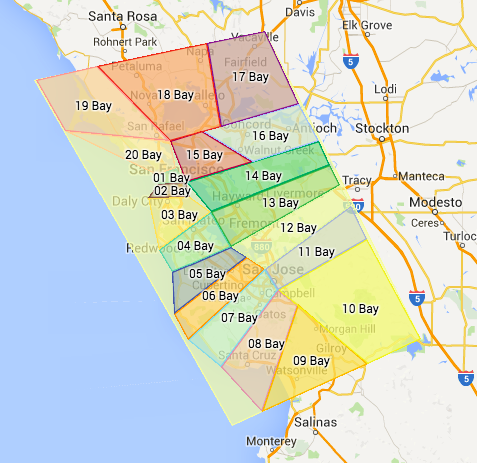
amarillux(1)  51 - Southern Swamps
ameriporean(1)  51 - Southern Swamps
arielmaydana(1)  51 - Southern Swamps
asreis(1)  51 - Southern Swamps
Baterco(1)  51 - Southern Swamps
Bticse(1)  51 - Southern Swamps
bwiebe(1)  51 - Southern Swamps
cancerman(1)  51 - Southern Swamps
car1ssa(1)  51 - Southern Swamps
carlosrsosav(1)  51 - Southern Swamps
ChalyCastillo(1)  51 - Southern Swamps
chuanyang80(1)  51 - Southern Swamps
dennism220(1)  51 - Southern Swamps
draymond04(1)  51 - Southern Swamps
DylanCM95(1)  51 - Southern Swamps
ejboyd(1)  51 - Southern Swamps
Elphabaaddams(1)  51 - Southern Swamps
fdarauz(1)  51 - Southern Swamps
Filakovszky(1)  51 - Southern Swamps
flycat2002(1)  51 - Southern Swamps
foresti01(1)  51 - Southern Swamps
fukkaos1503(1)  51 - Southern Swamps
gareth_c(1)  51 - Southern Swamps
GertBroos(1)  51 - Southern Swamps
GutoSalvador(1)  51 - Southern Swamps
hadescj(1)  51 - Southern Swamps
henguido(1)  51 - Southern Swamps
Hoorge(1)  51 - Southern Swamps
irwan13th_117023(1)  51 - Southern Swamps
JamesNelsonSunny7(1)  51 - Southern Swamps
jonaz_86(1)  51 - Southern Swamps
Ken-Tolley(1)  51 - Southern Swamps
kirias347(1)  51 - Southern Swamps
Lbielen(1)  51 - Southern Swamps
Lee_Bo(1)  51 - Southern Swamps
leobarretobhz(1)  51 - Southern Swamps
lordmogra(1)  51 - Southern Swamps
MacGyverBR(1)  51 - Southern Swamps
ManLizard(1)  51 - Southern Swamps
MariuszKo(1)  51 - Southern Swamps
MatildaBord(1)  51 - Southern Swamps
Mayneth(1)  51 - Southern Swamps
meg9344(1)  51 - Southern Swamps
Memphysto(1)  51 - Southern Swamps
Mickrocks(1)  51 - Southern Swamps
mikebluv(1)  51 - Southern Swamps
mrgarretson(1)  51 - Southern Swamps
omerc10696(1)  51 - Southern Swamps
oscaster(1)  51 - Southern Swamps
osminramos(1)  51 - Southern Swamps
oxenhaut(1)  51 - Southern Swamps
Paolom64(1)  51 - Southern Swamps
patrol75_1(1)  51 - Southern Swamps
pieruslu(1)  51 - Southern Swamps
reekeetiamson(1)  51 - Southern Swamps
rico19891129(1)  51 - Southern Swamps
robbguyer_217705(1)  51 - Southern Swamps
robje64(1)  51 - Southern Swamps
Rocky(1)  51 - Southern Swamps
rubenv31(1)  51 - Southern Swamps
Ruzza_br(1)  51 - Southern Swamps
Shadertheboi(1)  51 - Southern Swamps
skiutah1080(1)  51 - Southern Swamps
slanci(1)  51 - Southern Swamps
Slawkus(1)  51 - Southern Swamps
Sloooto(1)  51 - Southern Swamps
snethbeth(1)  51 - Southern Swamps
sotodiego13(1)  51 - Southern Swamps
sp33dyt(1)  51 - Southern Swamps
V_Sookz(1)  51 - Southern Swamps
Valdi57(1)  51 - Southern Swamps
vigilantecartel(1)  51 - Southern Swamps
Weatherinkc(1)  51 - Southern Swamps
Wellin039(1)  51 - Southern Swamps
WhereAmI121(1)  51 - Southern Swamps
wmacchia(1)  51 - Southern Swamps
XanXus(1)  51 - Southern Swamps
ZevaKi(1)  51 - Southern Swamps
MegaMapRaid!
Regional Coordinator: Silvio (PM [Help])  , Enhket (PM [Help])  , caradellino (PM [Help])  , orbitc (PM [Help])  , Jemay (PM [Help])  , sketch (PM [Help])  
Username (rank) Team Assigned Comments Team Area
AdamCStorm(1)  52 - Pine Barrens
alextoind(1)  52 - Pine Barrens
amov76(1)  52 - Pine Barrens
amstaffs5(1)  52 - Pine Barrens
andedb(1)  52 - Pine Barrens
arasu3(1)  52 - Pine Barrens
Archila57(1)  52 - Pine Barrens
aridemoulin(1)  52 - Pine Barrens
ArtifactsInMotion(1)  52 - Pine Barrens
AvedYah(1)  52 - Pine Barrens
bryce7up(1)  52 - Pine Barrens
cathygotx(1)  52 - Pine Barrens
danlupy(1)  52 - Pine Barrens
Danw33(1)  52 - Pine Barrens
DaRicket(1)  52 - Pine Barrens
dedeslp(1)  52 - Pine Barrens
deepace(1)  52 - Pine Barrens
Deslink(1)  52 - Pine Barrens
DrakeHunter(1)  52 - Pine Barrens
dzhurisimo(1)  52 - Pine Barrens
elf128(1)  52 - Pine Barrens
elitaylorlol(1)  52 - Pine Barrens
emilioronald(1)  52 - Pine Barrens
Flami12(1)  52 - Pine Barrens
FUNZ06(1)  52 - Pine Barrens
georgiagirll_1655(1)  52 - Pine Barrens
GonzaloTorresCalderon(1)  52 - Pine Barrens
grsshpprkm(1)  52 - Pine Barrens
herbelt2(1)  52 - Pine Barrens
hijan(1)  52 - Pine Barrens
hotstream(1)  52 - Pine Barrens
howpomp(1)  52 - Pine Barrens
jacksonloh0(1)  52 - Pine Barrens
Jadet(1)  52 - Pine Barrens
Jairick(1)  52 - Pine Barrens
jkolacko(1)  52 - Pine Barrens
JulianaTitarelli(1)  52 - Pine Barrens
katelynlenee(1)  52 - Pine Barrens
kickitlikechris(1)  52 - Pine Barrens
kiwiindo(1)  52 - Pine Barrens
Lau_Leoskl(1)  52 - Pine Barrens
luisgelar(1)  52 - Pine Barrens
LynnG-R(1)  52 - Pine Barrens
mitpatterson(1)  52 - Pine Barrens
mobilevoid(1)  52 - Pine Barrens
Mosik(1)  52 - Pine Barrens
mosko.il(1)  52 - Pine Barrens
mrbskbstyle32(1)  52 - Pine Barrens
nexux(1)  52 - Pine Barrens
nicobantar(1)  52 - Pine Barrens
NixFakhry(1)  52 - Pine Barrens
oblejimenez(1)  52 - Pine Barrens
Onmywaysir(1)  52 - Pine Barrens
OscarAldMar(1)  52 - Pine Barrens
oswaldormarques(1)  52 - Pine Barrens
Paulosantanasantana(1)  52 - Pine Barrens
PeposCon(1)  52 - Pine Barrens
POISON45(1)  52 - Pine Barrens
Prof_alex10(1)  52 - Pine Barrens
RachelTango(1)  52 - Pine Barrens
RafaelDeAbreuSpeedy(1)  52 - Pine Barrens
ralv1973(1)  52 - Pine Barrens
rxlumx(1)  52 - Pine Barrens
sebasra1(1)  52 - Pine Barrens
shoebhakim(1)  52 - Pine Barrens
Snowdog6519(1)  52 - Pine Barrens
SpdyMx(1)  52 - Pine Barrens
stimofei(1)  52 - Pine Barrens
Superkala(1)  52 - Pine Barrens
sweetbabylee(1)  52 - Pine Barrens
Tazmd2020(1)  52 - Pine Barrens
TexasChiverDino_84,213(1)  52 - Pine Barrens
thongkh(1)  52 - Pine Barrens
twrader(1)  52 - Pine Barrens
Tzezalica(1)  52 - Pine Barrens
UnassumingLocalGuy(1)  52 - Pine Barrens
WazdaWiata(1)  52 - Pine Barrens
WTFTruck79(1)  52 - Pine Barrens
Ybarrarubio(1)  52 - Pine Barrens
YouMeDevil3(1)  52 - Pine Barrens
MegaMapRaid!
Regional Coordinator: Silvio (PM [Help])  , Enhket (PM [Help])  , caradellino (PM [Help])  , orbitc (PM [Help])  , Jemay (PM [Help])  , sketch (PM [Help])  
Username (rank) Team Assigned Comments Team Area
AK-Jeff-(1)  53 - The Piedmont
alvinlorenzomd(1)  53 - The Piedmont
amiyess(1)  53 - The Piedmont
bnoof_384(1)  53 - The Piedmont
Bogotá(1)  53 - The Piedmont
BorisYordanov(1)  53 - The Piedmont
CarvalhoEng99(1)  53 - The Piedmont
CjaAndrade(1)  53 - The Piedmont
crin76(1)  53 - The Piedmont
cshinn89(1)  53 - The Piedmont
D1LL1GAF(1)  53 - The Piedmont
Dansbo(1)  53 - The Piedmont
davidmneves(1)  53 - The Piedmont
em0rej(1)  53 - The Piedmont
EuricoIsaac(1)  53 - The Piedmont
FabriBMW(1)  53 - The Piedmont
florinrotm(1)  53 - The Piedmont
garycws(1)  53 - The Piedmont
GoBlackhawks(1)  53 - The Piedmont
GreenAngel31(1)  53 - The Piedmont
gunnargsd(1)  53 - The Piedmont
HugoDeDeleon(1)  53 - The Piedmont
hyeap1(1)  53 - The Piedmont
hzetterlund(1)  53 - The Piedmont
iovadark(1)  53 - The Piedmont
Jascott85(1)  53 - The Piedmont
jenll425(1)  53 - The Piedmont
jessclawson(1)  53 - The Piedmont
jilianmello(1)  53 - The Piedmont
jknestrick_546982(1)  53 - The Piedmont
jorgeblanco(1)  53 - The Piedmont
josephsullivan1(1)  53 - The Piedmont
juanes18055(1)  53 - The Piedmont
Kabruxis(1)  53 - The Piedmont
KillerDANi(1)  53 - The Piedmont
kraiwut(1)  53 - The Piedmont
kronox_KGP(1)  53 - The Piedmont
lawong(1)  53 - The Piedmont
Lawrence_Italy(1)  53 - The Piedmont
Leeonell(1)  53 - The Piedmont
lokator82(1)  53 - The Piedmont
macgyver(1)  53 - The Piedmont
maZPri(1)  53 - The Piedmont
Motochucho(1)  53 - The Piedmont
N101BL(1)  53 - The Piedmont
namregok(1)  53 - The Piedmont
o_s_o(1)  53 - The Piedmont
panchulonko(1)  53 - The Piedmont
piet_sp(1)  53 - The Piedmont
pozenra(1)  53 - The Piedmont
radvolk(1)  53 - The Piedmont
ragekageprime(1)  53 - The Piedmont
RDomingues(1)  53 - The Piedmont
rhuisking(1)  53 - The Piedmont
Rivss(1)  53 - The Piedmont
robbguyer(1)  53 - The Piedmont
rodh(1)  53 - The Piedmont
sanyirigo(1)  53 - The Piedmont
SeanThong30(1)  53 - The Piedmont
Sharinaf30(1)  53 - The Piedmont
slyman1973(1)  53 - The Piedmont
soiaVS(1)  53 - The Piedmont
Sparqx(1)  53 - The Piedmont
ssgforti(1)  53 - The Piedmont
stupidboy0413(1)  53 - The Piedmont
sxl05(1)  53 - The Piedmont
TenPounder_204957(1)  53 - The Piedmont
TheLastTatertot(1)  53 - The Piedmont
thisappleguy(1)  53 - The Piedmont
Townshiptrekker(1)  53 - The Piedmont
trosner(1)  53 - The Piedmont
Twintiggrz(1)  53 - The Piedmont
TXWillieG(1)  53 - The Piedmont
Ultraman0(1)  53 - The Piedmont
UrHer0(1)  53 - The Piedmont
utimkk(1)  53 - The Piedmont
walteresca(1)  53 - The Piedmont
yariman69(1)  53 - The Piedmont
Zaboon(1)  53 - The Piedmont
MegaMapRaid!
Regional Coordinator: Silvio (PM [Help])  , Enhket (PM [Help])  , caradellino (PM [Help])  , orbitc (PM [Help])  , Jemay (PM [Help])  , sketch (PM [Help])  
Username (rank) Team Assigned Comments Team Area
Adielshe_635(1)  54 - "Crystal Lake"
aleskandalo(1)  54 - "Crystal Lake"
alexnovik(1)  54 - "Crystal Lake"
AndrMorimoto(1)  54 - "Crystal Lake"
annieander(1)  54 - "Crystal Lake"
arturocrc(1)  54 - "Crystal Lake"
aspira_neto(1)  54 - "Crystal Lake"
baddboy69(1)  54 - "Crystal Lake"
Bgblue01(1)  54 - "Crystal Lake"
bnoof(1)  54 - "Crystal Lake"
CiorbaDeBurta(1)  54 - "Crystal Lake"
co3mo(1)  54 - "Crystal Lake"
couyo(1)  54 - "Crystal Lake"
CristianLondonoM(1)  54 - "Crystal Lake"
cuttyrahb(1)  54 - "Crystal Lake"
dallanp71(1)  54 - "Crystal Lake"
decrawford55(1)  54 - "Crystal Lake"
dino83(1)  54 - "Crystal Lake"
Dodotto(1)  54 - "Crystal Lake"
Duful(1)  54 - "Crystal Lake"
Dumat(1)  54 - "Crystal Lake"
Dylan_mitchel(1)  54 - "Crystal Lake"
everaldotcn(1)  54 - "Crystal Lake"
FedericoUY(1)  54 - "Crystal Lake"
galavanting(1)  54 - "Crystal Lake"
GeorgeMBehr(1)  54 - "Crystal Lake"
gomengmf(1)  54 - "Crystal Lake"
goosey53(1)  54 - "Crystal Lake"
GrayF0X(1)  54 - "Crystal Lake"
GregorioBom(1)  54 - "Crystal Lake"
HamaKazu(1)  54 - "Crystal Lake"
holmanjd(1)  54 - "Crystal Lake"
iCalittri(1)  54 - "Crystal Lake"
IPC1007(1)  54 - "Crystal Lake"
jhhssuu(1)  54 - "Crystal Lake"
Jose_miguel-sonic(1)  54 - "Crystal Lake"
JPopeAus(1)  54 - "Crystal Lake"
Julian1984(1)  54 - "Crystal Lake"
kraziex17(1)  54 - "Crystal Lake"
LaniSpeed(1)  54 - "Crystal Lake"
lemu32(1)  54 - "Crystal Lake"
lotus2020(1)  54 - "Crystal Lake"
luison35(1)  54 - "Crystal Lake"
Manuelalex777(1)  54 - "Crystal Lake"
Marcounet62(1)  54 - "Crystal Lake"
marklestervalle(1)  54 - "Crystal Lake"
marwanag(1)  54 - "Crystal Lake"
masterofrandom(1)  54 - "Crystal Lake"
mihaianu(1)  54 - "Crystal Lake"
Mojitomen(1)  54 - "Crystal Lake"
Nate866(1)  54 - "Crystal Lake"
Nezmccupcake(1)  54 - "Crystal Lake"
nocola2002(1)  54 - "Crystal Lake"
Nubiator(1)  54 - "Crystal Lake"
ops87l(1)  54 - "Crystal Lake"
peanutheadsmom(1)  54 - "Crystal Lake"
Piju9M2PJU(1)  54 - "Crystal Lake"
rafaoneal(1)  54 - "Crystal Lake"
ralfnav(1)  54 - "Crystal Lake"
RaulCampillo(1)  54 - "Crystal Lake"
refazioli(1)  54 - "Crystal Lake"
rgiraldo(1)  54 - "Crystal Lake"
RoadKingRam(1)  54 - "Crystal Lake"
robsheppard(1)  54 - "Crystal Lake"
Samuel_Barata(1)  54 - "Crystal Lake"
sasykmh(1)  54 - "Crystal Lake"
sebazante(1)  54 - "Crystal Lake"
SetApart4Christ(1)  54 - "Crystal Lake"
sief727(1)  54 - "Crystal Lake"
spidermeow(1)  54 - "Crystal Lake"
swankrain(1)  54 - "Crystal Lake"
Tarayaki(1)  54 - "Crystal Lake"
TechGuy77(1)  54 - "Crystal Lake"
thanatos75(1)  54 - "Crystal Lake"
TopherDunlap(1)  54 - "Crystal Lake"
visuelz(1)  54 - "Crystal Lake"
vsuarez46(1)  54 - "Crystal Lake"
wallyjarek(1)  54 - "Crystal Lake"
yo007wa(1)  54 - "Crystal Lake"
MegaMapRaid!
Regional Coordinator: Silvio (PM [Help])  , Enhket (PM [Help])  , caradellino (PM [Help])  , orbitc (PM [Help])  , Jemay (PM [Help])  , sketch (PM [Help])  
Username (rank) Team Assigned Comments Team Area
,ickewennerholm(1)  55 - The Highlands
adimarian(1)  55 - The Highlands
AgoesSudjipto(1)  55 - The Highlands
Ampharos(1)  55 - The Highlands
andyloi(1)  55 - The Highlands
AntonioSardus(1)  55 - The Highlands
Autotuning(1)  55 - The Highlands
b-rapid(1)  55 - The Highlands
BentBox(1)  55 - The Highlands
BubbaD(1)  55 - The Highlands
caenaz(1)  55 - The Highlands
carlosbriceno10000(1)  55 - The Highlands
chiroptera(1)  55 - The Highlands
Chisp78(1)  55 - The Highlands
ckojam(1)  55 - The Highlands
DanoYo(1)  55 - The Highlands
davidakachaos(1)  55 - The Highlands
dcline414(1)  55 - The Highlands
derekfish(1)  55 - The Highlands
DrMub(1)  55 - The Highlands
edsonsalazar(1)  55 - The Highlands
esoledad(1)  55 - The Highlands
estebb(1)  55 - The Highlands
ferchand(1)  55 - The Highlands
Ffallas(1)  55 - The Highlands
gabriel_tavares(1)  55 - The Highlands
greg529(1)  55 - The Highlands
gsbhogal(1)  55 - The Highlands
gtijim_926(1)  55 - The Highlands
hakr1(1)  55 - The Highlands
hernandezmario03(1)  55 - The Highlands
hippychic7995(1)  55 - The Highlands
Ironheart13(1)  55 - The Highlands
IsraeLins(1)  55 - The Highlands
JackYip80(1)  55 - The Highlands
jamersontiago(1)  55 - The Highlands
jhslpm(1)  55 - The Highlands
joebogey(1)  55 - The Highlands
juanda631(1)  55 - The Highlands
julioilsilva(1)  55 - The Highlands
juniorsjc(1)  55 - The Highlands
KennethTham(1)  55 - The Highlands
Kovan(1)  55 - The Highlands
kyhtak(1)  55 - The Highlands
Lauchy73(1)  55 - The Highlands
litocabz_521777(1)  55 - The Highlands
Lnberger(1)  55 - The Highlands
LucasDeMouraFagundes(1)  55 - The Highlands
luisvenegasm(1)  55 - The Highlands
MapMakerMike(1)  55 - The Highlands
marks011(1)  55 - The Highlands
MasterChiefer(1)  55 - The Highlands
Mikebluewater(1)  55 - The Highlands
N2Success(1)  55 - The Highlands
paulvandenwyngaert(1)  55 - The Highlands
Peladito(1)  55 - The Highlands
phuckthepopo(1)  55 - The Highlands
pilot_ryan89(1)  55 - The Highlands
Please_do(1)  55 - The Highlands
princelondon(1)  55 - The Highlands
Reavesleather(1)  55 - The Highlands
SergioPaesSpeedy(1)  55 - The Highlands
sheepwood1(1)  55 - The Highlands
shemeel(1)  55 - The Highlands
silviu_sad_soul(1)  55 - The Highlands
SirAlexO(1)  55 - The Highlands
sledutah(1)  55 - The Highlands
smyrf13(1)  55 - The Highlands
swood2940(1)  55 - The Highlands
taybrooke15(1)  55 - The Highlands
Tecnobadal(1)  55 - The Highlands
the_wonder_drummer(1)  55 - The Highlands
Theloudestvoice(1)  55 - The Highlands
Thivvahsh(1)  55 - The Highlands
thowardii(1)  55 - The Highlands
TimnAnnWatkins(1)  55 - The Highlands
Tlatoani1978(1)  55 - The Highlands
troyvfuchs(1)  55 - The Highlands
vetlata(1)  55 - The Highlands
Most of the content for this page has been moved to the New Jersey MegaMapRaid page, and the rest is being migrated there. Please go there now.

Welcome new editors. You will be working with experienced editors on several important skills for new editors.

Most of what you will be learning about how to use WME and the right way to do things will also be found in this reference right here.

Background

Your edits will show up on the live map after the next tile update – usually in a day or two. When you are logged in, you will see your points in your dashboard. If you create or change places, you will have to wait for approval from a level 2 editor. See the FAQ for answers to frequently asked questions.

MegaMapRaid

Read the MegaMapRaid wiki page

Log in to the editor

See other editors

Use the layers icon in the upper right-hand corner and tick the box next to Live Users.

Use chat

During the mapraid, do most of your chatting in your slack channel. But keep this open in case someone needs to get your attention. After the mapraid, you will be using WME chat a lot.


Some things you will be learning to do:

Learn how to create and use a permalink

Create a new road

Recognize an unconfirmed red road and confirm how to confirm the details on the new road

Check and correct road direction (one-way or two way),

Correct road names.

How to recognize when roads are connected to other roads. fix all the allowed and not-allowed turns

Permissions – why you sometimes can’t edit things you want to edit – and what to do about it.

Use ⇧ Shift+Z to show which turns are forbidden.

Add a geometry node to a road and move it around

Remove a geometry node from a road

Select just an intersection and move it around

Cut a road segment in two using another road segment

[the junction between two road segments] – without removing any road segments

Create a new road segment that crosses over another road segment, but does not connect to it

Use the “junction” icon to join two crossing road segments

Recognize (and avoid) the “bridge” icon

Learn a little about parking lots

parking lot roads (PLR) - map only the outside edges, the storefront, the main aisles, mark them unnamed

Parking lots themselves – we usually don’t need them, unless they are a destination in themselves. Instead of marking the parking lot at the mall, mark the entire mall.


Don’ts

Do…

    1. Not Delete roads or any parts of roads – because that deletes traffic data.
    2. Not Create parking lots or area places, or add roads or lanes in parking lots. This can confuse Waze and clutter the map. Because all your place changes will initially require approval, you might like to avoid any Places edits (points and areas) entirely at first.
    3. Not Make changes to major roads and their ramps or turn lanes.
    4. Not Make changes to roads that are connected to locked roads.
    5. Not make two-way roads into divided roads or highways, even if they are that way in real life.