
This page serves as the primary resource for editors of the District of Columbia region. Review all the sections to better understand how the guidelines for this district might deviate from the overall USA or worldwide guidelines. If you have any comments or questions about this page or district refer to the community links below.
 |
|

Introduction
District of Columbia is a part of the Mid Atlantic region, which includes the states and/or territories of:
District of Columbia / Maryland / Virginia / West Virginia.
Mapping resources

Before editing the maps in the District of Columbia region, be sure to fully review and understand the editing manual.
The Waze user community follows the Waze etiquette guidelines discussed in the Wiki. Be sure to familiarize yourself with these guiding principles while editing the maps and this Wiki, as well as when communicating with other Waze users.
These are official sources of information that can be used in the editor, in the form of downloadable PDFs or interactive GIS maps.
Community

Waze Discuss is a great place to find answers to previously asked questions and also a place to ask new ones. Below are links to the forums specific to the District of Columbia region.
- District of Columbia section of Waze Discuss
- The USA section of Waze Discuss
- The USA segment unlock requests
Area Managers for the District of Columbia can be found in the table below.
New editors should consider checking into the formal mentoring program available at no charge.
Update Requests
An Update Request (UR) is a Map Issue reported by a user from the Waze client app. It is also a layer in the Map Editor. See update requests for more information. DC has a policy of shared UR management. This means that URs are open to all editors and that there is no “ownership” implied when posting the initial comment. However, it is courteous to allow new editors or editors you don’t have an informal agreement with an extra day or two to respond to reporter comments and/or post reminders. Effective UR conversations are usually achieved with a single point of contact for the reporter, but other editors can step in if a UR with reporter comments begins to sit idle or if they think another editor needs help. Please be respectful to other editors and reporters while working URs; it is usually best to send a message to the editor rather than chatting with them through a UR. (Most reporters don’t care about the chat, they just want it fixed and not be bothered with multiple responses). Typically, an editor should be given some time to respond to the reporter’s comments (since real life has a way to occasionally get in the way to prevent editing time on some days).
In DC we have adopted a 0/4/4 system for response to Update Requests. 0/4/4 is the short way of explaining the following.
Day 0
The first editor who is able to respond to UR should attempt to resolve the UR. If they are successful, they should comment as such in the UR and mark it closed. If more information from the reporter is required to make progress towards closure, a query should be sent to the reporter requesting the information needed for resolution.
Day 4+
Polite reminders should be sent to a reporter who has never responded to a query, provided at least three full days have elapsed since the initial response was sent. (You can send a reminder at 00:01 Eastern Standard (or Daylight when applicable) Time on the fourth day.)
Example
“If no further information is provided we will be unable to fix the issue you encountered and this report will be closed soon”
Second Day 4+
URs may be noted as closed due to lack of reporter response, provided at least three full days have elapsed since the followup message was sent. (You can close at 00:01 Eastern Standard (or Daylight when applicable) Time on the fourth day since the reminder was sent.)
Example
“This report is being closed due to lack of information, please submit another report if the issue continues. Happy Wazing!”
If you use URComments then the settings should be 4 for reminder and 4 for closure.
Cities and towns

One of the most common errors when editing the maps is when an editor creates a road and does not confirm the road by setting the city and road name (or stating it has none).
Duplicate cities can be caused by incorrectly named segments and should be corrected following the guidelines in the duplicate cities article.
Washington is the only city in the District of Columbia and it spans the entire area. All street segments in the District should have “Washington” as the city name, without exception.
Major roads

The District of Columbia region follows the general road naming and road type guidelines of the USA.
The primary reference for road types is the District’s Functional Classification Map. (PDF Version)
Locking
Any road of a certain segment type must be locked at least to the rank (level) in the chart below. Roads may be locked higher for protection and special situations (areas with construction, tricky design, frequent mistakes, imaging inaccuracies, and the like), but should not be locked lower. A great time to implement these locks is while bringing the road types of an area into compliance with the current US road type standards. Lock the roads based on type after they’ve been set to current US road type standards and connecting roads are set up correctly and all other edits are complete for the segment.
Minimum Locking Standard
Actual locks used may be more than the table below, depending on area circumstance. Please consult RC, SM, or appropriate AM for guidance
| Segment Type | Attribute | Lock |
|---|---|---|
| Freeway | 5 | |
| Ramp | 4 | |
| Major Highway | 4 | |
| Minor Highway | 3 | |
| Primary Street | One-Way | 3 |
| Primary Street | Two-Way | 2 |
| Street or Private Road | One-Way | 2 |
| Street or Private Road | Two-Way | 1 |
| Railroad | 2 | |
| Ferry | 5 |
Speed limits
The speed limit on all streets in the District of Columbia, unless otherwise posted, is 20 mph. Many (but not all) main arterials that are classified as Major Highway, Minor Highway, or Primary Street for Waze purposes have higher posted speed limits. Be sure to check for signage (either in person or by StreetView) before editing speed limits.
Special roads
Drivable roads
The District of Columbia region follows the standard USA guidelines for all of the following special road types.
- Divided highways and roadways
- Carpool, HOV, Transit lanes
- Roundabouts and traffic circles
- Dead ends and culs-de-sac
- Toll roads
- Partial and scheduled restrictions
- Private installations and military bases
Non-drivable roads
Review the Wiki guidelines for non-drivable roads to ensure compliance with the general guidelines.
Alleys
- Alleys should always be mapped if they have a name.
- Alleys should always be mapped if they are the sole access to a home or business.
- Alleys should always be set to “Private road”
- Alleys are normally mapped if they are acknowledged by the municipality.
If an alley does not meet the above criteria, mapping is optional. Leave the name field blank.
Important: Waze can sometimes route drivers to an alley behind their destination instead of to the front door. To avoid this, make sure all the house numbers on all sides of the block surrounding the alley have been correctly placed and verified by a map editor, and that all places (points and areas) on that block are closer to a street than they are to the alley. The exception to this, of course, is for destinations that are meant to be accessed via the alley.
Traffic circles
Washington, D.C. has a large number of traffic circles. Most of the circles are named, and (unlike most roundabouts and rotaries in other jurisdictions) these names typically appear on street signs at the intersections between the circle and the connecting streets/avenues. Some circles even have assigned street addresses. Also, some circles have non-standard configurations that include overpasses, underpasses, and/or streets passing through the center of the circle. Because of these situations, D.C. deviates from the usual Waze editing rules for roundabouts in the following respects:
- If the circle has posted street signs, then the road segments of the circle should be assigned this name in WME, and not left un-named. If there are no street signs, check the “No name” box. If there are street signs but they name the connecting streets rather than the circle, name the segments so that turn instructions given to drivers will match what is on the street signs.
- If the circle has any interior intersections (that is, a street or avenue that crosses through the circle and intersects at ground level with the circle), then do not use the Waze roundabout type for the road segments; these circles should be converted to ordinary street/highway segments. You should still follow the guidance at Roundabouts/USA#Road type in deciding what type of segments to use, even for this kind of circle.
U-Turns
It is illegal to make a U-turn at any intersection controlled by traffic signals in the District of Columbia, unless signage states otherwise. Please avoid allowing U-turns without checking for compliance with this rule first.
Closures
When managing a section of roadway under construction or being closed for a major event, follow the Wiki guidelines on construction zones and Real time closures.
Many road closures in the District are posted on the “Advisories” tab on the DDOT website at http://www.dc.gov/ddot
However, there are numerous agencies with jurisdiction over various roads and streets in the District. Accordingly, not all road closures are announced through a common information source.
Places
The District of Columbia region follows the USA standard for Places. Do not deviate from the guidelines without first obtaining consensus to do so via the district forum linked on this page.
Places (formerly called landmarks) in DC now follow the detailed guidance in the US standard for places.
To prevent loss of data due to automatic acceptance of submissions from trusted users, all area places should be locked to Level 2 at minimum. Additionally, area places for Hospital/Medical Care, Fire Department and Police Station should be locked at Level 4 at minimum.
Metro stations in DC, MD, and VA The major public transportation system within the Washington DC metropolitan is METRO. It consists of both buses and rail. The above ground train/bus stations shall be mapped as area places and locked at L3. The below ground train stations shall be mapped as point places and locked at L3.
| Place Type | Lock |
|---|---|
| Area Places | 2 |
| Gas Station | 3 |
| Metro Stations | 3 |
| Hospital/Medical Care | 4 |
| Fire Department | 4 |
| Police Station | 4 |
Cameras
Not every camera-looking device at an intersection is a speed or red light camera. Generally speaking:
-

a speed camera takes a photograph of a vehicle when it passes by the camera at too high a speed.
-

a red light camera takes a photograph of a vehicle that enters an intersection after the light is red. In some areas, it takes the photograph when a vehicle is not clear of the intersection some period after the light turns red.
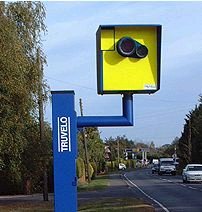

Be sure to know your cameras before accepting new camera reports.
When adding a camera, be sure to review the camera placement recommendations.
Based on information researched at the time this page was created, red light, stop sign, speed cameras are used throughout the District of Columbia.
In the District of Columbia, there are seven different types of traffic enforcement cameras. Below is a table containing each type of camera and how it should be mapped.
| Camera Type | Icon Used |
|---|---|
| Traditional Speed Cameras | Speed Camera |
| Speed Cameras at Intersections | Speed Camera |
| Traditional Red Light Cameras | Red Light Camera |
| Stop Sign Cameras | Stop Sign Camera |
| Bus Lane Cameras | Bus Lane Camera |
| Fake Cameras | Dummy Camera |
| Oversized Vehicle Cameras | Not Mapped |
Also, it is possible to have a combined speed and red light camera, which should be mapped using both of these types in Waze.
Reference the DDOT Automated Traffic Enforcement Dashboard to verify camera locations.
To do list

Many states and territories keep an active list of pending or closed actions that need to be done in the state by the editors. All editors are welcome to contribute to the list of activities.
This district does not currently have an active “to do” list at this time. Check in the District of Columbia section of the Waze forums to discuss creating one.
Local Editors
The editors below serve the editing community in a number of different roles. Read more about community and editing roles. If you have questions, feel free to reach out to any of the editors listed here.
Regional Coordinator
Regional coordinators are experts who coordinate between the local community and Waze Team. The regional coordinators for the Mid-Atlantic Region are:
| Role | Editor | Rank | Other Roles |
|---|---|---|---|
| Regional Coordinator | nzahn1 | 6 | USA Global Champ, Mentor |
| Assistant Regional Coordinator | ldriveskier | 6 | USA Global Champ, Mentor |
District Manager
District managers are active members of the Waze editing community and are responsible for the community and guidelines in their state. The district manager for the District of Columbia is:
| Editor | Rank | Other Roles |
|---|---|---|
| Nimbus- | 5 | DC District Manager, Mentor |
| russblau | 5 | DC District Manager, MAR-MSM |
Country Managers
Country Managers are experienced editors who have been granted countrywide editing ability. Country Managers based in the Mid-Atlantic Region are:
| Editor | Rank | Other Roles |
|---|---|---|
| ct13 | 6 | USA Local Champ, Mentor |
| fuji2086 | 6 | USA Local Champ, WV State Manager, Mentor |
| Kodi75 | 5 | MD State Manage, Mentorr |
| LennyNRPD | 5 | VA State Manager, Mentor |
| ldriveskier | 6 | USA Global Champ, MAR ARC, Mentor |
| MrNicGuy | 5 | VA State Manager, Mentor |
| mtb2314 | 5 | MD State Manager, Mentor |
| Nimbus- | 5 | DC State Manager, Mentor |
| nzahn1 | 6 | MAR RC, USA Global Champ, Mentor |
| roadtechie | 6 | USA Local Champ, Mentor |
| subs5 | 5 | VA State Manager, Mentor |
Area Managers
Area Managers are Waze map editors who take a proactive role in maintaining specific areas of the Waze map.
Mid-Atlantic Region Multi-State Managers (MAR-MSM) are experienced state managers who help throughout the region outside of their home state. MAR-MSM are not listed if they are also a Country Manager.
Mid-Atlantic Region Large Area Managers (MAR-LAM) help manage large sections of the state working with the local Area Managers and have statewide road closure ability
| Editor | Rank | Area | Other Roles/Info |
|---|---|---|---|
| G_W1Z | 5 | District-wide | PA State Manager |
| jr1982jr | 5 | District-wide | MD State Manager |
| SirGadwall | 5 | District-wide | Mentor |
| bimmer4WDrift | 4 | District-wide Closures | Has closure ability for any street throughout the district. |
Other Area Editors
The following editors are also editing in the state and may be working towards an Area Manager position. Feel free to contact them for assistance in their respective areas.
| Editor | Rank | General Editing Area | Comments |
|---|