Thank you G_W1Z. And I see that there is an additional button “Done” on the screen with the PUR. Is it possible to click on it?
Regards,
Nataliia
Thank you G_W1Z. And I see that there is an additional button “Done” on the screen with the PUR. Is it possible to click on it?
Regards,
Nataliia
Hi SC1GHERA,
Thank you, I have opened an internal issue for this. The team will review it.
Regards,
Nataliia
Clicking done will then close the window, but in the previous WME version that 2nd click was not necessary.
Thank you G_W1Z for your prompt reply. I will check this internally with the team and update you.
Regards,
Nataliia
“Move segment IDs to the bottom of the WME left panel and add a button to hide and view the segment IDs.”
Segment IDs are still at the top of the WME left panel and I don’t see a button to hide and view the segment IDs.
Hi Desoleh,
Thank you for the report. I have filed an internal issue for this. The team will review it.
Regards,
Nataliia
They are listed at the top but not expanded. 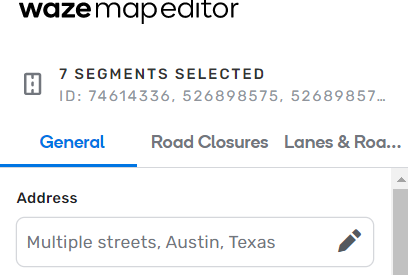
The full list is on the bottom of the panel now 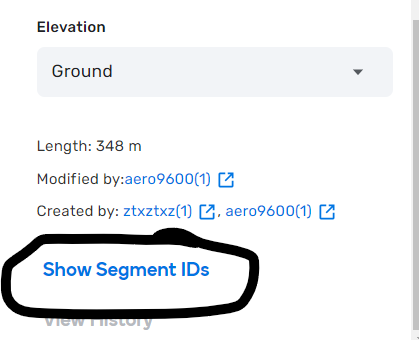
And the bottom list is expandable 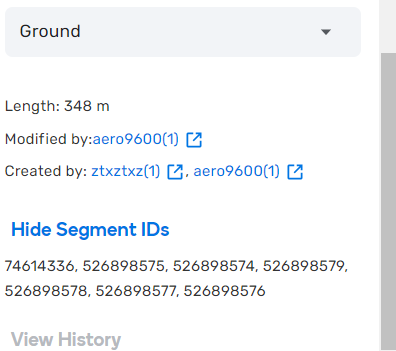
I too am getting load failures in Firefox 103.0.2 on Win10, due to the same CSP errors with editor-assets.waze.com.
I’m also seeing speed limits in km/h rather than mph, even though I’m in the US and have Imperial units selected. It’s been a while since I’ve edited anything, but this is the first time I’ve noticed that.
Same with me: FF Version 103.0.2 / WIN11
The same on 104 Beta
Don’t know if the origin of the error is the same, but similar behavior is happing on Android 11 with Firefox v103.2.0 and Opera v70.3.3653.66287
Quite honestly…It’s not what we are accustomed to, but I think this is the way it should work. That way we can use the Next Place button after we save our current edit.
Hi turbomkt,
Thank you for the comment. This behaviour is connected to the fix “PURs: place update panel doesn’t show the last PUR of a place”. This “Done” button was enabled in order to allow to handle cases with multiple PURs added.
Regards,
Nataliia
Hi G_W1Z,
May I ask you to add a suggestion to Uservoice for this behaviour with standing alone PURs and additional click? It would be very helpful for our team in order to understand if this additional click is really annoying?
Many thanks in advance! 
Nataliia
Hi Everyone,
We have received the answer that this is related to some back-end updates, which were enabled to the WME editor. They work fine for Chrome but unfortunately they are causing issues for FireFox and other web browsers. We are checking with the team optimal ways to handle them.
In the meantime I want to ask: is this blocking critical work that you can only do on Android/Firefox or you can use Chrome browser for the same tasks?
We want to understand the impact of the problem.
Thank you in advance,
Nataliia
I think some people find Chrome too much of a resource hog, so they use other browsers. Not everyone is on an i7 or higher CPU with 16 or more gigs of RAM.
I use Edge on WIN11 and I’m not facing any obvious problems … (just the ones related with broken scripts :?)
Tried accessing Waze via Firefox [103.0.2 (64-bit)], and I get the spinning circle syndrome.
All other websites work fine using Firefox
If I try via Microsoft Edge - it’s the same as above…
Using Opera works fine!!!
Are the 3 floating buttons on the right supposed to cover/partially cover windows that are open?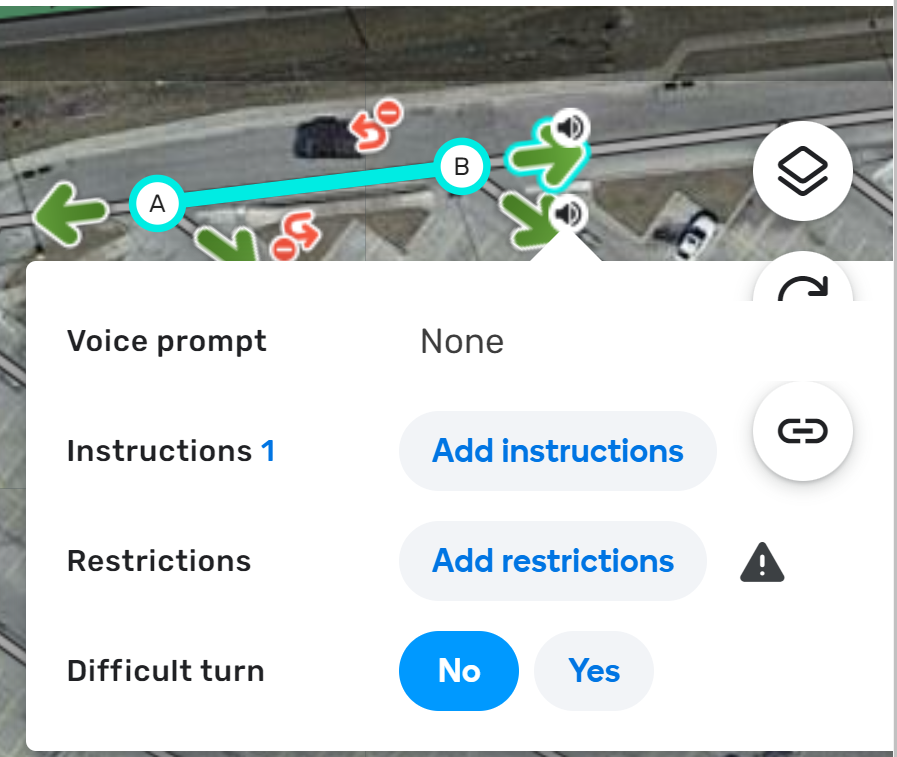
Permalink of where I experienced this: https://www.waze.com/en-US/editor?env=usa&lon=-76.97618&lat=39.82527&zoomLevel=19&segments=514447553
Hello
There seems to be a problem when creating an Event: it does not assume the city that is firstly shown by default
