Hi Pirates,
We’ve released a new WME prod v2.136.
Below you can find a summary of the release:
Known issues:
Left panel: the value “0” displayed instead of the field “Updated by”.
Issues checkboxes appear from time to time as disabled for some reason.
New features/enhancements:
WME Left panel alerts: Venue added as PUR shows 2 very similar alerts changed.
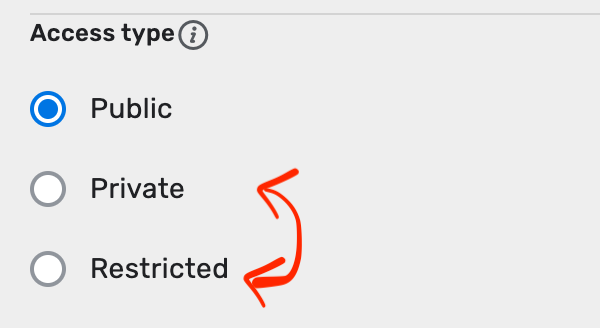
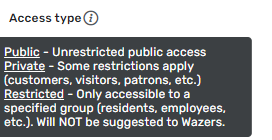
Access Type field added to the EV Charging stations objects in the left panel menu.
Known issue here: definitions of “private” and “Restricted” categories should be swapped.
Also the access Type field enabled in the EV PUR window.
The notification counter: the position of the counter centered.
Style guide: Update junction editor panel in accordance with the new style approach.
Bug fixes:
We’ve released 3 bug fixes:
EV charging stations (EVCS): Inconsistent behavior when adding a charging port with - fixed
EV charging stations (EVCS): Unable to delete only one chargers - all existing became removed - fixed
WME option showing Fee instead of Paid - fixed.
We look forward to hearing your feedback! :geek:
You can read more here.
[doc]https://docs.google.com/document/d/e/2PACX-1vS8OpHC92f4F7XTIOsxn2j1rHsmE1tN6_u6HvQ_pTuRR49dp3uOVHglgH3HfX2zjFXHy1hGD6uBnK2G/pub[/doc]
Thank you,
jm6087
February 6, 2023, 6:36pm
2
Nataliia,
Can you add the known issue about the Private and Restricted needing to be swapped to make it more visible?
Thanks
ojlaw
February 6, 2023, 6:59pm
3
For -
Known issue: definitions of “private” and “Restricted” categories should be swapt.
Does this also include the fact that the actual buttons need to be swapped?
kamonu
February 9, 2023, 2:20pm
5
Nataliia_Staff
Hi John,
Sure, done.
Regards,
Documented with the on-line help tekst…
kamonu
February 10, 2023, 3:22pm
6
Hi,
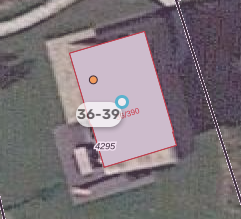
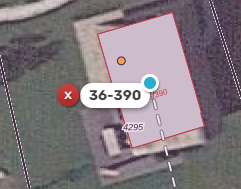
Long / composite house numbers are only partially displayed.
Two pictures: editing house number 36-390 and one how it is displayed, missing last digit.
Regards,
kamonu:
Hi,
Long / composite house numbers are only partially displayed.
Two pictures: editing house number 36-390 and one how it is displayed, missing last digit.
Regards,
Hi Dirk,
Could you provide the link to the location of this house with the long home number?
Thank you in advance,
kamonu
February 10, 2023, 4:11pm
8
Nataliia_Staff:
kamonu:
Hi,
Long / composite house numbers are only partially displayed.
Two pictures: editing house number 36-390 and one how it is displayed, missing last digit.
Regards,
Hi Dirk,
Could you provide the link to the location of this house with the long home number?
Thank you in advance,
Hi Nataliia,
Issue occurs in edit house number mode at zoom level 18.
PL: https://waze.com/nl/editor?env=row&lat=52.86557&lon=6.88342&zoomLevel=18&segments=89867377,281824523,281824524,341664060,420900512,420900513,420900597
Regards,
Since a few days I get Sometimes a 403 “Forbidden” HTTP error when I enter via a permalink and it won’t let me access the WME. Even after that, no matter what link, even without a permalink, the WME can no longer be opened.
I don’t know exactly since which editor version this happens.
Regards
Hi Dirk,
Thank you. I am checking this with the team.
Regards,
ChristophGP14:
Since a few days I get Sometimes a 403 “Forbidden” HTTP error when I enter via a permalink and it won’t let me access the WME. Even after that, no matter what link, even without a permalink, the WME can no longer be opened.
I don’t know exactly since which editor version this happens.
Regards
Hi Christoph,
Thank for the report. Can you please send the screenshot with the error what you see on your side?
Regards,
Hi,
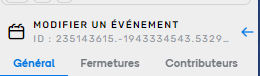
the id of an event is truncated, whether in compact view or not (moreover we see more numbers in compact view…)
See you soon
InstantT:
Hi,
the id of an event is truncated, whether in compact view or not (moreover we see more numbers in compact view…)
See you soon
Hi InstantT,
Thank you for the report. I will file an internal issue for this.
Regards,
jm6087
February 17, 2023, 11:43am
14
InstantT:
Hi,
the id of an event is truncated, whether in compact view or not (moreover we see more numbers in compact view…)
See you soon
If you double click the venue ID, it will highlight the venue ID (including anything that is truncated). You can then right click and copy the text. I do this quite often.
Hi,
I have been getting the “Service Unavailable” error for the last few days, which is quite annoying.
I have linked the forum post in my registered country.
Forum post - https://www.waze.com/forum/viewtopic.php?t=374120
Thanks!
jm6087
February 17, 2023, 12:23pm
16
You screenshot in you other forum post appears to show the issue with the forum pages not WME. I would recommend posting here instead.
Hi Temp2123454333,
Thank you for the report. Could you please tell which browser do you use? Does the issue happen today also?
Regards,
Hi,
Thanks for your reply.
i have posted it here - https://www.waze.com/forum/viewtopic.php?t=374206
Thank you Temp2123454333. We are checking this internally.
Regards,
I talk about event… Not venue