New Editor version 2.109

Hi Everyone,

We’ve released a new WME editor v2.109.

Looking forward to your feedback! :geek:

Quick Overview (more details below).

Known issues:

  • Left panel alert taking too much space in WME. - The team is still working on this, the problem is complex and requires more engineering effort. Sorry for the inconvenience.
  • Share location menu: Share Button text invisible.
  • Unable to change the case (upper / lower) of an existing street.
  • Unable to see direction of a closed segment if you cannot edit the segment.

Community suggestion:

  • Display all routing options without using dropdown buttons in the segment panel.

Bug Fixes:

  • “Enter” button doesn’t apply address’ changes.
  • “H” hotkey doesn’t open House Numbers mode.
  • Link to the Waze events page instead points back to the WME.
  • Issue with “no city” on alt addresses of segments.
  • TBRs not possible to set on Junction Box pathes.
  • Gas Station Brand / PL operator couldn’t be deleted.
  • Long drives not visible in Beta.
  • Roadshield applies to the original road name if the segment is not reselected.
  • RTCs via mobile browser can’t be added if you have to select “none” for the event.
  • Changing city to non existing one when updating alt address doesn’t trigger the confirm popup.
  • Deleting alternative address also deletes the primary address (when no common street).
  • PURs: place update panel doesn’t show the last PUR of a place (for venues with multiple PURs).
  • Venue: submitting main address form doesn’t close add alt street form.
  • Prevent submitting address change if no actual changes were made.
  • Segments: it is impossible to set “None” for city for the Alternative Address

New features/enhancements:

  • Move segment IDs to the bottom of the WME left panel and add a button to hide and view the segment IDs.
  • Remove the “node icon” from the closure nodes.
  • Design enhancements: align venue sidebar styles.
  • Show address by pressing the “E” button, when the segment or any other object on the map is selected.
  • New icons to venue header menu.
  • Text added to buttons, which define the geometry type for Map comments.
  • Update history main object styles and the empty state view.
  • Update error message when editing in snapshot mode : We no longer use the term ‘snapshot mode’ we call this the 'previous map build.
  • New elements of the top menu control panel were added.

[doc]https://docs.google.com/document/d/e/2PACX-1vTdif8BqY1xPdILoem8a2_vTdJF1CvXEGXoqvVUj1vAeIMJI54JG0eobAmx6upk9OipTzy9pEfZseJJ/pub[/doc]

This is the link to the release notes.

Thank you,
Nataliia

Thank you for fixing these two bugs:

  • “Enter” button doesn’t apply address’ changes.
  • “H” hotkey doesn’t open House Numbers mode.

The amount of extra time the additional clicks required adds up, so this will really help!

Hello,

Both are working for me on Google Chrome / Safari with no Scripts (Tampermonkey, Toolbox,…) on Mac

Hi there,

This new Editor version does not seem to work on Firefox and results in the loading spinner just being shown indefinitely.

In the console, I receive the following messages:
Content Security Policy: The page’s settings blocked the loading of a resource at https://editor-assets.waze.com/production/js/third_party-be20c1db39af017e4894.js.gz (“script-src”).
Content Security Policy: The page’s settings blocked the loading of a resource at https://editor-assets.waze.com/production/js/app-b516e371f8245809a4a3.js.gz (“script-src”).

Looking at the Network tab, the GET request to https://www.waze.com/editor returns the Content-Security-Policy header of:

script-src ‘self’ http: https: ‘unsafe-inline’ ‘strict-dynamic’ ‘sha256-VraYypTyfB1LbP4x1l7rIS4JleK6yjnfHxLQzo+3TN8=’ ‘sha256-1M5DWL0rjzuFyQ1hc2ObJOIaRrzLbFrADi+edYK6WyQ=’ ‘sha256-Od69aHlqmu6TKWW/yFz+2jZoGBvZJMvHVdQhvabK5wY=’ ‘sha256-/zEbabr01Q7+ZOVcSSkrDWNsN3yLAgfQrBb5INh0uBs=’ ‘sha256-gMNVsQB4UM5eR62dy1YgRd/cnL/rfvE0LBKNU6Dun7Y=’ ‘sha256-6KrTUYnPZeZItYZzcA8QbB/VpqvicBbp+cHwcG9GtPI=’ ‘sha256-88+zF4VWpJFcI50bdA7tKGr7LWWBsPwjqTaIUaegmr8=’ ‘sha256-avTDSPnhsEnCXzN1blPGWWbgyWLNkdJJFwD/6tUxF2o=’ 'sha256-X5Dfca8n…le-src ‘self’ http: https: ‘unsafe-inline’; font-src ‘self’ https: http:; connect-src ‘self’ editor-assets.waze.com www.google-analytics.com storage.googleapis.com maps.googleapis.com www.googleapis.com stats.g.doubleclick.net clouderrorreporting.googleapis.com sheets.googleapis.com docs.google.com tigerweb.geo.census.gov services.arcgis.com; frame-src ‘self’; object-src ‘none’; base-uri ‘self’; img-src ‘self’ data: https: http: blob:; report-uri https://csp.withgoogle.com/csp/wazeeditor/20220810_experiment

I have cleared all my Cache/Data to no avail.

Also notice that.

And not related:

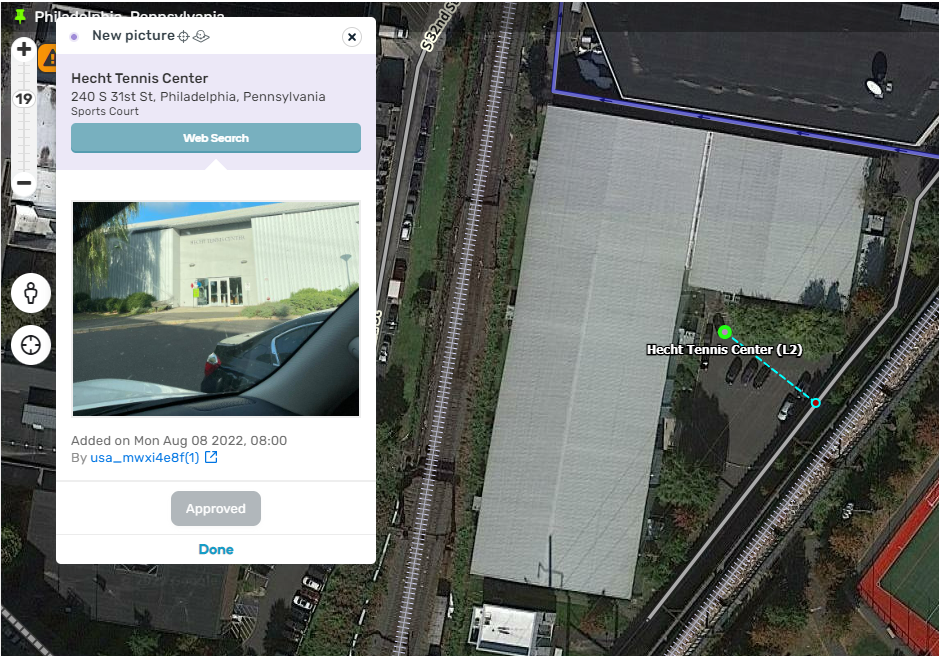
PUR (Place Upadate Request) Aproval / Rejection window doesn’t disappear after saving

Just for what it is worth, I have had no problem with WME in FF with this update

After approving a Place Update Request (PUR) and saving, the PUR window remains open. Here is what it looks like:Screenshot 2022-08-10 125714.png

This is happening with all scripts/extensions disabled.

Here is a PL to a place I had this happen with: https://www.waze.com/en-US/editor?env=usa&lon=-75.18751&lat=39.95119&zoomLevel=19&venues=186646928.1866534811.1431437

I tested in the general area with other types of PURs (adding a new place, for example) and the same behavior occured.

Hola Waze !

Así como “la voz” varias veces avisa (¿tres?) por un cambio de dirección. Ejemplo: “Mantener carril derecho y tomar la segunda salida”. Sugiero que debería “La voz” avisar: ¡Varias veces! que hay una cámara de velocidad a 500 metros, 300 metros, 100 metros. Es mucha plata pagar multas por exceso de velocidad, sobre todo aquellas cámaras que son caza-bobos. El conductor no puede estar fijando la vista en la pantalla todo el tiempo y regularmente. A 60 km/h los 500 metros se hacen en 30 segundos. Nada, con la mirada en el transito/manejo se pasa rapidísimo y uno esta al disparo de la cámara de velocidad casi sin darse cuenta. Es uno los tantos motivos que uso WAZE.

Me gustaría recibir una confirmación que leyeron mi mensaje, y espero me digan que harán con él: desestimarla, denegarla, tomar en cuenta, analiza, o cualquier otra situación en le que puede caer el pedido.

Supongo que muchos conductores distraídos como yo, les encantará esta mejora.

Muchas gracias.

Atilio Rugonyi

El mejor lugar para pedir eso es aquí: https://waze.uservoice.com/forums/59223-waze-suggestion-box
Cuantas más personas estén de acuerdo, mayores serán las posibilidades de que lo consideren.

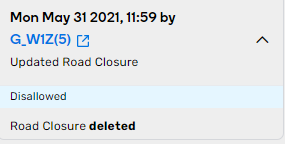
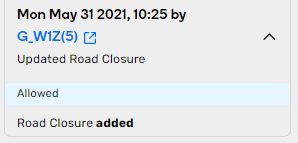
Now I am missing info/details about closures in history…
That info is important!

What krzycholub said ^^

Road closure (RTC) details, such as start and end dates, no longer show in the history pane.

Here is a PL for a segment that had a RTC on Mon May 31 2021 at 10:25: https://waze.com/en-US/editor?env=usa&lat=40.70530&lon=-77.58899&s=412387220757&zoomLevel=19&segments=507584266

Here is what the entry looks like when a RTC is added:3.png
Here is what the entry looks like when a RTC is deleted: 4.png

Pretty sure that has always been a script, URO+, that provides that info. Maybe post in the URO+ thread about that.

Good point. I keep forgetting what script is providing what info :smiley:
Looks like we are also missing info about gas price updates.

Can also confirm that the WME no longer loads in Firefox. It just stays stuck on the loading wheel. I have turned off all scripts and it still looks like this.

In the New Version we still experiencing an issue when closing a PUR or a UR the windows don’t closed automatically after saving.

Hi SC1GHERA,

Could you please tell which Fire Fox version do you use?

Thank you,
Nataliia

Hi G_W1Z,

Thank you for this report. Sorry, I am not experienced with approving PURs, what is the expected behaviour? Should the PUR window be closed after pressing “approved”?

Regards,
Nataliia

Once they are approved or rejected, the window remains displayed but once you click save the window closes (since the task with that PUR is now complete.)
Hi Nataliia,

I currently use Firefox 103.0.2 on my main computer, and I use 102.0.1 on my laptop - both versions exhibit the issue of being stuck at Loading.

I can confirm that I am still experiencing the Content-Security-Policy issue:

Known issues:
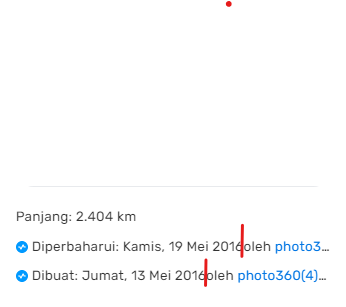
User history on Left Panel/sidebar, no space between date and oleh (by).
occurs when using the Language option “Bahasa Inggris”.
WME Need Fixed.png