Note: we have deployed some infrastructure changes around snapshot mode, so we ask you to pay attention and report if you notice any unexpected changes in behavior.
Known issue:
A text “disabled =” displayed in the field “External providers” in the left panel.
New features/enhancements:
Map editing for L1 is now available as for :
a) L1 will have limited editing capabilities that will grow over time, based on their lifespan and drives.
b) While unable to edit, L1 will see an alert message that will prompt him/her to request an edit via the forum.
Merge venues: some changes to the merge card logic added.
PUR reports: tag ” New EVCS" displayed for reports when EV is enabled in a certain country.
The style for the notification counter was updated and a red badge added to the bell icon.
Bug fixes:
We’ve released 3 bug fixes:
“Undefined” after name Place Update - fixed.
Possibly corrupted area - edits and saves refuse to occur - fixed.
Operator and Brand fields are not always visible - fixed.
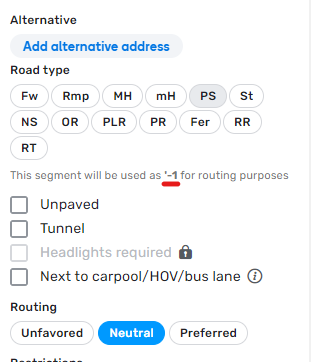
Is it correct that under the road type, with unprocessed routing preferences the segment with routing preference '-1 is displayed?
For routing prefernce “Unfavored” or “Preferred” this is displayed correctly.
I think this here is an error or a missing string.
Screenshot attached
It’s very good to hear that L1 editors are able to edit again after they were banned from editing in September last year, but I don’t understand to what extent they are able to edit.
Could you please provide more details what “L1 will have limited editing capabilities that will grow over time, based on their lifespan and drives” mean. This is very vaguely worded.
I understand that the amount of possible edits depends on the number of days since logging into Waze and the number / distance of drives. Are there any rules of thumb like “every week the number of maximum edits increases by 10, every 100 km the number increases by 10”?
Couldn’t agree more. Some official guidance from Waze would be super helpful here, either in WME or a link to a page on the Global Wiki.
The error message saying “you can’t edit the map yet” offers no helpful information. Waze needs to look at this from the perspective of a new user - someone who hasn’t used WME before. How would you perceive “you can’t do this yet” on a website with no other information readily available or accessible? You’d be frustrated, annoyed, confused.
In my opinion, Waze needs to make the requirements for editing clear for new editors.
With restrictions lifting, now is the perfect time to give new editors the reassurance that they WILL be able to edit (again), along with a reason to use WME. Perhaps this would even give some long-awaited hope to the potential editors that Waze pushed away over the past few months.
I just fear that with this generic error message, the regular question we will get going forward will change from “why can’t I edit?” to “why can’t I edit the map YET?” - except this time we have no answers. That in itself is likely to turn yet more potential editors away - just like the current situation :roll:
“You can’t edit because you haven’t edited enough.”
Likely the minimum account age and number of drives before editing rights are granted, is meant to limit the impact of bot damage. Giving hard numbers sets an easy target for malicious intent.
The exact details are proprietary and most likely will not be shared. The biggest take out of this should be that L1 editors need to get in contact with the editing community for guidance and help.
Any idea why the sequence of the road types in the drop down changed? Is this intentional? Editors now are lucky to be able to use Compact density (with the regular sequence). The sequence of the old fashioned dropdown doesn’t make sense to me: Primary Street, Street and Narrow Street as last road types. Better to change this back.
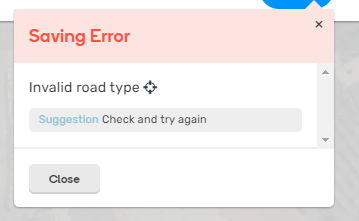
I get an Saving Error: Invalid road type after addding a segment and selecting the St button.
The error occurs when you click (again) on a button with the same road type.
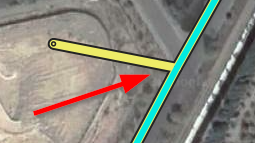
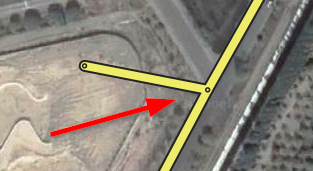
Probably not something of this WME version - but: Don’t display a connection node where there isn’t any connection
If one segment touches another segment somewhere in the middle it should be visible if there are two or three segments. Think of a T-crossing. At the spot where the segments meet the end-of-segment dot is displayed, which could suggest there is a connection, but sometimes there isn’t any: instead of 3 segments there are only 2. Better only display this dot when there is really a connection.
Regards,
Dirk
a) L1 will have limited editing capabilities that will grow over time, based on their lifespan and drives.
b) While unable to edit, L1 will see an alert message that will prompt him/her to request an edit via the forum."
In Italy, we don’t use the forum for any request to edit permissions, we have a specific tool UREQ this is much easier and faster than the forum