Hope you’re all doing well. A new editor version v2.75-2 has been released with exciting updates.
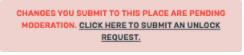
Add an entry point for sharing on forum- ENABLED.
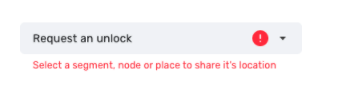
Share on Forum: alert when nothing is selected- FIXED
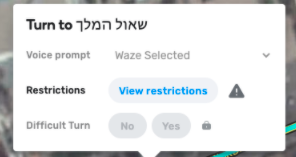
Turns tooltip arrow width fix- FIXED. Expected behavior is that the words "view restrictions"should be displayed completely.
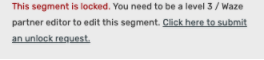
L1 users can use “Add linked Google Place” but can’t save it-FIXED Forum Link. Expected behavior is that “external providers” section is hidden when creating new places as L1 user.
Turn instructions in URs are behind suggested route and not visible- FIXED
Layers:Toggle off the ‘issues’ group -> the group would collapse/Toggle on the ‘issues’ group -> the group would open and the items are visible- FIXED
Comment panel does not scroll correctly- FIXED. Forum Link
Pedestrian segments can be closed: FIXED. Forum Link. (The expected behavior is that the closures tab would always be enabled and users can create and delete closures on walking segments)
Ok, wanted to check the country. The link points to this forum: https://www.waze.com/forum/viewforum.php?f=2002
Which is Ukraine (Українська) ‹ Запити від користувачів (коригування, додавання, допомога)
However that forum was set to be in read-only and only contains a single topic: Основна інформація про запити
by Sapozhnik » 12 Oct 2020, 17:55
That is why you get “You cannot post in this forum” it has nothing to do with the WME version or feature, it’s a forum permission problem because that link in WME is meant to open the forum in “New post” mode and since there is no permission to post, this text is displayed.
Easy to fix but not sure if the local community made it read-only on purpose or not.
Hi.
This forum was created for public requests. I asked Hezi to change settings. If it’s very ease and you have access for changing permissions, please correct it.
Hi,
it seems that the status Page has a Problem (https://status.waze.com/).
From the table above it seems, that there were no Map Update on INTL Server in the last six days, additional there is no delay shown.
But when I check the blog articels under the table, there is visible that the map update of INTL take place. ( Tuesday, March 30, 2021
International map tiles were successfully updated to: March 30, 2021 06:00 UTC )
Checked, also a place where I changed something and it’s in the livemap.
So it seems that the table row “Map Build” on the site is not updatet anymore. For NA Map Build it seems to be the same.
Regards
Peter
The issue with nothing showing up in the “Areas” tab (post below is quoted from the v2.74-2 release announcement thread) is still present in the new version.