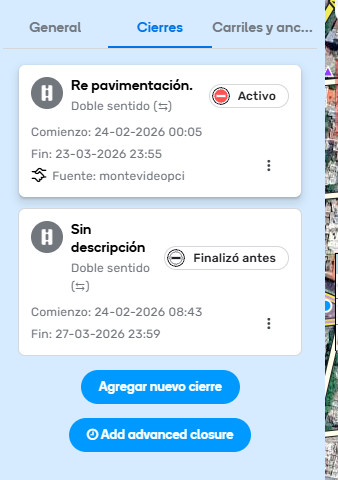
Add an editor closure on two segments leaving node closed from March 1 to 5
Add a Feed closure for the same segments from March 2 to 7 leaving node open
Editor only shows Feed closure enabled and in editor closure shows nodes enabled, but the node does not allow routing.
If you mark Feed closure as finished before March 5 Editors closure goes active en node is shown as closed, so you can mark the node as open…
So if steps above are followed you’ll find that active closure has nodes open, you can´t see nodes closed on previous closure and routing is not allowed. If you delete Feed closure the you can only see closed nodes
In case this behaviour is WAD, it should be clearly stated here
Can I please confirm that I understand the issue correctly? There are two overlapping closures and one of them has nodes closed. Once closed-nodes-closure from Editor (starts earlier, ends earlier) gets overlapped by another closure with nodes open (starts and ends later), the nodes become open as the latter closure gets enabled. But if open-nodes-closure get resolved before the end date of the other, closed-nodes-closure gets enabled back and routing is not possible through those nodes.
Also, I see that currently the closures from the linked area have no nodes closed so could you please confirm if you made any changes? If any nodes closures were changed, please share the permanent links to the node which was closed and some examples of the segments which were not available for navigation.
Could you please confirm if by this you mean that though nodes were/are open, they are closed for navigation and if resolving Feed closure removes the segment closure but keeps only nodes disabled:
Any additional details would be very helpful since currently I see all nodes as open so I am not sure to which node to mock the route to try to reproduce the issue.
The initial problem was that although the closed nodes did not appear, Waze did not route through them in any case.
We discovered that because there were two overlapping closures, even though the current one did not have closed nodes, the nodes did not allow routing (they acted as if they were closed) and were not displayed as closed in any case.
When the current closure was marked as completed, the closed nodes were displayed.
Changes had to be made to allow routing and to diagnose the problem.
To reproduce the problem, follow the steps above:
Add a closure with closed nodes.
Add a closure by Feed with open nodes (obviously I can’t do that).
I guessthat the problem is not the closing dates but the overlapping of different conditions for the nodes.
Can I please ask if the issue is still reproducible and if you can share the app logs? If the problem appears, it would help if some more examples of the issue could be shared.