Well… now I cannot reproduce it :oops: I could before back and forth several times but its not doing it anymore. It was as if the Save closure button did nothing at all when it happened. I turned all scripts off and enabled one on at a time refreshing each time and toggling the check box and saving.
Since all is fine now I’ll chalk it up as “FM” :lol:
Might be that the Waze server threw an error. I’ve had it happen that such errors aren’t displayed in any way. I had to look into the developer tools at the network calls to see the actual error. I’ll look into it nonetheless.
I decided to do the rewrite anyway this evening and slapped version number 1.0 on it
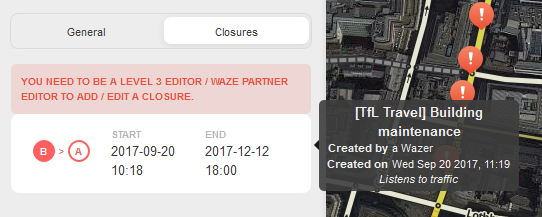
As can be seen on the new example picture in the first post (and below), the script now uses a right hand tooltip next to the closure to give more details, even if you can’t edit in the area you’re looking at. But even if you can edit in the area, it is still easier to see information about the closure.
Thank you for this! I have no idea why they don’t show closure details outside the EA by default. But then again, I question several things. Probably because their editors / developers aren’t allowed to use any scripts.
Every time I de-select a segment Closure Details is throwing two MO exceptions:
[code]VM348:100 Uncaught TypeError: Failed to execute ‘observe’ on ‘MutationObserver’: parameter 1 is not of type ‘Node’.
at MutationObserver.handleMutations (eval at <anonymous> (:2:479), <anonymous>:100:45)
handleMutations @ VM348:100
VM348:100 Uncaught TypeError: Failed to execute ‘observe’ on ‘MutationObserver’: parameter 1 is not of type ‘Node’.
at MutationObserver.handleMutations (eval at <anonymous> (:2:479), <anonymous>:100:45)[/code]
Hmm, indeed. I seem to have only tested whether things worked, but didn’t look in the web console. It didn’t break the code in any way, but we don’t want to pollute the console for everyone else
I haven’t tried v1.0.2 just yet but on 1.0.1 I have had a few instances where the closure details got stuck and would not go away. Not sure if anyone else has seen this but next time I see it I’ll see if the console spits anything out.
I’ve encountered another case myself where the popup didn’t disappear. I can’t remember exactly how it happened, but it seems like I’ll need to improve that part of the script slightly. It doesn’t seem to happen too often though.
I see it occasionally but it isn’t something that I can say do this, this, and this and it happens every time. It’s always at the most unexpected time but there days I don’t see it at all. Hope you can find it and thank you again for the script!
Version 1.0.3 has just been released. This is a technical release that replaces the internal Waze object with W, as the Waze object will be removed in about two months.
Version 1.0.5 has just been released. Version 1.0.4 was apparently not announced, but it was just a technical fix anyway to deal with some internal changes in the WME.
This version is also mostly about dealing with internal changes in the WME. It should also prevent tooltips from getting stuck further. If a tooltip does get stuck for some reason, it should disappear when you hover over another closure.
Hello – If I can be so bold as to request an Enhancement, here it goes!
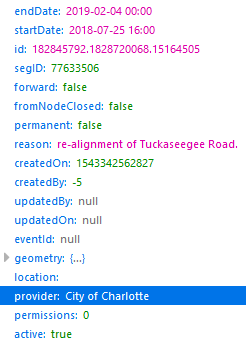
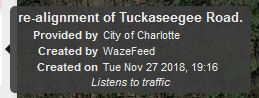
When a CCP Partner sends a feed to Waze for closures, the WME Closures Details shows “Created by WazeFeed” , but you need to click into the closure to find the “Provided by City of Charlotte” in my example. Request that "Provided by… " be included in the WME Closures details
Here is an example PL which (currently) can be used for testing
Version 1.1 has just been released. This version adds the “Provided by” information if it is available for a closure.
I also took the chance to clean up the code a bit by changing how the styling is applied to the tooltip. While doing that I also fixed a bug that was causing the tooltip to not have enough width to display all data. Tooltips may now stretch 400 pixels instead of 200 pixels. As an aside: this fixes the display of the information primary lot type tooltip for parking lots by Waze as well.
With the latest release of WME and the new active closure contextual menu, can we get some more horizontal space between the left-hand panel and the on hover closure details. Makes it difficult to read the new menu
I’ve just submitted a PR for review that fixes this issue by hiding the tooltip when that menu is opened, as well as fixes an issue I’ve been having where the tooltips are not hidden if you click on the “card” to edit the closure.