An odd difference I found that is a function of the Compress / enhance report panels (UR/MP). I would expect the Compress/enhance to possibly cause a problem, but in this case, it doesn’t. It acts opposite to what I expected.
Everything looks fine in the image below.
What I find confusing is that when the option is unchecked, the More Information portion is compressed horizontally. That causes the colors indicating the Waze projected route [purple] and the Waze driven route [green] to be overlaid with their corresponding text.
I know it is only a small cosmetic issue, but I wanted to bring it to your attention just in case.
No other scripts enabled, just WME Fix UI Memorial Edition v1.9.257.
Could you add an option to disable gyroscope sensor option when using the StreetView on a laptop?
It takes the position and movement of the laptop, just like a phone. If laptop is not stable, even if the screen moves a little bit, the streetview view will shake or move with how the screen moves. So need something to disable. You can disable the gyro sensor movement if you click on the icon that shows like a little phone screen with two arrows (to left and to right), when StreetView is open.
I cannot merge segments when Fix UI is enabled, the option is always greyed out. If I disable Fix UI, I can merge the segments normally. Is this an intended feature that I’m just not getting?
Also, using the Bridge button isn’t the best way to merge two segments, as it also increases their elevation. The right way is to select and remove the connection point between two segments.
Somehow I overlooked the option that disables the Bridge Button, my mistake.
But I also didn’t know that I could simply remove the connection point, so I will keep the button disabled. Thanks guys!
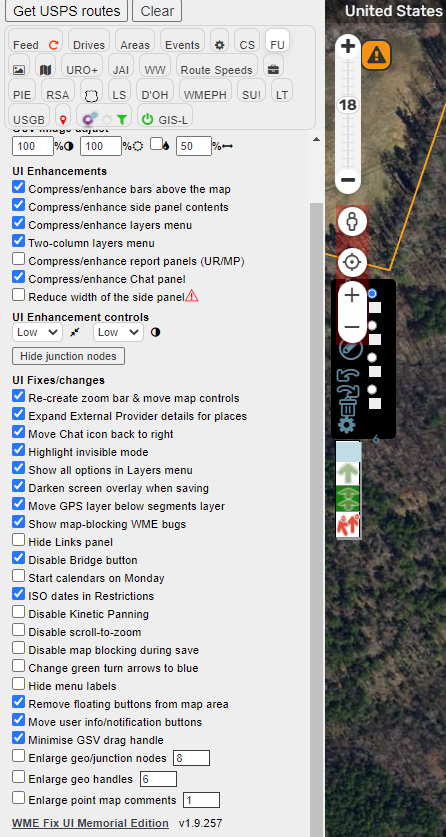
I’m currently getting duplicate zoom controls; the FUME zoom bar at the top and the native +/- zoom controls underneath it. (I’ve included my settings in the screenshot just in case they make a difference.)
Isn’t this something you can enable/disable via the browser itself, by denying WME access to the gyro sensor? None of the laptops I’ve got access to exhibit this behaviour, so I’ve got no way of observing how WME behaves when this occurs, or what (if any) means there may be to stop it via a script.
Request for which I think FUME would be the optimal provider:
A “reload at this location” button, probably in the Permalink box, so that the URL of the current location is loaded in to the “URL bar”, and not just a refresh, but a full reload of the page at that location.
I have never understood why Waze removed this capability.
Toolbox also adds some icons on right bottom corner of screen, that allows to do the same.
Just verify if you do not have enabled the “Hide Fancy Permalink icons” options on TB configuration menu
Would like a mouse-click, despite the keyboard shortcut.
I only turn on Toolbox for occasional specific jobs: don’t want the weight of TB all the time just to have a reload button. I currently run (a slightly modified) WME Simple Permalink to accomplish this feature, but think it would be a natural addition to FU, and that’s one less script I can run.