I’ve just seen that there is a UR within my AM area in Mold. As you can see from the picture, the user was given the correct directions but the instructions told him to continue straight when the turn is clearly to take the second exit or even to turn right. I’ve seen this myself at similar roundabouts. I’m not sure how to correct this. Is there anyway for Waze to recognise and say the correct instructions?

Thanks, Gareth
Using the Roundabout Angles Script, you can see that it is technically “straight on” - although only just!
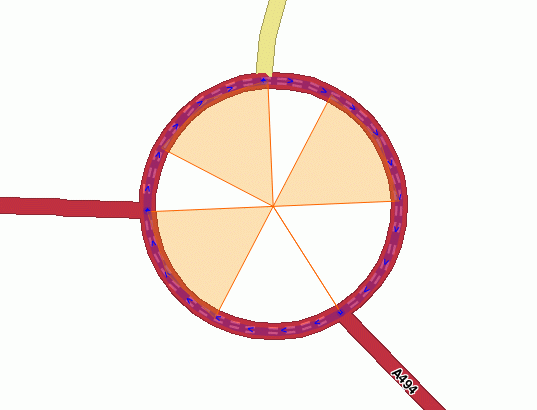
I would advise moving the junction at the north of the roundabout slightly clockwise and the junction at the south-east slightly anti-clockwise. That should prevent them describing each other as “straight across” - which they really don’t look like!
Thanks. This change will probably affect the instructions given for the other turning off this roundabout but I’ve updated the roads and I’ll check it once it goes live.
I’d watch that Iain chap, he knows too much.
Sent from my GT-N7100 using Tapatalk 2
There’s a page in the Wiki that explains how angles influence navigation instructions. Tricky to find, but it is in there…
via mobile
Yeah, I don’t use it very often, but it’s damn useful when you need it. It has 2 functions: 1 creates a landmark snapped to the roundabout (useful for motorway junctions).
The second function creates the weird looking landmark you can see in my screenshot. There are a couple of minor gotchas: first of all, if you don’t have the landmark layer on, it creates the landmark but you can’t see it - so you keep hitting the button until you have two or three. :lol: The other is that it really is a landmark, so you have to remember to delete it again.
It’s written by davitp from Portugal - a nice piece of work. The forum topic is here.
And I think this is the Wiki section Tim was referring to.
me too. I installed it and only used it once :mrgreen: