I got Waze to take me to Barking station not knowing there are any driving restrictions.
The UK address is as follows Barking Station, Station Parade, Barking IG11 8TU
Moved to correct sub-forum.
Hi
Welcome to the UK forum.
I’m one of the Local Champs primarily working in South London but have been to Barking a number of times. The road in front of the station entrance is buses and taxis only and clearly signed as such. As you didn’t post a report from the app, I’ve no information about whether you were approaching the station from the north or south, nor what your vehicle setting was in the app.
If you have your vehicle type set to taxi, Waze will assume you’re permitted to drive right up to the station entrance on Station Parade, otherwise it will take you as close as it can - either the junction of Cambridge Rd with Station Parade, or via either Salisbury Ave or Wakering Rd to the junction with Station Parade, where you’d have to turn onto Longbridge Rd.
What was your vehicle type set to?
Hi, thank you for responding. It’s the first time I’ve used this to report something so please forgive me.
My vehicle type is a private car. I planned to go to the station but because I didn’t know there were any restrictions, I didn’t know to plan to a different location. It was only at the point of no return that I realised there were.
Thanks
Thanks for giving more detail. It’s not necessarily a problem using this method for reporting a problem - it’s just that it’s helpful to give the details such as the roads you used approaching the point. It looks as though the restrictions were introduced in 2022 and Streetview images are earlier (2020), so the current restriction signs are not visible remotely. There should have been some warning signs indicating that the road ahead was restricted to buses and taxis. If not, you possible have an opportunity to appeal any fine imposed due to inadequate signage. I wish you well with that!
Unfortunately, Waze has no way of showing roads with restrictions and will give a route through a bus & taxi restriction if your vehicle type is set to taxi. It’s worth checking every time you start Waze that the vehicle type is set correctly, as an automatic app update has been known to trigger a change of type without the user being aware.
I’ve checked the route offered by my Waze app, and it shows the destination point for the station on Station Approach, but the route stops beside the entrance to the Vicarage Fields North car park entrance. That should have been offered as one of the closest parking locations near the station. I’m surprised there are no apparent signs to a pick-up or drop-off point given the ban of private cars and private hire cars from in front of the station.
I’ve added two additional “entry points” on Salisbury Rd by the Disabled Parking, and also on Station Parage at the entrance to the Vicarage Fields N car park entrance. Hopefully, that will make navigation easier.
Safe driving!
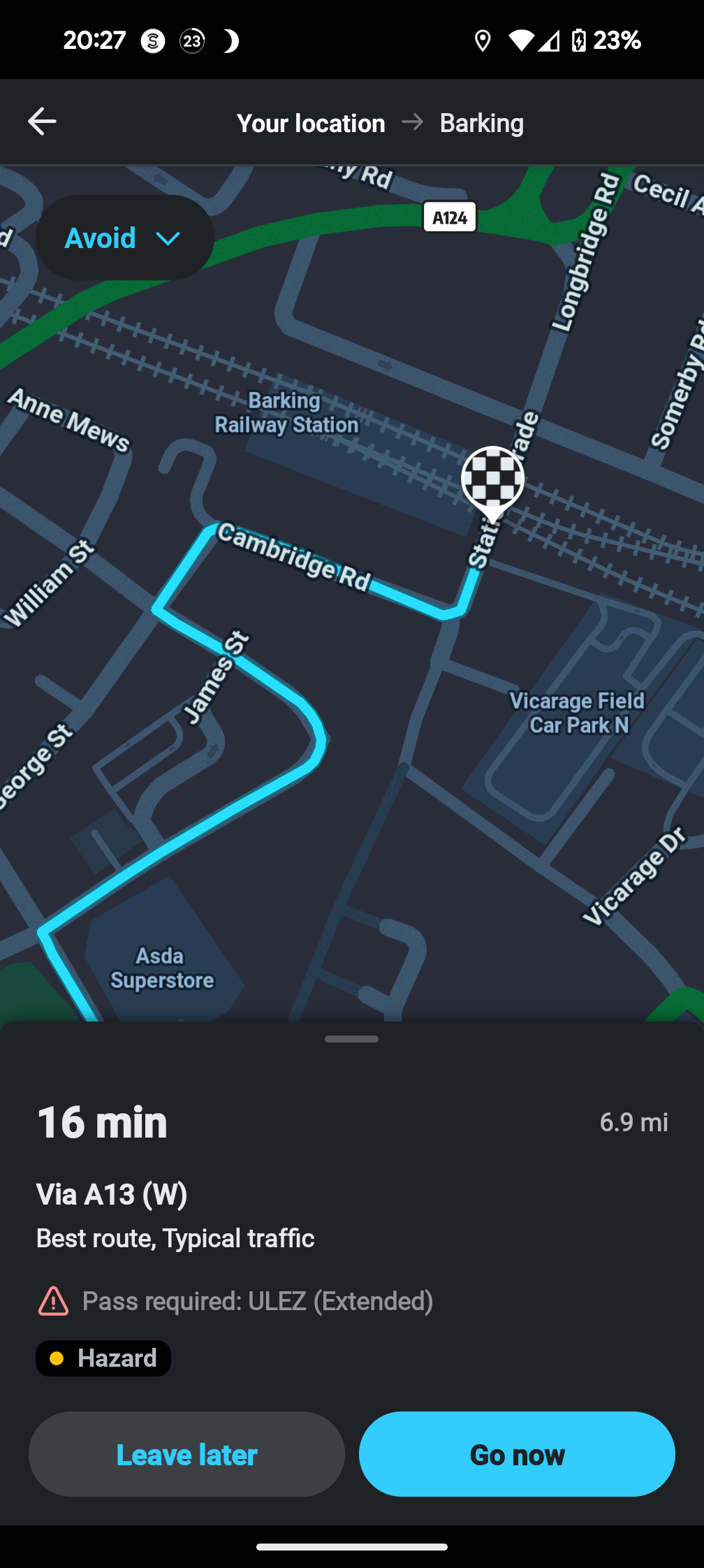
Hi and thank you so much for your response. Confirm that my settings are private car and not taxi. It’s never been set to taxi. As I was driving the time that I set the new destination, I asked ways to take me to Barking station. And I’ve just rechecked and it still taking me to station parade which is within the restricted area.
I might have noticed the signs on my way in if there are any had I not been arguing with my partner at the time due to them being late for work due to both railway stations that are options that we would normally take, being closed! Guess I have to take the fine on the chin but it’s still gutting and I’m surprised that Waze will still root me into the restricted zone despite being listed as a car in the app.
If you look closely at the screen shot by zooming in, you will see the football at the entrance to the station, which is the requested destination. However, the blue navigation line stops at the turning into the Car Park before the railway bridge.
I agree it would be helpful to have the end of navigation more visible. That’s why I’ve edited the destination points for the station which should improve things.
Safe driving!