Waze Routed Driver through PLR?

Please take a look at this UR:

https://www.waze.com/editor/?env=usa&lon=-71.36473&lat=42.29971&layers=997&zoom=4&mapUpdateRequest=4125796

The driver (en route to the MassPike) reports being instructed by Waze to detour off Route 9 - all well and good (could have been snow storm-related delays on the more direct route), but Waze routed through a parking lot road instead of using the off ramp to Route 27. Shoudn’t Waze have avoided the PLR?

The only reason I can think of for that is if Waze detected a traffic issue ahead, after the user had passed the ramps.

What I want to know is where Waze was sending the driver. There’s no access to the Mass Pike on that road.

I’ve bumped it upstairs to see what can be found about routing across the PLR like that.

It makes sense (except for the PLR) if Waze was redirecting the driver to route 27 north (N Main St), then to route 30 west - which brings you to the MassPike.

This, together with the same reporter’s other UR (https://www.waze.com/editor/?env=usa&lon=-71.33255&lat=42.30430&layers=997&zoom=5&mapUpdateRequest=4125795) indicates that Waze really wanted to avoid the more direct route 9 to Speen St path. (Well, there WAS a snow storm that day.)

Especially if it’s forcing them to go through a PLR to get around a problem.

dmcrandall,

Did you by any chance find and fix a problem on these segments today: https://www.waze.com/editor/?env=usa&lon=-71.35647&lat=42.30030&layers=997&zoom=5&segments=83935750 and https://www.waze.com/editor/?env=usa&lon=-71.35767&lat=42.30155&layers=997&zoom=5&segments=70320928 ?

Curious to know what it was - I was just looking at the 9/27 intersection using WME Route Checker (and then Live Map), and routings starting on those segments (showing as edited by you today, but would not have updated yet) behave as though that segment is the eastbound direction. Weird. Adjacent segments are OK.

I went through there clearing ReverseConnectivity issues. But both segments show westbound to me now. May have been a glitch in the display?

They look fine in the editor, but this might explain the weird routing originating in those segments (still present this morning, perhaps will update by tomorrow).

Response from a routing expert, regarding Waze routing through the PLR:

“Took a look finally at that UR in Natick. Definitely shows Waze routing the user through a PLR, but no suggested route before the PLR. This tells me that he missed the first turn Waze gave him, and the turn onto the PLR was following a recalculation. It is my pet theory that Waze can ignore most or all penalty based prohibitions within very close proximity to the beginning of a route.”

I just checked Live Map. Those segments are showing normally again.

And normal in WME as well.

Meanwhile, there’s been another UR for routing through the PLR (on Feb 5): https://www.waze.com/editor/?env=usa&lon=-71.36094&lat=42.30049&layers=3045&zoom=6&mapUpdateRequest=4134172

That one looks like he tried to get on Rt 9, and Waze directed him back to his original road. I wonder what was so bad ahead that Waze was directing people around it that fiercely.

I can’t imagine - don’t believe there were any major Route 9 problems on Feb 5.

Snow issues? Did you try routing through there on the live map?

Spelling errors are courtesy of large thumbs and a small smartphome keyboard.

Hmm. This is getting very interesting. In Live Map, today, Waze is definitely trying to avoid Route 9. (This was a route from a point on Route 9 westbound, between Weston Rd and Lexington Rd in Wellesley, to the MassPike entrance on Route 30 near Speen St. (The only problem reports are people reporting potholes.)
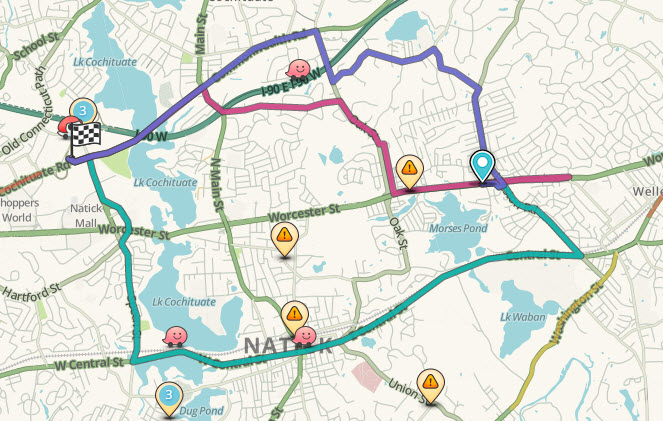
2-8-2015 1-52-54 PM.jpg

This segment may also be worth checking for connectivity issues:

https://www.waze.com/editor/?env=usa&lon=-71.31356&lat=42.30561&layers=3045&zoom=4&segments=83953815 (I assume I can’t see any because it’s locked at level 3?)

Here was the problem. It’s been fixed.

Great! Thanks.