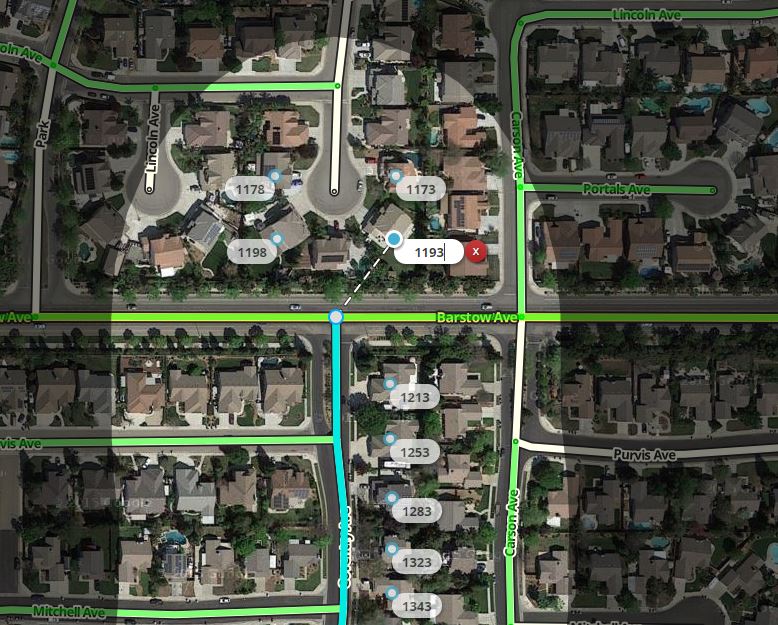
I wanted to give an example that emphasizes the need to check all the edits made using this script. I came across this while editing today:
As you can see, the selected north-south segment in the bottom half of the image is selected for house number editing. Several house numbers at the north end are incorrectly attached to this segment when they should be attached to the segment on the north side of Barstow Ave. In this case, the segment to the north did not get selected because it was missing the “Ave” at the end so the name was different than the selected segment. Because the segment wasn’t selected these numbers were nudged but remained connected to the wrong segment.
The fix was to name the northern segment properly and then manually nudge these house numbers (because I saved the first edit, this script will not move those numbers again). The moral of the story is to double check all edits!
Wanted to offer some more feedback after the “update” the other day. In a previous post, you suggested using the “H” key while editing HNs to initiate another add instead of clicking the “+”. It worked well enough until the update. Now, when I use the “H” key, it turns the surrounding area darker and darker with each key press, but does not add the HN window. Here is an example comparing them both. The top pic is before press “H” and the bottom after the first press of “H”.
Hope this helps the editing process for you. Thanks for all the effort to make it easier, and FASTER, to edit HNs!!!
I’m seeing the odd behavior using the ‘h’ shortcut even with the HN script disabled. Because of that, it looks like a WME bug not caused by this script. Can anyone confirm they are seeing this issue with the script disabled?
So, I found a script conflict between the NudgeAll and the script Closest Segment (https://www.waze.com/forum/viewtopic.php?f=819&t=133650). There is no shortcuts in that script so I don’t know why there’s a conflict. The coloring aspects of HN Tool works as expected and I see no other oddities. No messages in console at all.
This has been driving me crazy all week. You’re correct, there is no shortcut defined in Closest Segment, but I did find errors that only show up on init/first load. With Closest Segment enabled, the HN Tool throws an “uncaught typeerror”.
Uncaught TypeError: W.accelerators.registerShortcuts is not a function
   Interface.Shortcut.OL.Class.registerShortcut @ VM782:939
   Interface.Shortcut.OL.Class.add              @ VM782:965
   hnInit                                       @ VM780:1443
   hnBootstrap                                  @ VM780:1466
   (anonymous function)                         @ VM780:1482
I’ve not done much work with the Waze API stuff, but it looks like the Closest Segments plugin is either trashing, or not setting up parts of the W object, and as such it fails to register the shortcut. I’m sure somebody will figure this issue out long before I’ve figured out how to read half of the code for the APIs.
Well looks like another script is having the orange for base import HNs not show. I asked another SM and he did a refresh of scripts and his orange HNs went away too… :shock:
With every script off in tampermonkey (with Chrome obviously) the base import HNs are still white, so any ideas anyone?
The only script update I received was the WME Chat Addon. Since no other scripts updated, I would look at their script to see if you have a variable conflict. Of course, it could just be WME’s update that broke it.
So I used a different browser and removed all scripts and then went into HNs. They were still white…however, what was interesting is that the “H” key now correctly adds a new HN at the cursor location. So I’m thinking that a WME “fix” is the culprit.
The solution is to change this piece of code(twice) Waze/Presenter/FeatureEditor/Segment to this Waze/Modules/FeatureEditor/Segment
That did it for me and it is working fine now.
I got this solution from our script guy
Feel free to mention my nickname It’s not like I’m trying to hide that I write userscripts.
It seems that there was a bit of a reorganisation in the modules, hence the difference.


 It’s not like I’m trying to hide that I write userscripts.