sure sure. we all volunteer, and we all have our real life, and what you did here is more than enough to help editor to have better WME experience. I do volunteering in Waze also because i realize volunteering can help me make friends, learn new skills, advance my career, and even feel happier and healthier.
To toggle [WME SPEED DISPLAY] on MacOS
CMD + SHIFT + S works! Thank you so much
I just installed the script, but I see neither the speeds nor the option to activate the layer. The keyboard shortcut does nothing.
I tried it on both Prod and Beta WMEs, and I also changed the language from Spanish LatAm to US English and to BR Protugese without success. Tampermonkey in Chrome displays the script as active in the scripts list.
I don’t know what is going on. Any idea?
Solved!
Developer mode was disabled in this computer… No scripts were running here.
Cool!
I also like these challenges and networking that we do with other people that we could never imagine meeting one day. 
That’s great, I’m glad it’s working now. 
Any errors or suggestions, please report them to me.
Cheers.
Phew, I’m glad you found out what was causing the problem and that it wasn’t a grotesque error generated by the script itself. 
If you find any errors or you have any other suggestions, please report them to me.
Cheers.
I used it to find lots of segments that were not updated when the speed limit changed in our country some years ago. Thanks!!! 
I was expecting that the speed filter would remove the indications for out of range speeds, but it just added transparency to them. This was good and bad at the same time:
- Good because I could see which is the speed of the connected segments or the area in order to set the wrong ones accordingly, without having to select some of them to check for that info.
- Bad because in zoom out levels a cloud of transparent indications sum up and it is hard to read the speeds. I guess that it also takes too much CPU time to fill the layer.
Could the level of transparency be configurable? Too much transparency makes hard to read the speed in some situations (depends on the background map).
Thank you for your feedback, @witoco . 
It’s so good to see that my script is helping other WME editors 
I’m doing a script migration to new WME SDK. 
Maybe I do the opacity setting together with the migration update.
I don’t now when I will finish this migration, so we need to wait a bit haha
Cheers.


.The road signs in Israel match the default ones
Oh. Thank you for your feedback.
I was following some informations that I found on inthernet
New Script Update v2.0.0 is Arrived!
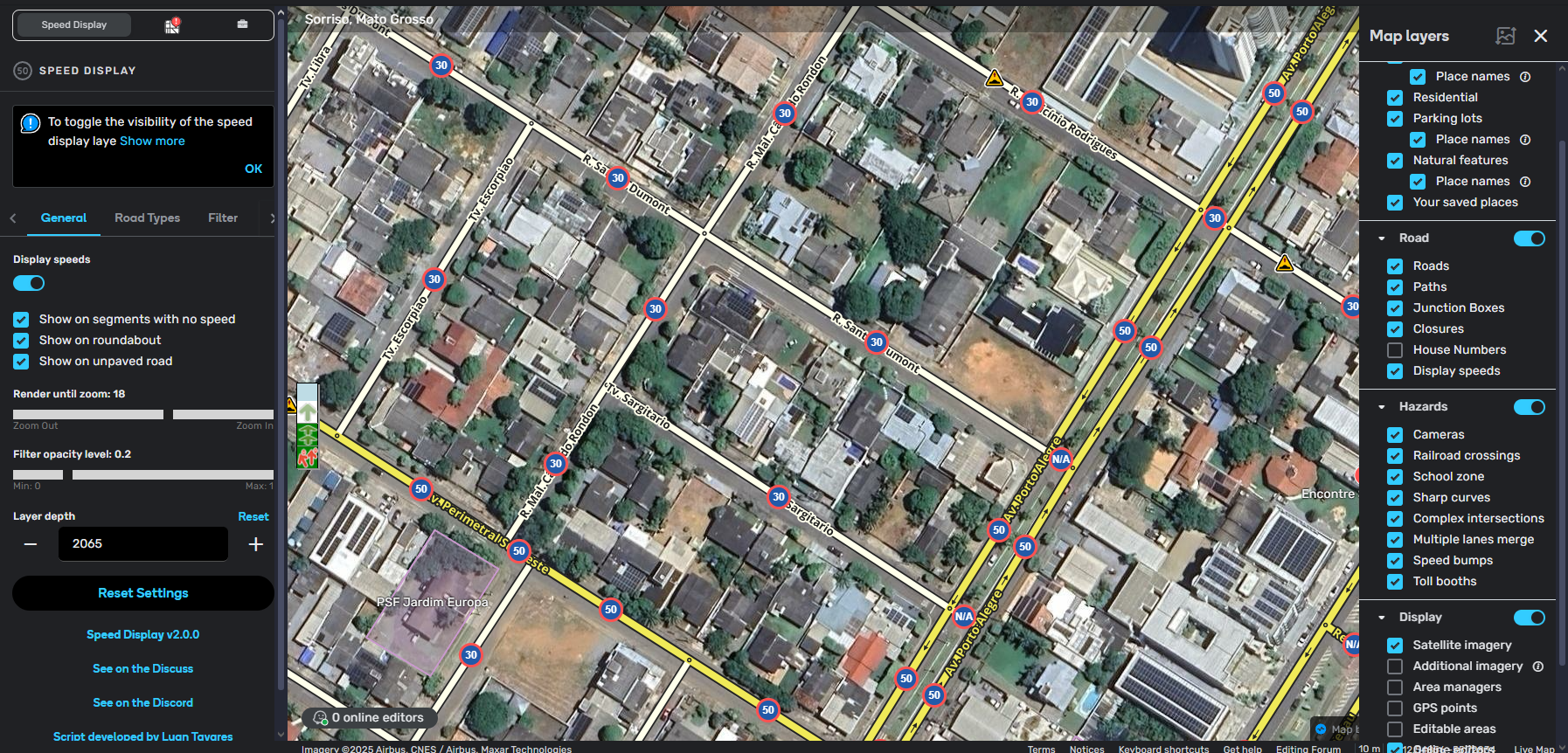
English:
What's New:
- New look! The script settings tab has been redesigned;
- Want to see the speed icons more similar to the ones in your country? You can now select themes;
- Working with more than one WME tab open? No problem. All settings are now synchronized simultaneously between all open tabs;
- Need to make the filtered icons more translucent? Your problems are over. You can choose the level of transparency you want for the icons yourself;
- The script now displays a message while loading new icons. There is an intentional delay in loading;
- If you enter a minimum speed greater than the highest in the speed filter, the script will clear the last field and display a warning message;
- Added a shortcut switch in the script settings tab to enable and disable the icons. It is still possible to activate/deactivate it through the "Map Layers" tab and also by shortcut;
- Thanks to the migration to the WME SDK, you can customize the script's shortcut key in the "Keyboard Shortcuts" modal;
- Added new buttons at the end of the script tab to access the Discord channel, the Discuss topic and my WME profile;
- Script code partially migrated to the WME SDK (not 100% migrated due to missing features in the SDK).
Fixes:
- Due to some changes in the code structure, previously saved settings will be restored automatically;
- The script now displays the speed on the correct side when the country has left-hand traffic;
- Several small fixes and code improvements.
Brazilian portuguese
Novidades:
- Novo visual! A aba de configurações do script foi redesenhado;
- Deseja ver os ícones de velocidade mais parecido com os que são em seu país? Agora é possível selecionar temas;
- Trabalha com mais de uma aba do WME aberto? Não há problemas. Todas as configurações agora são sincronizadas simultaneamente entre todas as abas abertas;
- Precisa deixar os ícones filtrados mais translúcidos? Seus problemas acabaram. Você mesmo pode escolher qual o nível de transparência que você deseja para os ícones;
- Agora o script exibe uma mensagem enquanto estiver carregando novos ícones. Há um delay intecional no carregamento;
- Caso você informe no filtro de velocidade uma velocidade mínima maior que a maior, o script irá limpar último campo e exibirá uma mensagem de aviso;
- Adicionado um switch de atalho na aba de configurações do script para ativar e desativar os ícones. Ainda é possível ativar/desativar pela aba de "Camadas do mapa" e também por atalho;
- Graças a migração para o SDK do WME, você pode personalizar a tecla de atalho do script no modal de "Atalhos do teclado";
- Adicionado novos botões ao final da aba do script para acessar o canal no Discord, ao tópico no Discuss e ao meu perfil no WME;
- Código do script migrado parcialmente para o SDK do WME (não migrado 100% por conta de recursos em falta no SDK).
Correções:
- Devido a algumas alterações na estrutura do código, as configurações já salvas serão restauradas automaticamente;
- O script agora exibe a velocidade do lado correto quando o país tiver mão inglesa;
- Diversas pequenas correções e melhorias de código.
wow, you are on fire. the update is very good one, thank you for your hard work
Thank you, @AndyLaode haha 
If you to find some bug, please, let me know. 
Cheers.
I’m OK with the delay, but the message is annoying. I wish it could be disabled in the settings or displayed in another way, like an (animated) icon in a corner.
Thanks for the feedback, @witoco.
When I created it, I really thought about doing something along these lines, but I ended up not doing it out of laziness.
I posted it hoping someone would comment on it so I could take some action. 
I’ll update it ASAP
Congratulations on your work to support the editor community. I’ve been using it for some time now to run checks in certain areas, and while I don’t mean to discredit the authors of similar scripts, this one has been the most satisfying for me. I can choose the zoom level, and it’s not as cluttered as the others. I truly appreciate your dedication.
Thank you very much! 
I’m very happy to know that my script is being very useful to other editors, as it is to me. I’m always available in case of errors or suggestions. 
And I haven’t forgotten about you @witoco, I just have other services outside of my work hours that have taken up my free time. But as soon as it’s finished I’ll post a new update with the improvements.