

THE MAP THAT KNOWS LIKE A LOCAL

About Waze

Colorful line art illustration of a car packed for a trip representing Waze community navigation

In 2009, we started with a simple idea:
The people driving the roads know them better than any map ever could.
Millions of people later, that's still how waze works

The companion that gets you

Waze doesn't just know the roads - it's getting to know you. Your routes, your timing, the streets you trust

Woman leaning out a passenger car window during a road trip representing personalized navigation with Waze

THE PEOPLE BEHIND THE MAP

Behind every waze route is an amazing volunteer community mapping the world

Global Waze volunteer map editors collaborating on local road map updates and navigation routes

Impact beyond Beyond the drive:

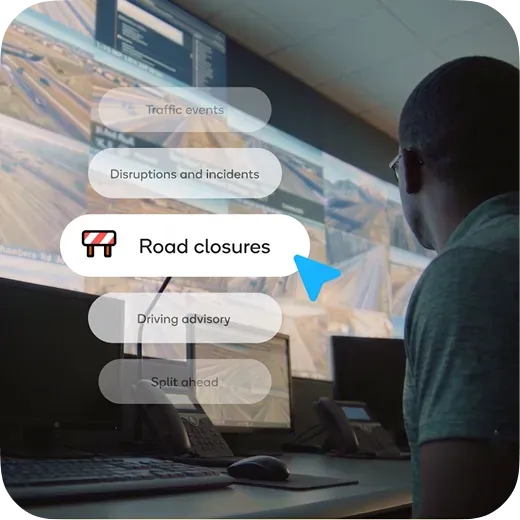
Waze also partners with cities, transit authorities and first responders to put community-driven data to work

Traffic control operator monitoring live city traffic screens and Waze road closures data
PLAN YOUR DRIVE
PLAN YOUR DRIVE

Waze lives at the intersection of technology and humanity - where every street feels local

Get answers on navigation, Gemini AI voice features, EV routing, and community map editing.

What is waze and how does it work?

Waze is a free, community-driven GPS navigation application for iOS, Android, Apple CarPlay, and Android Auto used by over 200 million drivers worldwide. Waze collects real-time GPS data and crowdsourced hazard reports from its driver community to dynamically calculate the fastest routes around traffic congestion, accidents, speed traps, and road work.
Waze is designed exclusively for private motor vehicles and motorcycles.

How does waze differ from Google Maps and Apple Maps?

While Google owns Waze, each platform serves a distinct navigation purpose:
  • Waze: Focuses strictly on vehicle navigation. It relies on real-time community reporting and dynamic routing. It's a specialized driver copilot.
  • Google Maps: Focuses on comprehensive geographic exploration, offering multi-modal transit (walking, public transit, biking), satellite imagery, street view, and detailed local business listings.
  • Apple Maps: Focuses on integrated iOS ecosystem navigation, featuring detailed 3D city landmarks, privacy-focused turn-by-turn guidance, and seamless integration with Apple devices.

Is the waze app free to use?

Yes, the waze app is 100% free to download and use across all supported platforms, including iOS, Android, Apple CarPlay, Android Auto, and Android Automotive OS (AAOS) built-in vehicle systems.

How does Google Gemini AI work in waze?

Google Gemini AI brings conversational intelligence to Waze through three key capabilities:
  • Conversational Incident Reporting: Drivers can state hazards out loud in natural language (e.g., "Looks like traffic is backed up from a crash ahead") without tapping buttons.
  • Conversational Map Updates: Saying "This road is closed for construction" logs an edit request for volunteer Map Editors to verify.
  • Natural-Language Destination Search: Drivers can search complex criteria out loud, such as "Find a gas station nearby with cheap premium fuel" or "Find open coffee shops with a drive-thru".

What is waze map mate?

Waze map mate is a community feature powered by Google Gemini AI that allows drivers to keep the local real-time map updated using natural voice commands. Drivers simply describe what they see on the road out loud to log live map edits and incident reports.

How do I search for a destination and start navigation?

  1. Tap the search bar.
  2. Type an address, point of interest, or contact name.
  3. Tap the destination.
  4. Tap Go now to begin navigation.

How do I plan trips, schedule drives, and view trip times?

To schedule a future trip or check predictive traffic before leaving, enter your destination in the search bar and select Leave later (or tap the menu icon and select Plan a drive). Waze displays a predictive traffic graph showing estimated drive times and traffic peaks across departure hours. Select your desired arrival time and tap Save. Waze will send real-time departure reminders based on live conditions. Ensure notifications and location permissions are set under Settings > Plan a drive > Time to leave reminder. You can also connect your phone calendar under Settings > Calendar sync to automatically schedule drives for calendar events with valid addresses.

How do I view turn-by-turn directions or compare alternate routes?

  • View Directions List: Tap the top bar of the screen during active navigation to open step-by-step route directions.
  • View Alternate Routes: Tap your destination, select View routes, and swipe up to compare alternate driving options and ETA differences.

How do I change vehicle profiles in waze?

To update your vehicle profile among options like Private Car, Taxi, Motorcycle, or EV:
1. Open Settings.
2. Tap Vehicle details or Vehicle type.
3. Select your vehicle profile to automatically adapt routing algorithms and eligible lane access, such as HOV or bus lanes.

What is waze motorcycle mode?

Motorcycle mode is a specialized navigation setting tailored for two-wheeled vehicles. It provides access to narrow roads and shortcuts inaccessible to standard cars, displays surface hazard alerts such as potholes and speed bumps, and uses ETA algorithms tuned specifically to motorcycle traffic speeds.

How does electric vehicle (EV) routing and charging work in waze?

Waze allows EV owners to enable EV features and select their specific plug type (such as CCS1, NACS, or Type 2) under Settings > Vehicle details > EV Settings. You can then search for EV charging stations in the search bar or view compatible stations along your route, showing real-time plug availability and charger speeds.

How do I manage toll roads, passes, and low-emission zones in waze?

  • Avoid Tolls & Toll Bridges: Go to Settings > Navigation and toggle on Avoid toll roads. Waze will recalculate your route using free public roads.
  • Toll & Passes: Go to Settings > Navigation > Custom Passes to add passes you own (such as EZPass, FasTrak, or regional carpool permits). This prevents Waze from detouring around tolls you already pay for and allows it to incorporate restricted areas you are allowed to travel through.
  • Estimate Toll Prices: Swipe up on the suggested routes screen before navigating to view upfront estimated toll costs.
  • Low-Emission Zones: waze automatically checks environmental driving restrictions and permits added in your vehicle details to prevent route violations.

How do I manage stops and navigation mid-trip?

  • Add a Stop: Tap the ETA bar at the bottom of the screen, tap Add a stop, search for the location, and select Go.
  • Stop Navigation: Tap the ETA bar at the bottom of the screen and select Stop.
  • Shut Off Waze: Tap the menu icon and select Shut off to close Waze completely.

How do audio directions and the waze audio player work?

"Less Chatty Mode" is an audio setting that reduces voice directions while keeping critical safety alerts active. It silences routine turn-by-turn prompts while continuing to announce mandatory turns, lane changes, and high-risk road hazards. You can enable it under Settings > Voice & Sound > Voice Directions > Less Chatty.
The built-in waze audio player connects natively with third-party audio apps. By tapping the Audio Player icon on the map screen, drivers can control playback for Spotify, Apple Music, YouTube Music, Audible, iHeartRadio, and Podcasts without leaving the navigation screen.

How do I share real-time trip progress (ETA) with friends?

You can share your live location, route progress, and real-time ETA with friends or family using the Share drive feature:
  1. Start active navigation in waze.
  2. Tap the ETA bar at the bottom of the map screen.
  3. Tap Share drive and choose your preferred messaging app, email, or contact.
Recipients will receive a secure web link showing your live progress on the map and your updated arrival time.

How do I find parking or request roadside help in waze?

Parking: Tap your destination, select nearby parking options, and tap Park here.
Roadside Help: Tap the orange Report menu icon, select Roadside help, and choose whether to request assistance from fellow wazers, professional roadside service, or emergency services.

How do speed trap and police alerts work?

Waze automatically displays visual and audio warnings on your map as you approach speed cameras, red-light cameras, and reported police traps. These alerts are generated in real time through crowdsourced reports from nearby drivers. You can customize audio alerts under Settings > Sound & Voice > Reports > Police.
Waze also includes a built-in speedometer that displays your current driving speed alongside the local speed limit. You can set waze to play a warning chime when you reach the exact speed limit or when you exceed it by 5%, 10%, or a specific threshold (e.g., 5 mph over). Manage this setting under Settings > Speedometer.

How do I find the cheapest gas prices along my route?

Tap the search bar, select Gas stations, and choose your preferred sort option (Price or Distance). Waze will display nearby stations with community-updated fuel prices (e.g., Regular, Midgrade, Premium, Diesel) and allow you to add the station as a quick stop along your existing route.

What happens if I encounter a sudden road closure, accident, or crisis?

Waze automatically recalculates your route in real time - often directing you through side streets or bypasses - to get you back on track with minimal delay.
Crisis Support: Type Crisis in the search bar to display regional emergency and crisis support locations.

Does waze support Apple CarPlay, Android Auto, and Android Automotive (AAOS)?

  • Apple CarPlay & Android Auto: Supported natively. Connect your smartphone to project waze maps, audio alerts, and voice controls directly onto your dashboard display.
  • Android Automotive OS (AAOS): Download waze directly from the vehicle's Google Play Store. You must install waze on your smartphone first to create an account before using standalone AAOS navigation.

Does waze work offline without cellular data?

Waze requires an active internet connection (5G, LTE, or Wi-Fi) to calculate initial routes, update live traffic, and process hazard reports. If cellular signal is lost mid-drive, pre-loaded turn-by-turn guidance will continue, but dynamic rerouting and live community updates will pause until connectivity returns.

Why does my phone get warm or lose battery quickly, and how do I fix it?

Waze continuously processes high-precision GPS tracking, real-time data sync, and map rendering simultaneously, which consumes significant hardware power. To reduce device heat and battery consumption:
  • Keep your smartphone plugged into a dedicated active car charger while driving.
  • Enable Dark Mode under Settings > Display & Map > Scheme > Night.
  • Ensure location access is set to "While Using App" in your phone system settings.

How do I fix "Searching for Network" or "No GPS" errors in waze?

  1. Toggle Connectivity: Switch Airplane Mode ON for 5 seconds, then OFF.
  2. Check Permissions: Ensure your phone settings grant Waze Precise Location or High Accuracy access.
  3. Adjust Phone Position: Move your smartphone away from metallic shields or glove compartments toward an open view of the windshield.
  4. Reset App: Force-close waze or clear the app cache in your device settings.

How are waze maps kept up to date?

Waze maps are maintained by a global network of over 500,000 volunteer Map Editors processing over 2 billion edits annually. Editors update road geometry, construction zones, and local detours using satellite imagery, official government feeds, and user-submitted Gemini voice reports via the Waze Map Editor (WME) online.

What is the waze for cities program?

Waze for cities is a free data-sharing partnership between waze and municipal governments or transit agencies. Cities share planned construction and road closure feeds with waze (which also syncs to Google Maps), while receiving anonymized driver speed and traffic flow data to optimize emergency responses and traffic signals.

How do local businesses advertise on waze?

Waze ad inventory is officially part of Google Ads Performance Max (PMax) for Store Goals. Businesses can connect with over 200 million drivers worldwide by leveraging existing PMax campaigns to automatically format creative assets into "Promoted Places in Navigation" pins along driver routes. This allows local and global brands to reach nearby drivers in real time with zero friction and no additional setup.

How do I become a waze map editor?

Anyone with a waze account can become a map editor. You can log into the online waze map editor (WME) at waze.com/editor using your waze credentials to start editing maps, fixing road details, and helping local drivers navigate better.

JOIN THE RIDE

The companion that gets you - and gets you there. Download waze.