
This page contains information related to editing Waze maps in the USA Southwest Region (SWR) which includes Arizona, California, Colorado, Hawaii, Nevada, New Mexico, and Utah. This page contains all guidance specific to the Southwest Region. Any exceptions by state are included here.
Your regional coordinators are Ottonomy (RC), tonestertm (ARC), Turbomkt (ARC), Jemay (ARC), and ojlaw (ARC). Questions regarding the information on this page should be addressed to the Coordinators or the individual State Managers (SM).
To get in contact with the Southwest editors please use >> this link << to join the Southwest Region Editors on Discord! Discord is the primary communication platform for Southwest editors.
This page is maintained by the local community and moderated by Ottonomy (RC), tonestertm (ARC), Turbomkt (ARC), Jemay (ARC), and ojlaw (ARC). Southwest map editors are encouraged to add/modify their own information in the Key Southwest Region Editors table below. All editors should be intimately familiar with Best Editing Practices.
Southwest editors should remember that If you edit in a state outside the Southwest Region, you must comply with that state’s guidelines.
If you have questions about this page or it needs updating please visit [Page update] Southwest Region (SWR) Wiki.
State-Specific Mapping Resources
Click to expand state specific mapping resources.
Arizona
Arizona Mapping Resources
For specific information and resources related to Arizona please refer to the page above.
Arizona Functional Classification
Click the link above for resources on functional classification.
Arizona Map Editors Community Forum
The page above is a discussion forum for map editing in Arizona.
California
California Mapping Resources
For specific information and resources related to California please refer to the page above.
California Functional Classification
Click the link above for resources on functional classification.
California Map Editors Community Forum
The page above is a discussion forum for map editing in California.
Colorado
Colorado Mapping Resources
For specific information and resources related to Colorado please refer to the page above.
Colorado Functional Classification
Click the link above for resources on functional classification.
Colorado Map Editors Community Forum
The page above is a discussion forum for map editing in Colorado.
Hawaii
Hawaii Mapping Resources
For specific information and resources related to Hawaii please refer to the page above.
Hawaii Functional Classification
Click the link above for resources on functional classification.
Place Name Harmonization
Click the link above for resources on place name harmonization in Hawaii.
Hawaii Map Editors Community Forum
The page above is a discussion forum for map editing in Hawaii.
Nevada
Nevada Mapping Resources
For specific information and resources related to Nevada please refer to the page above.
Nevada Functional Classification
Click the link above for resources on functional classification.
Nevada Map Editors Community Forum
The page above is a discussion forum for map editing in Nevada.
New Mexico
New Mexico Mapping Resources
For specific information and resources related to New Mexico please refer to the page above.
New Mexico Functional Classification
Click the link above for resources on functional classification.
New Mexico Map Editors Community Forum
The page above is a discussion forum for map editing in New Mexico.
Utah
Utah Mapping Resources
For specific information and resources related to Utah please refer to the page above.
Utah Functional Classification
Click the link above for resources on functional classification.
Utah Map Editors Community Forum
The page above is a discussion forum for map editing in Utah.
Roads (Segments)
Road Type
Determining road types in the Southwest aligns with the Waze USA Standard for freeways, major highways, minor highways, and primary streets. The Waze USA standard is a hybrid system based on a national standard called functional classification. In Waze, functional classification is used to determine road type.
Functional Classification
Functional classification maps are available for most states. Compliance across state borders is important to ensure better route selections between states.
Although the Waze USA Standard permits some road-type selection deviations, at present no Southwest deviations are permitted, but may be in the future.
Use only state DOT level Functional Classification (FC) maps when determining how to type (classify) a segment (Major Highway, Minor Highway, etc.). Some counties and cities have their own FC system, but only the state level system is to be used as a reference as these have been through a federal and state level approval process.
- Detailed information on Southwest states’ Functional Classification can be found in Mapping Resources.
- Functional Classification for other states.
Minimum Road Type Standards
- Interstate = Freeway
- US Highway = Major Highway (MH)
- State Roads = Minor Highway (mH)
Road Naming
Use the following designations when creating or editing numbered roads in the Southwest Region.
| Arizona | California | Colorado | Hawaii | Nevada | New Mexico | Utah | |
|---|---|---|---|---|---|---|---|
| Interstates | I-XX | I-XX | I-XX | H-XX | I-XX | I-XX | I-XX |
| US Highway | US-XX | US-XX | US-XX | US-XX | US-XX | US-XX | |
| State Highway | SR-XX | CA-XX | SH-XX | HI-XX | NV-XX | SR-XX | SR-XX |
| State Loop | AZ Loop XXX | ||||||
| County Road | CR-XXX | CR-XXX | CR-XXX | CR-XXX1 | Note2 | Note2 |
Additional:
- ↑ Clark County uses CC-XXX.
- ↑ New Mexico and Utah have multiple standards for County Road names, please contact a State Manager (SM) to ensure correct usage.
Often when US Highways, State Roads, and County Roads pass through municipalities, they have a local name (e.g, “Main St”). Please see Road Names for instructions on how to name these segments.
Use of City Field
- The “Primary City” name should be an incorporated municipality or a Census Designated Place (CDP) if that segment is confirmed to be within the established geographic limits. If a segment does not lie within one of these, the “Primary City” should be marked “None”.
- The “Alternate City” name is always the city named in the USPS mailing address. If the “Primary City” name is the same as the USPS city, an “Alternate City” name is not needed. Segments may have multiple “Alternate City” names which are valid and approved for use by the USPS.
- Duplicate City Names: You may find cities and/or CDPs with exactly the same name. If you believe you have encountered a city or CDP that is a duplicate of another in the same state, first confirm the findings with your State Manager(s) (SMs). Your SM will facilitate the necessary naming changes.
Frontage Road Naming
- If the sign says frontage or service road, match the sign.
- Otherwise use the format [Road name] (Frontage).
- Add alternate road names if needed to help with house number search
Locking Standard
The Southwest has a minimum standard for locking roads based on segment type. Any road of a certain segment type must be locked at least to the rank (level) in the chart below. Roads may be locked higher for protection and special situations (areas with construction, tricky design, frequent mistakes, imaging inaccuracies, and the like), but should not be locked lower.
Southwest Region Minimum Standards
| Segment Type | Default locks | Exceptions1 |
|---|---|---|
| Freeway | 5 | 4 - Utah & Rural Nevada |
| Ramp | HCS2 | |
| Major Highway | 3 | |
| Minor Highway | 3 | |
| Primary Street | 2 | |
| Street | 1 | |
| Ferry | 5 | |
| Railroad | 2 |
Additional:
- ↑ Nevada - Streets directly involved in the Las Vegas Strip area should be minimum locked at one rank (level) higher than the above minimums, to protect that vital traffic corridor.
- ↑ Use the lock level of the Highest-locked Connected Segment (HCS).
Ramps
For surface street transitions to on-ramps a Keep or Turn prompt is preferred, rather than the Exit prompt. Use a Voice Prompt Override (VPO) when necessary to create the best prompt for the turn.
Use a 25° departure angle (instead of 20°) for exit ramps. More information can be found in the geometry section of the Junction Style Guide/Interchange article.
Reverse Connectivity (RevCon)
When you turn a segment from two way to one way, any turn that shouldn’t be allowed needs to be disabled (made red) before you do that. We do this because they affect features like Paths. By starting early, we can teach editors about them before leaving them becomes a habit. More information can be found in the Reverse connectivity article.
Here are the ways to fix RevCons as you’re editing.
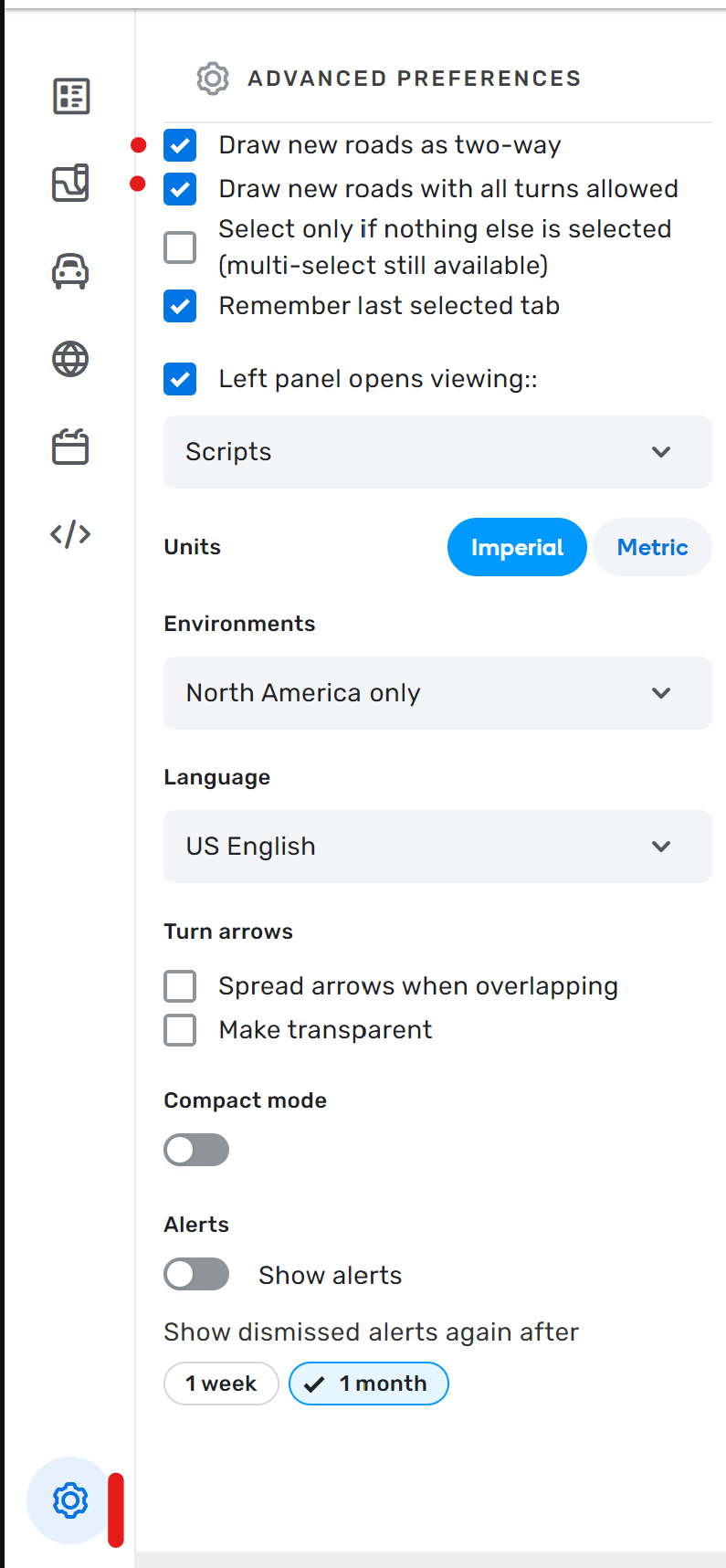
- Draw new segments with all turns disabled. Once directionality is set, enable turns that are allowed. The hidden turns will never get enabled, so no RevCon.
- Draw new segments as one way. Click the settings cog, click the first option on the list. Draw segments. Save. If you draw as one way, the hidden turns are all disabled by default.
- Draw segments as two way. Manually disable turns that shouldn’t be allowed. Switch segments to one way.
- Draw segments as two way. Change the directionality. Select each junction and hit Q then W, hoping you don’t miss one. (Q disables all turns, W enables all turns except hidden turns)
#4 can be used if the segment is already drawn and you want to change it to one way.
For #1 and 2, it’s in the map editor settings in the image (they are both currently enabled in the screen grab).
Lane Guidance
NOTE: If you have any questions, please seek guidance from a senior editor.
SWR follows the national guidance for lane guidance, with the exception of California and Utah (see below). Please do not do “lane flybys” (i.e. do not only add lane guidance and leave other items that need updating/fixing as incorrect, such as Falcon standards, PLRs, etc.). If adding lane guidance, please work through the entire junction/intersection and immediate surrounding connections to that junction/intersection.
California & Utah
California and Utah only add lane guidance when something unusual needs the driver’s attention and lane guidance would provide useful clarification.
Most often, this is multiple turn lanes (2+), but it can also be something like a continue from an unexpected lane, or maybe a hidden turn around a curve, or, or, or… Can’t make a hard and fast rule for all the possibilities.
The goal is to reduce the fatigue of being told, at every single turn, to use the right or left lane to turn right or left, when it’s already the law.
This means that California and Utah do not map lane guidance at the majority of standard intersections when only one lane turns right or left.
Visual Instructions
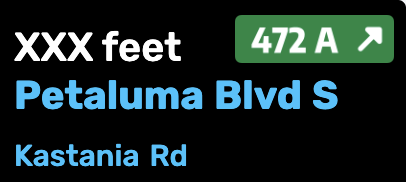
When adding visual Instructions (VI) as a component of a turn instruction, the street name suffix shall follow standard street name suffix abbreviations for these suffixes, even if the big green sign (BGS), little green sign (LGS), or blades have the suffix spelled out in full.
The suffix is defined as the part of a road name that describes what type of road it is. Examples include “avenue”, “boulevard”, "drive”, “highway”, “lane”, “parkway”, “road”, and “street”. Instead of using the complete word displayed on the sign, use standard abbreviations such as Ave, Blvd, Dr, Hwy, Ln, Pkwy, Rd, and St.
For further clarification, as an example, if the BGS, LGS or blade displays “Main Street”, the VI component shall display Main St.
If you have questions about the display of the other parts of the street name or whether a visual turn instruction is needed, please contact your State Manager.
Click to expand example
For this particular exit,
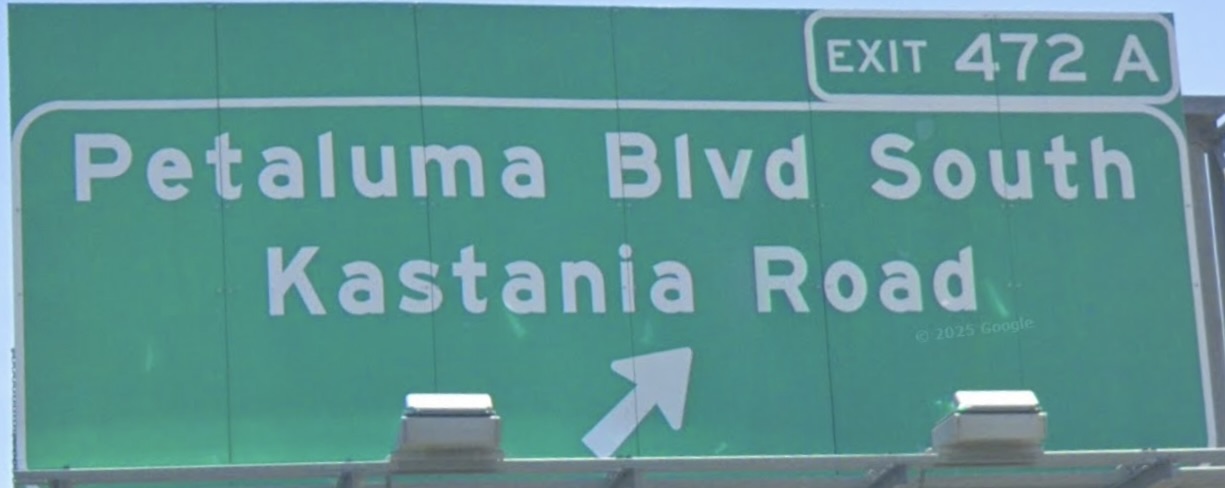
the VI should be set as
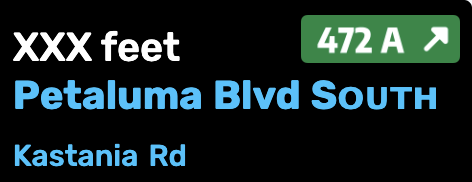
and not (although it “matches the sign” as per the national VI guidance)
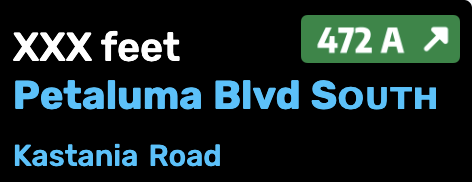
and also not (although it matches the road name abbreviation guidance).
Elevation
SWR does not practice “True elevation” or the practice of cutting segments solely for the purpose of adding elevation. Please do not cut segments just to add elevation. There are two major drawbacks with cutting segments for elevation:
- The reduced segment length can compromise the collection of accurate speed data.
- Adding closures to long stretches of roads is much more cumbersome.
There is a limited use case to cut segments for elevation: Bridges where destinations to either side of the bridge would be affected during a closure. This does not apply to freeways or ramps as those road types should not have end destinations. Similarly, this does not apply to one way segments with no destinations on the segment. When a segment needs to be cut for this purpose please follow these guidelines:
- Do not cut segments for elevation purposes if the bridge starts/stops within 500ft/150m of an existing junction.
- Do not create a segment less than 200ft/60m in length.
It is ok to cut segments for tunnels because the app uses the tunnel attribute as a clue to use dead reckoning through the tunnel when there is no GPS signal. To allow GPS time to acquire after exiting tunnels, segmentation guidelines are:
- Lower speed roads, cut the segment 75 feet before the tunnel entrance.
- Higher-freeway-like speed roads, cut the segment 150 feet before the tunnel entrance.
Special roads
Drivable roads
SWR follows the standard USA guidelines for all of the following special road types.
- Parking lot roads
- Carpool, HOV, Transit lanes
- Roundabouts and traffic circles
- Dead ends and culs-de-sac
- Toll roads
- Private installations and military bases
Divided Highways and Roadways
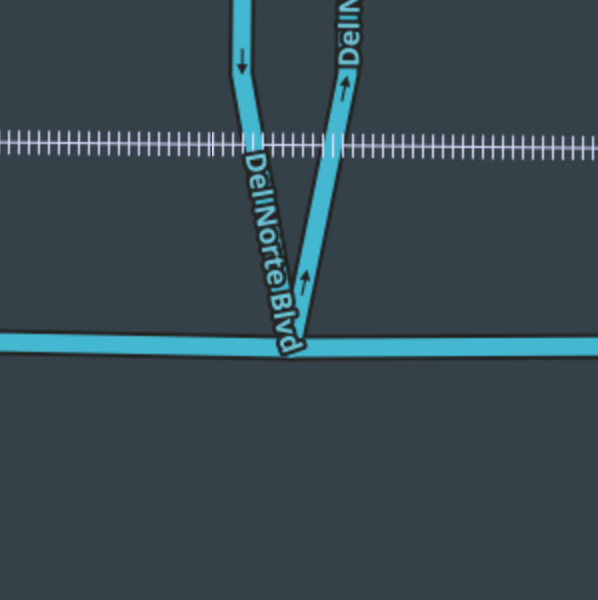
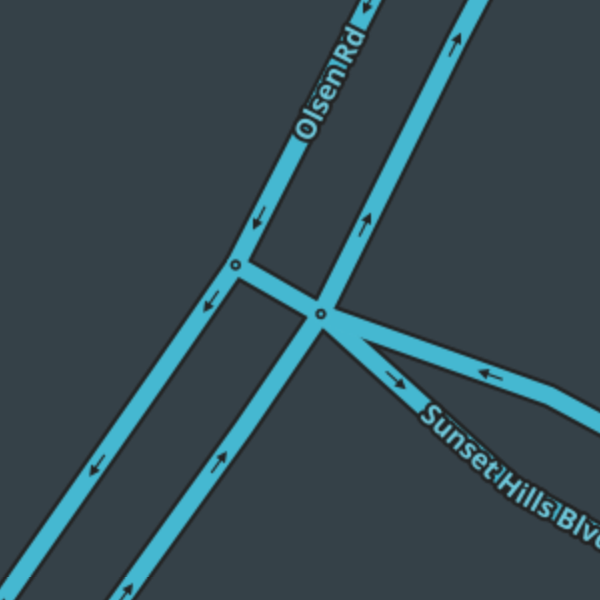
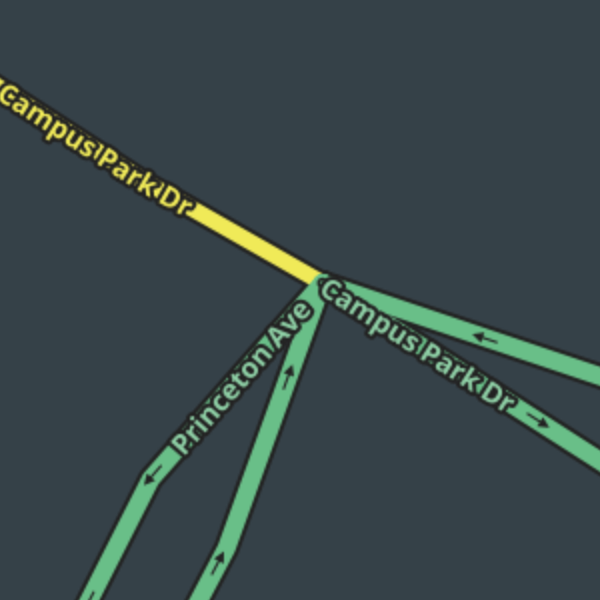
SWR follows national guidance on divided highways and roadways with a few exceptions where a divided road intersects at a T with another road. In place of the examples found on the Junction Style Guide please follow these guidelines.
| Intersection Style | Example |
|---|---|
| A divided road T at a 2-way road. | |
| A divided road T at a divided road. | |
| A divided road T at a 2-way road transitioning to a divided road. |
Alleys
Alleys can be mapped in the Southwest using the Parking Lot Road type. Alleys may be named if signed, otherwise the name can be left blank.
Dirt Roads
Use the unpaved checkbox for any gravel or dirt road that is maintained or “improved”. This means the road is graded and leveled from time to time. Any drivable road which is not paved with asphalt or concrete should have the Unpaved attribute box checked. If a typical passenger vehicle could easily travel at 10+ mph, the road should be considered unpaved and have the attribute set. If a car cannot maintain 10 mph, or otherwise requires high clearance, it should be set as Off-road.
California
In California there can be exceptions to use the unpaved checkbox on a paved road if the road is in uncommonly poor condition by local standards. Paved roads whose condition is typical of the local area should not be marked as unpaved, no matter how poor they may be by absolute standards. Use of the unpaved checkbox for uncommonly poor paved roads should be rare. Please consult a State Manager before using this attribute on a paved road.
Off-road / Not maintained
| Use extreme caution when mapping through roads with this type! In an emergency, such as wildfire, flooding and snow storms, Waze responders may mark primary through roads in an area as closed on behalf of public safety. However, if off-road segments appear to provide alternate through routes, and responders miss closing them, Waze may offer those segments instead, regardless of penalty. Waze may also route using off-road segments if they appear to bypass private or fee-collection gates. Do not map through roads using this type unless you make certain that the roads (1) are passable, if only barely, by ordinary passenger vehicles or (2) would not be routed as alternate routes in emergencies or into restricted areas. If you see Off-road segments mapped but disconnected from other road types do not connect them without consulting a State Manager. |
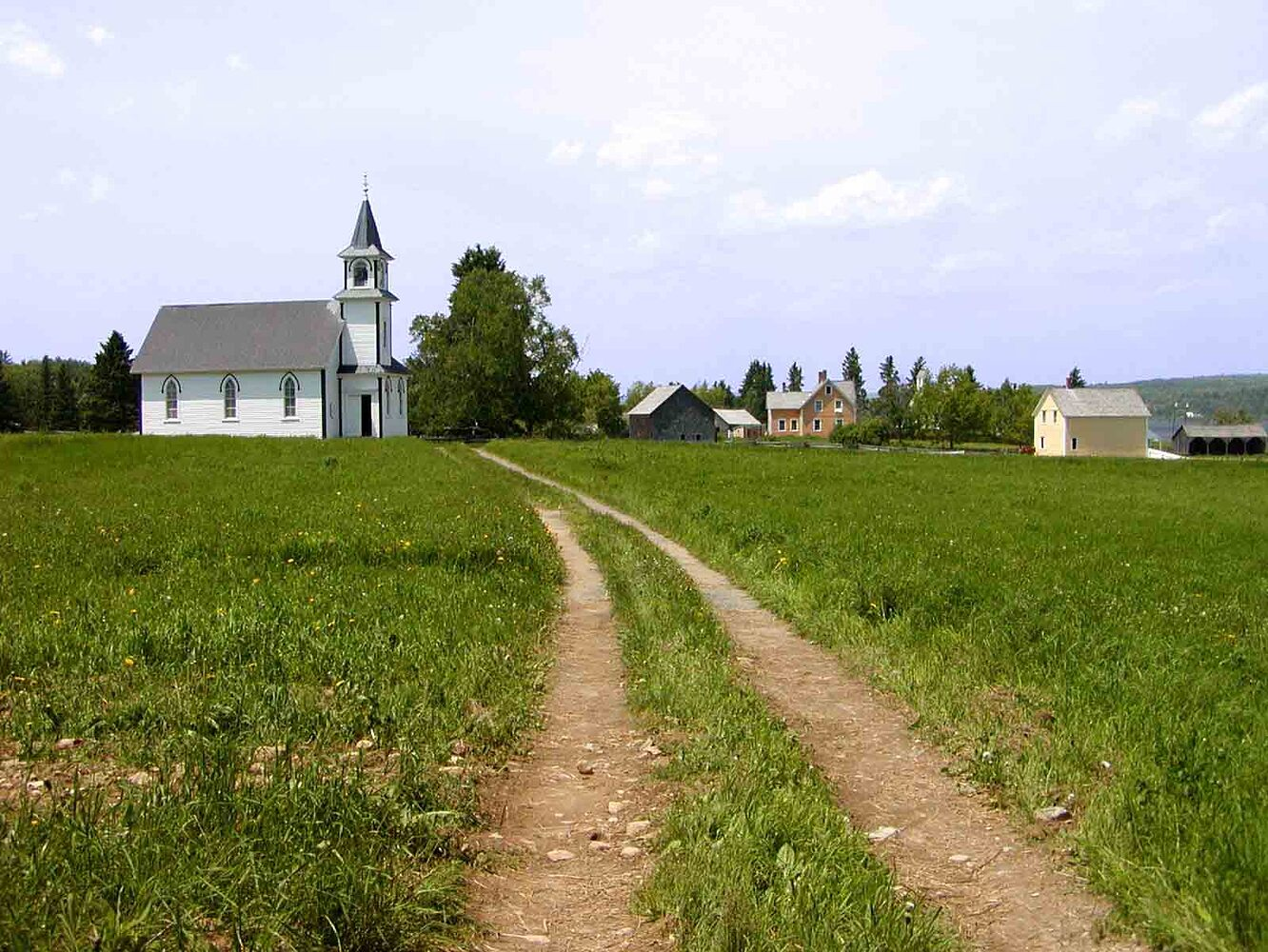
The Off-Road/Not Maintained road type is used for “2 track”, 4x4 roads, and unimproved roads. These type of roads are normally found in mountain and rural areas of the Southwest and should rarely be used around or in any city environment. These roads should only be mapped in limited circumstances when necessary for routing. The unpaved attribute is not necessary, but may be useful and can be set in some situations.
(Example of a “2 track road”)
Driveways
SWR follows national guidance for Driveways. The following is regional guidance:
- Driveways are to be mapped with Private Road (PR) segments. Most new editors will probably choose this segment type for driveways.
- Of note, for exceptionally long driveways, WME may prevent saving when a Residential Point Place (RPP) is too far from the roadway. In such cases, an editor should place the RPP at the furthest possible point and use an Entry Point to reach the final stop.
Non-drivable roads
Review the Wiki guidelines for non-drivable roads to ensure compliance with the general guidelines.
Pedestrian Path
Generally, if a pedestrian path can’t be driven on (e.g. Sidewalk, Walking Trail, Pedestrian Boardwalk, Stairway) then it is not mapped in the Southwest. With consultation from a State Manager exceptions can be made to map the following road types: Routable Pedestrian Path, Non-Routable Pedestrian Path, or Stairway.
Do not map hiking or biking paths/trails. It is common for newer editors to see “missing” paths/trails on the map, and see a readily available pedestrian path segment type to choose from, but mapping trails is an error. If you have changed your editor language to US English, this becomes clearer as that segment type is then named “Routable Pedestrian Path.” This segment type is routable by Waze and may cause unintended results for nearby destinations. There are rare cases where a Routable Pedestrian Path segment can be added to the map to improve routing, but all uses must be approved by a Routable Pedestrian Path expert.
Ferries
For areas where residents are dependent upon ferries, see the Ferries Editing Manual. Please contact your SM for any questions deciding if a ferry should be mapped.
Railroads
Railroads can be mapped, but they are not a priority at this time.
Runway
Public airport runways can be mapped with the Runway road type.
SWR also uses the Runway road type to map roads when the road may be closed for an extended period of time. This serves as a placeholder for the road in WME but the road will not display in the app.
Segment & Turn Restrictions
U-turns
SWR follows national guidance for U-turns. The following is regional guidance:
U-turns on two-way Primary Street through Major Highway type roads may be enabled in either of the following two circumstances:
-
- The U-turn is explicitly allowed by signage; or
-
- The U-turn is otherwise legal and safe, and there is at least 10.1 m (33 feet) from the left edge of the departure lane to the “destination” curb. This can include any median that may exist to the left of the departure lane. (The measurement is intended to accommodate the turning radius of most passenger vehicles.)
Do NOT make a point of enabling all U-turns valid under this guidance, only as you encounter them and they are necessary. Do not enable U-turns on Street type roads.
Closures
Real Time Closures (RTC) are the preferred method for road closures in the Southwest Region. Please contact a State Manager or higher for any of the closure types listed below. They will be happy to help with these.
- Major Traffic Events
- Temporary Road Closures
- Scheduled restrictions
- In some cases it may be best to completely disconnect road segments or map the segments as Runway so it does not display in the app. Please consult a senior editor or SM for advice before disconnecting a segment or setting road type to Runway. Remember that disconnecting or cutting a segment forces us to wait for a tile update before being able to set a closure.
Please refer to the Partial Restrictions wiki for further guidance.
Update Requests
SWR follows national Update Requests (UR) guidance of closing reports after 7 days without response from the reporter. All editors are expected to send an initial response, a reminder, and closing message when there is no response. The recommended timeframe after the initial response is to wait 4 days for the reminder and 4 additional days before closing the report. State leadership may use a different schedule as long as it meets the minimum national guideline.
Anyone who closes their own report will add a comment when closing to indicate it was closed by the reporter.
Map Suggestions
For editors established in the community (i.e. in Discord)
- Please do not add Map Suggestions (MS); instead, request unlocks in the appropriate State channel. This allows senior editors to prioritize active work, prevents requests from getting lost in the MS queue, and gives the requesting editor the chance to complete the edit themselves after discussion.
- If the proposed edit is outside the editors editable area please contact a senior editor to make the change.
The MS review process is rarely straightforward, particularly when a single suggestion contains multiple edits or additional visual instructions. These complexities can lead to the approval of unintentional map errors, creating a cumbersome and time-consuming workflow for senior editors responsible for ensuring the quality of the final saved edit.
Hazards
Speed Bumps
Speed bumps should not be added in parking lots at this time. It is considered a low speed, low stakes environment and speed bumps should be expected.
Places
Place Editing in the Southwest Region generally follows the National standards, but please note the following specific local guidelines. Hawaii does have some exceptions see details below.
Qualifying Standards
-
Southwest Region does not map freeway exits with Places (either Area or Point).
-
Southwest Region does not use the “Airport” category for private airfields or airstrips that do not welcome the general driving public. If there is a need for them to be mapped, “Other” is the appropriate category. If easily recognizable as airfields when seen from nearby public roads, they may be mapped as Area Places. Otherwise either do not map them, or map them as Point Places.
-
Southwest Region follows national guidance for Rest Areas. The following is regional guidance:
- In the Southwest Region, only use the Rest Area category when the facilities have restrooms and are quickly and easily accessible from the highway on which they are signed.
- Facilities such as scenic views and vista points should not be assigned the Rest Area category if they do not meet the above criteria, unless the signage explicitly uses the term “rest area”. Treat them as ordinary Places in all mapping respects, including the choice of whether to map them as Area or Point Places.
Locking Standards
Places should be completed as fully as possible any time they are created or updated. At a minimum, editors should:
- verify correct spelling of the name, using the guidelines below
- complete the address, to help when choosing among search results in the app, and
- ensure the correct location of the Point or Stop Point, to guide drivers to the correct location. Note that this may not always be on the street side of the location.
- Add an external provider (for level 2+ editors). Click the + where it says “Add linked Google place”. Type in the name and choose the correct location. If there is no place in Google for it, consider adding it there and the auto-matcher should eventually pick it up.
Phone numbers and opening hours are also particularly helpful to Wazers. Complete them whenever possible, using an online search, if necessary. Photos should help Wazers recognize the destination when they arrive.
Recommended phone number formats: (987) 654-3210 or 987-654-3210 Others may not auto-dial properly in some phones.
When completed, places should be locked to prevent inadvertent damage. Please don’t lock places to their highest level until most of their information is completed, but do lock to a level higher than 1, once you have verified any information, to help protect from accidental damage through client submissions. The following are recommended (minimum) levels:
| Place Type | Default Locks | Exceptions |
|---|---|---|
| Large Airports | 5 | |
| Military Installation | 4 | |
| Hospital | 4 | |
| Fire Station | 4 | |
| Police Station | 4 | |
| Large areas - (National & State Parks, Monuments, etc.) | 4 | |
| Gas Station | 3 | |
| Schools / Universities / Colleges | 3 | |
| Government Buildings / Consulates | 3 | |
| Most other places once completed | 3 | Nevada & Utah 2 |
Entry Points

Only add Entry Points (EP), shown as +Add point in the Place panel, to places when necessary for navigation.
- Do not add entry points on every Point Place (PP). Entry points are added only if needed for proper routing.
- Only add entry points to Residential Point Places (RPP) when the RPP should route to a segment with no street name or the street name is different from the street name in the RPP.
- Entry points are added to area places
Naming Standards
SWR uses standardized naming of most public facilities and businesses. This makes search results more consistent and useful, and gives Wazers a more professional and uniform experience. The names have been designed to work well with instant search, regular search, and to be clear and concise in the map display. Please follow these guidelines when naming the places described below.
Places which are part of a larger area place (e.g. place points for parking lots in a university area, separate ER entrances in a hospital area, etc.) should be named with their unique name followed by a hyphen and the name of the larger area they belong to. For example “Student Parking Lot C - StudyHard University”
Government Agencies (selected)
All places for the following agencies should be named according to the standards as follows:
Click to expand details
City and County Offices: City or County Name followed by City Hall or department or agency as appropriate, for example:
La Palma City HallLos Angeles County ProbationSan Diego County Administration Center
Police and Sheriff Stations: City, Agency or Division Name followed by “Police Station” or “Sheriff Station”, for example:
Rampart Division Police StationSacramento Police StationLakewood Sheriff Station
A page which can help you find the LAPD Station names, though it takes a little work.
Fire Stations: Agency Name or abbreviation followed by “Fire Station – “ and the station number. For example:
SFFD Fire Station 15CalFire Fire Station 3LACoFD Fire Station 105
Here is a list of LAFD Stations
Subway and Light Rail Stations: Start with the Agency (and the line if appropriate) followed by the station name. For example:
Metro Blue Line – Willow StationRT Gold Line – 29th Street StationBART – Powell Street StationVTA Light Rail - Tasman Station
Station names can be found for BART and VTA Light Rail.
In general, City Bus stops should not be mapped.
United States Postal Service: Start the name with “Post Office”, then append CDP or Station name. Place the City name and the ZIP code of the Post Office in the Description box so it will be viewable in the app GO page. Alternate name should be “USPS”. For example:
Post Office - Seal Beach Mariner StationPost Office - Los Angeles AirportPost Office - GMF Long Beach
Pease visit the Post Office article for complete information on Post Office place editing.
Here is the USPS tool to find the names of specific post offices.
https://tools.usps.com/go/POLocatorAction!input.action
US VA Hospitals/Centers/Clinics: Should be named with their official name as the primary name. For VA hospitals/medical centers “(US Veterans Only)” should be added to the end of the primary name, and as the first line of the description. In the primary name, “VA” should be expanded as “Veterans Affairs”, so as not to cause a TTS conflict with Virginia. Names can be shortened to remove extraneous words; for example, replace “Campus of the” from the official name with a hyphen (-). Any colloquial names should be added as alt names, so they are returned in search results, and also at the beginning of the description, so they are visible on the place preview page in the client. Some examples:
Veterans Affairs - Long Beach Medical Center (US Veterans Only)Anaheim Veterans Medical ClinicVeterans Affairs - West Los Angeles Medical Center (US Veterans Only)
Crisis locations
All places for Crisis locations should be named according to the standards as follows:
Shelter location: Emergency Shelter/Evacuation Center (as appropriate) followed by location name. This helps disambiguate in search. For example:
Emergency Shelter - Calvary Community ChurchEvacuation Center - Ritchie Valens Recreation Center
Always check “Customer parking” (as appropriate). Nearest parking is shown in the app notification, and will suggest non relevant results if the Shelter doesn’t have Customer parking checked.
Place Name Harmonization
These name spellings are standardized in the Southwest (except Hawaii, see below) so that Wazers will receive consistent results when searching in the client. Please use them when you edit one of these chain or franchise businesses.
If you don’t find the business you’re looking for, please use this form to submit the missing information.
View this list full-screen in Google Sheets
Hawaii
- Hawaii maintains its own place name harmonization separate from SWR, please see the Place Name Harmonization in HI Mapping Resources for more information.
- Hawaii uses the Junction / Interchange category as point places for mile markers. Please see Mile Markers/Mile Posts in Hawaii Mapping Resources for more information.
Cameras
Not every camera-looking device at an intersection is a speed or red light camera. Generally speaking:
| Camera Type | Example |
|---|---|
| A speed camera takes a photograph of a vehicle when it passes by the camera at too high a speed. | |
| A red light camera takes a photograph of a vehicle that enters an intersection after the light is red. In some areas, it takes the photograph when a vehicle is not clear of the intersection some period after the light turns red. | |
| A dummy / fake red light camera should not be mapped because they cannot issue tickets. |
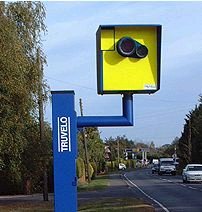

When adding a camera, be sure to review the camera placement recommendations.
The legality of red light and speed cameras varies by state. If you get a request for a camera type that is illegal in the state you are editing (or you find an already approved one), please remove it.
| Arizona | California | Colorado | Hawaii | Nevada | New Mexico | Utah | |
|---|---|---|---|---|---|---|---|
| Red Light Cameras | Legal | Legal | Legal | Legal | Not Legal | See Notes | Not Legal |
| Speed Cameras | Legal | Legal | Legal | Legal | Not Legal | See Notes | Not Legal |
Nevada
Per NRS 484A.600, speed and red light cameras are illegal in Nevada, except under special conditions. They can be hand-held by an officer or mounted to a patrol car or police building, but they cannot be placed as fixed or unattended mobile installations on the road or at signal lights.
New Mexico
- Red Light Cameras are legal in the State, but Illegal in the City of Albuquerque.
- Speed cameras are legal in the State and are in use in Bernalillo County, including the City of Albuquerque. A list of Albuquerque speed cameras is available here.
Utah
Speed Cameras and Red light Cameras are NOT CURRENTLY USED in the State of Utah. Or more specifically the restrictions on use are strict enough that no entity is using Speed Cameras. The reason is that unlike most states that allow such devices, Utah’s law requires that a certified Law Enforcement Officer must personally approve each ticket at the time of the infraction.
Key Southwest Region Editors
Southwest Region — Regional Coordinators, and Country, State, & Area Managers
Regional Coordinator(s)
[RC] ottonomy
[ARC] jemay
[ARC] tonestertm
[ARC] turbomkt
[ARC] ojlaw
Country Managers
| Username(rank) | Area Managed | Comments |
|---|---|---|
| ottonomy(6) | United States | Lifetime Los Angeles resident |
| jemay(6) | United States | Southern California resident |
| tonestertm(6) | United States | L.A. born/based, SWR ARC |
| turbomkt(6) | United States | Southern California |
| Machete808(6) | United States | Hawaii & California SM |
| ojlaw(6) | United States | USA LC/CM |
| the1who(6) | United States | Las Vegas resident, A/RC Emeritus |
| SuperDave1426(5) | United States | Resident of Nevada |
| rocketsciguy(5) | United States | UT SM |
State Managers
| Username(rank) | Area Managed | Comments |
|---|---|---|
| tonestertm(6) | California | LA born/based, lifetime California traveler, and ARC for Southwest Region |
| turbomkt(6) | California | Southern California |
| Machete808(6) | California / Hawaii | Hawaii & California SM |
| ojlaw(6) | California | USA LC/CM |
| abc1357(5) | California | Northern California |
| AquaZR1(5) | California | Also AM in Kauai |
| JoshJMM(5) | Colorado | Colorado Resident |
| chucksways(4) | Colorado | Colorado Resident |
| Nacron(5) | Hawaii | Hawaii Resident |
| KuniaKid(5) | Hawaii | Hawaii Resident |
| SuperDave1426(5) | Nevada | Nevada Resident |
| s2k2vidguy(4) | Nevada | Nevada Resident, frequent travel to Reno |
| mhh60(5) | New Mexico | Resident of Michigan |
| rocketsciguy(5) | Utah | Box Elder County Resident, Salt Lake County Native |
| macnewbold(4) | Utah | Frequently in Salt Lake and Utah Counties |
| TLknows(4) | Utah | Summit County |
Area Managers
Arizona Area Managers
| Username(rank) | Area Managed | Comments |
|---|---|---|
| appleboyca(4) | Yuma, Maricopa County | Resident of the state |
| ItsEric(3) | West Valley | Resident of the state |
| S_Cottier(3) | South East Arizona | Resident of the state |
| BummerDude69(4) | Former State Manager (NYC AM) | Resident of the state |
California Area Managers
| Username(rank) | Area Managed | Comments |
|---|---|---|
| DwarfLord(5) | Northern California | Mostly retired from Waze at this point |
| Deltamanx(4) | Statewide | Nor-Cal focus |
| Nagamasa(4) | North Bay Area - Sacramento | |
| geopgeop(4) | Most of the Bay Area | Also AM for Las Vegas |
| UEFL(4) | Los Angeles County | |
| bwawsc(3) | Santa Cruz area, south Santa Clara County | Also AM in the Sierras north of Yosemite |
Colorado Area Managers
| Username(rank) | Area Managed | Comments |
|---|---|---|
| mtb2314(5) | Statewide | Maryland State Manager |
| Coloradotom123(4 | Denver and Southeastern CO | 4th Gen Native Coloradan |
| Corqe(4) | The I-25 Corridor from the north border to C. Springs | Colorado native |
| heartpoam(4) | Pueblo to Wyoming | CO Resident |
| jcloudm(3) | Northern 40% of Colorado, from E<->W borders | Constantly chasing new subdivisions and road closures |
Hawaii Area Managers
Nevada Area Managers
| Username(rank) | Area Managed | Comments |
|---|---|---|
| Geopgeop(4) | Statewide, local to Las Vegas | Resident, originally from SF Bay Area |
| Japoro(4) | Northern Nevada/Reno/Tahoe | Resident, originally from SF Bay Area |
New Mexico Area Managers
| Username(rank) | Area Managed | Comments |
|---|---|---|
| locojd1(4) | Entire State | Resident of Canada |
| nbofsf(4) | Entire State | Resident of Santa Fe, NM |
Utah Area Managers
| Username(rank) | Area Managed | Comments |
|---|---|---|
| RichardPyne(4) | Most of Juab and Millard counties | Idaho AM: Southern half |
| tolpster(3) | St. George |
Other regional and state pages