This page serves as the primary resource for editors of Massachusetts. Review all the sections to better understand how the guidelines for this state might deviate from the overall USA or worldwide guidelines. If you have any comments or questions about this page or state refer to the community links below.

If you edit in Massachusetts, please make sure you have joined Discord! Contact an ARC or SM for the link.
Introduction
Massachusetts is a part of the New England region, which includes the states of:
Connecticut / Maine / Massachusetts / New Hampshire / Rhode Island / Vermont.
Thank you for your interest in editing Waze maps in the Commonwealth of Massachusetts. Please note Massachusetts follows the US national guidance with a few exceptions. Be sure to click on and read every link from this page for in-depth tips, guidance and advice.
All editors must have a real username, not a usa_username and are required to read and respond to chat messages in the map editor and forum.
Refer to the Glossary for common Waze related terms.
Community

There is a Discord Channel for Massachusetts editors. This is the primary and official communications link. All active editors are strongly encouraged to join. Feel free to ask for the link from an (A)RC or any Massachusetts State SM listed below.
Waze Discuss is a great place to find answers to previously asked questions and also a place to ask new ones. Below are links to the forums specific to Massachusetts.
Area Managers for Massachusetts can be found in the table below.
New editors should consider checking into the formal mentoring program available at no charge.
Formal Mentoring is a great tool to quickly learn the ropes of editing correctly and efficiently. It includes the potential for accelerated rank and role upgrades.
The Massachusetts editing community also communicates using X (Twitter) (linked below) and the state forum.
Mapping resources

Before editing the maps in Massachusetts, be sure to fully review and understand the editing manual.
The Waze user community follows the Waze etiquette guidelines discussed in the Wiki. Be sure to familiarize yourself with these guiding principals while editing the maps and this Wiki, as well as when communicating with other Waze users.
City Level Mapping Resources
- See MA Cities and Towns for links to city/town GIS pages and/or PLAT maps.
State Level Mapping Resources
Note that 2023 Aerial Ortho Imagery is available as a basemap option for all three Massachusetts GIS maps listed below.
-
MassMapper Statewide GIS - When there is a discrepancy between a City’s GIS and this one, default to the City GIS. If you have any questions, please contact a State Manager.
-
Road Inventory Map - Interactive MassDOT map showing the most commonly requested Road Inventory attributes, Functional Classification, Jurisdiction, National Highway System, Federal Functional classification, and Federal-Aid Eligibility.
MassDOT provides a variety of GIS datasets, for those who wish to download or use other viewers. Start here: GeoDOT Open Data Portal
WME Scripts
Useful scripts to help you start your WME career. Please read the General installation instructions before installing scripts.
Cities and towns

One of the most common errors when editing the maps is when an editor creates a road and does not confirm the road by setting the city and road name (or stating it has none).
Duplicate cities can be caused by incorrectly named segments and should be corrected following the guidelines in the duplicate cities article.
When editing roads and places, please make sure you enter the correct name.
There are 351 officially recognized Cities and Towns in the commonwealth. See the MA City List Page for proper naming information.
DO NOT Use ANY of the “Greater *** Area” or “*** Center” “Towns” and rename roads you come across.
Conflicting/Duplicate City Names
In some specific instances, there are duplicate street names sharing the same official city designation. In these cases, neighborhood names may be used to differentiate the street segments. Before making city name changes, contact a state manager to verify, so that we can document the specific adjustments below.
Major roads

Massachusetts follows the general road naming and road type guidelines of the USA.
Road Types
Important Note
Massachusetts Functional Classification settings are dictated by the Massachusetts Department of Transportation (MassDOT), at the request of the local jurisdictions, and in coordination with neighboring states. If you do not agree with our FC levels, please petition MassDOT to change the rating they’ve assigned.
Do NOT make random changes on your own.
Functional Classification
Functional Classification updates in Massachusetts have been completed. This will ensure a consistent, and better navigational experience to Wazers around the state and country. The general guidelines for implementation are in the Road types page. Any local deviations, and special information for Massachusetts will be listed below.
PLEASE REFER TO THIS FORUM TOPIC ON THE MATTER - Road Types – comprehensive overhaul of drivable roads
In Massachusetts, a road designated “Private Way” indicates that it has not been accepted by a municipality to bear the expense and responsibility for maintenance and improvement. However, the public is generally still allowed the right of access onto private ways, and therefore these roads are typically set as “Street” type and should not routinely be set as “Private Road” type. Please see forum post at Private Road vs “Private Way”, and contact a Massachusetts State Manager if you have questions.
Details of MassDOT Functional Classification Standard
MassDOT currently maintains two completely separate Functional Classification systems. The state level system has been developed by the MassDOT Planning Division, and consists of 6 Road Types.
The Federal Functional Classification system is the Nationwide standard, and consists of 7 Road Types. The major difference between the two is that the Federal FC classifies limited access arterials (non-Interstates) separate from full-access arterials.
MA to Waze FC conversion
We are utilizing the Federal Functional Classification system, because it matches up with other states.
Resource Links
MassDOT GIS class and color description

GIS Legend
The Massachusetts Classification and Color scheme come from the official Massachusetts D.O.T (MassDOT) Federal Functional Classification (FC) map that is published by MassDOT. The legend shows what classifications MassDOT uses and what color is assigned to each class.
Please refer to the GIS FC map found here, on the MassDOT Road Inventory webpage.
MassDOT to Waze conversion table
The numbers correspond to the Federal FC type indicated. (e.g. Federal Class 4 road is a Minor Arterial)
| Highway Systems | ||||||
|---|---|---|---|---|---|---|
| Functional Class | Interstate | US Hwy (incl. some special routes) | US Hwy BUS, SPUR, LOOP | State Hwy (incl. some special routes) | State Hwy BUS, SPUR[a], LOOP | Locally-maintained |
| example>>>>> | I-95 N | US-2 | US-460 Business | SR-27 (SR-27A) | SR-400 Loop | Robertson St |
| Interstate (1) | Fw | n/a | n/a | n/a | n/a | n/a |
| Principal Arterial OFE (2) | n/a | Fw | Fw | Fw | Fw | Fw |
| Principal Arterial - Other (3) | n/a | Major | Major | Major | Major | Major |
| Minor Arterial (4) | n/a | Major | Major | Minor | Minor | Minor |
| Major Collector (5) | n/a | Major | Major | Minor | PS | PS |
| Minor Collector (6) | n/a | Major | Major | Minor | PS | PS |
| Local/Not Mapped (7) | n/a | Major | Major | Minor | PS | Street |
Deviation From Functional Classification
Occasionally it makes sense to deviate from what FC should be. Please get agreement from State Management before changing the road type, and add a Map Note to explain the reason.
Locking Standard
In Massachusetts we have a set minimum standard for locking roads based on segment type. Any road of a certain segment type must be locked at least to the rank (level) in the chart below. Roads may be locked higher for protection and special situations (areas with construction, tricky design, frequent mistakes, imaging inaccuracies, and the like), but should not be locked lower.
A great time to implement these locks is while bringing the road types of an area into compliance with the current US road type standards (FC and highway systems). Lock the roads based on type after they’ve been set to current US road type standards.
| Massachusetts Minimum Locking Rank Standard | |
|---|---|
| Segment Type | Statewide |
| Freeway | 5 |
| Ramp | Highest rank of connected segments |
| Major Highway | 4 |
| Minor Highway | 3 |
| Primary Street | 2 |
| Street | 1 (Auto) |
| Private Road | 1 (Auto) |
| Ferry | 5 |
| Railroad | 2 |
| Note: Do Not Mass Edit just to update locks to these standards, these can be adjusted as you find them while editing other aspects of the segments such as FC, speed limits, naming, etc. |
Some segments still warrant higher locks and care should be taken when setting segment lock to these standards to look for and protect these special setups with higher locks. Some examples; segments which are part of BDP, U-turn prevention, or other complex intersection setups.
Roadway Naming
Massachusetts follows the US Road Naming conventions for Interstate, US and State routes, with the following considerations.
The naming format for Numbered State Highways in Massachusetts is “SR-###”.
State alternate routes have signage of “###A”. Do NOT use the style employed for US alternate routes “US-### ALT” when naming state alternate routes. Instead, use Waze names of the form SR-###A. Example: “SR-2A”
Cardinal Direction indicators will be used in accordance with National standards, except in the following situations:
- Undivided US Highway/State Highway
- US Highway with a primary name other than “US-##”
- State Highway with a primary name other than “SR-##”
City Names on Freeway Segments
If a road segment is classified as a Freeway, there shall be No City Names listed, as well as no Alternate Names.
- For the “Mass Turnpike,” we add the name “Mass Pike” to the on-ramp name.
City Names on MH/mH Numbered Highways
With the exception of Freeway segments (as mentioned above) all road segments should have a Primary city name assigned to them.

Street Name as Primary Name
The Primary Street name shall be whatever name is in common usage in that area. (Check business addresses, GIS, etc). If the Primary Name is an actual Street Name (Main St, etc), please add the “SR-##” to the Alternate Name field, with no City name.

State Route as Primary Name
However, if the commonly used name is “SR-##” then enter the street name, along with city, in the Alt Name.
If a segment has more than one State/US route number, follow the Concurrent Road Naming guidelines from the Wiki. Just remember, please no city names in the Alt Name field for numbered routes. (see examples on the right)
If a Major/Minor classed segment is not a numbered highway, there should be no alternate names listed.
Clear as mud? Contact the State Manager if you need help figuring this out.
PS and Lower
List the Primary street name, and city. No Alternate names are to be listed.
Named Roadways
These are named highways in Massachusetts which also carry numbered designations. Some are simply names of streets which carry a numbered route(s). Roads named after people/organizations were generally done so ceremoniously, after the numeric designation(s) already existed. Others carry more general names, such as the Southeast Expressway and Central Artery in Boston (which both refer to the same continuous span of I-93).
Several named highways cover the entire length of a given route in Massachusetts; for example, all of Interstate 90 in Massachusetts is the Massachusetts Turnpike, and the entire length of Route 213 is the Loop Connector.
Wikipedia table of Unnumbered, and Named State Routes
Speed Limits
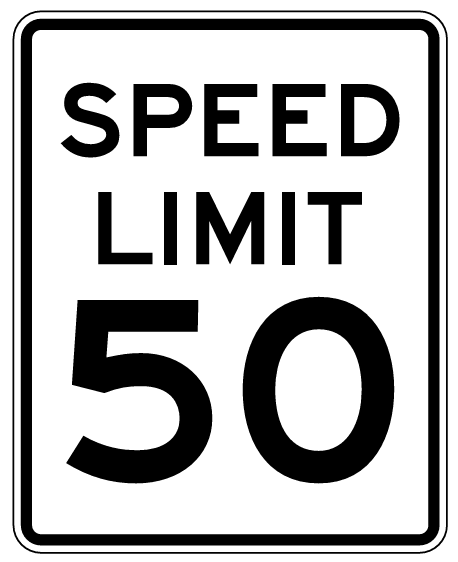
Speed limit data added to segments in the WME is used in the Waze app to display an app user’s speed relative to the speed limit. In addition, the app notifies users if they exceed a speed limit designated on the Waze map.
The ONLY speed limits added to the map must match federal, state, and municipal laws or regulations that designate maximum speeds for passenger vehicles.
Any highway ramp with speed limits posted on the regulatory black and white signs should be added to the road segments in the WME. Ramps with advisory speed signs should have no speed limit in the WME.
Freeway segments that contain toll booths will not have speed limits designated as there may be different limits in individual lanes. Waze does not currently support the identification of transponder lanes and the like. Also, the affected segments may be short in length so that the app might not be able to signal a drop in speed limit before users are at the toll booth.
Speed limits that are designated on private property may be added to road segments on the Waze map at the discretion of the regional coordinator or state manager(s).
State Specific Laws
Massachusetts has specific laws pertaining to speed limits for areas that are not posted. Please refer to the following table below for guidance for speed limits on road segments with no signage. To our knowledge, there are currently no roads in Massachusetts that have a speed limit greater than 65 mph. If you have a question regarding the speed limit of an area please consult with your State Manager.
| Speed Limit | MGL c.90, § 17 |
|---|---|
| 20 MPH | School Zones - Please review area for posted school zone, only if the zone speed limit is in effect 24 hours a day should this be set as the limit for segments within the zone |
| 30 MPH | Thickly Settled or Business District - Massachusetts General Law defines thickly settled as “an area where buildings are fewer than 200 feet apart for a distance of 1/8 mile or more.” |
| 40 MPH | Outside of a thickly settled or business district for a distance greater than ¼ mile |
| 50 MPH | On a divided highway outside a thickly settled or business district for a distance greater than ¼ mile |
NOTE: MGL c.90, § 17c allows individual municipalities to lower the maximum speed limits in thickly settled or business districts to 25 MPH. A listing of municipalities which have adopted these reduced statutory speed limits is maintained by MassDOT.
| MGL c.90, § 17c |
|---|
| a) Notwithstanding section 17 or any other general or special law to the contrary, the city council, the transportation commissioner of the city of Boston, the board of selectmen, park commissioners, a traffic commission or traffic director of a city or town that accepts this section in the manner provided in section 4 of chapter 4 may, in the interests of public safety and without further authority, establish a speed limit of 25 miles per hour on any roadway inside a thickly settled or business district in the city or town on any way that is not a state highway. |
This bill also allowed “Safety zones” to be designated by municipalities at 20 MPH.
| MGL c.90, § 18b |
|---|
| (a) Notwithstanding section 18 or any other general or special law to the contrary, the city council, the transportation commissioner of the city of Boston, the board of selectmen, park commissioners, a traffic commission or traffic director of a city or town that accepts this section in the manner provided in section 4 of chapter 4 may, in the interests of public safety and without further authority, establish designated safety zones on, at or near any way in the city or town which is not a state highway, and with the approval of the department if the same is a state highway. Such safety zones shall be posted as having a speed limit of 20 miles per hour. |
Additional special regulations have been set by MassDOT in the following manner:
| MassDOT Rules on Speed Limits unless otherwise posted - 700 CMR 7.09(6): Table 11 | |
|---|---|
| 65 MPH | I-90 W – Exit 123 to NY Border I-90 E – NY Border to Exit 123 |
| 55 MPH | All other areas of the Massachusetts Turnpike |
| 45 MPH | Prudential Tunnel Thomas P. O’Neill, Jr. Tunnel |
| 40 MPH | Ted Williams Tunnel |
| 35 MPH | Callahan Tunnel Sumner Tunnel |
Variable Speed Limits
The WME and Waze app do not support Variable Speed Limits (VSLs) that are changed based on traffic and road conditions. These VSLs can be changed at any time by government officials. If there is a ‘standard’ speed limit at which the signs on a stretch of road are usually set, this ‘standard’ speed COULD BE added to the associated road segments in the WME. However, the setting of any speed limit on a road with VSLs must be done in consultation with the appropriate State Manager.

Unsupported Speed Limits
The following speed limits are unsupported by the WME and the Waze app, and MUST NOT be added to road segments in the WME. Road segments with posted ‘advisory’ speeds or special speed limits should continue the Speed Limit for passenger vehicles as posted on the black and white signs pictured above.
Advisory Speed Limits
In addition, yellow ‘advisory’ speed signs (as shown below) are usually not enforceable; therefore, ‘advisory’ speeds, like the ones shown below, should NOT be added to the waze map.
-
Advisory Plaque
-
Turn Advisory
-
Exit Advisory
-
Exit Sign Plaque


Special Speed Limits
Currently, the WME and Waze App only support maximum speed limits for passenger vehicles, without variation for time of day, or day of the week. Specialty, also known as ‘bannered’, speed limits, like the ones shown below, should NOT be added to the Waze map (exception: School Zones as noted below).
School Zone speed limits (20 mph in Massachusetts) should be added when creating School Zones. As of late 2025, they are not displayed in the Waze app.
-
Night Speed
-
Truck Speed
-
School Speed
-
Minimum Speed


School zone and special safety zone speed limits that are in effect 24 hrs per day, and 365 days a year, should be added to the map as normal segment speed limits.
Special roads
Drivable roads
Massachusetts follows the standard USA guidelines for all of the following special road types.
- Divided highways and roadways
- Carpool, HOV, Transit lanes
- Roundabouts and traffic circles
- Dead ends and culs-de-sac
- Toll roads
- Partial and scheduled restrictions
- Private installations and military bases
Non-drivable roads
Review the Wiki guidelines for non-drivable roads to ensure compliance with the general guidelines.
Private Rds vs PLRs
There is a whole section of the national wiki regarding the “Private Road” road type.
This section only provides guidance in the state regarding whether or not a segment should be Private vs Parking Lot Road.
If a road is signed as “Private Property”, “No Trespassing”, or has a security gate on it, map it with a Private Road segment. Apartment complex driveways, parking lots, and everything else gets a Parking Lot Road (PLR) segment.
Please see discussion above regarding roads signed as a “Private Way” - which normally should NOT be set as a Private Road.
If you have any questions, please contact a State Manager.
Alleys
- Alleys should always be mapped if they have a name.
- Alleys should always be mapped if they are the sole access to a home or business.
- Alleys should always be set to “Private” (Northeast regional standard)
- Alleys are normally mapped if they are acknowledged by the municipality.
If an alley does not meet the above criteria, mapping is optional. Leave the name field blank.
Driveways
Please follow the following guidelines for Private Driveways. The Wiki standard can be found here: Driveways
Mapping driveways
- If an address/location cannot be reasonably guided to without a private drive, it can be added.
- If there are 5 houses at the end of a single shared 1/4mi (402m) long private drive, it probably is needed.
- If there’s a single house at the end of a 1mi (1609m) private drive, and that’s the only house, it probably isn’t needed, but -
- If there’s a house at the end of a 500m (1640 ft) long private drive which is near to another street from which you cannot access the address (stop point will be on the segment closest), then a private drive is probably needed.
Walking Trails
Walking Trails (Pedestrian Path) should only be used in rare cases. Walking Trails may have strange side effects on nearby routing. Never use the Walking Trail road type for ordinary hiking paths or bike paths. Most hiking and bicycling paths should not be on the map at all.
The WME lists the Walking Trail road type as non-drivable. Historically, editors have disconnected Walking Trails to make sure Waze doesn’t route drivers over them. This doesn’t always work as desired. If a disconnected Walking Trail comes closer to a destination than any other road, Waze may route drivers to a location nearer to the Walking Trail than to the destination. This problem can be severe for Walking Trails passing close to many destinations in a dense neighborhood. Connected or not, the Walking Trail type should never be used where effects on local routing are not desired.
Ferries
Massachusetts has scheduled ferry service between Cape Cod, Nantucket, and Martha’s Vineyard. Please consult with the State Manager before making changes to the ferry system.
Turns, U-Turns and Turn Restrictions
In Massachusetts it is legal to make a left turn across one double yellow line. Please do not disallow left turns due to URs reporting “dangerous” or “too difficult” turns, without consulting a State Manager.
Please be aware of physically divided roadways that are not divided in Waze. Check the satellite image closely before changing left turn restrictions along such roadways.
U-Turns are legal at all street intersections, unless signed as restricted. When in doubt, check Street View.
Toll Roads
Massachusetts uses the USA standard for toll roads as follows:
Roads with tolls can be indicated by checking the Toll road box on the road segment properties tab. Mark a segment as a toll road only if: there is a toll booth, transponder reader, or other tolling device within, or at either end of the segment Do not check the toll box setting for segments that lead up to the final toll segment even if they have no other exit except the final toll segment. In the case of a bridge that is tolled in only one direction, divide the road where the toll is collected and mark only the segment with the toll booth as a toll road.
Rotaries (Roundabouts)
Massachusetts Transportation Departments have never met a roundabout they didn’t like. They’re everywhere. Please don’t make adjustments to them unless you know exactly what you are doing. Some intersections that look like a roundabout may only be a traffic circle. Check with a State Mgr if you have a question.
Closures
When managing a section of roadway under construction or being closed for a major event, follow the Wiki guidelines on construction zones and Real time closures.
Use Map Notes to mark long-term closures.
Places
Massachusetts follows the USA standard for Places. Do not deviate from the guidelines without first obtaining consensus to do so via the state forum linked on this page.
Minimum Acceptable Information
All Places added to the map must contain the following entries:
- Proper Category
- Place Name
- Address (including address numbers)
- Placed in the correct location on the map
This is the minimum acceptable amount of information for inclusion on the map.
Phone Numbers
If a phone number is entered in the Place information, please utilize either of the following formats:
- (###) ###-####
- ###-###-####
Please correct the layout of any phone numbers you encounter while editing.
Locking Standard
| Massachusetts Place Lock Level Standards | |
|---|---|
| Place Type | Lock Level |
| Military Installation / Airport | 4 |
| Hospitals / Urgent Care / Police & Fire Dept | 4 |
| National & State Parks and Monuments | 4 |
| Gas Stations / Charging Stations | 3 |
| Schools / Universities / Colleges | 3 |
| Government Buildings / Consulates | 3 |
| MBTA Subway and Commuter Rail Stations | 3 |
| City and Local Parks | 2 |
All Places that have complete information (to include, at a minimum, address/city, hours of operation, phone number) are to be locked at Level 2. This is to prevent loss of data due to automatic acceptance of Place Update submissions from Trusted Users, or Place Update Request approvals from other editors without careful examination.
If you do not have a high enough enough rank to lock the place as indicated, please lock it as high as you can, and notify a higher rank AM, SM, CM, or Champ to lock it higher.
Place Name Harmonization
In an effort to standardize Place Names, Massachusetts uses the following list of Common names. Please note the appropriate category name, as well as the listed spelling.
View this list full-screen in Google Sheets
Area Editing

Area Mapping
When creating an Area, map it to the “fence line” of the area.
For instance, if you are mapping a shopping center, this means that you map the area to cover the shopping center buildings, and the parking lots out to the outer ring road (if applicable). If there is no ring road, or for smaller shopping centers, map to the curb line.
If you are mapping a school, you would map out to the fence line (if visible) or to a reasonable distance from the school. Contact a AM, SM, CM, or Champ for assistance.
Hospitals / Urgent Care

Hospital Mapping
A special Category of Hospital / Medical Center is used for Hospitals, Medical Centers and Urgent Care facilities. ONLY Hospitals, Emergency Rooms, and places offering Urgent Medical Care should use this category. Clinics, and Medical offices which do not offer urgent medical care for Walk-Ins should use the Office, and any other appropriate category, instead.
Set the Stop Point over the Main Entrance to the facility. Additionally, map the Emergency Entrance with the same category name, but place it over the Emergency entrance location. ERs encompassed in a hospital Place Area should be Points, and named in the following fashion: E.R. - Hospital Name
Layered Areas
Places which are part of a larger encompassing place (i.e. place points for lot in a university area, Separate ER entrances in a hospital area, etc.) should be named with their unique name followed by a hyphen and the name of the larger area they belong to. For example “E.R. - Generic Medical Center”
Parking Lots
Massachusetts follows USA guidance for Parking Lots. In general, Parking lot areas (PLA) should be added when the parking lot acts as a point of interest independent of places it serves. This includes public lots; lots at airports, hospitals, event venues, etc., where different areas have different purposes; lots at large shopping centers where individual stores are within a larger facility with separate entrances; lots that are connected to the parking feed; and remote parking lots for businesses. Any improvements are helpful, but editors are encouraged to start with popular lots with heavy usage, lots for MBTA stations; public (unrestricted) parking facilities including Park & Ride lots; and restricted lots (some restrictions apply, i.e. lots for customers or visitors only) associated with stadiums and event venues, shopping centers, etc.
On-premise parking for single business or shared parking for multiple businesses where the businesses are directly accessible from the lot should not be mapped. PLAs that do not meet the criteria to be mapped may be deleted. In lieu of these PLAs, it is imperative to map the place and check the ‘parking for customers’ box in the services field of the place.
MBTA Station Naming Standard
For the purpose of harmonizing local railway stations (MBTA or the “T”) we have 2 classes. One is for the color-coded subway lines and the other is for longer-distance commuter rails (purple line). The standard will be in the format: MBTA Type - Station Name
Examples:
- MTBA Subway - South Station
- MBTA Commuter - Halifax
Additionally they are to be POINT places - not areas, and locked to L3. If you have questions please direct them to a State Manager.
Cameras
Not every camera-looking device at an intersection is a speed or red light camera. Generally speaking:
-

a speed camera takes a photograph of a vehicle when it passes by the camera at too high a speed.
-

a red light camera takes a photograph of a vehicle that enters an intersection after the light is red. In some areas, it takes the photograph when a vehicle is not clear of the intersection some period after the light turns red.
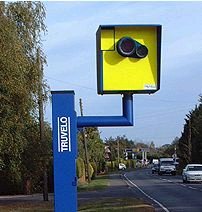

When adding a camera, be sure to review the camera placement recommendations.
Laws regarding speed and red light cameras vary between the states and territories, so be sure to understand the details of camera legality in Massachusetts.
Based on information researched at the time this page was last edited, Massachusetts does not have any laws allowing red light or speed cameras, therefore they are not currently legal in the state. Pending legislation may change their legality.
Bus-mounted cameras that detect vehicles passing school busses and blocking bus lanes or bus stops are legal, but cannot be mapped.
No other camera types should be mapped in Waze.
To do list

Don’t EVER let it be said that there’s nothing to do in Massachusetts (for editing, that is).
There are always URs to resolve, PURs to approve, Places to add and update.
Please, help out where you can… and ASK QUESTIONS!
Other
Working with URs
Massachusetts has adopted a 36hr/4/7 day standard when dealing with User Requests.

Our goal is to respond to new URs within 36 hours. Fix the issue and solve the UR (if within our control, and identifiable), or solicit additional needed information from the reporter.

If there is no response from the reporter within 4 days, “bump” the request with a reminder message.
If there is a response from the reporter, and a conversation starts about the error and how to resolve it, the 7 day clock starts over.

Resolve URs that have no response to comment in 7 days, or are completed. NEVER close a UR without leaving a closing comment, even if it’s something as simple as “No info received, closing.”
When responding to URs, please remember the wise words of the scholar, brevity is the soul of wit.
More than likely, the user is going to be reading your response in the Waze App, so try and keep it as short as possible, while still conveying the information, or request desired.
Before working with URs, you should review the Wiki documentation on URs and especially the section on etiquette.
Live Users
If you’re editing in Massachusetts, we ask that keep yourself visible in the editor (WME may change you back to “invisible” without warning, so check occasionally). If you see another editor show up where you are editing, and move around you, please check Waze Chat. Also, check and see if you have a Direct Message (DM) in Discord.
There may be an issue with the area you’re editing in, or what you are doing.
Never Be Unreachable!
Area Managers
The table below identifies the editors also designated as Area Managers or higher who are editing in Massachusetts. If you have any questions, please consider contacting them directly as needed. If you are an Area Manager that covers Massachusetts, or a USA Country Manager that does a lot of work in Massachusetts, please ask to be added o the list.
The editor who also serves as the Regional Coordinator for Massachusetts is listed at the top of the table. That editor may not be highly active in this state and therefore may not be listed separately in the table.
| Massachusetts - Area, State, Country Managers, and Regional Coordinators | ||
|---|---|---|
| Regional Coordinator(s): [RC] orbitc [ARC] SanzClew [ARC] JayWazin [ARC] SNYOWL |
||
| Username | Area Managed | Comments |
| Country Managers (New England region) | ||
| orbitc(6) | Coordinator of Northeast & New England | Global Champ |
| SanzClew(6) | Assistant Regional Coordinator | Local Champ / Moved to MA 40 yrs ago |
| jaywazin(6) | Assistant Regional Coordinator | Local Champ. Based out of the Boston Metro |
| SNYOWL(6) | Assistant Regional Coordinator | Local Champ / Multi-State Manager for New England Region. MA and ME State Manager. |
| Chronos74(5) | Country Manager | Multi-State Manager for New England Region. NH State Manager |
| Moogonk(5) | Country Manager | Multi-State Manager for New England Region. NH State Manager. |
| Mudge42(5) | Country Manager | Multi-State Manager for New England Region. MA State Manager |
| Dmcrandall(5) | Country Manager | Mostly Inactive - AZ Resident |
| State Managers (New England region) | ||
| Jallen(5) | Statewide | Multi-State Manager for New England Region. CT State Manager |
| Alshra(5) | RI and CT State Manager | Multi-State Manager NER and Recently converted Masshole |
| W1QA(5) | VT State Manager | AM MA |
| bobc455(5) | State Manager ME, LAM NER | I have coverage in much of the rest of the MA too from lots of driving |
| JS55CT(5) | CT State Manager | |
| Area Managers | ||
| juliansean(5) | Boston | TX SM |
| mtb2314(5) | Boston area | Maryland SM with AM area in Boston. |
| dodgingcones(5) | Massachusetts | Traveling often between Boston, NY and Montreal |
| tenetienne(5) | Massachusetts and New Hampshire | MetroWest - Been here since '75 |
| rdsxfn85(5) | Middlesex/Metrowest, Western Mass & SE Mass, | Editing occasionally in other NER places or where I’ve driven |
| dewdranch(3) | South Shore - Cape Cod SR3 corridor | Middleboro based |
| QuebecRefugee(3) | Cape Cod | Live in Western MA, work on projects throughout MA and CT. |
| Kelosine(3) | rt95-rt3 and between | Also in RI. Rideshare brings me all over. Primary job is for the town of Rockland |
Other states and territories

The other states and territories of the USA can be found in the navigation box below.
| USA | |
|---|---|
| Great Lakes | Illinois / Indiana / Michigan / Ohio / Wisconsin |
| Mid Atlantic | District of Columbia / Maryland / Virginia / West Virginia |
| New England | Connecticut / Maine / Massachusetts / New Hampshire / Rhode Island / Vermont |
| Northeast | Delaware / New Jersey / New York / Pennsylvania |
| Northwest | Alaska / Idaho / Montana / Oregon / Washington / Wyoming |
| Plains | Iowa / Kansas / Minnesota / Missouri / Nebraska / North Dakota / South Dakota |
| South Atlantic | Kentucky / North Carolina / South Carolina / Tennessee |
| South Central | Arkansas / Louisiana / Mississippi / Oklahoma / Texas |
| Southeast | Alabama / Florida / Georgia |
| Southwest | Arizona / California / Colorado / Hawaii / Nevada / New Mexico / Utah |
| Territories | American Samoa / Guam / Northern Mariana Islands / Puerto Rico / Virgin Islands |