Is this a…:
Standard bug
Steps to reproduce this issue:
WME Bug Report: Google Link Visibility Hidden for Out-of-Area Venues on Main Account
Short Summary:
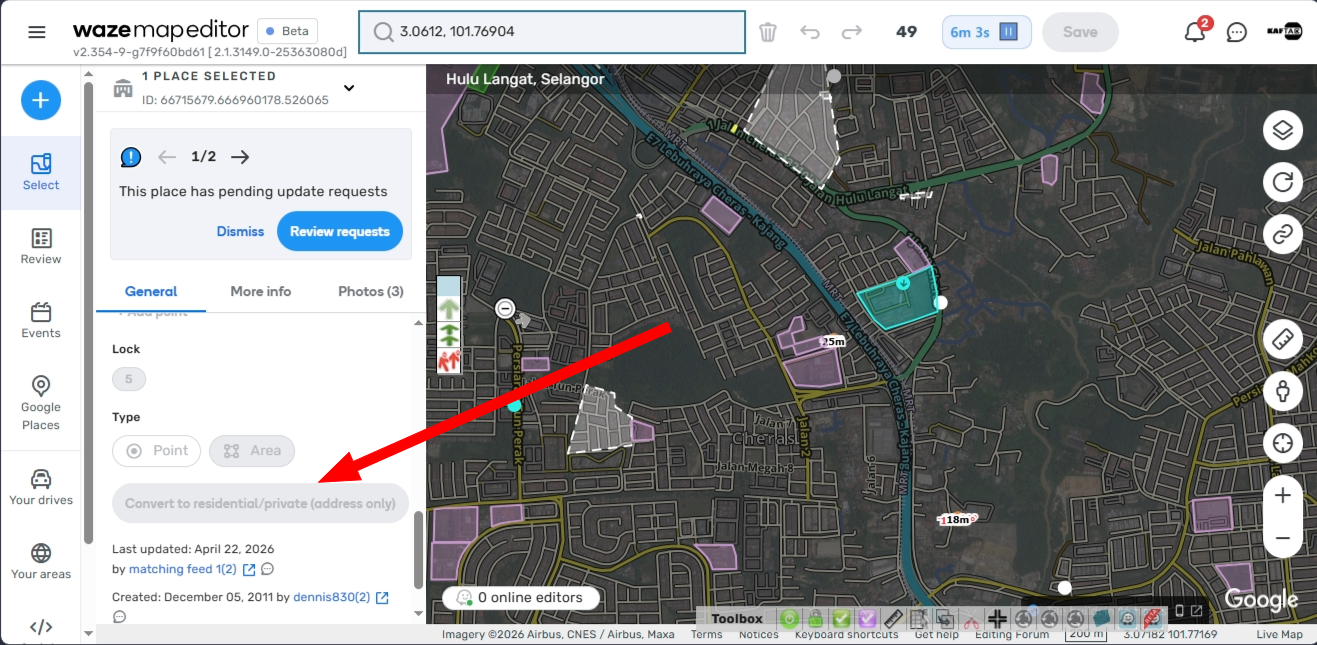
When viewing a Map Comment or Update Request (UR/PUR) regarding a wrong address outside of my designated editing area, the venue’s Google Links (gLink) are completely hidden/invisible on my main account. However, when switching to a Practice Account, the Google Links are fully visible.
This visibility bug severely impacts an Editor’s or Area Manager’s ability to cross-verify duplicate or bot-linked venues causing routing errors.
Description & Technical Context:
There is a long-standing issue where a system bot has linked multiple venues with similar names to the same Google Place ID, or generated duplicate gLinks. When multiple venues share the same gLink, user routing is broken, often directing drivers to the wrong location.
As Map Editors and First Responders, we actively review URs and Place Update Requests (PURs) globally to triage and verify these exact routing issues. However, when opening a venue outside of my editing area on my main account:
- The Google Link section is blank or missing entirely.
- I cannot see which Google Place ID the venue is attached to, making it impossible to diagnose why the routing is broken.
The Anomaly:
If I open the exact same venue in WME Practice Mode, the Google Links display perfectly fine, despite it being outside an editable segment. This confirms the data exists and the rendering issue is specifically tied to active account permissions/constraints when handling out-of-area venues.
Steps to Reproduce:
- Log into WME using a standard editor account.
- Navigate to a place/venue that is located outside your regular /editable editing area. which having with or without g:Link
- Click on the associated Place/Venue to open its details panel.
- Observe: The Google Link field is empty, hidden, or missing.
- Now, switch to Practice Mode (or use a Practice Account) and navigate to the exact same venue.
- Observe: The Google Link field appears normally and shows the attached links.
Actual Result:
Main accounts cannot view gLinks on venues outside their editing footprint, preventing them from auditing bot-linked duplicates and fixing critical routing errors.
Expected Result:
Google Links should remain visible (read-only) for all editors inspecting URs/PURs globally, exactly how they are currently displayed in Practice Mode, so that Area Managers and responders can verify data accuracy.
Impact:
- High. It heavily restricts the community’s ability to act as a first line of defense in verifying mapping issues.
- It slows down regional cleanup efforts, as editors cannot quickly determine if a routing issue is caused by a bad bot-link without swapping accounts or asking an AM local to that specific segment.
Environment where the bug occurs…:
ROW,All environments
Permalink:
https://waze.com/en-US/editor?env=row&lat=3.06120&lon=101.76904&marker=true&zoomLevel=16&venues=66715679.666960178.526065
Browser name and version:
Microsoft Edge Version 148.0.3967.83 (Official build) (64-bit)
Are you using scripts? Please detail which ones.:
with or without scripts… consistent