School Zone is a type of Waze’s permanent hazard (PH) feature, created to enhance road safety near schools. These zones highlight areas where drivers should exercise extra caution, adhere to specific speed limits, and remain alert of increased pedestrian activity.

Limitations
Permissions. As of July 2025, school zone PHs may only be added by editors rank 3 and above. However, rank 3 editors can place school zone PH on segments of any lock level. Similarly, shared Community Schedules can be created by level 4 editors.
Grouping. As of March 2025, school zone PHs within 500’ of one another are subject to “grouping”, meaning that only the first of the school zones will be presented to the user. It is unclear how grouping will impact the presentation of reduced speed limits.
Familiarity filter. As of July 2025, school zone alerts are not impacted by a familiarity filter. Waze HQ found that users were generally unbothered by SZ alerts in A/B testing.
Speed limits. As of March 2025, reduced speed limits can be recorded on school zone PH, but are not shown in the client. Also, reduced speed limits can only be set on a per-zone basis. If a single school has school zones encompassing segments with differing reduced speed limits during school hours, consider defining each stretch of road with a separate school zone PH. Reduced speed limits are expected to be supported in the app in the future, perhaps as early as the second half of 2025.
When to add a school zone PH
School zones should be added to the Waze map using the WME when the local highway/road authorities have designated a school zone, no matter if there is a reduced speed limit associated with the school zone or not. Designating a school zone is typically a site-specific process by which the roads and approaches to a school are evaluated by authorities for potential hazards, and controls (such as signage, road markings, traffic calming, and enhanced enforcement or traffic control) are added to mitigate the risks to road users and pedestrians near schools. This process is usually above and beyond allowing for school zones in statute or regulation within a set distance of a school, preschool, or higher educational institution.
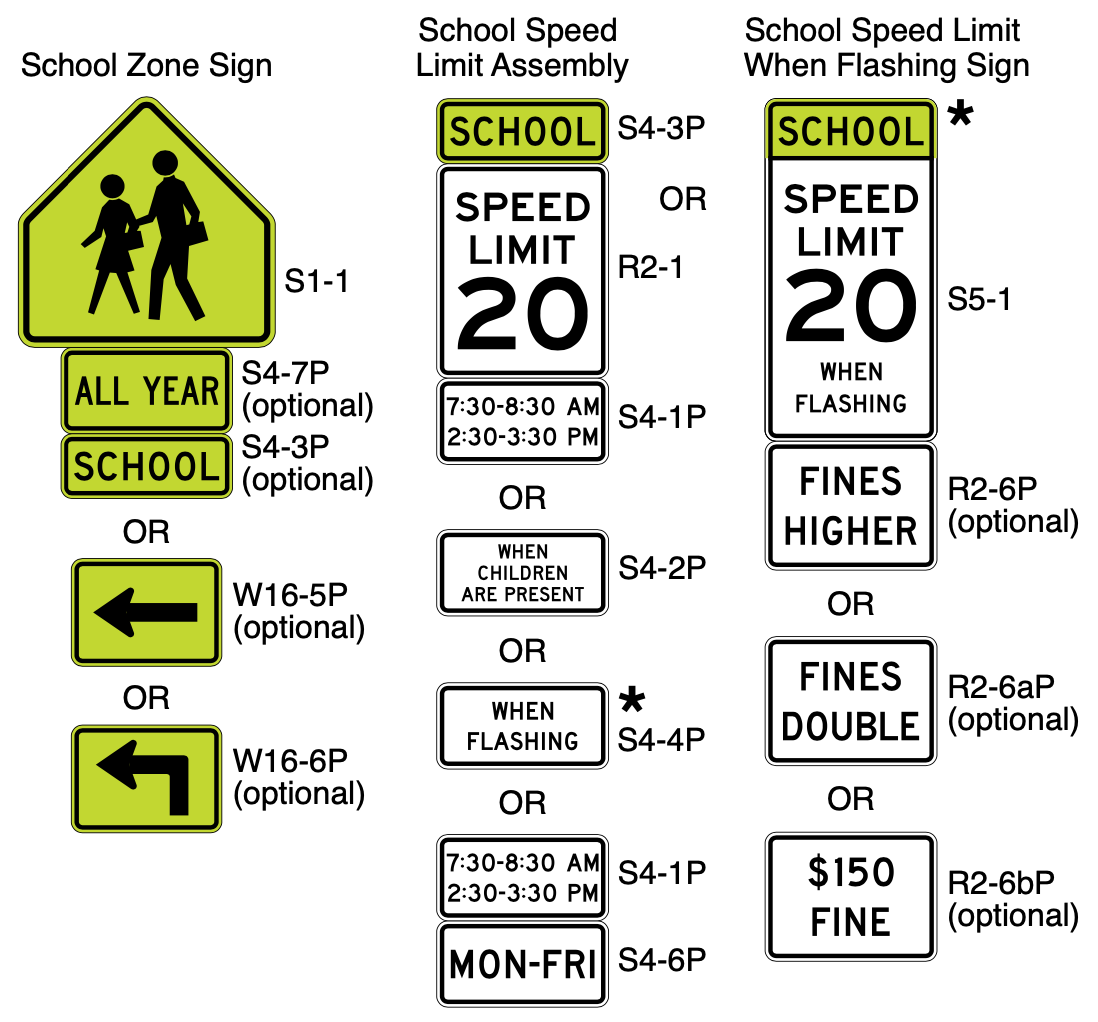
School zones can be identified through the specific signage and markings allowed by the MUTCD, as shown below. When drawing a school zone polygon, the edges of the polygon should extend to the furthest extent of the School Zone signs:
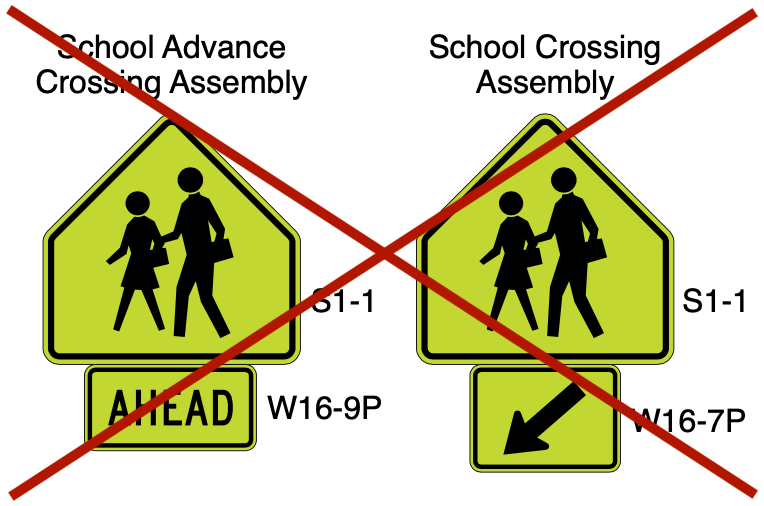
School zones do not need to be drawn around School Crossings. Although some School Crossings may occur within school zones, many School Crossings may occur along walking paths in neighborhoods outside School Zones. School Crossings can be identified by the School Crossing signs as shown below:
How to add a school zone PH
| For more information on how to add School Zones and schedules in the WME, see the how-to documents for School Zones and for the Scheduler features by Waze Staff. |

1. To add a school zone in the WME, you must first enable both the Hazards layer and the School Zone type in the WME layers menu. Alternatively, these layers can be enabled through the pop-ups in the (+) “plus” menu.
2. Go to the (+) “plus” menu on the left-side toolbar, hover over Hazard, then select School zone.
3. Using your cursor, drop geo-nodes on the map, drawing the perimeter of a School zone polygon encompassing the extent of the school zone on all impacted segments. Double click to finish drawing the polygon. While accuracy of the start & end points on school zones is paramount, also take care to draw the school zone polygon in an aesthetically pleasing way. School zone polygons may be surfaced to users in future phases.
| Note: you may have to encompass portions of segments that are not signed as school zones. It is possible to filter-out roads without a designated school zone by road type, but not by individual segment. |
4. General info. Complete the metadata for the school zone PH in the General tab in the left panel:
- Name. As of March 2025, the name field is not used by the client. It is used for editor reference only. Select a descriptive name such as: “Anytown Elementary School Zone”.
- School zone speed limit. Optional, but encouraged. As of March 2025, this field does not impact any behavior. In the future this field is expected to override the speed limit on the portion of segments encompassed by the school zone PH.
- Exclude road types. Optional. Users entering the School Zone on any road type that is “excluded” will not receive a School Zone alert.
5. Schedule. As of March 2025, school zones in the United States and Canada are active weekdays from 7:00 AM - 4:30 PM. Shared schedules for individual states, counties, or school districts can be created using the Community Schedule feature, then applied to many school zones. Individual school schedules can be set via the Schedule tab of the School Zone feature:
- Add a schedule for the School Zone in the Schedule tab in the left panel, by clicking the “Set a Schedule” button.
- Check to see if a shared Community Schedule for the district, county, or state is appropriate. These Shared Schedules can be used to more easily update multiple school zones at one time. Shared schedules can be added using the search bar at the top of the “Create schedule” popup. Consult local leaders if a new Community Schedule is warranted.
- If no Shared Schedule is appropriate, add an individual schedule using dates, days, times interface in the “Create schedule” popup. Holiday exceptions can be added in the second step.
- If no shared Community Schedule or individual schedule is added, the default schedule for the country will be used.
 Note: Any local schedules created on a school zone or Community Schedules applied to a school zone “stack”. Stacking means any days/hours on either schedule are combined and any exclusion dates from both schedules are then removed. To learn more about the Scheduler’s functionality see the Scheduler page.
Examples
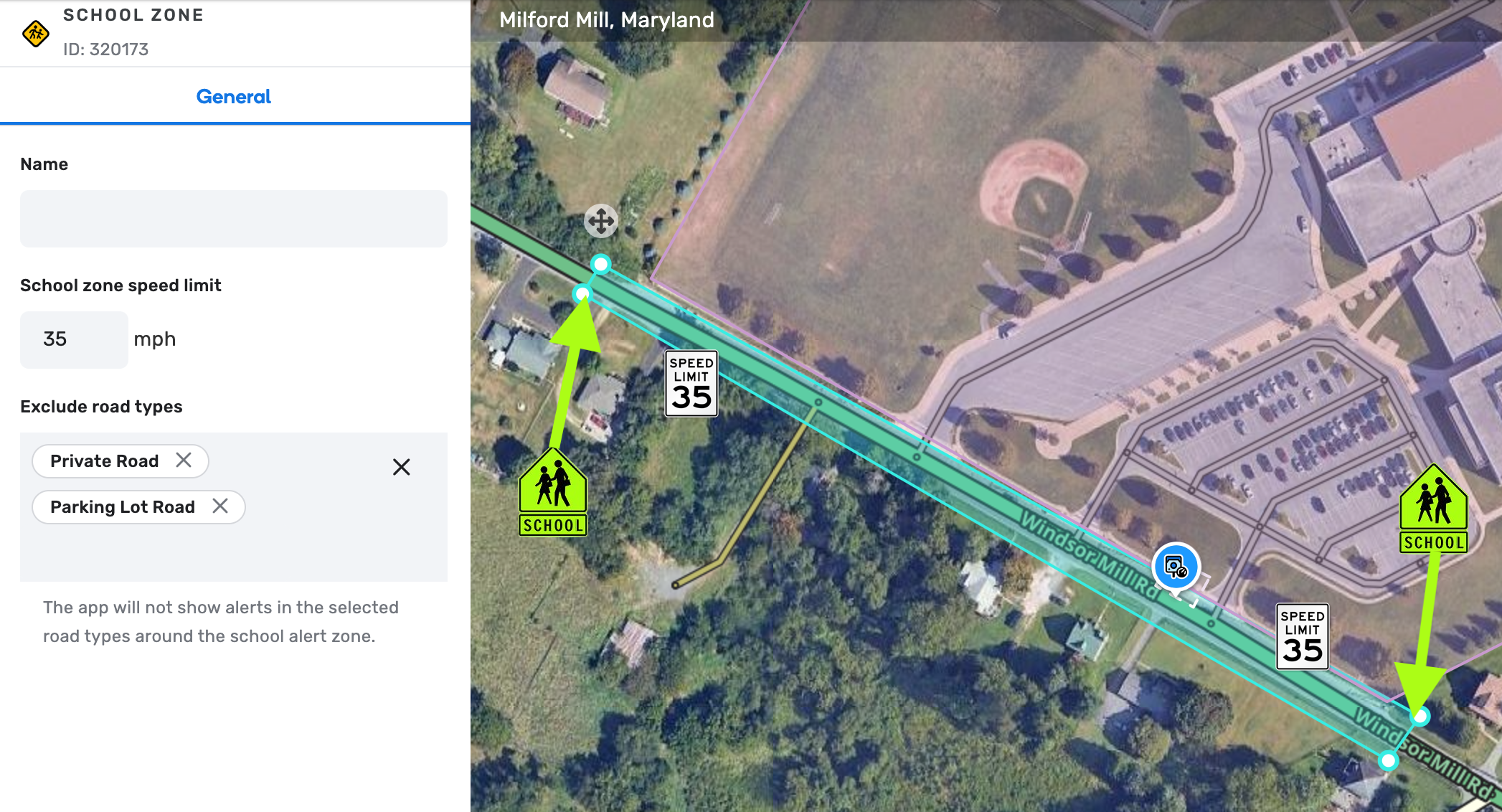
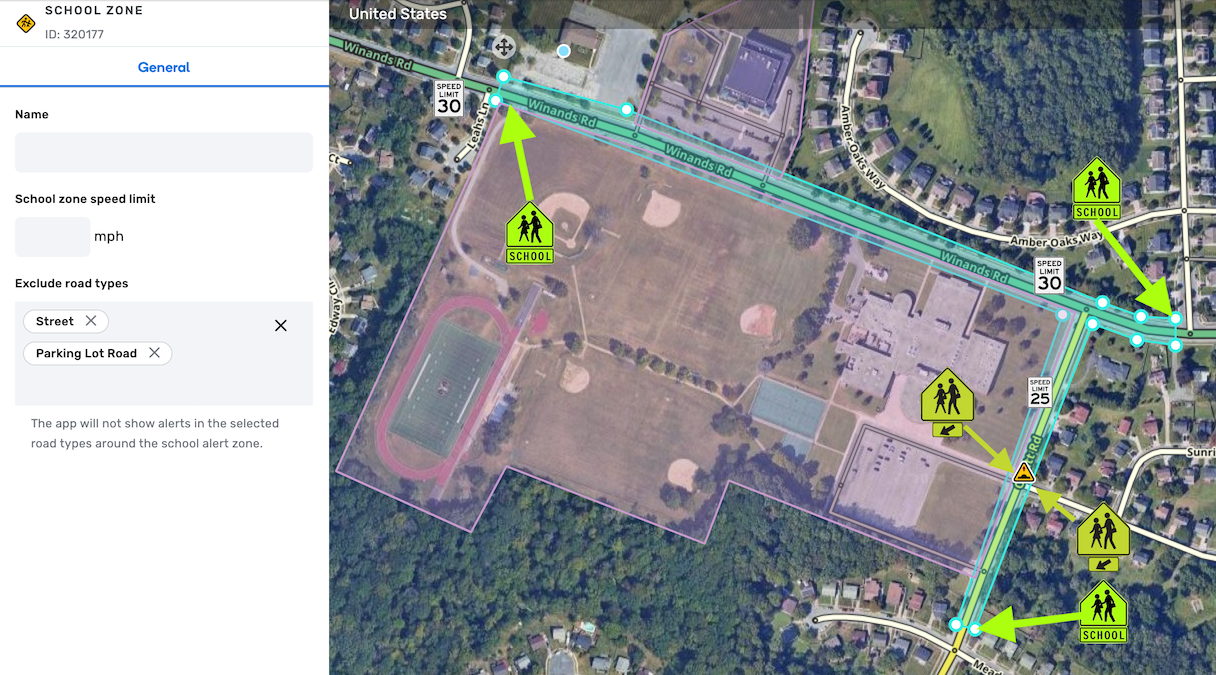
See the examples of school zone PH below. The screenshots have been annotated to indicate the signage delineating the school zone and related controls such as speed limits and school crossings.
Example 1: Simple single road school zone with no reduced speed limit
This school zone is on a single main road. The road types excluded are PLR and PR for the intersecting driveways and parking lots which are not marked as a school zone. The speed limit is 35 mph all-day everyday with no reduction during school hours, but there is no harm in recording it on the school zone PH.
Example 2: Corner school zone with no reduced speed limit
This school zone is at the corner of a minor highway and a primary street. Note that there is a School Crossing within the school zone, but the school zone did not need to be extended to capture it. There are also excluded intersecting PLR and Street segments not specifically designated as within a school zone. The speed limits for the minor highway and primary street are 30 mph and 25 mph, respectively, all-day everyday with no reduction during school hours. Because the included segments do not change during school hours, they can be grouped together in a single school zone. If the speed limits were reduced during school hours, with differing speed limits, it may be beneficial to map each road as a separate school zone.
FAQs
What do we do with designated school zones that use “when students are present” signs or flashing beacons to indicate reduced speed limits?
-
At each editor’s discretion, research can be done to determine if local or state laws/regulations restrict school zone enforcement to a certain timeframe, or before/after school hours.
-
It may not be efficient for editors to spend time contacting each school to try and determine enforcement hours. If information is not readily available on signage or in public sources, editors are not required to continue research.
-
If information regarding enforcement times is difficult to determine, it is acceptable to not add a schedule, and rely on the default country-wide schedule.
What should I do if a designated school zone prohibits drivers from using a certain road, or making a certain movement, such as a u-turn?
- The school zone PH does not support routing restrictions. Use existing tools such as time-based restrictions and private installation gates to manage school traffic flows and turn restrictions.