Unable to change the case (upper / lower) of a existing Street

I am trying to change “To Service Centre” into “to Service Centre”

If I press Enter when I have “to Service Centr” it takes that as the name.

However when I press Enter to indicate I am finished typing “to Service Centre” it changes to the Auto Complete option “To Service Centre”.


Edit - the old behaviour of pressing ESC was changed to Enter to finish typing recently.

3 Likes

I agree. It’s a pain and I would have to figure out again what I did to get it to work.

Previous build you could hit the escape key and the autocomplete would go away, allowing the name change. Now escape stops the edit and clears the name field completely.

1 Like

To change a street name that is similar to one that autocomplete insists on using, you simply type the new name and add a space at the end. This has been the case for as long as I can recall. While a questionable design, I don’t believe we can call it a bug.

1 Like

I have honestly never used that before. I simply hit the escape key and moved on.

3 Likes

Yes, better way to do it is to write the new name completely and then press Esc, works everytime, no need for extra spaces etc.

1 Like

As long as I remember, it’s been the Escape key to avoid the autocomplete result, as others have already mentioned. So this behavior isn’t something new.

1 Like

Actually the behavior is new. As stated, prior you could hit the escape key to cancel the autofill and accept the new text.

The new behavior is that hitting escape no long cancels the autofill and accepts what you have typed in, it clears the text box completely.

3 Likes

The old method of using ESC no long works, instead escape now blanks the text box.

in most cases pressing Enter now avoids an auto complete value. If you have a value that isn’t the same combination of characters Enter will avoid auto com0lete and accept the typed value.

but my issue is that doesn’t work when the same characters typed as the autocomplete but with different case.

I Need to be able to change “To Service Centre” into “to Service Centre”. But I can’t get that new value into the text box

1 Like

Again, I was able to accomplish this very task by hitting the space bar at the end of the new name.

1 Like

But doesn’t that give you “to Service Centre “ the space might not be noticeable but it’s would still be there in the string?

2 Likes

But doesn’t that give you “to Service Centre “ the space might not be noticeable but it’s would still be there in the string?

1 Like

Hi, it is impossible to change the first letter (or any letter) in a street name from lower case to upper case. Clicking “Apply” doesn’t change the letter, clicking ESC deletes the complete street name. I can change the first letter to upper case by adding a space at the end of the street name (as the suggested street name doesn’t appear anymore), but is that intended?
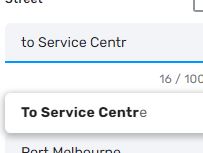
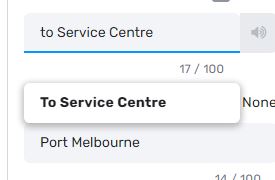
https://beta.waze.com/de/editor?env=row&lat=51.34522&lon=7.48702&marker=true&zoomLevel=18&segments=276845499

1 Like

Instead of pressing ESC try clicking outside the text box.

1 Like

Clicking outside the text box with the suggested street name doesn’t work either.

1 Like

Following up to see if this can be reported as a bug. It is still impossible to fix a segment name if the only issue is the proper case.

For example ~ you can’t change “main st” to “Main St”

1 Like

It has been reported to staff.

3 Likes

Internal issue opened :slight_smile: Thanks for reporting!

1 Like

Actually had this issue too. Good that its reported.

1 Like

Fixed in Beta v2.113.

1 Like

It seems that this bug is back again

I can’t change the lower case g in “grünen” to an upper case G, it should be “Grünen” (Cottbus, Germany)

https://beta.waze.com/editor?env=row&lat=51.72334&lon=14.41878&marker=true&zoomLevel=18&segments=74804727

1 Like